Deep learning inference on large rasters: sliding-window prediction, COGs and polygons in Python
Run a trained PyTorch U-Net over a whole Sentinel-2 scene of a city it has never seen: tiled sliding-window inference on a large GeoTIFF with overlapping, blended windows, a georeferenced Cloud Optimised GeoTIFF of classes and confidence, raster-to-vector polygons with rasterio.features.shapes in a GeoPackage, and an honest check against reference labels.
- Level
- Advanced
- Tested with
- Python 3.12
- Source code
- Download scripts
Key takeaways
- Sliding-window inference with 256-pixel windows, 64 pixels of overlap and a linear-ramp blend classified a 30 km square of Leicester (9 million pixels) in 16 seconds on a CPU, with no visible seams.
- Naive non-overlapping tiles changed the answer on 1.5% of pixels, but on 5.2% of pixels near tile edges against 1.0% elsewhere. Blending costs under three times the compute and removes the edge effect.
- In a city it never saw, the model scored 87.3% overall accuracy and a mean IoU of 0.619, close to the 0.643 on Nottingham's held-out blocks. The block split in part 2 gave an honest estimate.
- It finds 88% of buildings larger than 2,000 m², but only 7 to 14% of houses under 200 m². 55% of all reference buildings are under 100 m². At 10 m, the building class marks dense roofs, not individual buildings.
Before you start
- Parts 1 and 2 of this series, or about 25 minutes for this script to rebuild the chips and retrain the model automatically
- Comfortable with NumPy, rasterio windows and GeoPandas; basic PyTorch
- Python 3.10+ with the CPU build of PyTorch, segmentation-models-pytorch, rasterio, odc-stac, geopandas and overturemaps (see requirements.txt); about 2 GB of RAM and 1 GB of disk space; no GPU
Short answer: to run a deep learning model on a large GeoTIFF, read it in overlapping windows with rasterio (src.read(window=...)), and predict class probabilities for each window. Multiply each window by a weight that fades towards its edges, add the results into a full-size array and divide by the summed weights. That blends the overlaps so the tile edges leave no seams. Take the most likely class per pixel and write it with the same transform and CRS as a Cloud Optimised GeoTIFF. Then remove specks with rasterio.features.sieve, turn the classes into polygons with rasterio.features.shapes, simplify them and save a GeoPackage.
This is part 3 of the series Deep learning for satellite imagery with Python. Part 1 built labelled Sentinel-2 chips of Nottingham, and part 2 trained a U-Net on them, scoring a mean IoU of 0.643 on held-out blocks. Now we use the model as you would in practice. We run it over a 30 km square around Leicester, a city it has never seen, turn the result into maps and polygons, and check it against reference labels to see where it fails.
You will learn how to:
- write a large Sentinel-2 composite as a Cloud Optimised GeoTIFF and read it window by window;
- run sliding-window inference with overlap and blending, and measure the seams it removes;
- save the classes and a confidence layer as georeferenced COGs with a colour map and overviews;
- convert the raster to vector polygons with
rasterio.features.shapes, simplify them and export a GeoPackage; - measure accuracy in the new area, by pixel and by building size, and show where the model fails.
All outputs below come from predict_large_raster.py, run on 19 October 2026 with Python 3.12, PyTorch 2.14.1 (CPU), rasterio 1.5.2 (GDAL 3.12.2) and geopandas 1.2.0. The machine was a desktop AMD Ryzen 9 7950X limited to 8 threads, with no GPU.
Step 1: load the model from part 2
Install the CPU build of PyTorch as in part 2, then the rest of requirements.txt. The script looks for part 2’s checkpoint in the folder next to it: ../train-unet-satellite-segmentation-pytorch/output/unet_resnet18_s2_nottingham.pt. If you have it somewhere else, set MODEL_PATH. If it is missing, the script downloads train_unet.py from this site and runs it. That in turn builds part 1’s chips if needed, so a fresh run takes about 25 minutes before inference starts.
PART2 = HERE.parent / "train-unet-satellite-segmentation-pytorch"CKPT = Path(os.environ.get("MODEL_PATH", PART2 / "output" / "unet_resnet18_s2_nottingham.pt"))if not CKPT.exists():    script = PART2 / "train_unet.py"    if not script.exists():                       # skipped part 2: fetch its script from the site        PART2.mkdir(parents=True, exist_ok=True)        url = os.environ.get("TGIS_CODE_URL", "https://www.technicalgis.com/code")        urllib.request.urlretrieve(f"{url}/train-unet-satellite-segmentation-pytorch/train_unet.py", script)    subprocess.run([sys.executable, str(script)], check=True, cwd=PART2)
ckpt = torch.load(CKPT, map_location="cpu", weights_only=False)model = smp.Unet(ckpt["encoder"], encoder_weights=None, in_channels=ckpt["in_channels"], classes=len(ckpt["classes"]))model.load_state_dict(ckpt["state_dict"])model.eval()CLASSES, COLOURS, BANDS = ckpt["classes"], ckpt["colours"], ckpt["bands"]
The checkpoint carries the band order, the scaling and the position of the blank B10 channel, so the preprocessing below is guaranteed to match training. weights_only=False is needed because the checkpoint also holds Python lists and dictionaries. Only use it on checkpoints you trust, because unpickling can run code.
def to_input(x: np.ndarray) -> torch.Tensor: """Same preprocessing as in training: reflectance / 10000, with a zero channel where B10 would be.""" x = torch.from_numpy(x.astype("float32") / ckpt["scale"]) i = ckpt["b10_zero_index"] return torch.cat([x[..., :i, :, :], torch.zeros_like(x[..., :1, :, :]), x[..., i:, :, :]], dim=-3)Step 2: a new area, saved as a Cloud Optimised GeoTIFF
Leicester is about 35 km south of Nottingham, and the two squares are about 4 km apart at their closest. It is close enough to share the climate and the 2021 summer, but it is a different city with different streets. We build the composite exactly as in part 1: Sentinel-2 L2A from May to August 2021 on the Planetary Computer, masked with the scene classification layer, then the per-pixel median. This time we write it to disk as a COG:
with rasterio.open(s2_cog, "w", driver="COG", height=H, width=W, count=len(BANDS), dtype="uint16", crs=CRS, transform=TRANSFORM, nodata=0, compress="deflate", blocksize=512) as dst: dst.write(stack) dst.descriptions = tuple(BANDS)leicester: 3000 x 3000 pixels of 10 m (30 km square); lon/lat bounds (-1.357, 52.497, -0.902, 52.773)10 items, 10 dates, 10 at least 20% clear: 31 May, 05 Jun, 08 Jun, 13 Jun, 15 Jun, 23 Jun, 18 Jul, 20 Jul, 04 Aug, 12 Augs2_leicester_2021_cog.tif: 12 bands, 512 px internal tiles, overviews [2, 4, 8], 244 MB on diskGDAL’s COG driver tiles the file and adds overviews by itself. Internal tiles matter for inference: reading a 256-pixel window only decompresses the few 512-pixel tiles it touches, not whole rows of the image. For a raster too big for memory, or one on cloud storage, the same windowed reads work unchanged.
Step 3: sliding-window inference with overlap and blending
A U-Net trained on 128-pixel chips will accept larger windows, because it is fully convolutional. We use 256-pixel windows and step them 192 pixels apart, so neighbouring windows overlap by 64 pixels. The last row and column of windows are moved back to sit flush with the raster’s edge, so no window hangs off it unnecessarily.
The key to avoiding seams is the weight. Near the edge of a window, the network sees only part of each object and pads the rest with zeros, so its predictions there are worst. We weight each window’s softmax probabilities with a ramp that rises linearly from almost 0 at the edge to 1 at 64 pixels in. Every pixel’s final probability is then dominated by the windows in which it sits well inside.
TILE, OVERLAP = 256, 64STRIDE = TILE - OVERLAP

def starts(n: int) -> list[int]:    """Window origins every STRIDE pixels, with the last window flush with the raster edge."""    s = list(range(0, n - TILE, STRIDE))    return s + [n - TILE]

ramp = np.minimum(np.arange(TILE) + 1, OVERLAP) / OVERLAPramp = np.minimum(ramp, ramp[::-1])WEIGHT = np.outer(ramp, ramp).astype("float32")

def predict(path: Path, overlap: bool) -> tuple[np.ndarray, np.ndarray, float]:    rows = starts(H) if overlap else list(range(0, H, TILE))    cols = starts(W) if overlap else list(range(0, W, TILE))    probs = np.zeros((NC, H, W), "float32")    wsum = np.zeros((H, W), "float32")    with rasterio.open(path) as src, torch.no_grad():        for r in rows:            for c in cols:                x = src.read(window=Window(c, r, TILE, TILE), boundless=True, fill_value=0)   # pads past the edge                h, w = min(TILE, H - r), min(TILE, W - c)                p = torch.softmax(model(to_input(x[None])), 1)[0].numpy()[:, :h, :w]                wt = WEIGHT[:h, :w] if overlap else 1.0                probs[:, r:r + h, c:c + w] += p * wt                wsum[r:r + h, c:c + w] += wt    probs /= wsum    return probs.argmax(0).astype("uint8"), probs.max(0), ...
The boundless=True read is only needed for the naive version, whose last row and column of tiles run past the raster’s edge. They are padded with zeros and the padding is cropped from the prediction. torch.no_grad() and model.eval() matter more than they look. Without them, PyTorch stores every intermediate result for back-propagation, and batch normalisation uses the statistics of each window instead of the training set.
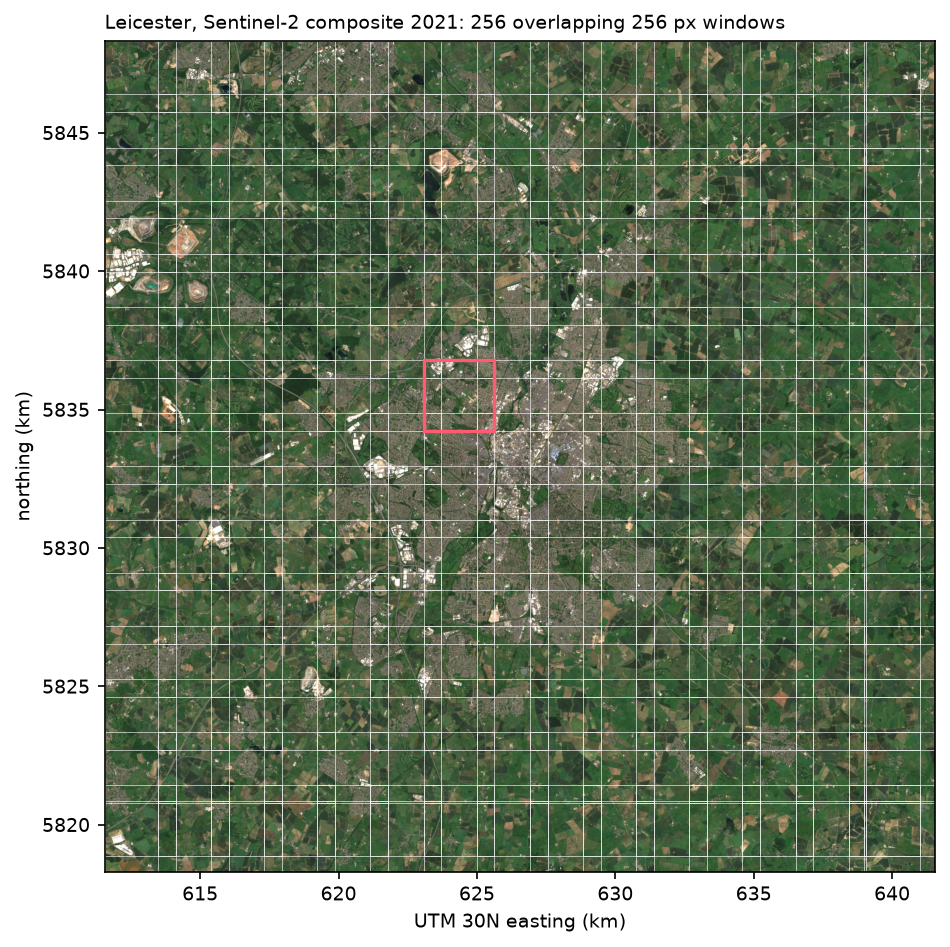
We also run the naive version, with non-overlapping tiles and no blending, to measure what the blending buys:
blended: 256 windows of 256 px with 64 px overlap in 16 s (0.57 Mpx/s, 57 km2/s)naive: 144 windows, no overlap, in 6 snaive and blended maps differ on 1.5% of pixels: 5.2% within 8 px of a naive tile edge, 1.0% elsewhereThe whole 900 km² square takes 16 seconds on a CPU, so a full 110 km Sentinel-2 tile would take about four minutes. The blended map runs 256 windows instead of 144 and takes 16 seconds instead of 6, and it changes 1.5% of the pixels. Those changes are concentrated along the naive tile edges, where 5.2% of pixels change, five times the rate elsewhere. The remaining 1.0% come from the extra context that overlapping windows give every pixel.
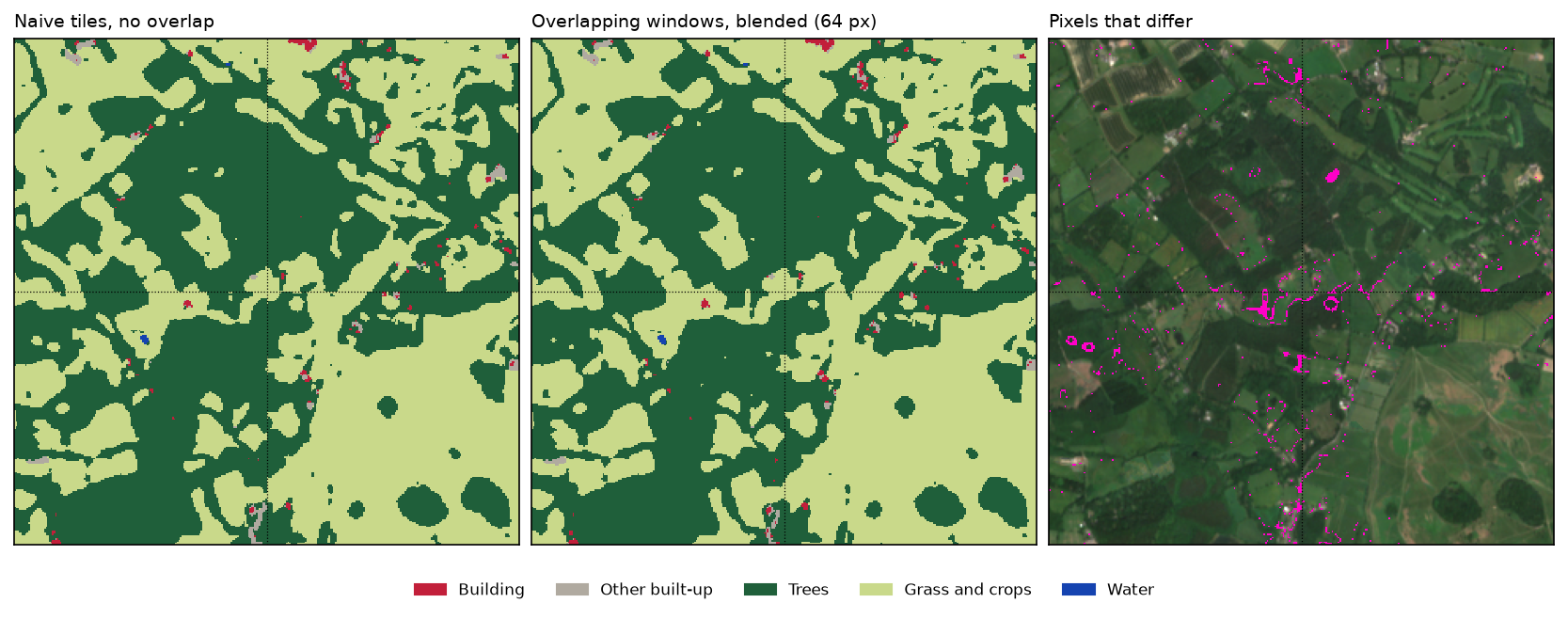
Step 4: write the classes and confidence as COGs
The classified raster needs the input’s transform and CRS to be georeferenced, and a colour map so it opens in QGIS with the right colours. GDAL’s COG driver builds its overviews as it writes, so it cannot take a colour map added afterwards. We write an ordinary GeoTIFF with the colour map and class names, then copy it to a COG. Using overview_resampling="mode" keeps the overview pixels as valid classes instead of averaging them into meaningless numbers:
with rasterio.open(tmp, "w", driver="GTiff", height=H, width=W, count=1, dtype="uint8", crs=CRS,                   transform=TRANSFORM, nodata=IGNORE) as dst:    dst.write(pred, 1)    dst.write_colormap(1, {i: tuple(int(c[k:k + 2], 16) for k in (1, 3, 5)) + (255,) for i, c in enumerate(COLOURS)})    dst.update_tags(1, **{f"class_{i}": n for i, n in enumerate(CLASSES)})rasterio.shutil.copy(tmp, class_cog, driver="COG", compress="deflate", blocksize=512, overview_resampling="mode")
with rasterio.open(conf_cog, "w", dtype="uint8", nodata=0, overview_resampling="average", **cog) as dst: dst.write(np.clip(np.round(conf * 100), 1, 100).astype("uint8"), 1)unet_classes_leicester_2021.tif: GTiff, uint8, tiles (512, 512), overviews [2, 4, 8], layout COG, 0.9 MBunet_confidence_leicester_2021.tif: GTiff, uint8, tiles (512, 512), overviews [2, 4, 8], layout COG, 5.5 MBmean confidence 0.89; pixels below 0.6: 9.2%rasterio reports the driver of any COG as GTiff, because a COG is a GeoTIFF. The LAYOUT=COG tag in the IMAGE_STRUCTURE metadata confirms the file is a true COG. The confidence layer is stored as a percentage in 8 bits rather than as floats, so it compresses to 5.5 MB.
Step 5: raster to vector polygons in a GeoPackage
Vectorising a classified raster with rasterio.features.shapes turns every connected group of same-class pixels into a polygon. Run on raw predictions, that would create tens of thousands of one-pixel specks. We first sieve out groups smaller than 4 pixels (400 m²). After vectorising, we simplify the polygons by half a pixel, 5 m, which removes the staircase edges of the pixels without moving boundaries further than the data supports:
sieved = rasterio.features.sieve(pred, size=4, connectivity=4)polys = [(shape(g), int(v)) for g, v in rasterio.features.shapes(sieved, transform=TRANSFORM, connectivity=4)]gdf = gpd.GeoDataFrame({"class_id": [v for _, v in polys]}, geometry=[g for g, _ in polys], crs=CRS)gdf["class"] = gdf["class_id"].map(dict(enumerate(CLASSES)))gdf["geometry"] = gdf.simplify(RES / 2, preserve_topology=True) # 5 m: removes the pixel staircasegdf["area_m2"] = gdf.area.round(0)gdf.to_file(gpkg, layer="landcover", driver="GPKG")sieved specks < 4 px: 0.5% of pixels changed27,614 polygons in 3 s; vertices 1,271,480 -> 1,020,390 after simplify (20% fewer) polygons area_km2 median_m2classBuilding 10243 18.27 700.0Other built-up 3925 111.10 1400.0Trees 11313 178.22 2100.0Grass and crops 1813 587.12 4000.0Water 320 5.29 3200.0saved unet_landcover_leicester_2021.gpkg (21.6 MB)Passing transform= to shapes is what makes the polygons georeferenced. Without it, you get pixel coordinates. connectivity=4 means pixels that touch only at a corner form separate polygons, which avoids self-touching shapes. simplify with preserve_topology=True simplifies each polygon on its own, so neighbouring polygons can develop slivers and small gaps between them. If you need a gap-free coverage, use shapely.coverage_simplify instead.
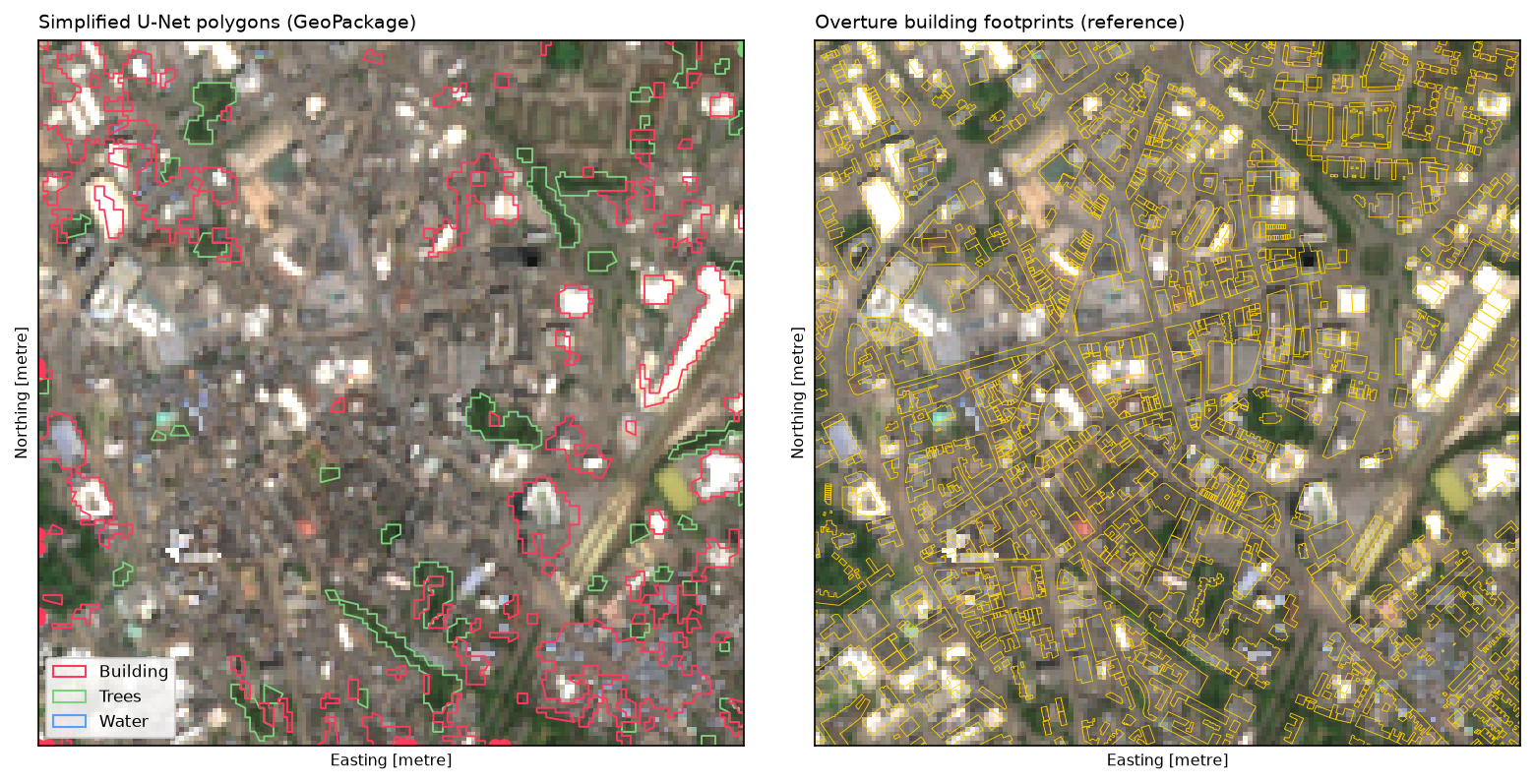
Step 6: how good is it in a city it never saw?
To score the new area, we build reference labels for Leicester exactly as part 1 did for Nottingham. That means 236,886 Overture building footprints rasterised over ESA WorldCover 2021, with a pixel counted as a building when footprints cover at least half of it. We compare them with the prediction pixel by pixel:
=== accuracy against the reference labels (236,886 Overture buildings, ESA WorldCover 2021) === IoU F1 precision recall ref share pred shareBuilding 0.218 0.358 0.438 0.303 0.034 0.024Other built-up 0.578 0.732 0.671 0.805 0.101 0.122Trees 0.644 0.783 0.779 0.788 0.195 0.197Grass and crops 0.897 0.946 0.955 0.937 0.664 0.652Water 0.759 0.863 0.812 0.921 0.005 0.006overall accuracy 0.873, mean IoU 0.619 (Nottingham test blocks: mean IoU 0.643)confusion matrix (rows: reference, columns: prediction, % of each reference class): Building Other built-up Trees Grass and crops WaterBuilding 30.3 59.2 8.1 2.4 0.0Other built-up 9.9 80.5 7.1 2.4 0.1Trees 1.3 6.2 78.8 13.3 0.3Grass and crops 0.1 1.1 5.0 93.7 0.0Water 0.7 2.8 3.5 0.9 92.1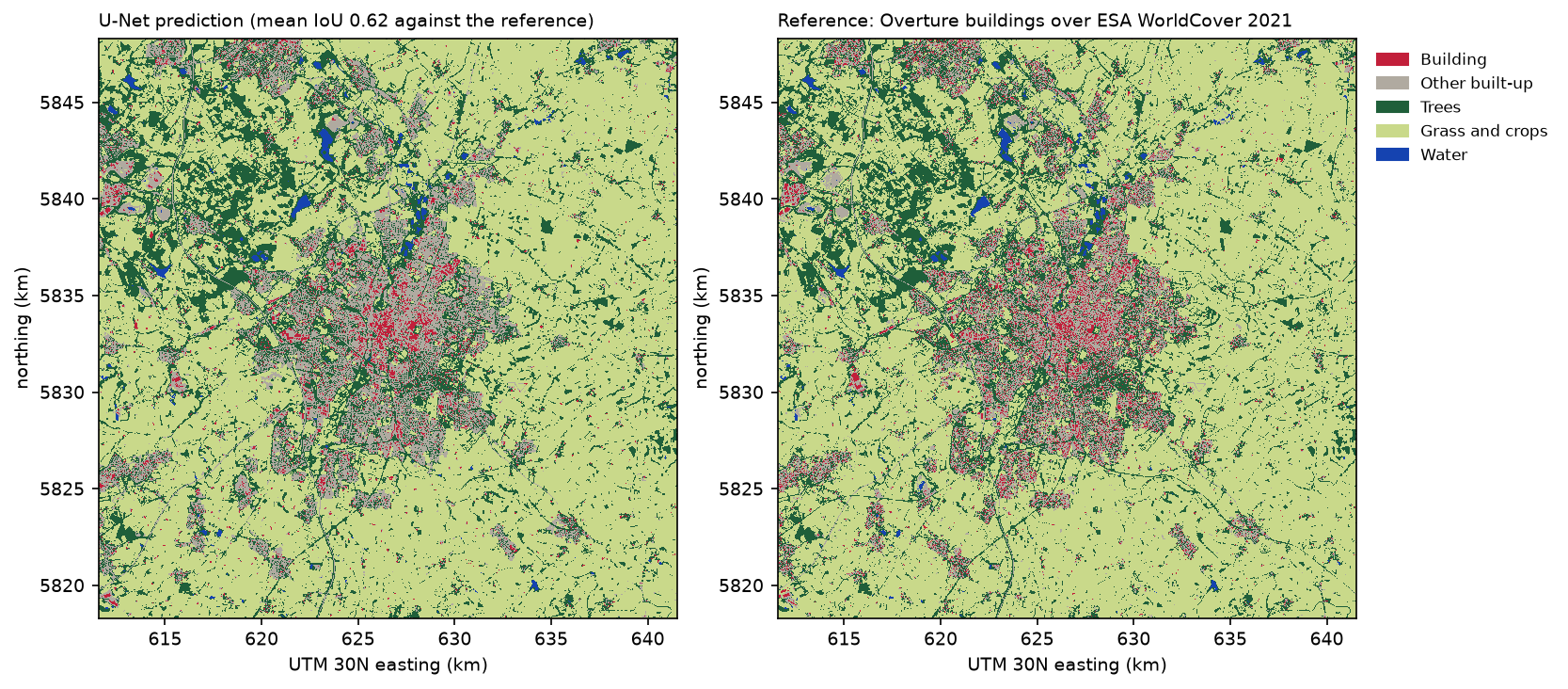
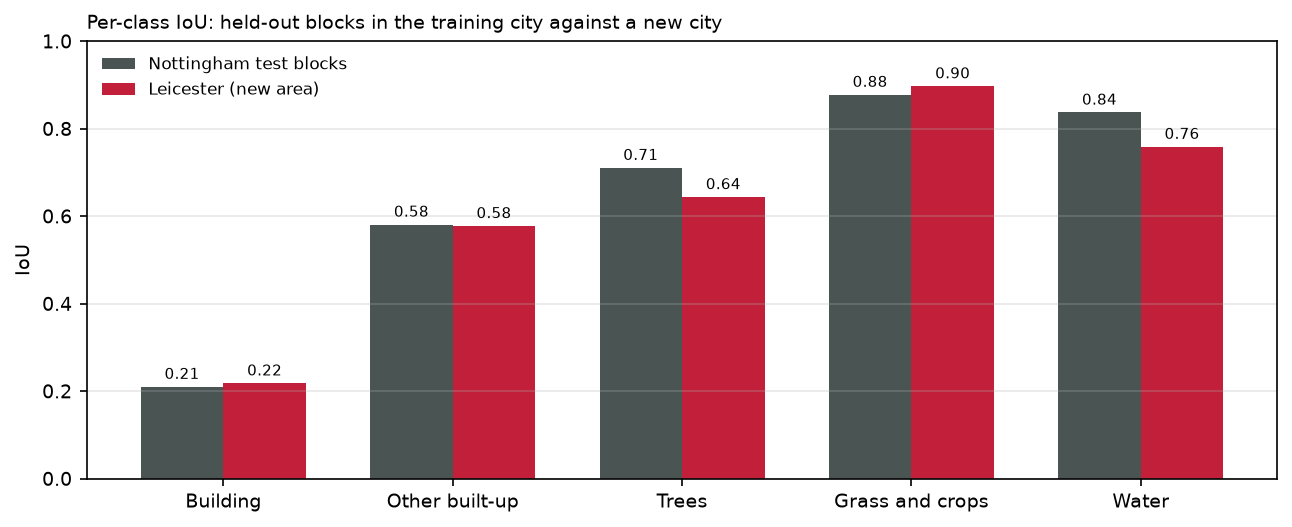
The mean IoU in Leicester, 0.619, is only 0.024 below the Nottingham test blocks. This is what part 1’s block split was for: it predicted the score in a new area well. The changes by class make sense:
- Buildings and other built-up land are unchanged. English towns look much the same from 10 m, and the model has learned brick-and-tarmac in general, not Nottingham’s streets.
- Trees drop from 0.71 to 0.64. 13.3% of Leicester’s tree pixels are predicted as grass and crops, against 8.5% in Nottingham. Most of the confusion is along the edges of small woods, copses and tree-lined hedges, which are narrow and mixed at 10 m, so a landscape with more of them scores lower.
- Water drops from 0.84 to 0.76 because there is so little of it: 0.5% of pixels, mostly thin rivers and canals. A one-pixel error along a 20 m wide canal changes IoU far more than one along a lake.
Step 7: where it fails
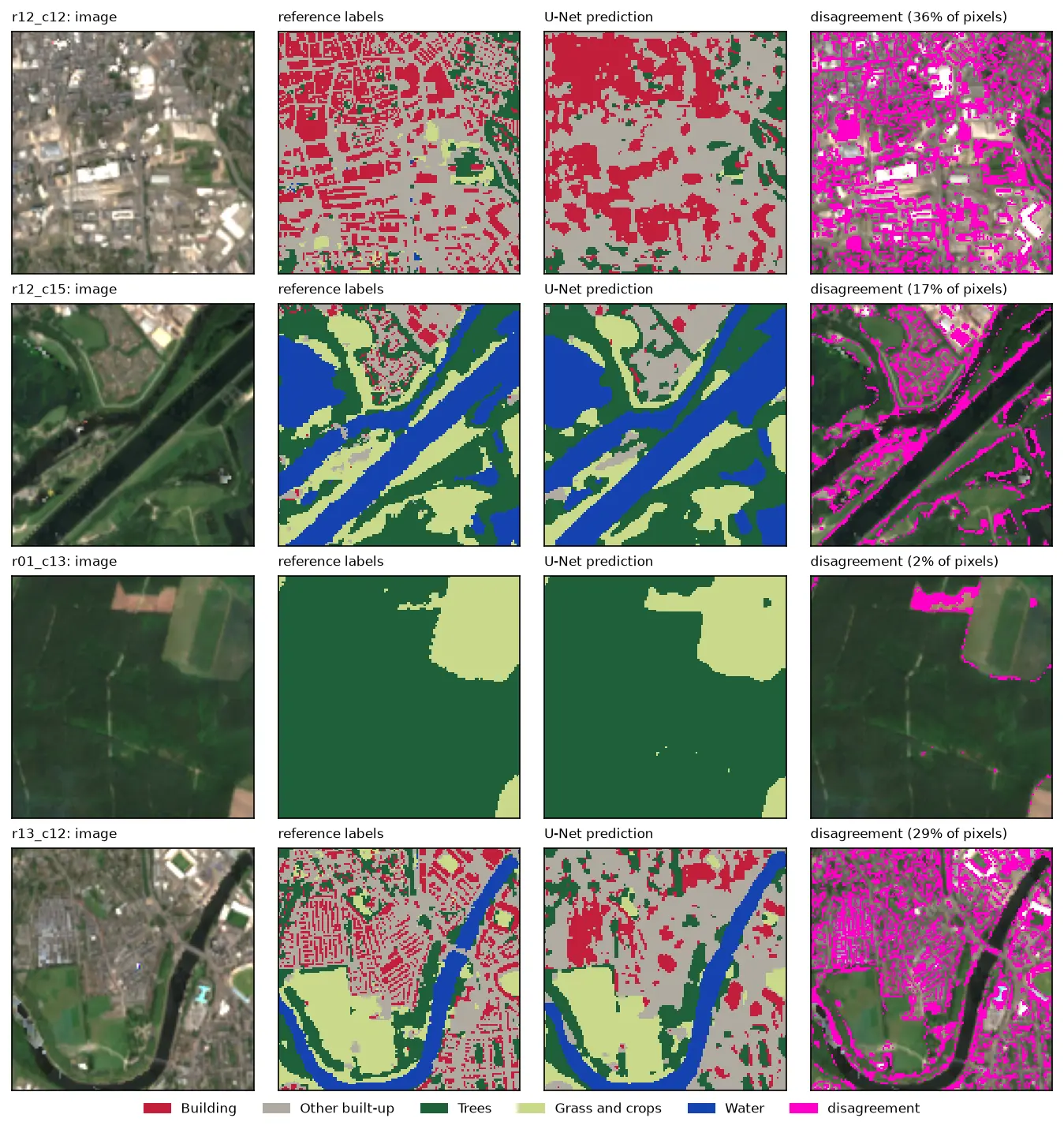
Pixel scores hide how the errors fall on the map. The city centre is the hardest place:
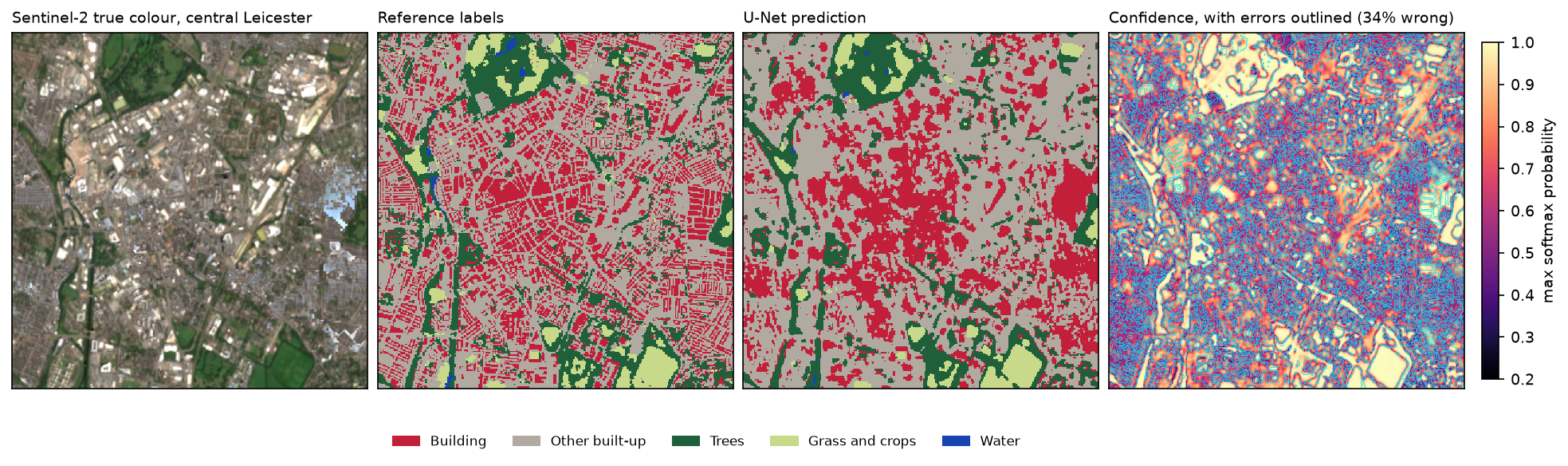
Three kinds of failure show up:
- Terraces and houses vanish into other built-up land. Leicester’s Victorian terraces are rows of narrow roofs separated by streets and yards, so each 10 m pixel mixes roof, road and garden. The reference still marks many of those pixels as buildings; the model sees a grey mix and calls it other built-up.
- Large roofs and dense blocks become blobs. Where the model does find buildings, it draws smooth shapes that spill over the streets between them.
- Image artefacts are confidently misclassified. The pale blue patch on the right of the true colour image is almost certainly a compositing artefact, such as haze or a cloud edge that the scene classification layer did not mask. The model has never seen anything like it and paints most of it as a large building.
The confidence layer helps but does not solve this. It is low across most of the dense streets, where the errors are, and high in parks and fields. But softmax confidence is not a calibrated probability, and parts of the artefact on the right still get high confidence.
The object view makes the building results concrete. For each Overture footprint, we check whether any predicted building polygon touches it:
Overture buildings touched by a predicted building polygon, by footprint area (m2): buildings share foundarea_m2<50 62257 0.07350-100 68515 0.102100-200 75698 0.135200-500 22501 0.273500-2000 6539 0.632>2000 1376 0.877all buildings: 14.0%; area-weighted: 38.6%predicted building polygons that touch no Overture footprint: 740 of 10243 (4.8% of predicted building area)Large buildings are found: 88% of those over 2,000 m², such as warehouses, schools and shopping centres, and 63% of those between 500 and 2,000 m². Houses are not: only 10 to 14% of buildings between 50 and 200 m² are touched, and some of those are only touched because they sit next to a bigger building. Most buildings are houses or garages, so only 14% of all buildings are found. Weighted by area, the figure is 38.6%. In the other direction, the model rarely invents buildings: only 740 of its 10,243 building polygons, 4.8% of the predicted building area, touch no footprint at all.
Limitations
- Resolution sets the ceiling. No amount of inference engineering makes a 10 m model find houses. For individual buildings, use aerial imagery at 25 cm to 1 m with a model such as Segment Anything, or LiDAR.
- One new city is one test. Leicester is a nearby English city in the same summer. In a different landscape, such as uplands, coast or a city outside the UK, or in another season, expect larger drops, especially for trees and water.
- The reference is not ground truth. As in parts 1 and 2, the scores measure agreement with WorldCover and Overture, including their errors and the five-year gap between the imagery and the footprints.
- Composite artefacts pass straight through. The model has no “unknown” class, so a badly masked cloud or haze patch becomes a confident building or water. Check the composite, or mask low-confidence areas, before using the map.
- Single run, CPU settings. Window size, overlap and the ramp weight were not tuned. Test-time augmentation, which averages predictions over flips and rotations, usually adds a little accuracy at eight times the cost.
Frequently asked questions
How do I run a deep learning model on a GeoTIFF that is too large for memory?
Read and predict it in windows. Open the file with rasterio, step a window across it with rasterio.windows.Window, and read each one with src.read(window=...). Predict the window and write the result to the same window of an output GeoTIFF that has the input’s transform and CRS. Store the input as a tiled GeoTIFF or COG so that each window read is fast. For very large rasters, keep only one block of probabilities in memory at a time.
Why does my tiled prediction have visible seams?
Convolutional networks see less context near a tile’s edge and pad the missing area, so predictions there are less accurate, and neighbouring tiles disagree along the join. Overlap the windows and blend them with a weight that falls towards each window’s edge, or keep only the centre of each window. In our run, blending changed 5.2% of the pixels within 8 pixels of a naive tile edge, against 1.0% elsewhere.
How much overlap should sliding windows have?
A quarter of the window is a good default: 64 pixels for 256-pixel windows. More overlap gives smoother results at more cost. 50% overlap needs four times as many windows as no overlap. The blending weight matters as much as the overlap: a linear or Gaussian ramp works much better than a plain average.
How do I convert a classified raster to polygons in Python?
Use rasterio.features.shapes(array, transform=src.transform). It yields a GeoJSON-like geometry and value for each connected group of pixels. Build a GeoDataFrame from them with shapely.geometry.shape, set the raster’s CRS, and save with to_file. Sieve small groups first with rasterio.features.sieve to avoid thousands of specks. Afterwards, simplify by about half a pixel to remove the staircase edges.
How do I save a prediction as a Cloud Optimised GeoTIFF?
With GDAL 3.1 or later behind rasterio, open the output with driver="COG", or copy an existing GeoTIFF with rasterio.shutil.copy(src, dst, driver="COG"). For class maps, use overview_resampling="mode" so the overviews keep valid class values. Add the colour map to an ordinary GeoTIFF first, because the COG driver cannot add one after writing.
How accurate is a model on an area it was not trained on?
Usually less accurate than on its own test data, and the only way to know is to measure it. Our U-Net lost 0.024 mean IoU between held-out blocks of the training city and a new city 35 km away. That small drop is because the block split gave an honest estimate to begin with, and the new area is similar. Expect larger drops in different landscapes.
Next steps
- Go back to part 1 and add chips from a second city, then retrain in part 2. It is the most reliable way to improve results in new areas.
- For individual buildings, try Segment Anything on aerial imagery or building footprints from LiDAR.
- Compare with a classical approach in Land cover classification with a Sentinel-2 random forest.
Data and licences
- Sentinel-2 L2A: Copernicus Sentinel data 2021, processed by ESA, accessed from the Microsoft Planetary Computer. Free and open under the Copernicus data licence.
- ESA WorldCover 2021 (v200): © ESA WorldCover project 2021, contains modified Copernicus Sentinel data (2021) processed by the ESA WorldCover consortium. CC BY 4.0.
- Building footprints: Overture Maps Foundation, release 2026-09-23.1, under the ODbL. Contains data © OpenStreetMap contributors and Microsoft ML Buildings.
- Model: the U-Net from part 2, whose encoder starts from TorchGeo’s SSL4EO-S12 Sentinel-2 weights (Wang et al., 2023, CC BY 4.0).
- Code:
predict_large_raster.py, tested with Python 3.12.0, PyTorch 2.14.1 (CPU), segmentation-models-pytorch 0.5.0, rasterio 1.5.2, GDAL 3.12.2, geopandas 1.2.0 and shapely 2.2.0.
Key terms
- Sliding-window inference
- Predicting a raster too large for the model by running it on many small windows, usually overlapping, and stitching the window predictions back into one map.
- Seam (tiling artefact)
- A visible line in a stitched prediction where two windows meet. Convolutional networks see less context near a window's edge, so their predictions are less reliable there and do not match across the join.
- Cloud Optimised GeoTIFF (COG)
- An ordinary GeoTIFF with internal tiles and overviews, arranged so that programs can read just the part and zoom level they need, including over HTTP.
- Softmax confidence
- The highest class probability the network outputs for a pixel. It ranges from 1/k for k classes to 1. It is a useful but over-optimistic guide to where the model is unsure.
- Sieve filter
- A raster operation that replaces connected groups of pixels smaller than a threshold with the value of their largest neighbour. It removes speckle before vectorising.
Data for this tutorial
- Microsoft Planetary Computer · Sentinel-2 L2A and ESA WorldCover for Leicester
- ESA WorldCover · reference land cover for 2021
- Overture Maps · reference building footprints
Licences and formats for each source are listed in the GIS data sources catalogue.