Training data for deep learning on satellite imagery: Sentinel-2 image chips in Python
Build a labelled deep learning dataset from free data: stream a Sentinel-2 L2A composite from the Planetary Computer, rasterise Overture building footprints over ESA WorldCover, cut georeferenced image chips, split them by spatial block so the test set does not leak, check the class balance and load it all as a TorchGeo dataset.
- Level
- Intermediate
- Tested with
- Python 3.12
- Source code
- Download scripts
Key takeaways
- Free, open data is enough for a real segmentation dataset. We fused 439,266 Overture building footprints with ESA WorldCover 2021 into five classes over a 30.72 km square of Nottingham, and cut 576 Sentinel-2 chips of 128 × 128 pixels.
- A random train/test split leaks: every test chip (100%) touched a training chip. Splitting by 5.12 km blocks cut that to 55%, and a one-chip buffer would remove the rest at the cost of 108 of 416 training chips.
- Rasterise footprints at a finer resolution and average. At 2 m, 11.2% of 10 m pixels touch a building but only 3.9% are at least half covered, so Building is a rare class that needs a higher loss weight.
- Plain GeoTIFF chips with a GeoPackage index are simple to inspect in QGIS, load with rasterio in any framework, and work directly as a TorchGeo RasterDataset.
Before you start
- Comfortable with NumPy, rasterio and GeoPandas; Measuring Lake Mead's shrinking shoreline with Sentinel-2 and STAC introduces STAC searches on the Planetary Computer
- Python 3.10+ with odc-stac, pystac-client, planetary-computer, overturemaps, rasterio, geopandas, scipy and matplotlib (see requirements.txt); PyTorch and TorchGeo only for the optional last step
- About 1 GB of free disk space and an internet connection; no GPU, account or API key needed
Short answer: to build training data for deep learning on satellite imagery, first make one cloud-free image of your area, such as a Sentinel-2 median composite on a fixed 10 m grid. Then rasterise a label source onto exactly the same grid. Cut both into matching chips (for example 128 × 128 pixels) and save each as a georeferenced GeoTIFF. Split the chips into training, validation and test sets by spatial block, not at random, and check that every class appears in every set. Finally, choose loss weights for the rare classes.
Most deep learning tutorials for satellite imagery start from a ready-made benchmark dataset. Real projects start from an area of interest and whatever labels you can find. This tutorial builds a dataset from scratch with free data for Nottingham, in the English Midlands. The imagery is a Sentinel-2 summer composite. The labels combine two sources: ESA WorldCover for land cover and Overture Maps for building footprints.
This is part 1 of a three-part series, Deep learning for satellite imagery with Python:
- Part 1 (this tutorial): build a labelled dataset of Sentinel-2 image chips.
- Part 2: train a U-Net in PyTorch: train a U-Net on these chips on a CPU, with a TorchGeo Sentinel-2 pretrained encoder, and report loss curves, IoU, F1 and a confusion matrix.
- Part 3: inference on large rasters: run the trained model over a new city with sliding-window inference, write Cloud Optimised GeoTIFFs and polygons, and see where it fails.
You will learn how to:
- define a chip-aligned grid and stream a cloud-free Sentinel-2 L2A composite onto it;
- turn ESA WorldCover and Overture building footprints into one label raster on the same grid;
- cut and save georeferenced image chips and masks, with a GeoPackage index;
- make a spatial block split and measure how much a random split leaks;
- check the class balance and compute loss weights;
- load the same rasters as a TorchGeo dataset.
All outputs below come from make_training_chips.py, run on 19 October 2026 with Python 3.12, odc-stac 0.5.3, rasterio 1.5.2, geopandas 1.2.0, overturemaps 1.0.2 and TorchGeo 0.10.1. No GPU is needed for this part. The Sentinel-2 composite took 107 seconds on 8 threads.
Step 1: a chip-aligned 10 m grid
Decide the grid first: everything else is resampled onto it. We use Sentinel-2’s native 10 m pixels in UTM zone 30N, and make the area an exact multiple of the chip size. Then chips tile the area with no partial chips at the edges, and chip boundaries fall on pixel boundaries.
CENTRE = (-1.15, 52.955)          # lon/lat: Nottingham city centreCHIP = 128                        # chip size in pixels: 1.28 km at 10 mNCHIPS = 24                       # 24 x 24 chips = 30.72 x 30.72 kmRES, CRS = 10, "EPSG:32630"       # Sentinel-2's native 10 m grid in UTM zone 30NYEAR = 2021                       # the year of ESA WorldCover v200, our land cover labels
cx, cy = Transformer.from_crs(4326, CRS, always_xy=True).transform(*CENTRE)size = CHIP * NCHIPS * RESx0, y1 = round(cx - size / 2, -1), round(cy + size / 2, -1)       # snap to whole 10 mgeobox = GeoBox.from_bbox((x0, y1 - size, x0 + size, y1), crs=CRS, resolution=RES)TRANSFORM = from_origin(x0, y1, RES, RES)
Why 128 pixels? A chip must be large enough to give the network context, such as a whole street block, and small enough to train quickly on a CPU. At 10 m, 128 pixels is 1.28 km. Common choices are 128, 256 and 512, and powers of two suit U-Nets, which halve the image several times.
nottingham: 3072 x 3072 pixels of 10 m (30.72 km square) in EPSG:32630; lon/lat bounds (-1.384, 52.813, -0.915, 53.096)Step 2: a cloud-free Sentinel-2 composite
We search the Planetary Computer for Sentinel-2 L2A scenes from May to August 2021 with less than 40% cloud. We mask cloud, cirrus and shadow with the scene classification layer (SCL), and take the per-pixel median of the clear views. We load all 12 L2A bands, not just red, green and blue, because a network can use the near-infrared and shortwave-infrared bands just as a random forest can. NDVI time series with odc-stac explains the loading pattern in more detail.
BANDS = ["B01", "B02", "B03", "B04", "B05", "B06", "B07", "B08", "B8A", "B09", "B11", "B12"] # L2A has no B10items = catalog.search(collections=["sentinel-2-l2a"], bbox=bbox_ll, datetime=f"{YEAR}-05-01/{YEAR}-08-31", query={"eo:cloud_cover": {"lt": 40}}).item_collection()ds = odc.stac.load(items, bands=BANDS + ["SCL"], geobox=geobox, groupby="solar_day", dtype="uint16", nodata=0, chunks={"time": 1, "x": 1536, "y": 1536}, resampling={"*": "bilinear", "SCL": "nearest"})scl = ds["SCL"].compute()cloudy = np.isin(scl.values, [3, 8, 9, 10]) # cloud shadow, cloud, cirruscloudy = ndimage.binary_dilation(cloudy, iterations=3, axes=(1, 2)) # grow by 30 mclear = scl.isin([4, 5, 6, 7]) & ~xr.DataArray(cloudy, coords=scl.coords, dims=scl.dims)...refl = (ds[BANDS].sel(time=keep).astype("float32") - offset.sel(time=keep)).where(clear.sel(time=keep))med = refl.chunk({"time": -1, "y": 512, "x": 512}).median("time").compute()# SCL calls some bright roofs "cloud" on every date. Fill those gaps with the unmasked median.raw = (ds[BANDS].sel(time=keep).astype("float32") - offset.sel(time=keep)).where(ds["SCL"].sel(time=keep) > 0)med = med.fillna(raw.chunk({"time": -1, "y": 512, "x": 512}).median("time").compute())The offset handles the 1000-unit shift that ESA added to L2A values from processing baseline 04.00 in January 2022. It is zero for 2021, but the check costs nothing and makes the script safe for later years.
19 L2A items with < 40% cloud, May to August 2021, tiles ['30UWD', '30UXD']11 acquisition dates; 10 are at least 20% clear: 31 May, 05 Jun, 08 Jun, 13 Jun, 15 Jun, 23 Jun, 18 Jul, 20 Jul, 04 Aug, 12 Augpixels never clear, filled from the unmasked median: 0.37%median composite written in 107 s; clear views per pixel: min 0, median 8, max 10Step 3: land cover labels from ESA WorldCover
ESA WorldCover 2021 is a global 10 m land cover map with 11 classes, and the Planetary Computer serves it through the same STAC API. Loading it with the same geobox puts it on exactly the same pixels as the imagery. Use nearest-neighbour resampling for class codes, never bilinear.
wc_items = catalog.search(collections=["esa-worldcover"], bbox=bbox_ll, query={"esa_worldcover:product_version": {"eq": "2.0.0"}}).item_collection()wc = odc.stac.load(wc_items, bands=["map"], geobox=geobox, resampling="nearest")["map"].isel(time=0).valuesTree cover 22.9% | Grassland 29.7% | Cropland 30.7% | Built-up 15.2% | Bare 0.2% | Water 1.3% | Wetland 0.0%We picked 2021 for the imagery because it is the year of WorldCover v200. Labels and imagery from the same year avoid teaching the model about changes it cannot see.
Step 4: building labels from Overture Maps
WorldCover’s Built-up class lumps roofs, roads, car parks and gardens together. To give the network something sharper to learn, we add individual buildings from Overture Maps, which merges OpenStreetMap with machine-learned footprints from Microsoft and others. The overturemaps package reads just our bounding box from Overture’s GeoParquet files in about 12 seconds.
b = overture.geodataframe("building", bbox=bbox_ll, stac=True).set_crs(4326, allow_override=True)b[["id", "geometry"]].assign(source=b["sources"].map(lambda s: s[0]["dataset"])).to_parquet(bld_file)bld = gpd.read_parquet(bld_file).to_crs(CRS)
# Rasterise at 2 m, then average 5 x 5 blocks: the share of each 10 m pixel covered by buildings.SUB = 5fine = rasterio.features.rasterize(((g, 1) for g in bld.geometry), out_shape=(H * SUB, W * SUB),                                   transform=from_origin(x0, y1, RES / SUB, RES / SUB), dtype="uint8")cover = fine.reshape(H, SUB, W, SUB).mean((1, 3))
overture.geodataframe returned a GeoDataFrame with no CRS in overturemaps 1.0.2, so we set WGS84 explicitly before reprojecting.
Rasterising footprints straight onto a 10 m grid is a poor choice: with the default rule, a pixel is a building only if its centre falls inside a footprint. With all_touched=True, every pixel a footprint touches becomes a building, which fattens every house. Rasterising at 2 m and averaging gives the fraction of each 10 m pixel that is roof, and you choose the threshold.
=== Overture Maps buildings (latest release 2026-09-23.1) ===439,266 footprints; by source: OpenStreetMap 85.7%, Microsoft ML Buildings 14.3%pixels touched by a building: 11.2%; at least half covered: 3.9%Step 5: fuse the labels into five classes
Next, we map WorldCover’s classes to four broad classes and paint buildings over the top wherever they cover at least half a pixel:
CLASSES = ["Building", "Other built-up", "Trees", "Grass and crops", "Water"]IGNORE = 255label = np.full((H, W), IGNORE, "uint8")label[np.isin(wc, [20, 30, 40, 90, 100])] = 3 # shrubs, grass, crops, wetland, mosslabel[wc == 10] = 2label[np.isin(wc, [50, 60])] = 1 # built-up and bare: roads, car parks, yards, quarrieslabel[wc == 80] = 4label[cover >= 0.5] = 0 # a building footprint wins wherever it covers half a pixellabel[no_data] = IGNOREThe value 255 marks pixels that the loss function should ignore, such as pixels with no imagery. Keep an ignore value even if you do not need it yet. It is far easier than re-cutting chips later.
Building 3.9%Other built-up 12.3%Trees 22.3%Grass and crops 60.3%Water 1.3%ignored 0.0%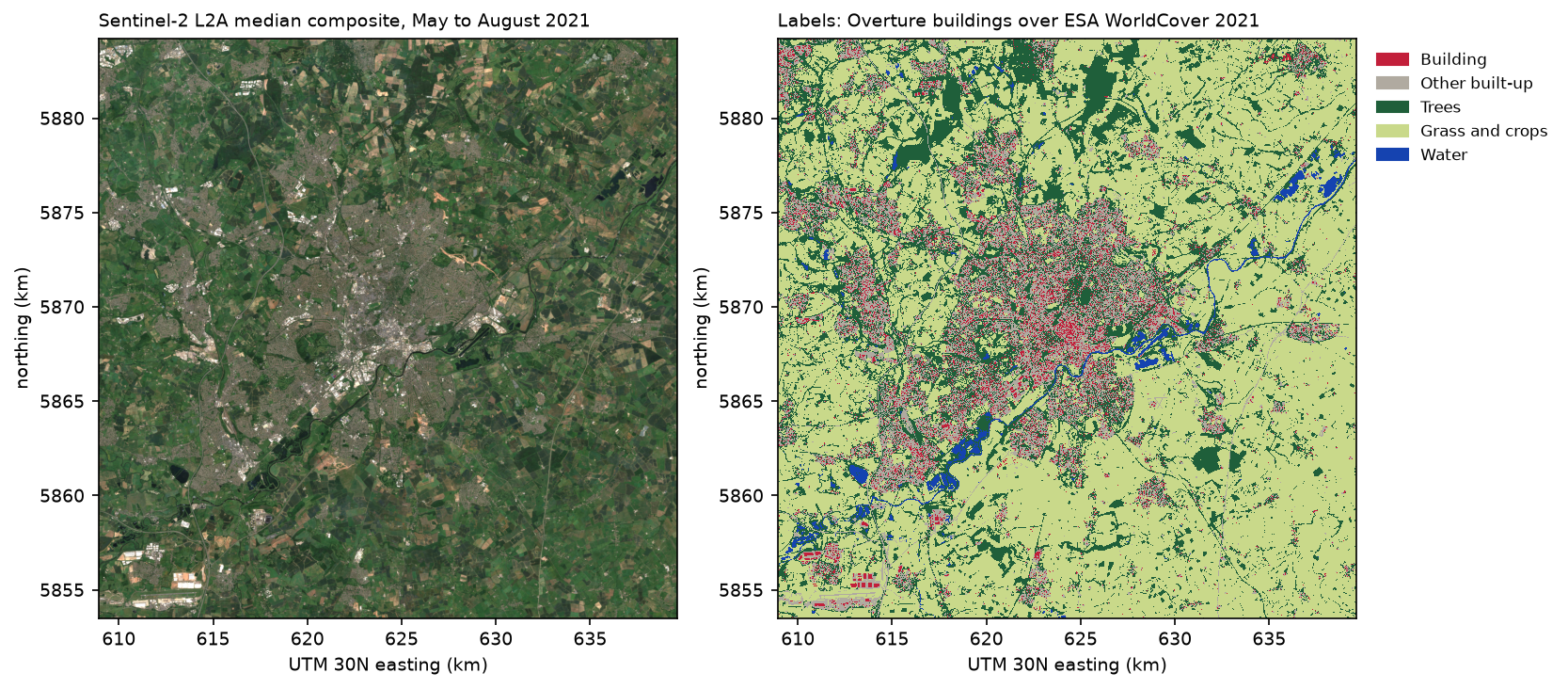
Step 6: cut georeferenced chips
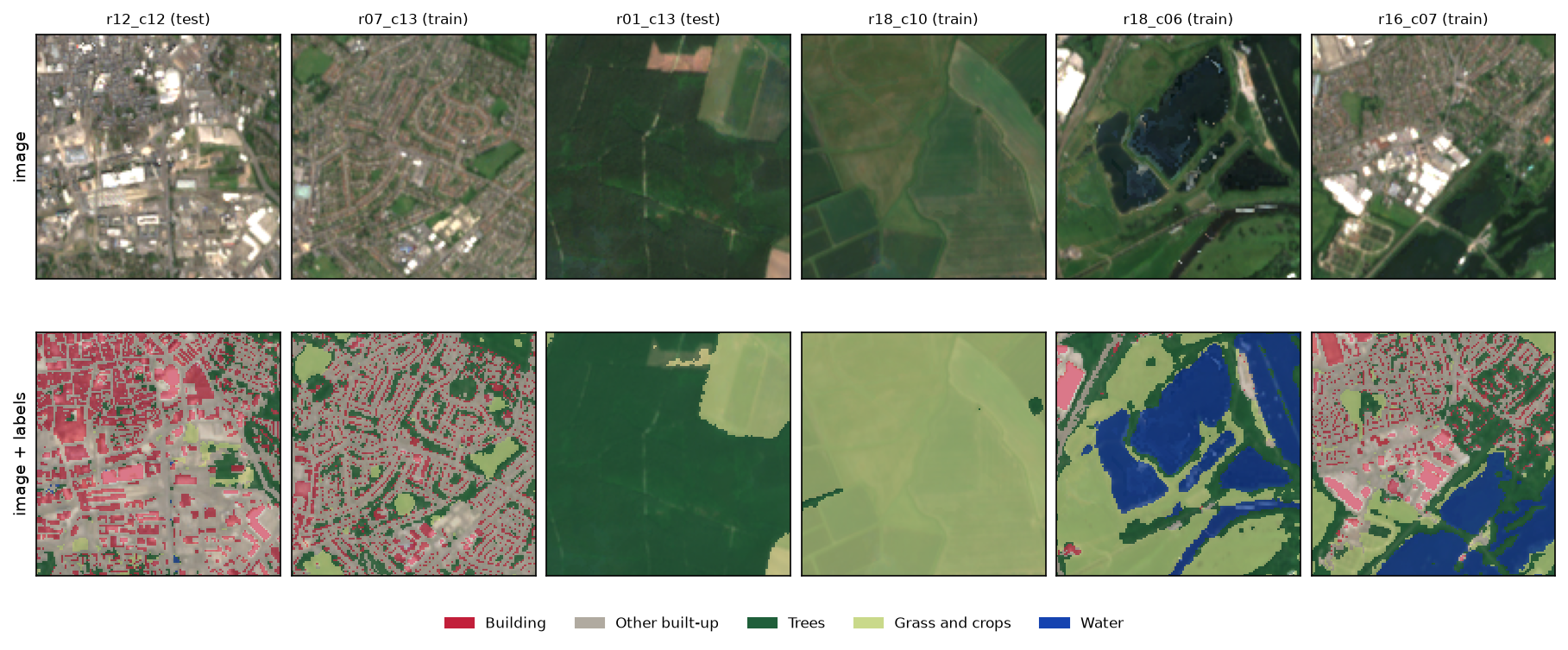
Each chip is written as two small GeoTIFFs: a 12-band image and a 1-band mask, both with their own transform. Chips with more than 5% missing data are skipped. One row per chip goes into a GeoPackage, with the chip’s footprint, its class shares and, after Step 7, its split.
for r in range(NCHIPS): for c in range(NCHIPS): win = np.s_[r * CHIP:(r + 1) * CHIP, c * CHIP:(c + 1) * CHIP] lab = label[win] cx0, cy1 = x0 + c * CHIP * RES, y1 - r * CHIP * RES rec = {"chip_id": f"{NAME}_r{r:02d}_c{c:02d}", "row": r, "col": c, "valid": (lab != IGNORE).mean(), **{CLASSES[k]: (lab == k).mean() for k in range(len(CLASSES))}, "geometry": box(cx0, cy1 - CHIP * RES, cx0 + CHIP * RES, cy1)} rows.append(rec) if rec["valid"] < 0.95: continue profile = dict(driver="GTiff", height=CHIP, width=CHIP, crs=CRS, transform=from_origin(cx0, cy1, RES, RES), compress="deflate") with rasterio.open(CHIPS / "images" / f"{rec['chip_id']}.tif", "w", count=len(BANDS), dtype="uint16", nodata=0, **profile) as dst: dst.write(s2[(slice(None),) + win]) with rasterio.open(CHIPS / "masks" / f"{rec['chip_id']}.tif", "w", count=1, dtype="uint8", nodata=IGNORE, **profile) as dst: dst.write(lab, 1)576 chips of 128 x 128 pixels written; 0 dropped for > 5% missing dataWhy GeoTIFFs and not one big NumPy array? Every chip opens in QGIS on top of a basemap, so you can check a suspicious label in seconds. Any framework can read them with rasterio. The 576 chips and their masks take 186 MB, compressed. For millions of chips, you would switch to a format such as Zarr or WebDataset, but the GeoTIFFs plus a GeoPackage index work well up to tens of thousands.
Step 7: split by spatial block, not at random
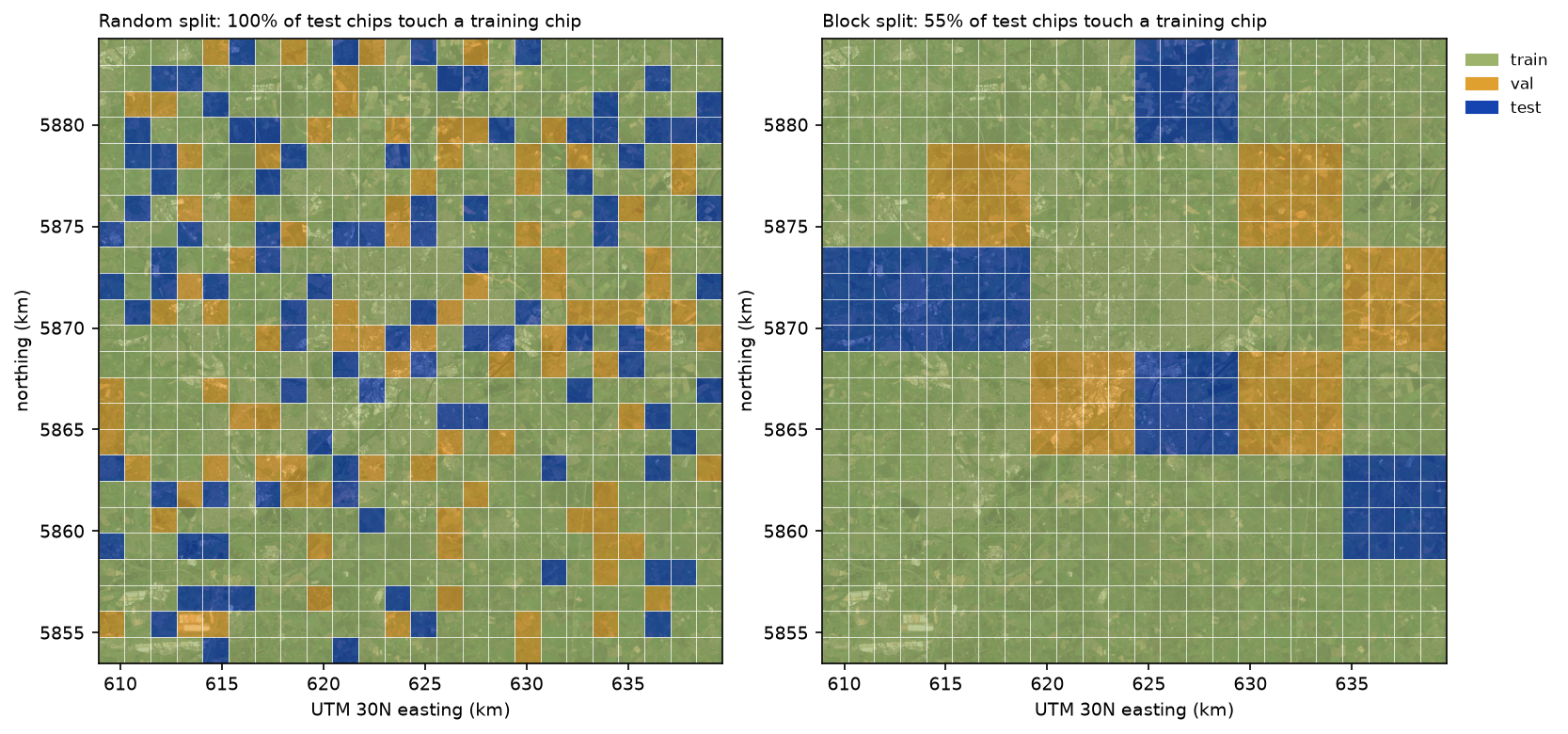
A random split puts each chip into training, validation or test independently. Its neighbours, which look almost the same, are then very likely to be in the training set. The test score then measures how well the model interpolates between nearby training chips, not how well it works somewhere new. This is the deep learning version of the spatial cross-validation problem covered in the random forest land cover tutorial.
We group chips into blocks of 4 × 4 chips (5.12 km square) and assign whole blocks: 70% to training and 15% each to validation and test. One random assignment can easily put all the water in the test set. So we try 500 assignments and keep the one whose class shares are closest to the area as a whole:
BLOCK = 4 # 4 x 4 chips = 5.12 km blockschips["block"] = (chips["row"] // BLOCK) * (NCHIPS // BLOCK) + chips["col"] // BLOCK...for seed in range(500): order = np.random.default_rng(seed).permutation(blocks) assign = {b: "val" for b in order[:n_hold]} | {b: "test" for b in order[n_hold:2 * n_hold]} split = chips["block"].map(lambda b: assign.get(b, "train")) shares = chips.groupby(split)[CLASSES].mean() score = float((np.abs(shares - area) / area).max().max()) # worst relative deviation of any class if best is None or score < best[0]: best = (score, seed, split)To put a number on the leak, we count the test chips that share an edge or a corner with a training chip:
36 blocks of 4 x 4 chips; best of 500 block shuffles: seed 415 (worst class share off by 17%)splittrain 416val 80test 80test chips touching a training chip: random split 100%, block split 55%a one-chip buffer would remove 108 of 416 training chipsWith a random split, every single test chip had a training chip next to it. With the block split, 45% of test chips are at least one chip (1.28 km) from any training data, and the rest sit along block edges. A buffer, which drops training chips next to the test blocks, would make the split fully independent but would cost a quarter of the training data. We keep the plain block split here. Part 2 trains on both splits so you can compare them.
Step 8: check the class balance
Grass and crops cover 60% of the labelled pixels and water just 1.3%. If you train with a plain cross-entropy loss, the network can score 60% accuracy by predicting Grass and crops everywhere. The usual fix is to weight each class in the loss. We use the inverse square root of each class’s frequency, a softer version of plain inverse frequency, which would weight Water about 46 times more than Grass and crops.
counts = np.bincount(label[label != IGNORE].ravel(), minlength=len(CLASSES))weights = 1 / np.sqrt(counts / counts.sum()) Building Other built-up Trees Grass and crops Watersplittrain 3.8 12.2 21.5 61.1 1.3val 4.3 12.4 22.3 59.9 1.1test 4.0 12.3 26.0 56.2 1.5all chips 3.9 12.3 22.3 60.3 1.3loss weights, 1 / sqrt(frequency) scaled to mean 1: Building 1.26, Other built-up 0.71, Trees 0.53, Grass and crops 0.32, Water 2.18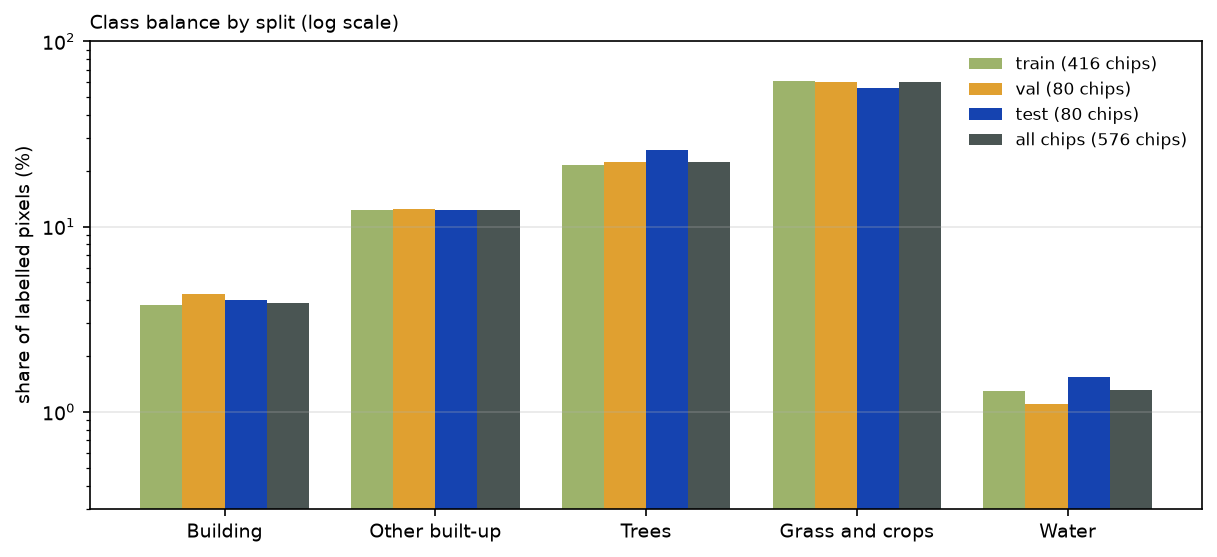
Step 9: the same data as a TorchGeo dataset
TorchGeo can skip chip files altogether. A RasterDataset indexes GeoTIFFs by location, and a sampler cuts chips on the fly, so you can change the chip size without re-cutting anything. Two subclasses, one for the composite and one for the labels, are enough. The & operator joins them on their shared grid:
from torchgeo.datasets import RasterDataset, stack_samplesfrom torchgeo.samplers import RandomGeoSampler
class Sentinel2Composite(RasterDataset):    filename_glob = "s2_nottingham_*.tif"    is_image = True
class FusedLabels(RasterDataset):    filename_glob = "labels_nottingham_*.tif"    is_image = False
dataset = Sentinel2Composite(paths=DATA) & FusedLabels(paths=DATA)sampler = RandomGeoSampler(dataset, size=CHIP, length=64)batch = next(iter(DataLoader(dataset, sampler=sampler, batch_size=8, collate_fn=stack_samples)))=== TorchGeo 0.10.1 ===RandomGeoSampler batch: image (8, 12, 128, 128) torch.float32, mask (8, 128, 128) torch.int64Random sampling across the whole raster ignores your block split, though. For a real experiment, give each split its own region of interest, or use TorchGeo’s spatial splitting helpers. Part 2 uses the saved chips and the split column, because the split is then fixed and easy to check.
What the script saves
Part 2 loads everything from data/chips/:
data/chips/images/nottingham_rXX_cYY.tif: 576 chips, 12 bands (B01 to B12 without B10), uint16 reflectance × 10,000;data/chips/masks/nottingham_rXX_cYY.tif: matching uint8 masks, with classes 0 to 4 and 255 for “ignore”;data/chips/chips.gpkg: one polygon per chip withchip_id,row,col, the five class shares,blockandsplit;data/s2_nottingham_2021.tifanddata/labels_nottingham_2021.tif: the full composite and label rasters.
Limitations
- The labels are other maps, not ground truth. WorldCover 2021 has an overall accuracy of about 77% globally, and the model will learn its errors. Overture’s footprints are good in England, where 86% come from OpenStreetMap, but some are missing and some are machine-generated.
- Buildings and imagery come from different years. The footprints are from the September 2026 Overture release, and the imagery is from 2021. Buildings built after 2021 are labelled but invisible, and buildings demolished since then are visible but unlabelled. For a cleaner dataset, use footprints from the same year as the imagery.
- 10 m is coarse for buildings. A typical semi-detached house covers about one Sentinel-2 pixel. The Building class is really “pixels mostly covered by roof”, and Part 2 shows how hard that is to learn.
- One city, one season. All chips come from one 30 km square in one summer. A model trained on them will be weaker in other landscapes and seasons. Part 3 tests it on a different city.
- Leakage remains. 55% of test chips still touch training data on one side. With a one-chip buffer, the test set is fully separate, at the cost of 108 training chips.
Frequently asked questions
How much training data do I need for deep learning on satellite imagery?
There is no fixed number, but a few hundred labelled chips is a workable start for semantic segmentation with a pretrained encoder, and thousands is better. Each 128 × 128 chip holds 16,384 labelled pixels, so our 576 chips contain 9.4 million labelled pixels. What limits you is usually variety, such as more cities, seasons and sensors, rather than the raw pixel count.
What chip size should I use for Sentinel-2?
128 or 256 pixels (1.28 or 2.56 km at 10 m) are common choices. Larger chips give the network more context but use more memory per batch. Chip sizes that divide by 32 suit U-Nets with five downsampling steps. For inference on a large area, you are not limited to the training chip size: Part 3 predicts on 256-pixel windows with a model trained on 128-pixel chips.
Why should I not split satellite image chips at random?
Neighbouring chips look alike because land cover is spatially autocorrelated. A random split places almost every test chip next to a training chip (100% in our case), so the test score mostly measures interpolation, not how the model will do in a new place. Split by spatial blocks, by region or by city, and add a buffer if you need the test set to be fully independent.
How do I turn building footprint polygons into a training mask?
Rasterise them with rasterio.features.rasterize onto the same grid as the imagery. For pixels larger than many buildings, rasterise at a finer resolution (we used 2 m) and average into the coarse pixels to get the fraction covered. Then choose a threshold, such as 50%, or keep the fraction as a soft label.
Is TorchGeo required?
No. The chips are ordinary GeoTIFFs, and Part 2 loads them with rasterio into a plain PyTorch Dataset. TorchGeo is useful for sampling chips on the fly from large rasters, for its ready-made benchmark datasets, and for its pretrained Sentinel-2 weights, which Part 2 uses.
Where can I get free labels for satellite imagery?
Global land cover maps (ESA WorldCover, Dynamic World, ESRI Land Cover), building footprints (OpenStreetMap, Overture Maps, Microsoft and Google Open Buildings), water masks (JRC Global Surface Water) and national datasets such as the UKCEH Land Cover Map all work as labels. Check each licence before you use it. For anything important, hand-label a test set, because the model will learn the errors of whatever map you train on.
Next steps
- Train a U-Net on these chips in Part 2: U-Net satellite image segmentation in PyTorch.
- Compare with a classical approach on the same kind of labels in Land cover classification with a Sentinel-2 random forest.
- Learn STAC searches step by step in Measuring Lake Mead’s shrinking shoreline with Sentinel-2 and STAC.
- For buildings, higher-resolution imagery helps a lot: try Segment Anything on aerial imagery or building footprints from LiDAR.
Data and licences
- Sentinel-2 L2A: Copernicus Sentinel data 2021, processed by ESA. Free and open under the Copernicus data licence. Accessed from the Microsoft Planetary Computer on 19 October 2026.
- ESA WorldCover 2021 (v200): © ESA WorldCover project 2021, contains modified Copernicus Sentinel data (2021) processed by the ESA WorldCover consortium. CC BY 4.0. Zanaga, D. et al. (2022), ESA WorldCover 10 m 2021 v200, doi:10.5281/zenodo.7254221.
- Building footprints: Overture Maps Foundation, release 2026-09-23.1, under the ODbL. Contains data © OpenStreetMap contributors and Microsoft ML Buildings.
- Code:
make_training_chips.py, tested with Python 3.12.0, odc-stac 0.5.3, pystac-client 0.9.0, rasterio 1.5.2, geopandas 1.2.0, overturemaps 1.0.2 and TorchGeo 0.10.1.
Key terms
- Image chip
- A small, fixed-size tile cut from a large raster, such as 128 × 128 pixels, used as one training example. Each chip keeps its own georeferencing so it can be mapped and traced back to its source.
- Semantic segmentation
- Assigning a class to every pixel of an image, rather than one label per image (classification) or one box per object (detection).
- Spatial autocorrelation
- The tendency of nearby places to be similar. It is why a test chip next to a training chip is an easy test: the model has effectively seen it already.
- Block split
- Assigning whole spatial blocks of chips, not individual chips, to the training, validation and test sets, so that most test chips are far from any training data.
- TorchGeo
- A PyTorch library for geospatial deep learning. It provides datasets that read GeoTIFFs by location, samplers that cut chips on the fly, and models pretrained on satellite imagery.
- Sentinel-2 L2A
- Sentinel-2 surface reflectance: atmospherically corrected, with 12 spectral bands at 10, 20 and 60 m and a scene classification layer (SCL) that flags cloud, shadow and water.
Data for this tutorial
- Microsoft Planetary Computer · Sentinel-2 L2A and ESA WorldCover through STAC
- ESA WorldCover · 10 m global land cover for 2021 (v200), the land cover labels
- Overture Maps · building footprints from OpenStreetMap and Microsoft, the building labels
Licences and formats for each source are listed in the GIS data sources catalogue.