Coordinate reference systems in Python: EPSG codes, pyproj transforms and reprojecting vectors and rasters
A practical guide to coordinate reference systems in Python with pyproj, GeoPandas and rasterio, tested on real Greater Manchester data. Covers EPSG codes, WGS 84 vs British National Grid (EPSG:27700), the always_xy axis-order trap, OSTN15 vs Helmert datum shifts checked against 13,187 NaPTAN bus stops, measured area and distance errors in the wrong CRS, and reprojecting a GeoDataFrame and a Copernicus DEM raster.
- Level
- Beginner
- Tested with
- Python 3.12
- Source code
- Download scripts
Key takeaways
- A CRS is identified by an EPSG code: EPSG:4326 is WGS 84 latitude/longitude in degrees, EPSG:27700 is British National Grid in metres. Use `to_crs()` to reproject coordinates; `set_crs()` only labels them, and a mistaken `set_crs(27700)` shrank Greater Manchester to a 0.82 × 0.36 m speck off Cornwall.
- EPSG:4326 officially lists latitude first. Without `always_xy=True`, passing (lon, lat) to pyproj put Manchester Town Hall at E 7,854,184, N −5,967,513 with no error raised.
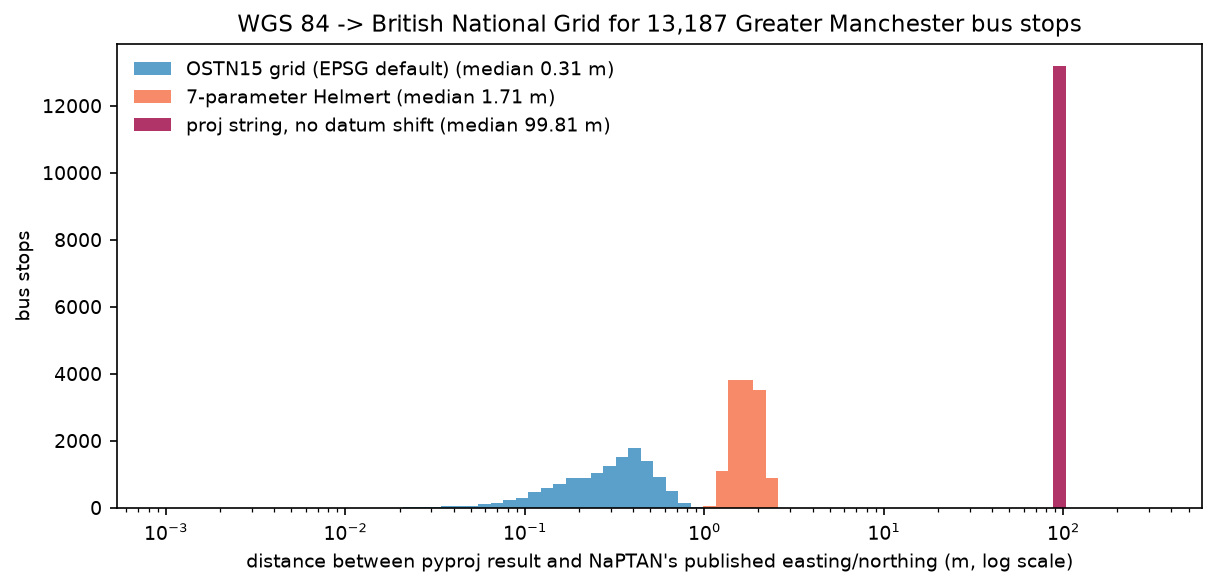
- Against the published coordinates of 13,187 Greater Manchester bus stops, pyproj's default OSTN15 grid transformation matched to a median 0.31 m, a 7-parameter Helmert shift to 1.71 m, and an old proj string with no datum shift was out by 99.8 m.
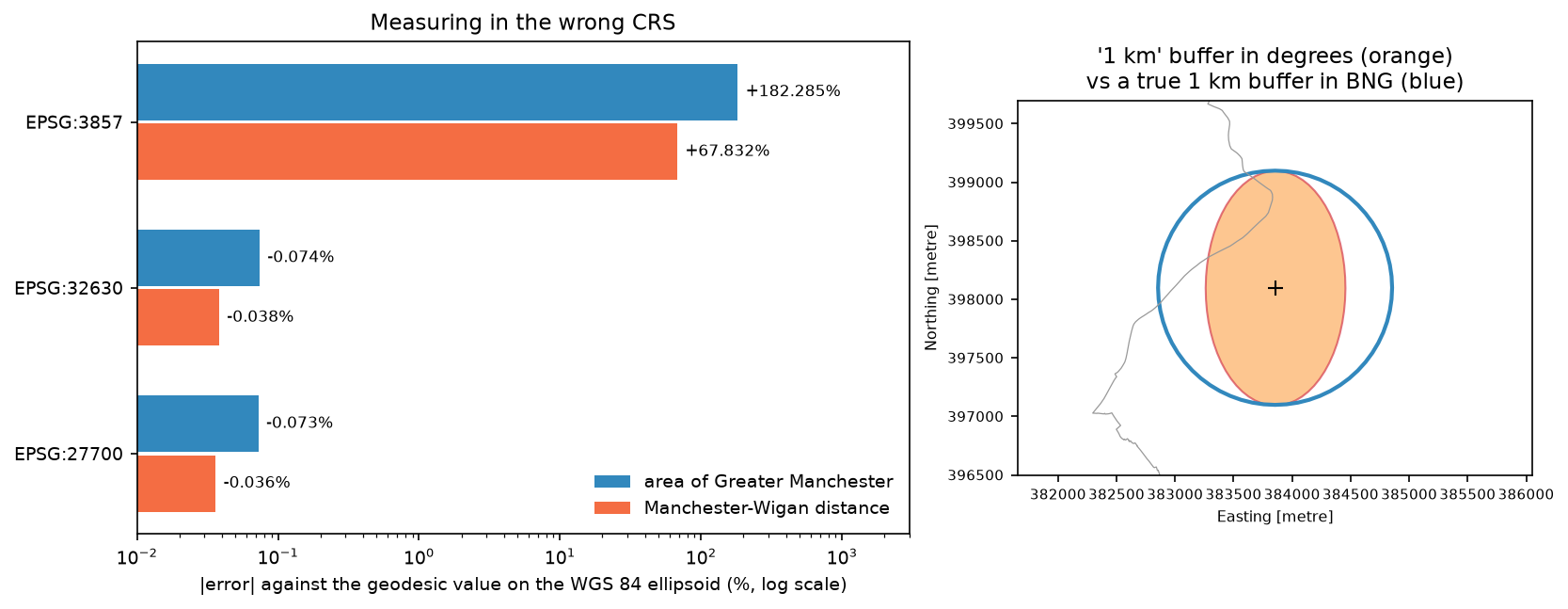
- Measured in Web Mercator (EPSG:3857), Greater Manchester's area is 182% too large and the Manchester–Wigan distance 68% too long; in EPSG:27700 both are within 0.08% of the geodesic values.
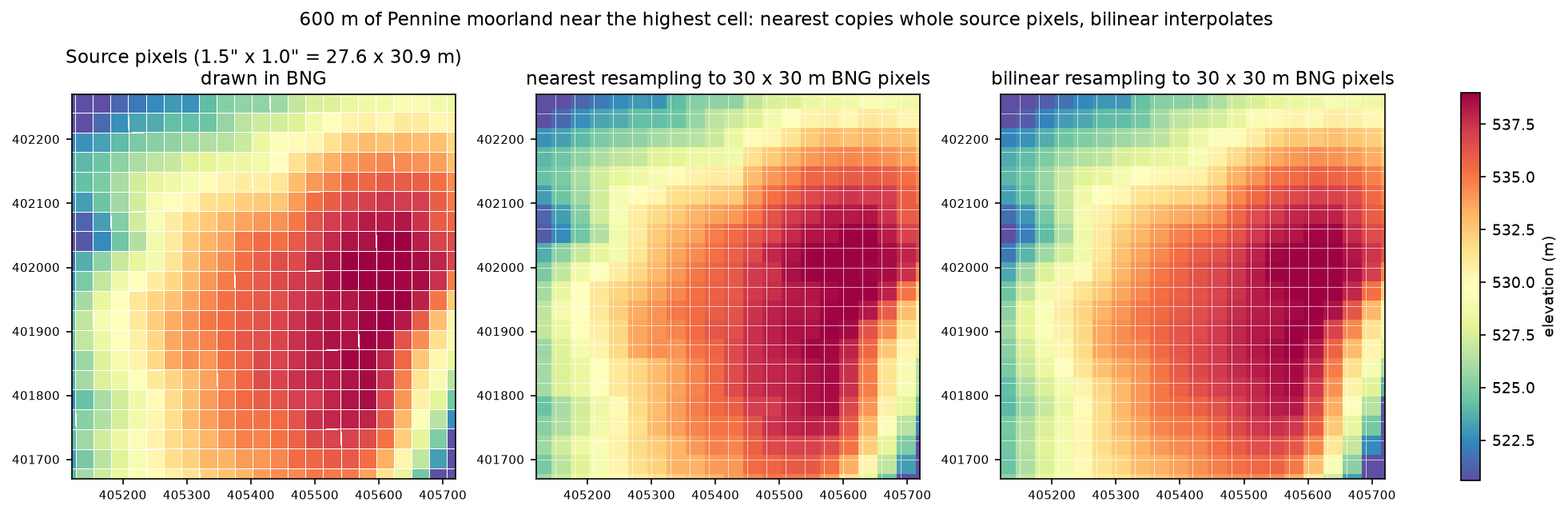
- Reprojecting the Copernicus DEM from EPSG:4326 to a 30 m EPSG:27700 grid with rasterio or rioxarray gave identical results; nearest-neighbour resampling differed from bilinear by 2.99 m RMS.
Before you start
- Basic Python and pandas; the GeoPandas getting-started tutorial is a gentle introduction to GeoDataFrames
- Python 3.10+ with pyproj, geopandas, rasterio, rioxarray, pystac-client, planetary-computer, numpy, pandas, requests and matplotlib
- An internet connection: boundaries come from the ONS Open Geography Portal, bus stops from the NaPTAN API and the DEM from the Microsoft Planetary Computer, all with no account or key
Short answer: in Python, a coordinate reference system is identified by an EPSG code. Use pyproj for single coordinates: Transformer.from_crs("EPSG:4326", "EPSG:27700", always_xy=True).transform(lon, lat). Use gdf.to_crs(27700) to reproject a GeoDataFrame, and rasterio.warp.reproject or da.rio.reproject("EPSG:27700") to reproject a raster. Always pass always_xy=True, so that pyproj expects longitude before latitude. Use to_crs, not set_crs, to change coordinates. Measure lengths and areas in a projected CRS in metres, such as British National Grid, not in degrees or Web Mercator.
Most “my layers don’t line up” and “my areas are wrong” problems in Python GIS come down to the coordinate reference system (CRS). This tutorial explains what is inside a CRS and shows how to transform points with pyproj. It then puts numbers on the mistakes using real data for Greater Manchester:
- the ten borough boundaries from the ONS;
- 13,187 NaPTAN bus stops, which are published with both GPS latitude/longitude and British National Grid coordinates, so they make a free accuracy test;
- the Copernicus 30 m DEM.
Every number below comes from the script crs_python.py, which you can download with the rest of the code.
Step 1: what is inside an EPSG code?
An EPSG code names a complete CRS definition: the datum, the axes and their order and units, any map projection, and the area where the CRS is valid. pyproj’s CRS object exposes all of it:
from pyproj import CRS
for code in [4326, 27700, 3857, 32630]: crs = CRS.from_epsg(code) axes = ", ".join(f"{a.abbrev} ({a.direction}, {a.unit_name})" for a in crs.axis_info) kind = "projected" if crs.is_projected else "geographic" print(f"EPSG:{code:<5} {crs.name:28s} {kind:10s} datum: {crs.datum.name}") print(f" axes: {axes}")EPSG:4326 WGS 84 geographic datum: World Geodetic System 1984 ensemble axes: Lat (north, degree), Lon (east, degree)EPSG:27700 OSGB36 / British National Grid projected datum: Ordnance Survey of Great Britain 1936 axes: E (east, metre), N (north, metre)EPSG:3857 WGS 84 / Pseudo-Mercator projected datum: World Geodetic System 1984 ensemble axes: X (east, metre), Y (north, metre)EPSG:32630 WGS 84 / UTM zone 30N projected datum: World Geodetic System 1984 ensemble axes: E (east, metre), N (north, metre)Three points from this output matter for everything that follows:
- EPSG:4326 (WGS 84) is geographic. Its units are degrees, and its official axis order is latitude first. GPS, GeoJSON, OpenStreetMap and most web APIs give you WGS 84 coordinates, although GeoJSON and most software store them as (longitude, latitude).
- EPSG:27700 (British National Grid, BNG) is projected, in metres, on a different datum: OSGB36, based on the Airy 1830 ellipsoid. Ordnance Survey data, ONS boundaries and most UK government data use it. OSGB36 and WGS 84 differ by about 100 m in Manchester, so changing between them needs a datum transformation, not just a projection.
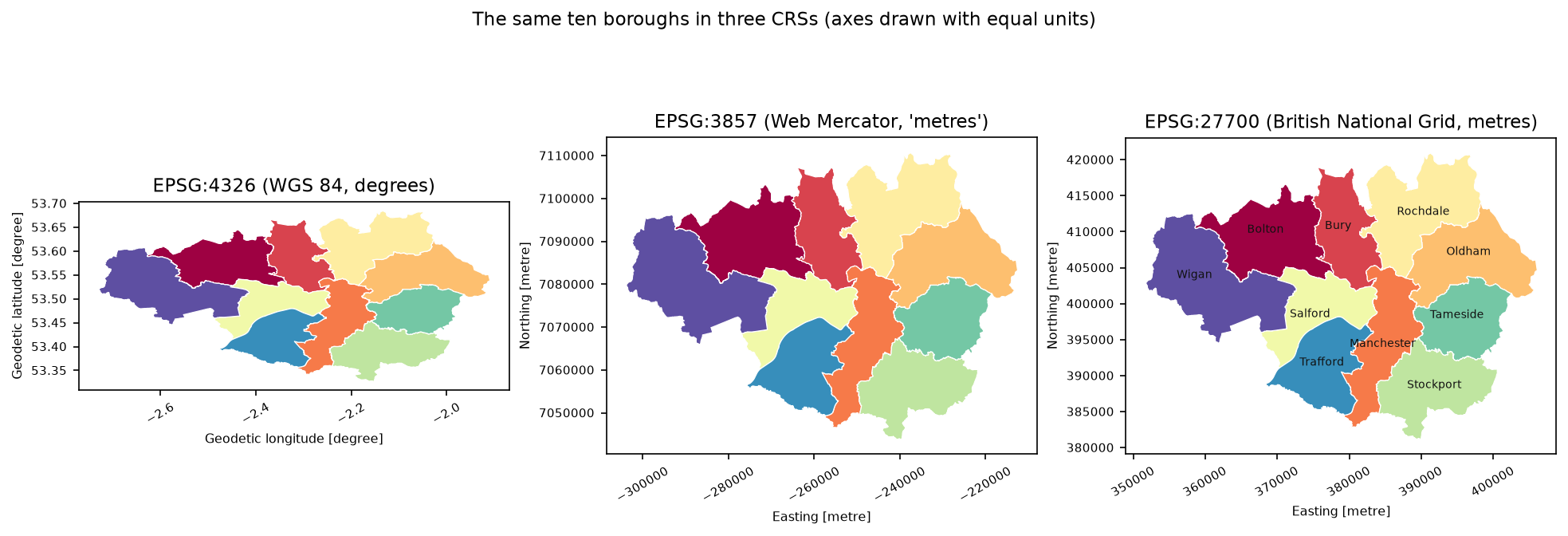
- EPSG:3857 (Web Mercator) is in metres, but those “metres” are stretched more and more away from the equator, as Step 5 shows. It is built for web map tiles, not for measuring.
Step 2: transform a point with pyproj, and avoid the axis-order trap
A pyproj Transformer converts coordinates between two CRSs. The most common bug in all of Python GIS is getting the axis order wrong:
from pyproj import Transformer
lon, lat = -2.24474, 53.47938   # Manchester Town Hall, WGS 84t_strict = Transformer.from_crs("EPSG:4326", "EPSG:27700")              # authority order: lat, lont_xy = Transformer.from_crs("EPSG:4326", "EPSG:27700", always_xy=True)  # always lon, lat (x, y)
print(t_strict.transform(lat, lon)) # correctprint(t_strict.transform(lon, lat)) # swapped: no error, wrong answerprint(t_xy.transform(lon, lat)) # correct, and the order every other library usesstrict, (lat, lon) in : E 383,854.7 N 398,099.0strict, (lon, lat) in : E 7,854,183.6 N -5,967,512.6 <- swapped axes, silently wrongalways_xy, (lon, lat) : E 383,854.7 N 398,099.0round trip back to WGS 84: lon -2.244740, lat 53.479380operation used: Inverse of OSGB36 to WGS 84 (9) + British National Grid (with axis order normalized for visualization)Without always_xy=True, pyproj follows the EPSG definition of 4326, which puts latitude first. Pass (lon, lat) by habit and the point lands thousands of kilometres off the grid, with no error or warning. GeoPandas, Shapely, rasterio and GeoJSON all use (x, y), meaning (longitude, latitude), so always create transformers with always_xy=True. Then pyproj behaves the same way as the rest of your stack.
Step 3: which datum transformation did pyproj use?
WGS 84 to BNG is not a single formula. PROJ knows several transformations between the two datums. The best is OSTN15, the official Ordnance Survey grid, which models the distortions of the old OSGB36 triangulation to about 0.1 m. If the OSTN15 grid file is not installed, PROJ silently falls back to the next best method. TransformerGroup lists the options, and it can download the grid:
from pyproj.transformer import TransformerGroup
tg = TransformerGroup("EPSG:4326", "EPSG:27700", always_xy=True)if not tg.best_available: # the OSTN15 grid is not installed yet: fetch it once from cdn.proj.org pyproj.network.set_network_enabled(True) tg.download_grids(verbose=True) tg = TransformerGroup("EPSG:4326", "EPSG:27700", always_xy=True)for tr in tg.transformers: print(f" accuracy {tr.accuracy:5.1f} m {tr.description.split(' + ')[0]}")9 candidate operations EPSG:4326 -> EPSG:27700, in PROJ's order (first = default): accuracy 1.0 m Inverse of OSGB36 to WGS 84 (9) accuracy 2.0 m Inverse of OSGB36 to WGS 84 (6) accuracy 21.0 m Inverse of OSGB36 to WGS 84 (1) accuracy 10.0 m Inverse of OSGB36 to WGS 84 (2) accuracy 21.0 m Inverse of OSGB36 to WGS 84 (3) accuracy 18.0 m Inverse of OSGB36 to WGS 84 (4) accuracy 35.0 m Inverse of OSGB36 to WGS 84 (5) accuracy 3.0 m Inverse of OSGB36 to WGS 84 (8) accuracy -1.0 m Ballpark geographic offset from WGS 84 to OSGB36Operation (9) is the OSTN15 grid. Its stated 1 m accuracy is conservative, because it includes the uncertainty of WGS 84 itself. Operation (6) is the classic 7-parameter Helmert transformation. The last one, “ballpark”, means no datum shift at all: it is what you get from an old .prj file or proj string that gives the projection but not the datum.
To see what these differences mean on the ground, we can test them against data. NaPTAN, the national bus-stop dataset, publishes every stop with both latitude/longitude and BNG easting/northing. The download for Greater Manchester (ATCO area 180) has 13,187 active on-street bus stops. We transform their latitudes and longitudes three ways and compare the results with the published eastings and northings:
bng_no_datum = CRS.from_proj4("+proj=tmerc +lat_0=49 +lon_0=-2 +k=0.9996012717 +x_0=400000 +y_0=-100000 " "+ellps=airy +units=m +no_defs")candidates = { "OSTN15 grid (EPSG default)": tg.transformers[0], "7-parameter Helmert": next(t for t in tg.transformers if "WGS 84 (6)" in t.description), "proj string, no datum shift": Transformer.from_crs("EPSG:4326", bng_no_datum, always_xy=True),}for name, tr in candidates.items(): x, y = tr.transform(stops.Longitude.to_numpy(), stops.Latitude.to_numpy()) d = np.hypot(x - stops.Easting.to_numpy(), y - stops.Northing.to_numpy()) print(f"{name:28s}: median {np.median(d):6.2f} m, 95th pct {np.percentile(d, 95):6.2f} m, max {d.max():7.2f} m")OSTN15 grid (EPSG default) vs NaPTAN easting/northing: median 0.31 m, 95th pct 0.61 m, max 0.91 m7-parameter Helmert vs NaPTAN easting/northing: median 1.71 m, 95th pct 2.23 m, max 2.46 mproj string, no datum shift vs NaPTAN easting/northing: median 99.81 m, 95th pct 101.47 m, max 102.56 mrounding to whole metres alone: median 0.40 m, max 0.71 mNaPTAN eastings and northings are whole metres. Rounding alone produces offsets of up to 0.71 m (median 0.40 m), so the OSTN15 result is as good as this test can measure. The Helmert shift is about 2 m out, which is fine for mapping but not for surveying. The proj string without a datum shift is consistently 100 m out: all your points move the length of a football pitch, and nothing warns you.
Step 4: reproject a GeoDataFrame with to_crs (not set_crs)
GeoPandas stores the CRS on the GeoDataFrame. to_crs() transforms every coordinate using pyproj, with the same default transformation as above. set_crs() only attaches a label, for data that you know is in a CRS but that has no CRS recorded:
boroughs = gpd.read_file("data/gm_lad24_wgs84.geojson") # ONS boundaries, downloaded in WGS 84boroughs_bng = boroughs.to_crs(27700) # transform the coordinateswrong = boroughs.set_crs(27700, allow_override=True) # relabel degrees as metres: moves nothingread 10 boroughs, CRS EPSG:4326, bounds -2.730, 53.327, -1.910, 53.686to_crs(27700): CRS EPSG:27700, bounds 351,669, 381,153, 406,087, 421,038set_crs(27700) by mistake: bounds -2.730, 53.327, -1.910, 53.686 -> a 0.82 x 0.36 m speck at lon -7.56, lat 49.77 (the BNG false origin)set_crs(27700) on degree coordinates tells GeoPandas that −2.73 and 53.33 are metres from the BNG false origin. Greater Manchester becomes a speck 82 cm wide in the sea south-west of the Isles of Scilly. If a layer “disappears” or turns up off Cornwall or near (0, 0), check for a misused set_crs.
Rules of thumb:
- Use
to_crs()whenever data already has a CRS and you want another one. - Use
set_crs()only whengdf.crsisNone, and you know from the source’s documentation what it should be. - Before any spatial operation between two layers, check
a.crs == b.crs. GeoPandas warns about mismatches insjoinandoverlay, but not in every function. - Many services can return data directly in the CRS you want. The ONS ArcGIS services take
outSR=27700, which Part 2 uses to avoid a reprojection step.
Step 5: measure the error of areas and distances in the wrong CRS
Areas and lengths in GeoPandas are computed in the units of the layer’s CRS. To put a number on the error, we compare them with the geodesic values that pyproj’s Geod computes on the WGS 84 ellipsoid:
from pyproj import Geod
geod = Geod(ellps="WGS84")true_area = sum(abs(geod.geometry_area_perimeter(g)[0]) for g in boroughs.geometry) # m², on the ellipsoidfor code in [3857, 32630, 27700]: a = boroughs.to_crs(code).area.sum() print(f"EPSG:{code}: {a / 1e6:,.2f} km2, error {(a / true_area - 1) * 100:+.3f}%")warning from .area in EPSG:4326: Geometry is in a geographic CRSGreater Manchester, geodesic area on the WGS 84 ellipsoid: 1,276.89 km2 (ONS Shape__Area: 1,275.97 km2) EPSG:4326 (degrees) total = 0.1730 square degrees (not an area) EPSG:3857 total = 3,604.48 km2 error +182.285% EPSG:32630 total = 1,275.95 km2 error -0.074% EPSG:27700 total = 1,275.97 km2 error -0.073%Manchester Town Hall -> Wigan Town Hall, geodesic: 26,653.6 m EPSG:4326 (degrees) length = 0.39195 degrees (not a distance) EPSG:3857 length = 44,733.2 m error +67.832% EPSG:32630 length = 26,643.4 m error -0.038% EPSG:27700 length = 26,644.0 m error -0.036%buffer(0.009) in degrees, measured in BNG: 1.19 km wide x 2.00 km tall, area 1.88 km2 (a true 1 km buffer: 3.14 km2)BNG point scale factor at Manchester Town Hall: 0.999605; Web Mercator: 1.6804What the numbers show:
- EPSG:4326 gives square degrees and degrees. GeoPandas warns about this, but the warning is easy to filter out or miss in a notebook. A “1 km” buffer of 0.009° comes out as a 1.19 × 2.00 km ellipse, because a degree of longitude is shorter than a degree of latitude at 53.5°N.
- Web Mercator inflates lengths by 1/cos(latitude): 1.68 at Manchester. Its areas come out 2.8 times too big. Never measure in EPSG:3857, even though web maps and many tile-based tools use it.
- BNG and UTM 30N are both within 0.08% of the geodesic values. The small negative error is real: BNG’s scale factor at Manchester is 0.999605, so 1 km on the ground is 999.6 m on the grid. The ONS’s own
Shape__Area(1,275.97 km²) is a BNG area, too. For survey-grade lengths, use the geodesic values or apply the scale factor.
Step 6: reproject a raster to EPSG:27700 with rasterio and rioxarray
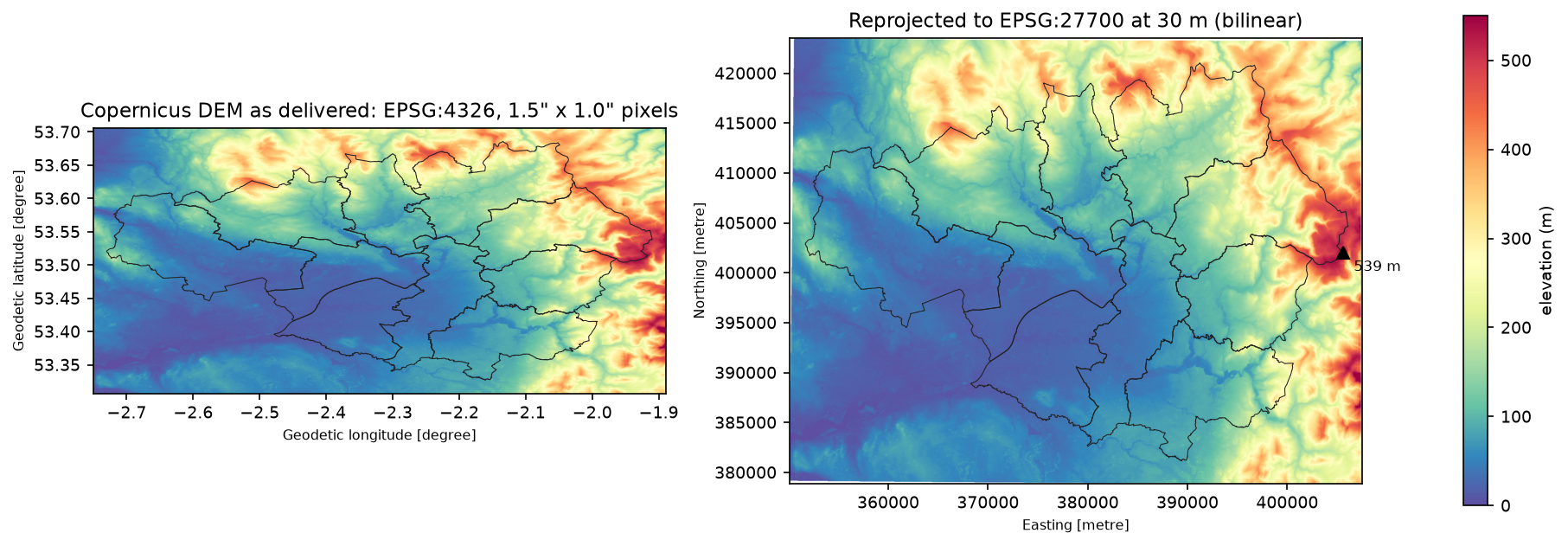
Rasters need more care than vectors. A vector reprojection moves vertices exactly, but a raster has to be resampled onto a new grid of cells. The Copernicus GLO-30 DEM is delivered in EPSG:4326 with 1 arcsecond pixels. At Manchester’s latitude the tiles use 1.5″ in longitude, so the pixels are not square and not 30 m. We read the two tiles that cover Greater Manchester from the Microsoft Planetary Computer and mosaic them:
import planetary_computer as pcimport pystac_clientimport rasterio.merge
catalog = pystac_client.Client.open("https://planetarycomputer.microsoft.com/api/stac/v1", modifier=pc.sign_inplace)items = catalog.search(collections=["cop-dem-glo-30"], bbox=bbox_ll).item_collection()arr, transform = rasterio.merge.merge([it.assets["data"].href for it in items], bounds=bbox_ll)
calculate_default_transform designs a target grid in BNG that covers the source, here with 30 m cells. reproject fills the grid using the resampling method you choose:
from rasterio.warp import calculate_default_transform, reprojectfrom rasterio.enums import Resampling
with rasterio.open(dem_ll_tif) as src:    dst_transform, width, height = calculate_default_transform(        src.crs, "EPSG:27700", src.width, src.height, *src.bounds, resolution=30)    dst = np.full((height, width), np.nan, "float32")    reproject(rasterio.band(src, 1), dst, dst_transform=dst_transform, dst_crs="EPSG:27700",              resampling=Resampling.bilinear, dst_nodata=np.nan)
With rioxarray the same job is a single line, and it is a convenient way to clip to a boundary afterwards:
da = rioxarray.open_rasterio(dem_ll_tif, masked=True).squeeze("band", drop=True)da_bng = da.rio.reproject("EPSG:27700", resolution=30, resampling=Resampling.bilinear)dem_gm = da_bng.rio.clip(gm.geometry, gm.crs)source: EPSG:4326, 2066 x 1435 px, pixel 1.5" x 1.0" (0.000417 x 0.000278 deg), nodata Noneon the ground at 53.51 N one pixel is 27.6 m wide x 30.9 m talltarget grid: EPSG:27700, 1913 x 1487 px at 30 m, origin E 350,094 N 423,518nearest minus bilinear: mean +0.007 m, RMS 2.99 m, 99th pct |diff| 4.52 mcubic minus bilinear: mean -0.002 m, RMS 0.80 m, 99th pct |diff| 1.04 mrioxarray: EPSG:27700, shape (1487, 1913), res (30.0, -30.0)same grid as rasterio.warp: True, max |difference| 0.000 mclipped to Greater Manchester: 1,417,745 cells; elevation 7-539 m, mean 123 mhighest cell: 539 m at E 405,579 N 401,993 (lon -1.9173, lat 53.5146)rioxarray calls the same GDAL warper, so its grid and values match rasterio exactly. The highest cell in Greater Manchester, 539 m in the far east of Oldham, is on the moorland around Black Chew Head (542 m), the county’s highest point. A 30 m DEM cell averages over the summit, so it reads a few metres low.
Which resampling method?
The resampling method matters more than most people expect. Nearest neighbour copies whole source pixels, so the 27.6 × 30.9 m cells are sometimes duplicated and sometimes skipped. That shows up as steps and stripes, and as a 2.99 m RMS difference from bilinear. Cubic is smoother still, but within 0.8 m RMS of bilinear.
| Data | Use | Why |
|---|---|---|
| Elevation, temperature, reflectance (continuous) | bilinear or cubic |
Interpolation gives smooth, realistic values |
| Land cover, classes, masks (categorical) | nearest or mode |
Never invent a class code such as 2.5 |
| Counts such as population per cell | sum (GDAL 3.1+) |
Conserves the total |
Choosing a CRS: a quick guide
| Task | Use | Notes |
|---|---|---|
| Storing or exchanging data (GeoJSON, web APIs) | EPSG:4326 | GeoJSON requires it; always (lon, lat) on disk |
| Measuring, buffering, joining in Great Britain | EPSG:27700 | OS, ONS and most UK open data are already in it |
| Measuring elsewhere | Local UTM zone (EPSG:326xx north, 327xx south) | gdf.estimate_utm_crs() picks one for you |
| Areas over a country or continent | An equal-area CRS, such as EPSG:3035 (Europe) or EPSG:6933 (global) | Areas stay true across large extents |
| Web map tiles | EPSG:3857 | Only for display; never for measurement |
Pitfalls and limitations
- Axis order. Use
always_xy=Trueon everyTransformer. The only exception is when you really want the authority order, and that is rare. - Missing OSTN15 grid. Without it, WGS 84 to BNG conversions are about 2 m out. Install the grid, or turn on PROJ networking.
- Old
.prjand proj strings. A CRS defined by projection parameters without a datum (ortowgs84) gives “ballpark” transformations, which were 100 m out here. Prefer EPSG codes. set_crsversusto_crs. Useset_crsonly to label data with no CRS. Useto_crsto change coordinates.- Geodesic versus projected. Even BNG is 0.04% short of geodesic lengths at Manchester (scale factor 0.999605). For long lines, or for precise lengths, use
Geod.geometry_length. - Raster reprojection is lossy. Every warp resamples. Reproject a raster once, preferably to the CRS and grid your analysis needs. Where possible, reproject the vectors to the raster’s CRS instead, as in the zonal statistics tutorial.
- WGS 84 is a moving target. WGS 84 is a datum ensemble, and the British Isles drift about 2.5 cm a year. That is irrelevant for mapping, but it matters at the centimetre level. Use ETRS89 or ITRF realisations with epochs for survey work.
Frequently asked questions
What is the EPSG code for British National Grid?
EPSG:27700, “OSGB36 / British National Grid”. It is a Transverse Mercator projection on the OSGB36 datum, with eastings and northings in metres. In Python: gdf.to_crs(27700) or Transformer.from_crs(4326, 27700, always_xy=True).
How do I reproject a shapefile or GeoDataFrame in Python?
Read the file with gpd.read_file("file.shp"), check that gdf.crs is set, then call gdf.to_crs(epsg=27700) or gdf.to_crs("EPSG:27700") and save the result with to_file. If gdf.crs is None, first set the CRS the data is actually in with set_crs, then reproject with to_crs.
How do I reproject a raster in Python?
With rioxarray: rioxarray.open_rasterio(path).rio.reproject("EPSG:27700", resolution=30, resampling=Resampling.bilinear). With rasterio: use calculate_default_transform to design the target grid, then rasterio.warp.reproject to fill it. Both use GDAL’s warper and give the same result. Choose the resampling method to suit the data, as in the table in Step 6.
Why are my pyproj coordinates swapped or enormous?
Because EPSG:4326 officially lists latitude first. Create the transformer with Transformer.from_crs(src, dst, always_xy=True) and pass (longitude, latitude). Without it, (lon, lat) input produced E 7,854,184, N −5,967,513 for Manchester Town Hall instead of E 383,855, N 398,099.
Can I calculate area or distance in EPSG:4326?
Not with .area or .length: the results are in square degrees and degrees, which are not real measurements. Either reproject to a projected CRS in metres (BNG in Great Britain, or the local UTM zone from gdf.estimate_utm_crs()), or use pyproj’s Geod for geodesic areas and lengths on the ellipsoid. Never use Web Mercator: it made Greater Manchester 182% too big.
Is WGS 84 the same as ETRS89 or OSGB36?
No. OSGB36 differs from WGS 84 by about 100 m in Great Britain, which is why the transformation matters. ETRS89 is fixed to the European plate and differed from WGS 84 by under 1 m in 2026. GNSS-derived UK data, including the OSTN15 input side, is formally in ETRS89.
Next steps
- Part 2: spatial joins in GeoPandas uses the EPSG:27700 boundaries and NaPTAN stops from this tutorial to count bus stops per ward. It also finds each school’s nearest stop with
sjoin_nearestand times the spatial index against a naive loop. - Part 3: raster to vector in Python polygonises rasters like the reprojected DEM, and rasterises vectors back onto a grid.
- Get started with GeoDataFrames in GeoPandas getting started.
- Turn the 30 m BNG DEM into slope, aspect and hillshade with raster terrain analysis in Python with rasterio.
- Summarise the DEM per LSOA or ward with zonal statistics in Python.
- Measure distances along streets rather than straight lines with street networks in Python with OSMnx.
Data and licences
- Local Authority Districts (May 2024) Boundaries UK BFC: Source: Office for National Statistics, licensed under the Open Government Licence v3.0. Contains OS data © Crown copyright and database right 2026. From the ONS Open Geography Portal, accessed on 23 October 2026.
- NaPTAN (National Public Transport Access Nodes): Department for Transport, Open Government Licence v3.0. From the NaPTAN API, ATCO area 180 (Greater Manchester), accessed on 23 October 2026.
- Copernicus DEM GLO-30: © DLR e.V. 2010–2014 and © Airbus Defence and Space GmbH 2014–2018, provided under COPERNICUS by the European Union and ESA; all rights reserved. Free to use under the Copernicus DEM licence. Accessed from the Microsoft Planetary Computer.
- OSTN15 transformation grid: © Ordnance Survey, distributed by the PROJ project via cdn.proj.org under the BSD 2-Clause licence.
- Code:
crs_python.py, tested with Python 3.12.0, pyproj 3.8.0 (PROJ 9.8.1), geopandas 1.2.0, rasterio 1.5.2 (GDAL 3.12.2) and rioxarray 0.23.0.
Key terms
- Coordinate reference system (CRS)
- The definition that turns coordinate numbers into places on Earth: a datum (the model of the Earth's shape and position), a coordinate system (axes, order and units) and, for projected CRSs, a map projection.
- EPSG code
- A numeric identifier from the EPSG Geodetic Parameter Dataset, such as 4326 for WGS 84 or 27700 for British National Grid. pyproj, GeoPandas, rasterio and QGIS all accept them.
- Geographic vs projected CRS
- A geographic CRS gives latitude and longitude in degrees on an ellipsoid. A projected CRS flattens the ellipsoid onto a plane, giving x and y in metres or feet, so lengths and areas can be measured.
- Datum transformation
- The step that converts coordinates between two datums, such as WGS 84 and OSGB36. It may be a simple Helmert shift (metres of error) or a grid such as OSTN15 (centimetres).
- Axis order
- Whether a CRS lists latitude or longitude first. EPSG:4326 is officially (latitude, longitude); `always_xy=True` in pyproj makes every CRS (x, y), meaning (longitude, latitude) or (easting, northing).
- Resampling
- How a raster's cell values are recalculated on a new grid when it is reprojected: nearest neighbour copies the closest value, bilinear and cubic interpolate between neighbours.
Data for this tutorial
- ONS Open Geography Portal · Local Authority Districts (May 2024) boundaries, full resolution clipped (BFC)
- NaPTAN · Bus stops for Greater Manchester (ATCO area 180) with lat/lon and easting/northing
- Copernicus DEM GLO-30 · 30 m elevation, via the Microsoft Planetary Computer
- Microsoft Planetary Computer · STAC catalogue used to find and read the DEM tiles
Licences and formats for each source are listed in the GIS data sources catalogue.