Spatial joins in GeoPandas: sjoin, predicates, sjoin_nearest and point in polygon
A practical guide to spatial joins in GeoPandas with real Greater Manchester data: 13,187 NaPTAN bus stops, 1,386 OpenStreetMap schools, 215 ONS wards and 1,702 LSOAs. Covers point in polygon with sjoin, predicates, counts per polygon, how='left'/'inner'/'right', sjoin_nearest with max_distance, clip and overlay, and a timing comparison of a naive loop against the spatial index.
- Level
- Beginner
- Tested with
- Python 3.12
- Source code
- Download scripts
Key takeaways
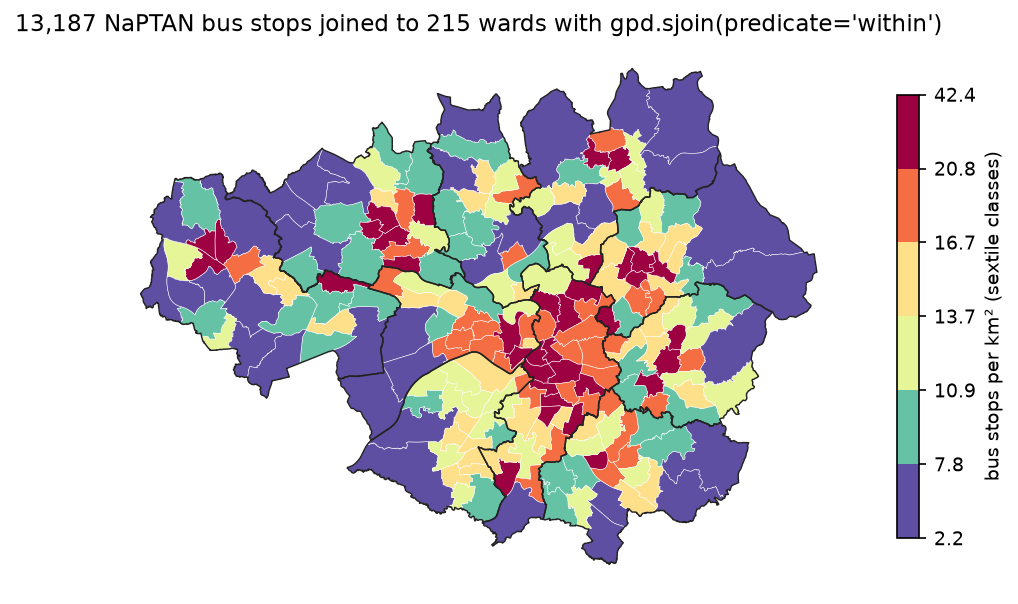
- `gpd.sjoin(points, polygons, how='left', predicate='within')` adds the attributes of the polygon each point falls in. For 13,187 Greater Manchester bus stops and 215 wards it took 0.024 s; then `groupby().size()` counts points per polygon.
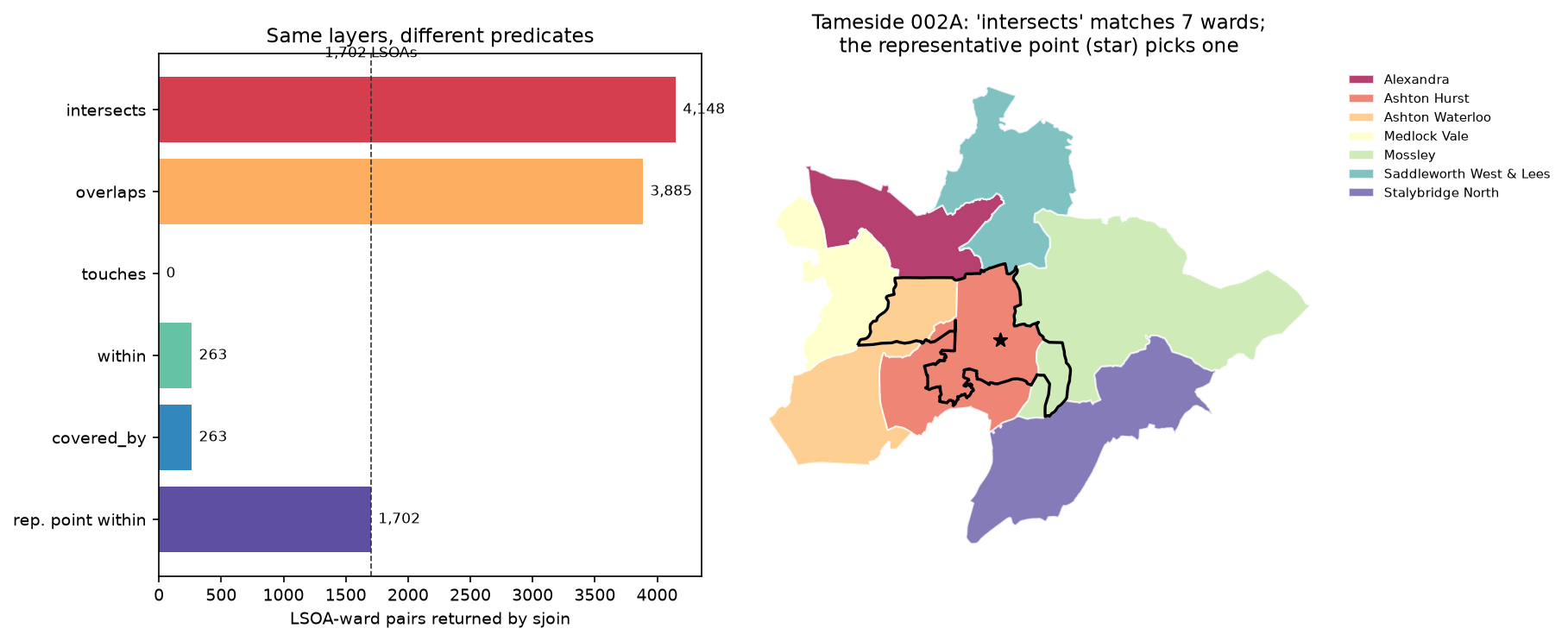
- Predicates matter most for polygon-to-polygon joins. 'intersects' matched 1,421 of 1,702 LSOAs to two or more wards, but only 666 really straddle a ward boundary; the rest touch neighbours by slivers. Joining on a representative point gives exactly one ward per LSOA.
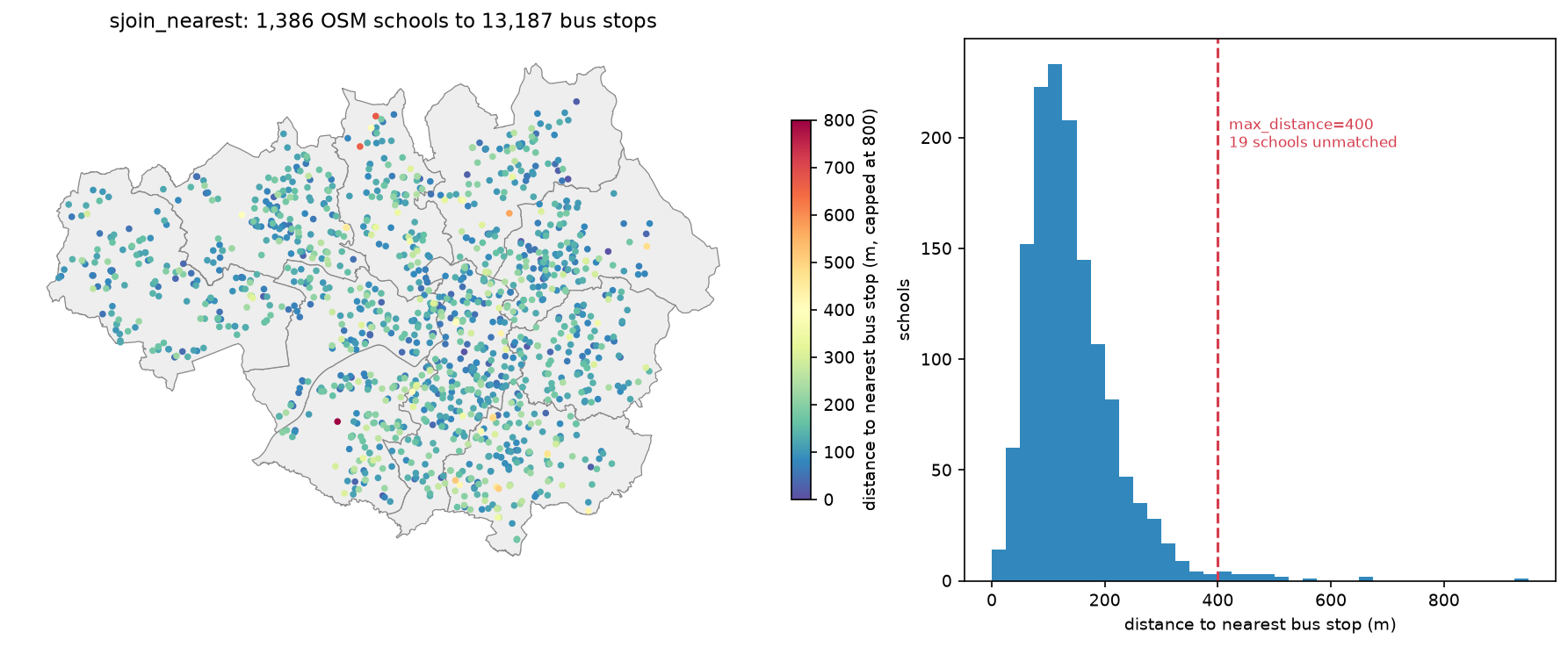
- `sjoin_nearest` with `distance_col` found each school's nearest bus stop (median 127 m); `max_distance=400` left 19 of 1,386 schools unmatched instead of pairing them with a stop up to 947 m away.
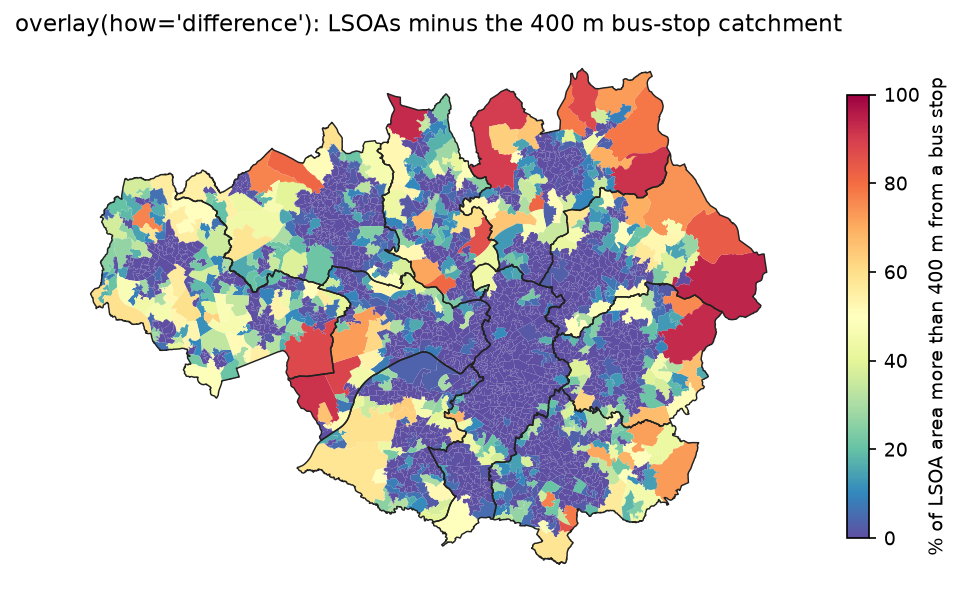
- `overlay(how='difference')` with a 400 m stop buffer showed that 32.7% of Greater Manchester's area, home to 140,438 people in the 87 LSOAs that are mostly outside it, is more than 400 m in a straight line from a bus stop.
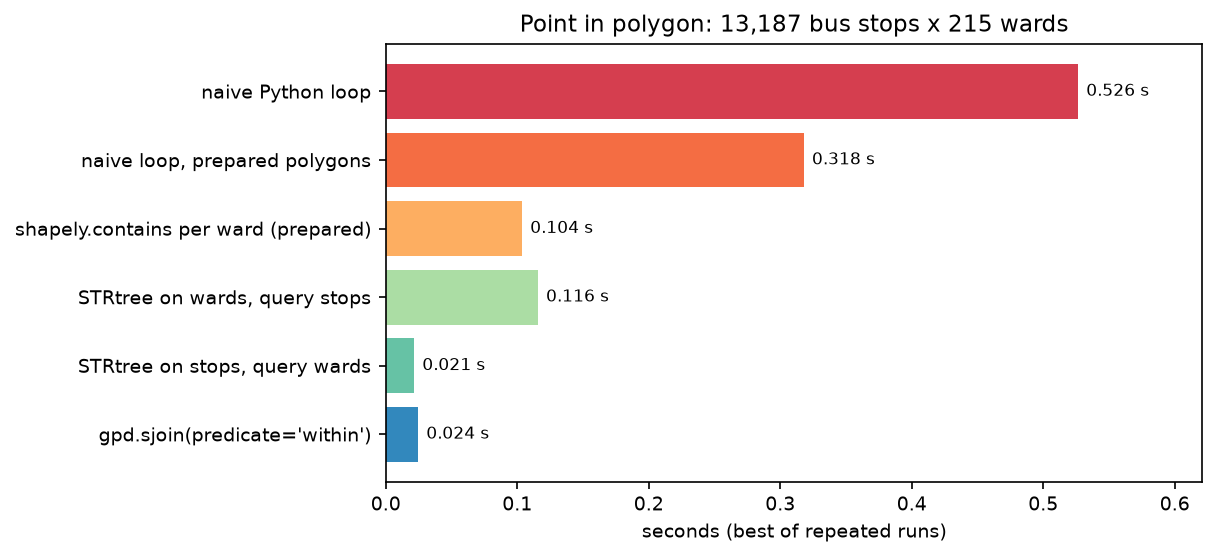
- A pure Python loop took 0.53 s and gpd.sjoin 0.024 s, 22 times faster; the gap grows with the number of polygons, because the spatial index tests each point only against nearby candidates.
Before you start
- Part 1 of this series, or an understanding of why both layers must share a projected CRS such as EPSG:27700
- Python 3.10+ with geopandas, shapely, pyogrio, pyproj, numpy, pandas, requests and matplotlib
- An internet connection: the script downloads every layer itself from the ONS Open Geography Portal, Nomis, the NaPTAN API and the OpenStreetMap Overpass API, with no account or key
Short answer: to do a spatial join in GeoPandas, put both layers in the same projected CRS, then call gpd.sjoin(points, polygons, how="left", predicate="within"). Each point gets the attributes of the polygon it falls in. Count points per polygon with joined.groupby("polygon_id").size(). To find the nearest feature instead, use gpd.sjoin_nearest(left, right, distance_col="dist", max_distance=400). Use gpd.overlay when you need new geometries, such as the part of each polygon outside a buffer, rather than matched attributes. GeoPandas uses a spatial index automatically, so sjoin is many times faster than looping over the points yourself.
A spatial join answers questions such as “which ward is each bus stop in?”, “how many stops does each neighbourhood have?” and “how far is each school from the nearest stop?”. This tutorial answers all three for Greater Manchester with real public data:
- 215 ONS wards, 1,702 LSOAs with Census 2021 populations, and the ten borough boundaries;
- 13,187 NaPTAN bus stops;
- 1,386 schools from OpenStreetMap.
Along the way it shows how the choice of predicate changes the result, what how= does, how to avoid silent bad matches with max_distance, and how much the spatial index really saves. Every number comes from spatial_join.py, which you can download with the rest of the code.
Step 1: get points and polygons into one CRS
The ONS ArcGIS services can return boundaries directly in British National Grid (outSR=27700), and NaPTAN publishes eastings and northings, so neither needs reprojecting. Only the OpenStreetMap schools arrive in WGS 84 and need to_crs(27700):
def ons_query(url, where, fields, out_file):    """Page through an ONS ArcGIS feature service, asking for British National Grid coordinates."""    parts, offset = [], 0    while True:        r = requests.get(url, params={"where": where, "outFields": fields, "outSR": 27700, "f": "geojson",                                      "resultOffset": offset, "resultRecordCount": 500}, timeout=180)        page = gpd.GeoDataFrame.from_features(r.json()["features"], crs=27700)        parts.append(page)        offset += len(page)        if len(page) < 500:            break    ...
wards = ons_query(WARDS, f"LAD24NM IN {IN_GM}", "WD24CD,WD24NM,LAD24NM", DATA / "gm_wards_dec2024.gpkg")naptan = naptan[(naptan.Status == "active") & (naptan.StopType == "BCT") & naptan.Easting.notna()]stops = gpd.GeoDataFrame(naptan[["ATCOCode", "CommonName", "LocalityName"]].reset_index(drop=True), geometry=gpd.points_from_xy(naptan.Easting, naptan.Northing), crs=27700)schools = gpd.GeoDataFrame(schools, geometry=gpd.points_from_xy(schools.lon, schools.lat), crs=4326).to_crs(27700)assert wards.crs == stops.crs == schools.crs == lsoa.crs, "reproject first: sjoin needs one CRS"boroughs 10 rows Polygon CRS EPSG:27700wards 215 rows Polygon CRS EPSG:27700LSOAs 2021 1,702 rows Polygon CRS EPSG:27700bus stops 13,187 rows Point CRS EPSG:27700schools (OSM) 1,387 rows Point CRS EPSG:27700Census 2021 residents in the LSOAs: 2,867,719The stops are NaPTAN stop type BCT, which means on-street bus stops, filtered to active stops. The schools come from an Overpass query for amenity=school inside the Greater Manchester boundary. Schools mapped as areas are reduced to their centre with out center.
Step 2: point in polygon with sjoin
gpd.sjoin(left, right) keeps the left geometries and adds the columns of every right row that matches. With points on the left, polygons on the right and predicate="within", that is a point-in-polygon join:
joined = gpd.sjoin(stops, wards[["WD24CD", "WD24NM", "LAD24NM", "geometry"]], how="left", predicate="within")print(f"rows in: {len(stops):,} rows out: {len(joined):,} stops matched to no ward: {joined.WD24CD.isna().sum()}") ATCOCode CommonName WD24NM LAD24NM index_right0 1800ANIN0A1 Ashton-under-Lyne Interchange St Peter's Tameside 105.01 1800ANIN0B1 Ashton-under-Lyne Interchange St Peter's Tameside 105.02 1800ANIN0C1 Ashton-under-Lyne Interchange St Peter's Tameside 105.03 1800EB00011 Piccadilly Station Piccadilly Manchester 26.0rows in: 13,187 rows out: 13,187 stops matched to no ward: 3unmatched stops are in: {'Middle Healey': 1, 'Stanley Green': 1, 'Orrell Post': 1}Two details to note:
index_rightis the index of the matched ward. It is a float here becausehow="left"keeps the three stops that match no ward, and gives themNaN. Those three stops are coded to Greater Manchester in NaPTAN but sit just outside the county boundary. Drop the column before a second join, because GeoPandas will not create a secondindex_right.- Select only the right-hand columns you need (
wards[[...]]). Otherwise every ward column is copied onto all 13,187 rows.
Count points per polygon
Counting is a groupby on the joined table, merged back onto the polygons. The fillna(0) matters: a polygon with no points does not appear in the groupby at all.
counts = joined.groupby("WD24CD").size().rename("n_stops")wards = wards.merge(counts, on="WD24CD", how="left").fillna({"n_stops": 0})wards["stops_per_km2"] = wards.n_stops / (wards.area / 1e6)wards: 215, stops per ward: median 58, min 16, max 132densest wards: WD24NM LAD24NM n_stops area_km2 stops_per_km2 Deansgate Manchester 84 2.0 42.4Piccadilly Manchester 81 1.9 41.8 Old Moat Manchester 52 1.8 28.9sparsest wards: WD24NM LAD24NM n_stops area_km2 stops_per_km2 Norden Rochdale 62 28.3 2.2 Saddleworth South Oldham 74 32.6 2.3Cadishead & Lower Irlam Salford 38 16.0 2.4stops per borough: {'Manchester': 2116, 'Wigan': 1721, 'Bolton': 1510, 'Stockport': 1238, 'Oldham': 1209, 'Tameside': 1206, 'Rochdale': 1172, 'Salford': 1076, 'Trafford': 998, 'Bury': 938}Raw counts and densities tell different stories. Saddleworth South has more stops than Deansgate, spread over sixteen times the area. Always divide by area or population before you compare polygons of different sizes.
Step 3: choose the right predicate
The predicate argument decides what counts as a match. For points against polygons, most predicates give the same answer. The exception is points that lie exactly on a boundary: they intersect both polygons but are within neither.
stops within wards: 13,184 pairsstops intersects wards: 13,184 pairswards contains stops: 13,184 pairs (same pairs, other way round)valid predicates: ['contains', 'contains_properly', 'covered_by', 'covers', 'crosses', 'dwithin', 'intersects', 'overlaps', 'touches', 'within']Polygons against polygons are where predicates matter. LSOAs are built for statistics and wards for elections, so they do not nest. Here we join the 1,702 LSOAs (2021) to the 215 wards (2024) with each predicate, and once more using a representative point of each LSOA:
for pred in ["intersects", "overlaps", "touches", "within", "covered_by"]:    pred_pairs[pred] = gpd.sjoin(lsoa[["LSOA21CD", "geometry"]], gw, predicate=pred)
lsoa_pts = lsoa.copy()lsoa_pts["geometry"] = lsoa.representative_point() # guaranteed to be inside the polygon, unlike centroidpred_pairs["rep. point within"] = gpd.sjoin(lsoa_pts[["LSOA21CD", "geometry"]], gw, predicate="within")LSOAs intersects wards: 4,148 pairs, 1,702 LSOAs matched, 1,421 matched to 2+ wardsLSOAs overlaps wards: 3,885 pairs, 1,439 LSOAs matched, 1,421 matched to 2+ wardsLSOAs touches wards: 0 pairs, 0 LSOAs matched, 0 matched to 2+ wardsLSOAs within wards: 263 pairs, 263 LSOAs matched, 0 matched to 2+ wardsLSOAs covered_by wards: 263 pairs, 263 LSOAs matched, 0 matched to 2+ wardsLSOAs rep. point within wards: 1,702 pairs, 1,702 LSOAs matched, 0 matched to 2+ wardsoverlay check: 666 of 1,702 LSOAs have under 99% of their area in one ward (they genuinely straddle a ward boundary); 1,036 sit in one ward apart from sliversThese results are worth reading closely:
intersectsmatched 1,421 LSOAs to two or more wards. An overlay check (cutting LSOAs by wards and measuring areas) shows that only 666 really straddle a boundary. The other 755 pick up extra wards through slivers, because the two boundary sets were digitised separately and shared edges do not coincide to the millimetre.touchesreturned nothing, for the same reason. Neighbouring polygons from different datasets almost never share an edge exactly: they overlap or leave gaps.withinmatched only 263 LSOAs, the ones that sit entirely inside one ward with no sliver crossing the line.- A representative point gives every LSOA exactly one ward. It is the standard way to assign small areas to larger ones when a best-fit match is good enough. For area-weighted shares, use
overlay(how="intersection")and the areas of the pieces instead.
Step 4: how=‘inner’, ‘left’ and ‘right’, and counts per LSOA
how controls which rows survive, just as in a pandas merge:
for how in ["inner", "left", "right"]: j = gpd.sjoin(stops, gl, how=how, predicate="within")how=inner : 13,183 rows, geometry from the left frame (Point)how=left : 13,187 rows, geometry from the left frame (Point)how=right : 13,213 rows, geometry from the right frame (Polygon)LSOAs with no bus stop at all: 30 of 1,702 (home to 45,828 residents)stops per 1,000 residents: median 4.2, Greater Manchester overall 4.6inner(the default) drops the 4 stops that fall in no LSOA.leftkeeps every stop.rightkeeps every LSOA and returns the polygon geometry. It has 13,213 rows: the 13,183 matched pairs plus the 30 LSOAs with no stop at all, which get one row each with empty stop columns.
how="right" is a quick way to find polygons with no points. To count, the groupby-and-merge from Step 2 is clearer.
Step 5: nearest neighbours with sjoin_nearest and max_distance
sjoin_nearest matches each left geometry with the closest right geometry. With distance_col, it also returns the distance, in CRS units (metres here, which is why Part 1 matters):
near = gpd.sjoin_nearest(schools, stops[["ATCOCode", "CommonName", "geometry"]], how="left", distance_col="dist_m")near = near[~near.index.duplicated()] # ties (equidistant stops) add extra rowslim = gpd.sjoin_nearest(schools, stops[["ATCOCode", "CommonName", "geometry"]], how="left", max_distance=400, distance_col="dist_m")OSM schools inside the ten boroughs: 1,386sjoin_nearest, no limit: 1,386 rows for 1,386 schools in 16 ms (ties add rows: 0)distance to the nearest stop: median 127 m, 90th pct 234 m, max 947 mfurthest: name LAD24NM CommonName dist_m Changing Lives Trafford Ackers Farm 947.0Emmanuel Holcombe Church of England Primary School Bury Garnett Street 675.0 Holly Mount Roman Catholic Primary School, Bury Bury Shepherd Street 662.0max_distance=400: 19 schools have no stop within 400 m (1.4%), returned with NaN instead of a far-away matchtime with max_distance: 15 msstops within 400 m of each school (buffer + sjoin): median 10Without a limit, sjoin_nearest always finds a match, however far away. A school 947 m from a stop is “matched” just as confidently as one with a stop at the gate. max_distance=400 turns that into an explicit “no stop within 400 m” (NaN) for 19 schools. It is also faster on large datasets, because the index search stops at the limit.
If two right geometries are exactly the same distance away, sjoin_nearest returns both. That did not happen here, but dropping duplicated index values, as above, keeps one row per school. For “all stops within 400 m” rather than “the nearest”, use a buffer and a normal sjoin, or predicate="dwithin" with distance=400.
Step 6: clip and overlay
sjoin only matches rows; it never changes geometries. To cut geometries, use gpd.clip, or gpd.overlay for polygon-on-polygon operations:
manc = boroughs[boroughs.LAD24NM == "Manchester"]clipped = gpd.clip(stops, manc)                                        # points inside one borough
catch = gpd.GeoDataFrame(geometry=[stops.buffer(400).union_all()], crs=27700) # 400 m of any stopbeyond = gpd.overlay(lsoa[["LSOA21CD", "LSOA21NM", "residents", "geometry"]], catch, how="difference")beyond["beyond_km2"] = beyond.area / 1e6gpd.clip(stops, Manchester): 2,116 stops in 9 ms; sjoin gives 2,116overlay(how='difference') in 5.7 s: 417.0 km2 of 1,276.0 km2 (32.7%) is more than 400 m in a straight line from a bus stopLSOAs with more than half their area beyond 400 m: 87 (home to 140,438 residents)For points, clip and an intersects sjoin select the same 2,116 stops. clip would also cut lines and polygons at the boundary. overlay(how="difference") keeps the parts of each LSOA outside the 400 m catchment. Then the area of each LSOA left over is a simple .area.
One-third of the county is more than 400 m from a stop, but most of that is moorland, mossland and parks. The 87 LSOAs that are mostly outside the catchment are home to 140,438 people. 400 m is a common bus-planning guideline, but this is straight-line distance. Walking distance along streets is longer, which street networks with OSMnx can measure.
Step 7: how much faster is the spatial index?
To see what sjoin saves, we time the same point-in-polygon job five ways and check that all of them give identical ward codes:
def naive_loop(points, polys):    out = []    for p in points:                     # every point against every ward until a hit, in pure Python        code = None        for g, c in zip(polys, ward_codes):            if g.contains(p):                code = c                break        out.append(code)    return out
def tree_on_stops(): # what sjoin(predicate="within") does internally: index the points, ask each ward tree = shapely.STRtree(stops.geometry.values) return tree.query(wards.geometry.values, predicate="contains")13,187 stops x 215 wards; all methods give identical ward codes: Truethe naive loop ran 1,408,999 contains tests (107 per stop on average) naive Python loop 0.526 s 1.0x the loop's speed naive loop, prepared polygons 0.318 s 1.7x the loop's speed shapely.contains per ward (prepared) 0.104 s 5.1x the loop's speed STRtree on wards, query stops 0.116 s 4.6x the loop's speed STRtree on stops, query wards 0.021 s 24.5x the loop's speed gpd.sjoin(predicate='within') 0.024 s 21.5x the loop's speedbuilding an STRtree for 13,187 stops: 2.4 msgpd.sjoin was 22 times faster than the loop. The loop is not hopelessly slow at this size, because GEOS rejects most wards with a quick bounding-box test. But it ran 1.4 million contains tests, and its cost grows with points × polygons. The index tests each point only against the few wards whose bounding boxes overlap it, so its cost grows much more slowly. With the 35,672 LSOAs of England and Wales instead of 215 wards, the loop would need roughly 165 times as many tests per point; the index would still test only a handful.
The table also shows two less obvious details:
- Which side is indexed matters. For
predicate="within", GeoPandas indexes the points and asks each polygon which points it contains. That was 5.5 times faster than indexing the 215 wards and querying 13,187 points one by one. - Prepared geometries help.
shapely.preparecaches a polygon’s internal index of edges, which made the loop 1.7 times faster. Shapely’s STRtree prepares the query geometries before testing a predicate, so sjoin gets this for free.
For millions of points, see fast vector geoprocessing, which compares sjoin with Shapely’s STRtree and DuckDB spatial, and GeoParquet and DuckDB with Overture Maps.
Pitfalls and limitations
- CRS mismatch. sjoin raises a warning, not an error, if the CRSs differ, and the result is usually empty. Check
left.crs == right.crsfirst, and use a projected CRS for any distance (see Part 1). - Duplicate rows. A left row that matches several right rows appears several times. This happens with polygon-to-polygon joins, with overlapping polygons, and with ties in
sjoin_nearest. Check withjoined.index.duplicated().sum(). - Polygons with no points are missing from counts. Merge the counts back onto the polygons with
how="left"andfillna(0). - Slivers between boundary sets.
intersectsbetween layers from different sources over-matches. Use representative points, or filter on intersection area. - Straight-line distances.
sjoin_nearestand buffers measure as the crow flies. For walking or driving access, use a network. - OpenStreetMap completeness. OSM’s
amenity=schoolfeatures are volunteer-mapped. They may miss a few schools, and they include sites worth checking, such as Changing Lives in Trafford, the furthest “school” here. For official analysis, use the Department for Education’s Get Information about Schools register. - Ward and LSOA vintages. These are December 2024 wards and 2021 LSOAs. Boundaries change, so record which vintage you joined to.
Frequently asked questions
How do I do a spatial join in GeoPandas?
Make sure both GeoDataFrames share a CRS, then call gpd.sjoin(left, right, how="inner", predicate="intersects"), or the method left.sjoin(right, ...). The result keeps the left geometries, adds the right-hand columns for every match, and adds an index_right column. Choose how and predicate for your question.
How do I find which polygon each point is in (point in polygon) in Python?
Use gpd.sjoin(points, polygons, how="left", predicate="within"). Each point gets the attributes of the polygon that contains it, or NaN if none does. For a few points and one polygon, polygon.contains(point) from Shapely is enough. For many points, sjoin’s spatial index is much faster.
What is the difference between within, intersects and contains?
within is true when the left geometry lies inside the right one. contains is the same test the other way round. intersects is true when the two share any point, including boundaries. For points in polygons they differ only for points exactly on an edge. For polygons against polygons, intersects also matches neighbours that merely touch or overlap by slivers.
How do I count points in each polygon with GeoPandas?
Join, group by the polygon ID and merge back: counts = gpd.sjoin(points, polys, predicate="within").groupby("poly_id").size(), then polys.merge(counts.rename("n"), on="poly_id", how="left").fillna({"n": 0}). Divide by area or population before comparing polygons of different sizes.
How does sjoin_nearest work, and what does max_distance do?
sjoin_nearest(left, right, distance_col="dist") finds, for each left geometry, the nearest right geometry using the spatial index, and records the distance in CRS units. max_distance=400 ignores anything further than 400 units: left rows with nothing in range get NaN (with how="left") instead of a distant match, and the search is faster.
When should I use overlay instead of sjoin?
Use sjoin to transfer attributes between matching features without changing any geometry. Use gpd.overlay (intersection, union, difference, symmetric_difference or identity) when you need new geometries, such as the part of each LSOA inside a buffer, or areas for area-weighted shares. Use gpd.clip to cut any layer to a boundary.
Next steps
- Part 3: raster to vector in Python turns raster classes into polygons that you can join like the ones here, and burns polygons into rasters.
- Go back to basics with GeoPandas getting started, or forward to millions of features with fast vector geoprocessing.
- Replace straight-line 400 m buffers with walking distances along streets in street networks with OSMnx.
- Join raster values to polygons instead of points with zonal statistics in Python.
- Query Overture Maps places, a larger alternative to OSM points of interest, with GeoParquet and DuckDB.
Data and licences
- Local Authority Districts (May 2024), Wards (December 2024) and LSOAs (December 2021), BFC: Source: Office for National Statistics, licensed under the Open Government Licence v3.0. Contains OS data © Crown copyright and database right 2026. From the ONS Open Geography Portal, accessed on 23 October 2026.
- Census 2021 TS001 (usual residents): Office for National Statistics via Nomis, Open Government Licence v3.0.
- NaPTAN (National Public Transport Access Nodes): Department for Transport, Open Government Licence v3.0. From the NaPTAN API, ATCO area 180 (Greater Manchester), accessed on 23 October 2026.
- Schools: © OpenStreetMap contributors, available under the Open Database Licence (ODbL) v1.0. Queried through the Overpass API on 23 October 2026.
- Code:
spatial_join.py, tested with Python 3.12.0, geopandas 1.2.0, shapely 2.2.0 (GEOS 3.14.1), pyogrio 0.13.0 and pandas 3.0.6.
Key terms
- Spatial join
- A join that matches rows of two layers by the spatial relationship of their geometries, such as a point inside a polygon, rather than by a shared key.
- Predicate
- The spatial test used to decide whether two geometries match, such as within, intersects, contains, touches, overlaps or covered_by. GeoPandas passes it to Shapely and GEOS.
- Point in polygon
- Finding which polygon contains each point. In GeoPandas this is sjoin with predicate='within' (points on the left) or 'contains' (polygons on the left).
- Nearest join
- Matching each geometry to the closest geometry in another layer, optionally within a maximum distance. GeoPandas provides it as sjoin_nearest.
- Spatial index (STRtree)
- A tree of bounding boxes that quickly finds which geometries could intersect a query, so the exact test runs only on a few candidates. GeoPandas builds one automatically through gdf.sindex.
- Overlay
- A polygon operation that cuts two layers against each other and returns new geometries: intersection, union, difference, symmetric difference or identity.
Data for this tutorial
- ONS Open Geography Portal · Local authority districts (May 2024), wards (December 2024) and LSOAs (December 2021), full resolution clipped
- Nomis · Census 2021 TS001 usual residents by LSOA
- NaPTAN · 13,187 active on-street bus stops in Greater Manchester
- OpenStreetMap · Schools (amenity=school), via the Overpass API
Licences and formats for each source are listed in the GIS data sources catalogue.