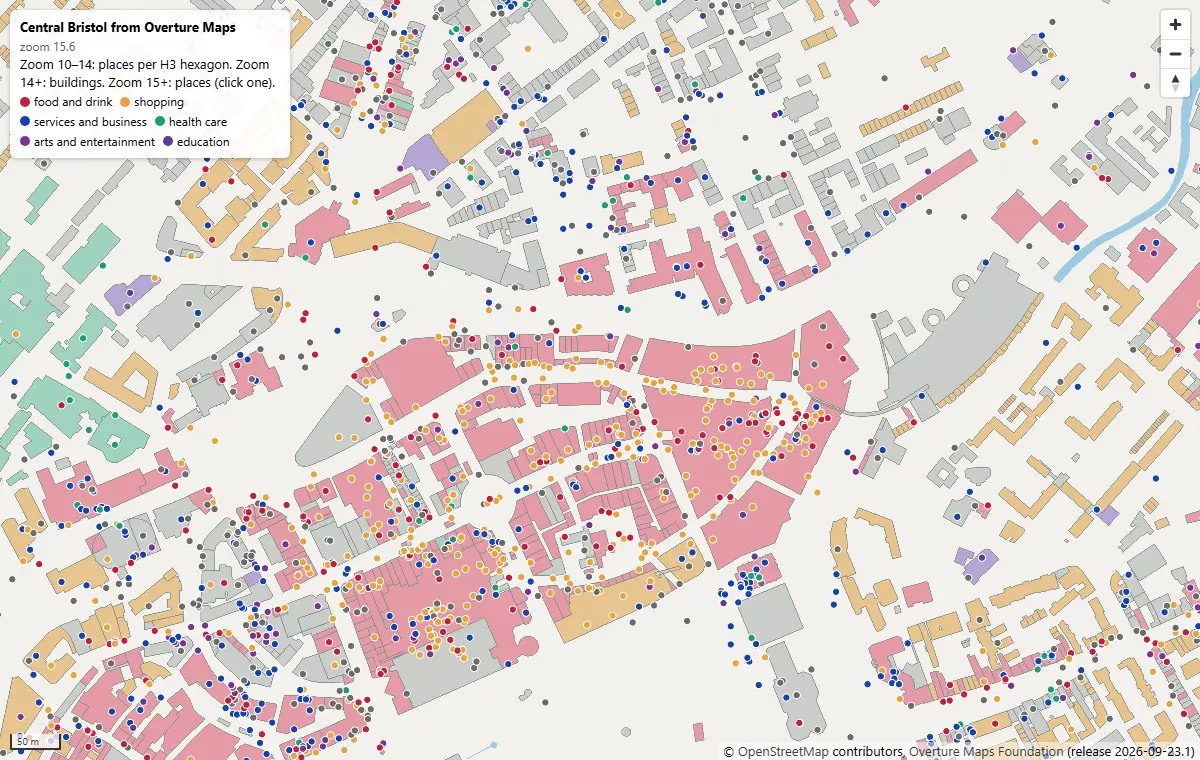
Query Overture Maps with DuckDB spatial and GeoParquet in Python
Pull Bristol's 144,965 buildings and 20,727 places straight from the Overture Maps GeoParquet release with DuckDB, run spatial SQL joins and H3 aggregation, load the result into GeoPandas, write GeoParquet 1.1, and time it against Shapefile, GeoPackage and FlatGeobuf.
- Level
- Intermediate
- Tested with
- Python 3.12
- Source code
- Download scripts
Key takeaways
- Overture publishes every theme as GeoParquet on S3 and Azure. DuckDB reads it with a bbox filter, so you download only the row groups that cover your area: 144,965 Bristol buildings came out of a 2.5-billion-building, 277 GB theme in 3.4 s.
- Use Overture's STAC index (collections.parquet) to pick the files first. Counting Bristol's buildings took 4.1 s against the one file that covers it, and 62.5 s when DuckDB had to check all 512 files.
- DuckDB spatial does the GIS work in SQL: footprint areas in British National Grid, a point-in-polygon join of 20,727 places against 144,965 buildings in 0.05 s, and H3 hexagon summaries in 0.11 s.
- GeoParquet beat the GDAL formats on size and full reads: 13.5 MB against 48.8 MB for GeoPackage and 193.2 MB for a Shapefile. GeoPackage and FlatGeobuf were still faster for a small bbox read, thanks to their spatial indexes.
- Licences differ by theme: buildings and water are ODbL, places are CDLA-Permissive-2.0, Apache-2.0 or CC0 by source. Keep the per-record source and licence columns and credit OpenStreetMap and Overture.
Before you start
- Comfortable with GeoPandas basics (see Getting started with GeoPandas) and a little SQL
- Python 3.10+ with duckdb, geopandas, pyogrio, pyarrow, shapely, pandas and matplotlib
- An internet connection: the data is read from Overture's public bucket, with no account or API key
Short answer: to query Overture Maps in Python, pip install duckdb, load the spatial and httpfs extensions, and point read_parquet() at Overture’s public GeoParquet files on S3 (s3://overturemaps-us-west-2/release/<release>/theme=…). Filter on the bbox column (bbox.xmin <= east AND bbox.xmax >= west …) so DuckDB fetches only the row groups that cover your area. Then COPY the result to a local GeoParquet file. For speed, first use Overture’s STAC index to choose the few files that overlap your box. You don’t need an account, an API key or the overturemaps command-line tool.
Overture Maps is one of the largest open map datasets: 2.5 billion buildings, 81 million places, and roads, water and boundaries for the whole planet, refreshed every month. It is published only as GeoParquet in cloud storage, so you can’t open it whole in a desktop GIS. You query it. DuckDB is the tool for that. It runs inside your Python process, reads Parquet over HTTP, and its spatial extension speaks PostGIS-style SQL.
This is part 1 of the two-part series Cloud-native vector GIS with Python. We pull central Bristol out of the latest Overture release, analyse it with spatial SQL, hand it to GeoPandas, and save clean GeoParquet. In part 2 we turn those files into PMTiles vector tiles and a MapLibre GL JS web map on static hosting.
You will learn how to:
- find the latest Overture release and the files that cover your area from its STAC index;
- download buildings, places and water for a bounding box with DuckDB, without the rest of the planet;
- read Overture’s sources and licences for each feature;
- run spatial SQL: areas in British National Grid, a point-in-polygon join and an H3 hexagon summary;
- move the results into GeoPandas and write GeoParquet 1.1 with the right metadata;
- compare GeoParquet, FlatGeobuf, GeoPackage and Shapefile on size and speed.
All outputs below are real results from overture_duckdb.py, run on 19 October 2026 on Windows 11 with Python 3.12.0, DuckDB 1.5.6, GeoPandas 1.2.0, pyogrio 0.13.0 (GDAL 3.12.4) and pyarrow 26.0.0.
Set up
pip install duckdb==1.5.6 geopandas==1.2.0 pyogrio==0.13.0 pyarrow==26.0.0 shapely==2.2.0 matplotlib requests pytzDuckDB downloads its extensions on first use. spatial adds the geometry type and ST_ functions, httpfs reads s3:// and https:// URLs, and the community h3 extension adds hexagons:
import duckdb
con = duckdb.connect()con.sql("INSTALL spatial; LOAD spatial; INSTALL httpfs; LOAD httpfs; INSTALL h3 FROM community; LOAD h3;")con.sql("SET s3_region = 'us-west-2'")  # the bucket is public: no credentials needed
We use a 9.7 × 8.9 km box over central Bristol, from Leigh Woods in the west to St George in the east:
BBOX = (-2.66, 51.42, -2.52, 51.50) # xmin, ymin, xmax, ymax in lon/latStep 1: find the latest release and the files you need
Overture publishes a STAC catalogue. Its latest field names the current release, so the script never hard-codes a date. Each release also has a collections.parquet file. It is itself GeoParquet, with one row per data file and its bounding box, row count and size:
import requests
catalog = requests.get("https://stac.overturemaps.org/catalog.json", timeout=60).json()RELEASE = catalog["latest"]
con.sql(f"""    CREATE TABLE stac AS    SELECT collection, num_rows, assets.aws."file:size" AS bytes,           assets.aws.alternate.s3.href AS s3_url, bbox    FROM read_parquet('https://stac.overturemaps.org/{RELEASE}/collections.parquet')""")xmin, ymin, xmax, ymax = BBOXOVERLAPS = f"bbox.xmin <= {xmax} AND bbox.xmax >= {xmin} AND bbox.ymin <= {ymax} AND bbox.ymax >= {ymin}"
def files_for(collection): return [r[0] for r in con.sql( f"SELECT s3_url FROM stac WHERE collection = '{collection}' AND {OVERLAPS}").fetchall()]latest release: 2026-09-23.1 (schema 2.0.0)themes: addresses, base, buildings, divisions, places, transportation
collection files features total_gb files_over_bristol building 512 2533842612 276.9 1 place 16 81455423 11.0 1 water 128 66204219 28.6 2The latest release on 19 October 2026 is 2026-09-23.1, schema 2.0.0. Overture’s files are sorted spatially, so Bristol’s buildings sit in just 1 of the 512 building files (277 GB in total).
The same OVERLAPS condition works on the data files too, because every Overture row has a bbox struct column. Parquet keeps min/max statistics for each row group, so DuckDB skips row groups that can’t match. Here is what choosing the files first is worth:
n_stac = con.sql(f"SELECT count(*) FROM read_parquet({files_for('building')}) WHERE {OVERLAPS}").fetchone()[0]
glob = f"s3://overturemaps-us-west-2/release/{RELEASE}/theme=buildings/type=building/*.parquet"n_glob = con.sql(f"SELECT count(*) FROM read_parquet('{glob}') WHERE {OVERLAPS}").fetchone()[0]STAC-pruned file list, bbox filter : 144,965 buildings in 4.1 sall 512 building files, bbox filter : 144,965 buildings in 62.5 s (15x slower)Both queries give the same answer, but the glob has to open the footer of every one of the 512 files to read its statistics. The STAC index does that work once for everyone. These timings are over a home broadband link to us-west-2. Your times will vary with distance and bandwidth, but the ratio holds.
Step 2: download Bristol to local GeoParquet
Now we select the columns we want and COPY the result to a local Parquet file. Overture’s schema nests a lot: names.primary holds the name, and sources is a list of structs that records which dataset supplied which property, under which licence. An empty property means the whole feature came from that source.
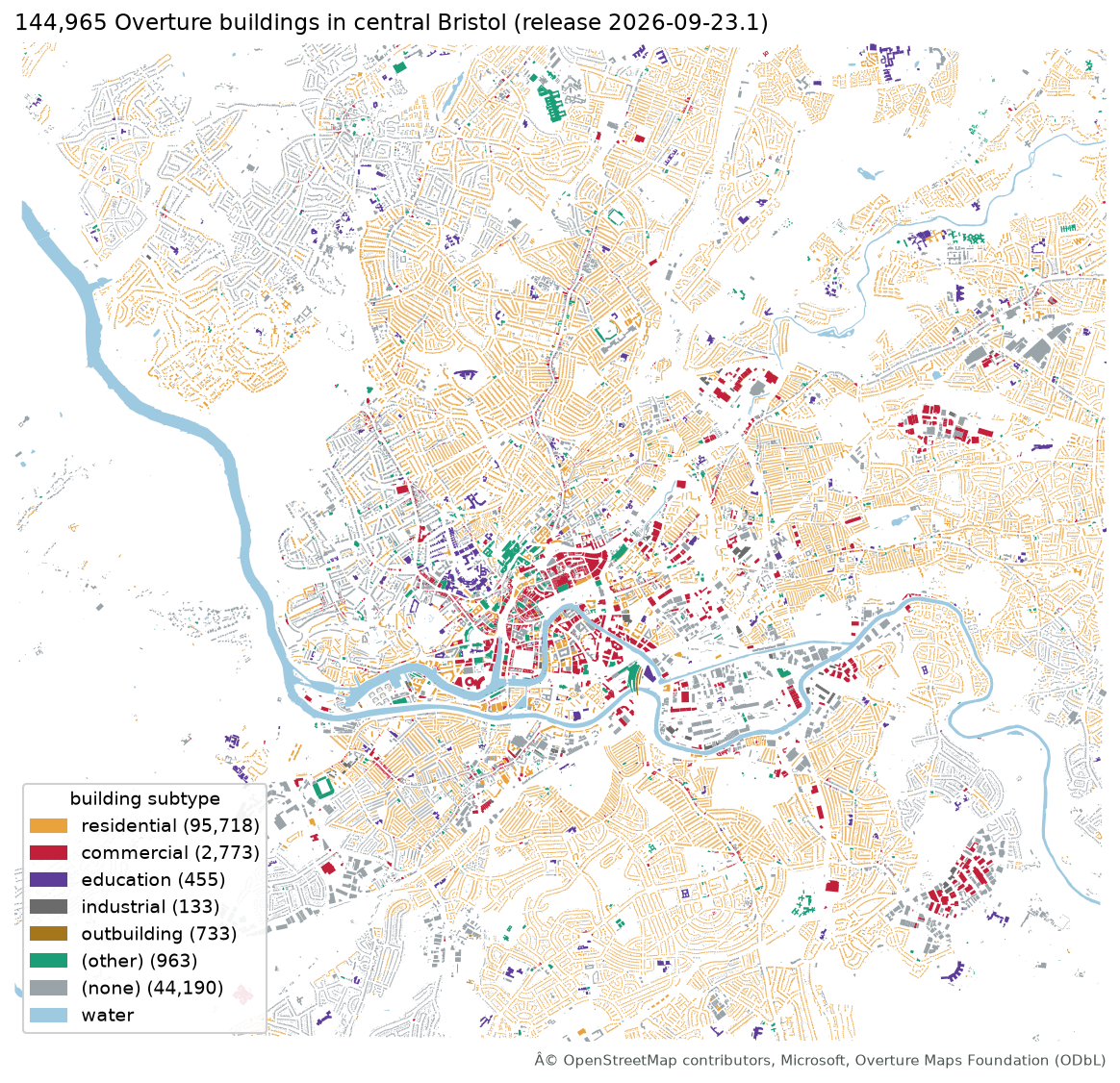
queries = { "buildings": f""" SELECT id, names.primary AS name, subtype, class, height, num_floors, list_filter(sources, s -> s.property = '')[1].dataset AS source, list_filter(sources, s -> s.property = '')[1].license AS licence, list_filter(sources, s -> s.property = '/properties/height')[1].dataset AS height_source, geometry FROM read_parquet({files_for('building')}) WHERE {OVERLAPS}""", "places": f""" SELECT id, names.primary AS name, basic_category, taxonomy.hierarchy[1] AS category_group, round(confidence, 3) AS confidence, list_filter(sources, s -> s.property = '')[1].dataset AS source, list_filter(sources, s -> s.property = '')[1].license AS licence, geometry FROM read_parquet({files_for('place')}) WHERE {OVERLAPS}""", # Water polygons can be huge (the Severn estuary), so clip them to the box. "water": f""" SELECT id, names.primary AS name, subtype, class, ST_Intersection(geometry, ST_MakeEnvelope({xmin}, {ymin}, {xmax}, {ymax})) AS geometry FROM read_parquet({files_for('water')}) WHERE {OVERLAPS} AND ST_GeometryType(geometry) IN ('POLYGON', 'MULTIPOLYGON')""",}for name, sql in queries.items(): path = DATA / f"bristol_{name}_raw.parquet" con.sql(f"COPY ({sql}) TO '{path.as_posix()}' (FORMAT parquet, COMPRESSION zstd)") con.sql(f"CREATE OR REPLACE TABLE {name} AS SELECT * FROM '{path.as_posix()}'")buildings 144,965 features 13.3 MB 3.4 splaces 20,727 features 0.9 MB 5.3 swater 161 features 0.1 MB 9.5 sThat is about 14 MB on disk for a whole city centre, in seconds. In schema 2.0.0, places no longer have a categories column. Use basic_category (for example cafe) and taxonomy.hierarchy, whose first element is the top-level group (for example food_and_drink).
Step 3: check sources and licences
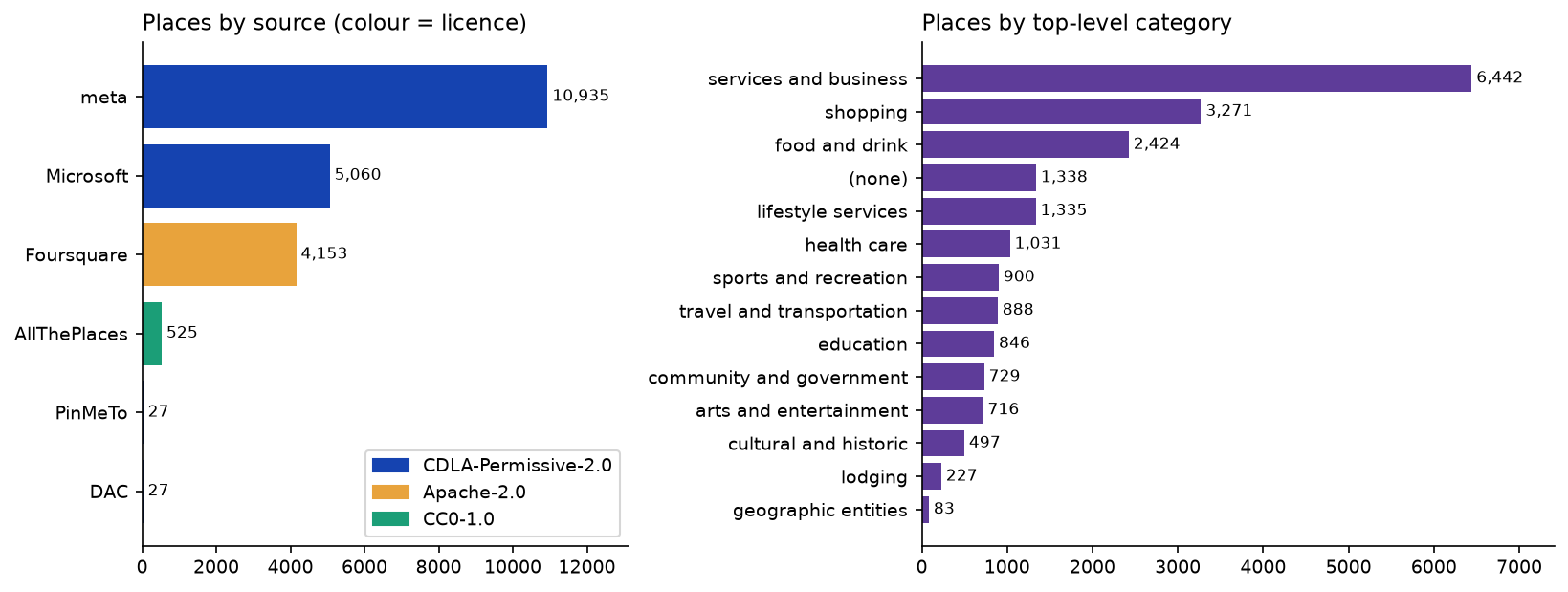
Before you analyse or publish anything, find out where the data came from. The source and licence columns we extracted make that one GROUP BY:
theme source licence nbuildings OpenStreetMap ODbL-1.0 140161buildings Microsoft ML Buildings ODbL-1.0 4804 places meta CDLA-Permissive-2.0 10935 places Microsoft CDLA-Permissive-2.0 5060 places Foursquare Apache-2.0 4153 places AllThePlaces CC0-1.0 525 places DAC CDLA-Permissive-2.0 27 places PinMeTo CDLA-Permissive-2.0 27In Bristol, 97% of building footprints come from OpenStreetMap and the rest from Microsoft’s machine-learned buildings. Both are under the ODbL. Places are a mix: Meta and Microsoft under CDLA-Permissive-2.0, Foursquare’s open places under Apache-2.0, and AllThePlaces under CC0.
           height_from      n  median_height_m           (no height) 125192              NaNMicrosoft ML Buildings  19626              4.6         OpenStreetMap    147              3.0
           category_group    n  median_confidence    services_and_business 6442               0.80                 shopping 3271               0.85           food_and_drink 2424               0.94                   (none) 1338               0.85
The output shows two quality caveats. 86% of buildings have no height, and almost all the heights that exist are Microsoft’s estimates, attached to OpenStreetMap footprints. Use them with care, for example in a 3D view. Places carry a confidence score from 0 to 1. Food and drink places have the highest median, at 0.94.
Step 4: spatial SQL in DuckDB
DuckDB spatial’s functions are named like PostGIS’s. Overture geometry is in WGS 84 longitude and latitude (OGC:CRS84), so we project to British National Grid (EPSG:27700) to measure areas in square metres:
con.sql(""" ALTER TABLE buildings ADD COLUMN area_m2 DOUBLE; UPDATE buildings SET area_m2 = round(ST_Area(ST_Transform(geometry, 'OGC:CRS84', 'EPSG:27700')), 1);""") buildings footprint_km2 median_m2 max_m2 144965 13.15 58.0 30151.0 name subtype area_m2 Brunel Building medical 30151.0 Demolished site NaN 27651.0 The Pavilions commercial 16290.0 IKEA NaN 12448.0BRI Queen's Building medical 11060.0Buildings cover 13.15 km² of the 86 km² box. The median footprint is 58 m², typical of Bristol’s terraces. The largest is the Brunel Building at Southmead Hospital. The second largest is mapped in OpenStreetMap as a “Demolished site”, a reminder that the data is only as current as its sources.
A point-in-polygon join
Which places sit inside a building? It’s a join on ST_Intersects. DuckDB builds a spatial join plan automatically, so no index is needed:
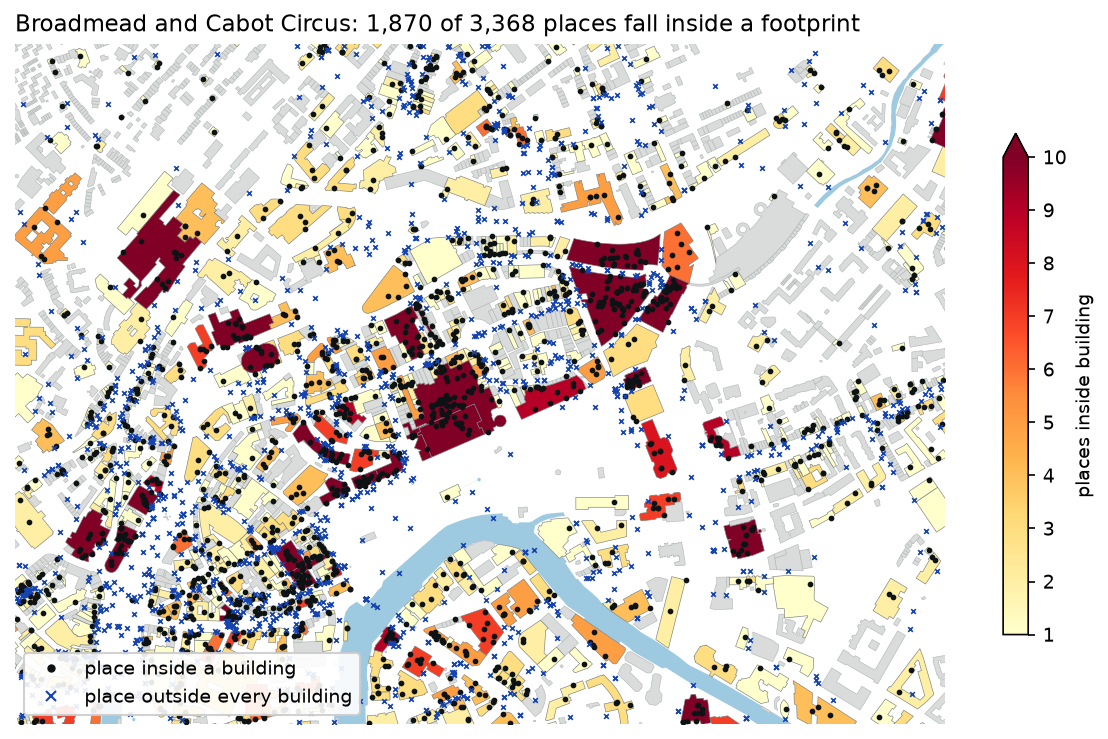
con.sql(""" CREATE OR REPLACE TABLE place_building AS SELECT p.id AS place_id, b.id AS building_id FROM places p JOIN buildings b ON ST_Intersects(b.geometry, p.geometry)""")point-in-polygon join of 20,727 places x 144,965 buildings: 0.05 splaces inside a building footprint: 10,147 (49.0%) name subtype area_m2 placesThe Galleries commercial 10267.0 62 NaN commercial 331.0 61 NaN commercial 9104.0 59 NaN residential 56.0 50 NaN residential 58.0 49 NaN residential 57.0 47The join took 0.05 s, and only 49% of places fall inside a footprint. Most of the rest are on the pavement in front of the shop, because place points are often geocoded to the street. The table also shows why you should look at your data. Three small 56–58 m² houses each hold about 50 places. These are most likely businesses registered at a home address, or an accountant’s address used by many companies. Filter on confidence, or drop buildings with implausible counts, before you use these numbers.
Aggregate to H3 hexagons
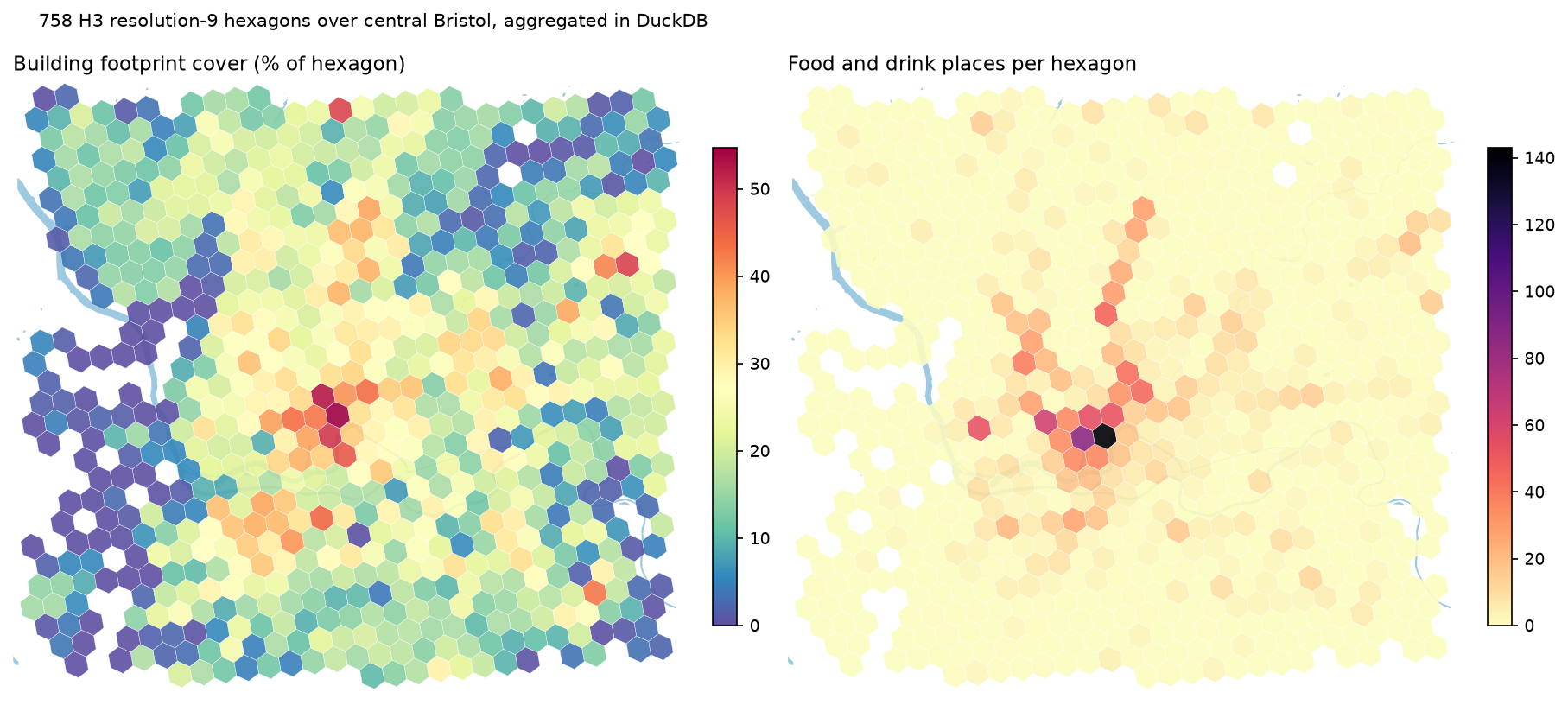
Hexagons make a fair, regular grid for comparing density. The community h3 extension turns a point into a cell ID. We group buildings by the cell of their centroid and places by their own cell, join the two, and keep only hexagons that lie wholly inside the download box:
con.sql(""" CREATE OR REPLACE TABLE hex AS WITH b AS ( SELECT h3_latlng_to_cell(ST_Y(ST_Centroid(geometry)), ST_X(ST_Centroid(geometry)), 9) AS h3, count(*) AS buildings, sum(area_m2) AS footprint_m2, count(*) FILTER (WHERE subtype = 'residential') AS residential FROM buildings GROUP BY h3), p AS ( SELECT h3_latlng_to_cell(ST_Y(geometry), ST_X(geometry), 9) AS h3, count(*) AS places, count(*) FILTER (WHERE category_group = 'food_and_drink') AS food_drink FROM places GROUP BY h3) SELECT h3_h3_to_string(h3) AS h3, coalesce(buildings, 0) AS buildings, coalesce(residential, 0) AS residential, coalesce(places, 0) AS places, coalesce(food_drink, 0) AS food_drink, round(100 * coalesce(footprint_m2, 0) / h3_cell_area(h3, 'm^2'), 1) AS built_pct, ST_GeomFromText(h3_cell_to_boundary_wkt(h3)) AS geometry FROM b FULL JOIN p USING (h3) WHERE ST_Within(ST_GeomFromText(h3_cell_to_boundary_wkt(h3)), ST_MakeEnvelope(-2.66, 51.42, -2.52, 51.50))""")built 758 hexagons in 0.11 s h3 buildings built_pct places food_drink8919583922fffff 196 49.7 534 14389195876c93ffff 179 39.3 413 868919583926fffff 199 39.4 285 62 r_built_places r_residential_share_food 0.58 -0.13The top food-and-drink hexagon (143 places) covers the Old City, around Corn Street and St Nicholas Market. The second (86) is its neighbour to the west, around the Centre and Baldwin Street. The line of orange cells running north in the hexagon map below follows Stokes Croft and Gloucester Road, one of Bristol’s best-known independent high streets. Built cover and place counts are moderately correlated (r = 0.58). Food and drink is weakly negatively related to the residential share (r = −0.13).
Step 5: from DuckDB to GeoPandas
To hand a DuckDB table to GeoPandas, export the geometry as WKB and decode it with Shapely. It’s quick: all four tables took 0.23 s.
import geopandas as gpdimport shapely
def to_gdf(table):    df = con.sql(f"SELECT * EXCLUDE geometry, ST_AsWKB(geometry) AS wkb FROM {table}").df()    geom = shapely.from_wkb(df.pop("wkb").map(bytes))    return gpd.GeoDataFrame(df, geometry=geom, crs="OGC:CRS84")
buildings = to_gdf("buildings")
You can also read DuckDB’s Parquet output directly with gpd.read_parquet(), because DuckDB writes GeoParquet metadata whenever a table has a geometry column. Watch the metadata, though.
Step 6: write GeoParquet with the right metadata
GeoPandas writes GeoParquet 1.1 when you ask for it. With write_covering_bbox=True it adds a bbox struct column, as Overture does, so other readers can filter by area without decoding geometry:
buildings.to_parquet("output/bristol_buildings.parquet", compression="zstd", schema_version="1.1.0", write_covering_bbox=True)output/bristol_buildings.parquet 144,965 rows 18.86 MBoutput/bristol_places.parquet 20,727 rows 1.75 MBoutput/bristol_water.parquet 161 rows 0.14 MBoutput/bristol_hex.parquet 758 rows 0.08 MB'geo' metadata (GeoPandas): {"version": "1.1.0", "primary_column": "geometry", "encoding": "WKB", "geometry_types": ["MultiPolygon", "Polygon"], "bbox": [-2.6606, 51.4195, -2.5192, 51.5004], "covering": {"bbox": {"xmin": ["bbox", "xmin"], "ymin": ["bbox", "ymin"], "xmax": ["bbox", "xmax"], "ymax": ["bbox", "ymax"]}}, "crs": "PROJJSON OGC:CRS84"}'geo' metadata (DuckDB): {"version": "1.0.0", "primary_column": "geometry"} | keys of the geometry column: ['bbox', 'encoding', 'geometry_types']The difference matters. GeoPandas records the CRS as PROJJSON, the geometry types, the dataset bbox and the covering column. DuckDB 1.5.6 wrote GeoParquet 1.0.0 metadata with no crs key. The specification says a missing CRS means OGC:CRS84, so readers assume longitude/latitude. That is correct here, but it would be silently wrong if you had transformed the geometry to EPSG:27700 in SQL. If your data isn’t in longitude and latitude, write the final file with GeoPandas (or set the CRS when you read it back).
These four files in output/ are the input to part 2.
Step 7: GeoParquet vs Shapefile, GeoPackage and FlatGeobuf
How does GeoParquet compare with the classic formats on real data? The script writes the same 144,965 buildings with 8 attribute columns to five formats and times a write, a full read and a read of a 1 km box near Temple Meads (846 buildings). Each time is the median of three runs on a laptop SSD:
format size_MB write_s read_s bbox_read_s bbox_rows GeoParquet (DuckDB) 13.5 0.14 0.13 0.053 846GeoParquet (GeoPandas) 18.8 0.35 0.15 0.044 846 FlatGeobuf 52.4 1.76 0.73 0.009 846 GeoPackage 48.8 1.38 0.25 0.011 846 Shapefile 193.2 2.36 0.98 0.580 846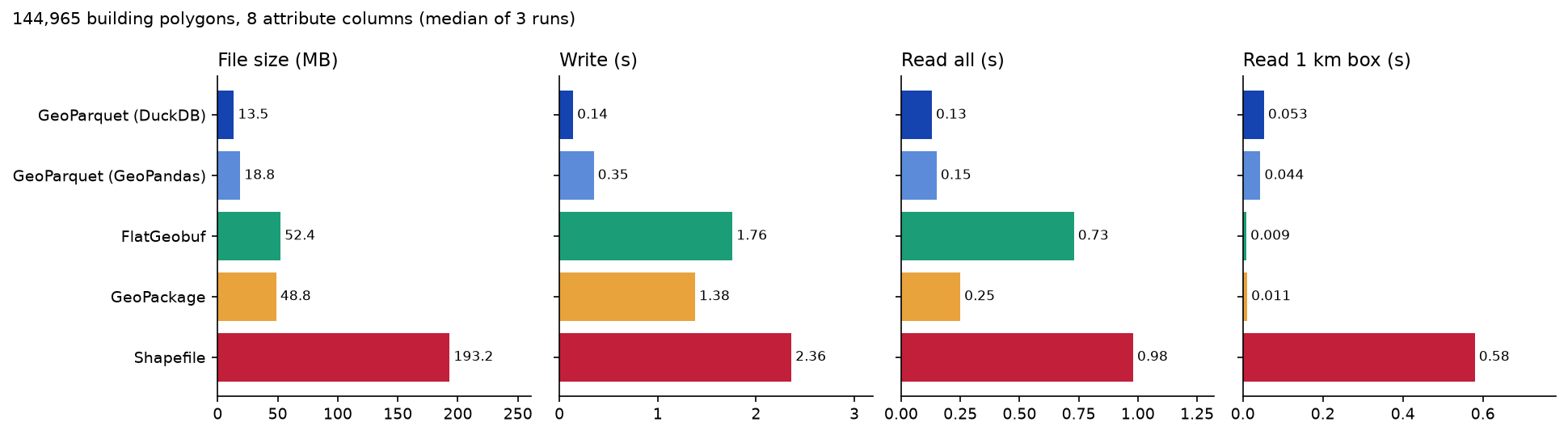
The results:
- Size: GeoParquet is 3.6–3.9× smaller than GeoPackage or FlatGeobuf, thanks to columnar zstd compression. DuckDB’s file is smaller than GeoPandas’s because it has no bbox covering column. The Shapefile is 193 MB, 14× the GeoParquet. Its DBF stores every text field at a fixed width of up to 254 characters, and Overture’s 36-character IDs fill a lot of that.
- Full reads and writes: GeoParquet read the whole file 2–8× faster and wrote it 4–17× faster than the GDAL formats.
- Small-area reads: FlatGeobuf (0.009 s) and GeoPackage (0.011 s) are 4–5× faster than GeoParquet, because they have a real spatial index. GeoParquet relies on row-group statistics, which help most with large, spatially sorted files like Overture’s. The Shapefile had no
.qixindex and took 0.58 s.
So use GeoParquet to store, share and analyse data in bulk, and GeoPackage or FlatGeobuf when an application reads small windows over and over. Fast vector geoprocessing in Python runs a similar benchmark on 200,000 points, with spatial indexes in GeoPandas.
Licences and attribution
Overture data is open, but each theme has its own licence, and the places theme varies record by record:
| Theme | Licence | What it means for you |
|---|---|---|
| Buildings | ODbL 1.0 (OpenStreetMap, Microsoft ML Buildings, Esri Community Maps, Google Open Buildings and others) | Attribute; a shared derived database must also be ODbL |
| Base (water, land use, land) | ODbL 1.0 | As above |
| Transportation, divisions | ODbL 1.0 | As above |
| Places | CDLA-Permissive-2.0 (Meta, Microsoft and others), Apache-2.0 (Foursquare), CC0-1.0 (AllThePlaces) | Permissive; keep the licence text or notice |
| Addresses | Varies by source | Check the sources column |
For maps and figures, Overture recommends the line “© OpenStreetMap contributors, Overture Maps Foundation”. Add other sources where their licences ask for it (Microsoft, Esri and Google for buildings). The figures on this page carry that credit. Because our bristol_buildings.parquet is a derived database of ODbL data, share it under the ODbL too. Check the Overture attribution page for each release: sources are added often.
Limitations and caveats
- Coverage is uneven. Heights are missing for 86% of Bristol’s buildings, 30.5% have no subtype, and 1,338 places have no category group. Overture is a merge of sources, not a survey.
- Places are noisy. Duplicate and closed businesses remain, and some points sit at registered addresses rather than shopfronts. Filter on
confidence, and useoperating_statuswhere the source fills it. - Releases change. Overture publishes monthly and keeps only recent releases in the bucket. Old paths disappear, which is why the script reads
latestfrom STAC. Feature IDs are designed to be stable across releases, but they can still change. - Timings depend on your network. The remote queries ran from the UK to AWS
us-west-2. Expect different absolute numbers elsewhere. The local benchmark depends on your disk and CPU. - The box clips features. Buildings are selected when their bbox overlaps the area, so some hang over the edge. Water polygons are clipped, and edge hexagons are dropped.
Frequently asked questions
How do I download Overture Maps data for one city in Python?
Use DuckDB with the httpfs and spatial extensions. Read s3://overturemaps-us-west-2/release/<release>/theme=<theme>/type=<type>/*.parquet with a WHERE filter on the bbox struct column, and COPY the result to a local Parquet file. Overture’s STAC collections.parquet index tells you which files overlap your box, which made the query 15× faster here. The overturemaps Python CLI (overturemaps download --bbox=… -f geoparquet --type=building) wraps the same idea if you just want a file.
Is GeoParquet better than Shapefile or GeoPackage?
For storing and analysing data, usually yes. Here GeoParquet was 3.6× smaller than GeoPackage and 14× smaller than a Shapefile, and 2–8× faster to read in full. It has no field-name limits or 2 GB cap, and it stores the CRS as PROJJSON. GeoPackage and FlatGeobuf still win for repeated reads of small areas, because they have a spatial index, and for editing in desktop GIS.
What is the latest Overture Maps release?
On 19 October 2026 it was 2026-09-23.1 (schema 2.0.0). Overture releases monthly. Read the latest field from https://stac.overturemaps.org/catalog.json, as the script does, rather than hard-coding a date: old releases are removed from the bucket after a few months.
Can I use Overture Maps data commercially?
Yes. All themes are under open licences that allow commercial use, but the conditions differ. ODbL themes (buildings, base, transportation, divisions) need attribution, and derived databases you share must stay ODbL. Places are under permissive licences (CDLA-Permissive-2.0, Apache-2.0 or CC0) by source. Credit “© OpenStreetMap contributors, Overture Maps Foundation” on maps.
Do I need DuckDB, or can GeoPandas read Overture directly?
GeoPandas can read the remote files with gpd.read_parquet(url, bbox=…, filesystem=…) and pyarrow’s S3 support, but it can’t run SQL. You would have to flatten the nested names, sources and taxonomy columns in pandas. DuckDB filters, projects and flattens before anything reaches Python. The usual pattern is DuckDB for extraction and heavy SQL, then GeoPandas for plotting and the Python ecosystem.
Why does DuckDB say my GeoParquet file has no CRS?
DuckDB 1.5.6 writes GeoParquet 1.0 metadata without a crs key, which by the specification means OGC:CRS84 (longitude/latitude). That is right for Overture data. If you transform to a projected CRS in SQL, write the final file with GeoPandas (to_parquet(schema_version="1.1.0")) so the CRS is recorded.
Next steps
- Continue with part 2: PMTiles vector tiles and a MapLibre web map, which turns these GeoParquet files into a map you can host as static files.
- New to GeoPandas? Start with Getting started with GeoPandas.
- Benchmark spatial joins and indexes in more depth in Fast vector geoprocessing in Python.
- Add the missing building heights from lidar in Building footprints and heights from lidar in Python.
- Pull the
transportationtheme with the same query pattern and compare it with OpenStreetMap roads from OSMnx.
Data and licences
- Overture Maps Foundation, release 2026-09-23.1, accessed from
s3://overturemaps-us-west-2on 19 October 2026. Buildings and water: ODbL 1.0, © OpenStreetMap contributors, Microsoft ML Buildings. Places: CDLA-Permissive-2.0 (Meta, Microsoft, DAC, PinMeTo), Apache-2.0 (Foursquare) and CC0-1.0 (AllThePlaces). See the Overture attribution guide. - H3 hexagonal grid: Uber Technologies, Apache-2.0. DuckDB h3 community extension by Isaac Brodsky.
- Code:
overture_duckdb.py, tested with Python 3.12.0, DuckDB 1.5.6, GeoPandas 1.2.0, pyogrio 0.13.0 (GDAL 3.12.4), pyarrow 26.0.0 and Shapely 2.2.0.
Key terms
- Overture Maps
- An open map dataset from the Overture Maps Foundation (Amazon, Meta, Microsoft, TomTom and others) that merges OpenStreetMap with other sources into themes such as buildings, places, transportation and base, released monthly as GeoParquet.
- GeoParquet
- An open specification for storing vector geometries in Apache Parquet files: WKB or native geometry columns plus a 'geo' metadata block with the CRS, geometry types and bounding box.
- DuckDB spatial
- An extension for the in-process DuckDB database that adds a GEOMETRY type and ST_ functions (ST_Intersects, ST_Area, ST_Transform and more), similar to PostGIS but with no server.
- Row group
- A horizontal chunk of a Parquet file with its own column statistics. Readers skip row groups whose min/max values cannot match a filter, which is what makes bbox queries over HTTP fast.
- H3
- Uber's hierarchical hexagonal grid. Resolution 9 cells are about 0.1 km², a handy size for city-scale summaries.
- Bbox covering
- A GeoParquet 1.1 feature: a struct column (xmin, ymin, xmax, ymax) for each row, so readers can filter by area using ordinary Parquet statistics.
Data for this tutorial
- Overture Maps · Buildings, places, base, transportation and more as GeoParquet on S3 and Azure
- Overture STAC catalogue · Release list and a collections.parquet index of every file with its bbox
- Overture attribution and licensing · Licence of each theme and source
Licences and formats for each source are listed in the GIS data sources catalogue.