Hot spot analysis in Python: Getis-Ord Gi*, Moran's I and LISA on Birmingham road collisions
Run a hot spot analysis in Python with PySAL: aggregate 2025 STATS19 road collisions in Birmingham to a hexagon grid, test for clustering with global Moran's I, map Getis-Ord Gi* hot spots and LISA clusters with permutation inference and FDR correction, and see how spatial weights, the areal unit and exposure change the answer.
- Level
- Intermediate
- Tested with
- Python 3.12
- Source code
- Download scripts
Key takeaways
- A hot spot analysis has three parts: a count per areal unit, a spatial weights matrix that says who is a neighbour, and a local statistic such as Getis-Ord Gi* or local Moran's I tested by permutation. PySAL's esda and libpysal do all three in a few lines.
- Birmingham's 2,307 injury collisions in 2025 are strongly clustered on a 500 m hexagon grid: global Moran's I is 0.384, and none of 9,999 random permutations came close (the largest was 0.064).
- Local tests need a multiple-testing correction. 319 of 1,240 hexagons have p ≤ 0.05, but about 62 of those would be false positives by chance alone. A Benjamini–Hochberg FDR correction leaves 56 hot and 146 cold hexagons; Bonferroni would leave none.
- The weights and the units change the answer. With a 2 km distance band the hot spot area grows from 12.1 km² to 63.9 km², and the overlap with the queen result falls to 0.19. Moving from 250 m to 1 km hexagons raises Moran's I from 0.187 to 0.552.
- Counts are not risk. Collisions per hexagon correlate with road length (r = 0.49). Normalising by road-km with an empirical-Bayes rate keeps only 14 of 41 count hot spots, so say which question you are answering: where collisions are, or where roads are unusually dangerous.
Before you start
- Comfortable with GeoPandas: reading files, spatial joins and plotting (see the GeoPandas getting-started tutorial)
- Python 3.10+ with geopandas, pyogrio, esda, libpysal, numpy, pandas, matplotlib and requests
- An internet connection: the script downloads about 160 MB of open data from the DfT, the ONS and Geofabrik on the first run
Short answer: to run a hot spot analysis in Python, count your events per areal unit (a hexagon grid works well), build a spatial weights matrix with libpysal, and run esda.G_Local(..., star=True) for Getis-Ord Gi* or esda.Moran_Local for LISA. Both use permutations to get a pseudo p-value for every unit. Because you are running one test per unit, correct the p-values for multiple testing with esda.fdr before you map anything. For the 2,307 injury road collisions in Birmingham in 2025, this gives 56 hot spot hexagons around the city centre and the inner south-east, holding 16.1% of the city’s collisions in 4.5% of its area.
Hot spot maps are easy to make and easy to over-read. The software will always produce red and blue hexagons; the work is in deciding whether they mean anything. This tutorial uses real open data from the Department for Transport’s STATS19 road safety dataset, and it spends as much time on the choices that change the map as on the code that draws it.
You will learn how to:
- turn STATS19 collision points into counts on a 500 m hexagon grid for Birmingham;
- build queen contiguity and distance band spatial weights with libpysal;
- test for clustering with global Moran’s I and read the Moran scatterplot;
- map Getis-Ord Gi* hot and cold spots with permutation inference and FDR correction;
- map LISA clusters and outliers with local Moran’s I;
- see how the weights, the areal units (MAUP) and normalising by exposure change the result.
All outputs below are real results from hot_spot_analysis.py, run on 19 October 2026 with Python 3.12.0, esda 2.10.0, libpysal 4.15.0, geopandas 1.2.0 and numpy 2.5.4.
The data: STATS19 road collisions
Every road traffic collision in Great Britain that injures someone and is reported to the police is recorded in STATS19. The DfT publishes the records as open data under the Open Government Licence, with British National Grid coordinates for each collision. We use the most recent full year, 2025, and the collision file only (there are separate vehicle and casualty files).
For the study area we use the City of Birmingham, the largest local authority in England by population. It has a dense centre, a ring of inner-city neighbourhoods, suburbs, and large green areas such as Sutton Park in the north, so it should have both hot and cold spots.
STATS19 = "https://data.dft.gov.uk/road-accidents-safety-data/dft-road-casualty-statistics-collision-2025.csv"LAD = "E08000025"   # BirminghamCRS = "EPSG:27700"  # British National Grid, metres
df = pd.read_csv(download(STATS19, DATA / "dft-road-casualty-statistics-collision-2025.csv"), low_memory=False)bham = df[df.local_authority_ons_district == LAD].dropna(subset=["location_easting_osgr"])pts = gpd.GeoDataFrame(bham, geometry=gpd.points_from_xy(bham.location_easting_osgr, bham.location_northing_osgr),                       crs=CRS)
boundary = gpd.read_file(download(LAD_URL, DATA / "birmingham_lad.geojson", where=f"LAD26CD='{LAD}'",                                  outFields="LAD26CD,LAD26NM", outSR=27700, f="geojson"))city = boundary.geometry.iloc[0]
The boundary comes from the ONS Open Geography Portal’s ArcGIS REST service. Asking for outSR=27700 returns it in British National Grid, the same CRS as the collisions.
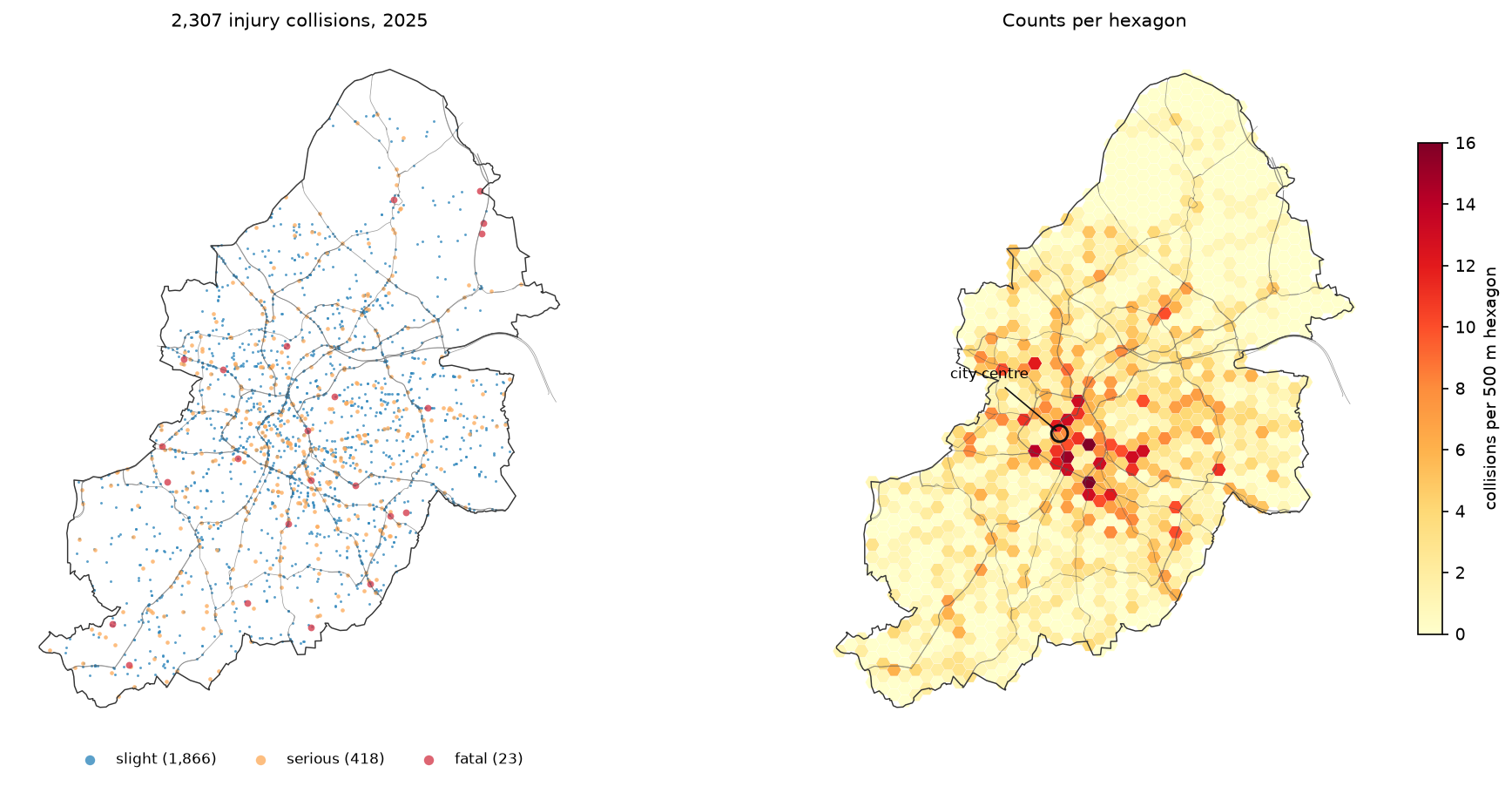
101,525 collisions in Great Britain in 2025 (12 months, 01/01/2025 .. 31/12/2025)Birmingham: 2,307 collisions | fatal 23, serious 418, slight 1866boundary: Birmingham, 267.8 km2Step 1: aggregate the points to a hexagon grid
Gi* and LISA work on values attached to areal units, so the points must be counted into areas first. Hexagons are a good default: every neighbour shares an edge, the distance from the centre to every neighbour is the same, and they do not line up with the street grid the way squares can. We build flat-topped hexagons 500 m across and keep those whose centre is inside the city:
def hex_grid(poly, width):    """Flat-topped hexagons `width` metres across the flats, kept if their centre is inside `poly`."""    side = width / np.sqrt(3)    dx, dy = 1.5 * side, width    x0, y0, x1, y1 = poly.bounds    angles = np.radians(np.arange(0, 360, 60))    cells = []    for i, cx in enumerate(np.arange(x0 - side, x1 + side, dx)):        for cy in np.arange(y0 - width + (dy / 2 if i % 2 else 0), y1 + width, dy):            # round to the millimetre so neighbouring hexagons share exactly the same vertices            cells.append(Polygon(zip(np.round(cx + side * np.cos(angles), 3), np.round(cy + side * np.sin(angles), 3))))    g = gpd.GeoDataFrame(geometry=cells, crs=CRS)    return g[g.centroid.within(poly)].reset_index(drop=True)

def count_points(units, points):    joined = gpd.sjoin(points[["geometry"]], units[["geometry"]], predicate="within")    return joined.groupby("index_right").size().reindex(units.index, fill_value=0).to_numpy()

hexes = hex_grid(city, 500)hexes["n"] = count_points(hexes, pts)
The rounding matters. Queen contiguity decides who is a neighbour by looking for shared vertices. Without rounding, floating-point noise means neighbouring hexagons can have vertices that differ in the twelfth decimal place, and some of them stop being neighbours.
1,240 hexagons 500 m across (0.217 km2 each) cover 268.5 km22,288 of 2,307 collisions fall in the grid; 39.8% of hexagons have none; max 16 in one hexagonmean 1.85, variance 6.43 (variance/mean 3.5)The 19 missing collisions are in slivers at the city edge where the hexagon centre falls outside the boundary. The variance is 3.5 times the mean: if collisions were scattered at random (a Poisson process), the two would be about equal. That overdispersion is the first hint of clustering.
Step 2: choose the spatial weights
A spatial weights matrix W says which units count as neighbours. Every statistic below depends on it, so it is the most important decision you make. libpysal builds the common kinds straight from a GeoDataFrame:
w_queen = Queen.from_dataframe(hexes, use_index=False)cent = hexes.copy(); cent["geometry"] = hexes.centroidw_d1 = DistanceBand.from_dataframe(cent, threshold=1001, binary=True, silence_warnings=True, use_index=False)w_d2 = DistanceBand.from_dataframe(cent, threshold=2001, binary=True, silence_warnings=True, use_index=False)queen contiguity: 1240 units, mean 5.69 neighbours (min 1, max 6), islands 0distance band 1 km: mean 16.6 neighbours (min 4, max 18)distance band 2 km: mean 52.3 neighbours (min 12, max 60)| Weights | Who is a neighbour | When to use it |
|---|---|---|
| Queen contiguity | Units that share an edge or a corner: the 6 touching hexagons | Regular grids and polygons of similar size; the most local view |
| Rook contiguity | Units that share an edge | Same as queen for hexagons; differs for squares and irregular polygons |
| Distance band | All units whose centroids are within a fixed distance | When the process has a known reach, such as a 1 km walk; equal-sized units |
| k-nearest neighbours | The k closest units | Units of very different sizes, such as LSOAs, where a distance band would give the centre many neighbours and the suburbs few |
The thresholds are 1,001 m and 2,001 m, not 1,000 and 2,000, because neighbouring hexagon centres are exactly 500 m, 866 m or 1,000 m apart. A threshold of exactly 1,000 m would include or exclude a whole ring of neighbours depending on rounding. A hexagon in the middle of the grid has 18 neighbours within 1 km and 60 within 2 km.
Weights also have a transform. Row-standardised weights ("r") divide each row by its number of neighbours, so the spatial lag is the average of the neighbours. Moran’s I is normally computed with these. Binary weights ("b") leave each neighbour at 1, so the lag is a sum; the classic Gi* uses binary weights.
Step 3: is there any clustering? Global Moran’s I
Global Moran’s I answers one question for the whole map: are similar values closer together than chance would put them? It ranges roughly from −1 (a checkerboard) through 0 (random) to +1 (strong clustering).
SEED = 42PERMS = 9999np.random.seed(SEED) # esda.Moran has no seed argument; this makes the global tests repeatabley = hexes.n.to_numpy().astype(float)w_queen.transform = "r"mi = esda.Moran(y, w_queen, permutations=PERMS)I = 0.384 E[I] = -0.0008 z(normal) = 22.6 z(permutation) = 22.5 pseudo p = 0.0001largest of 9999 permuted I values: 0.064distance band 1 km: I = 0.338, z(permutation) = 33.6, pseudo p = 0.0001distance band 2 km: I = 0.296, z(permutation) = 53.2, pseudo p = 0.0001Permutation inference is how esda tests the statistic. It keeps the hexagons where they are, shuffles the 1,240 counts among them 9,999 times, and computes I for every shuffle. That gives the distribution of I if there were no spatial pattern. Our observed 0.384 is far above the largest shuffled value, 0.064, so the pseudo p-value is (0 + 1) / (9,999 + 1) = 0.0001. That is the smallest p-value 9,999 permutations can give; it means “more extreme than every shuffle”, not “exactly 1 in 10,000”.
The expected value under the null is −1/(n − 1) = −0.0008, not 0. Permutation inference also makes no assumption that the counts are normally distributed, which matters here: almost 40% of hexagons have zero collisions.
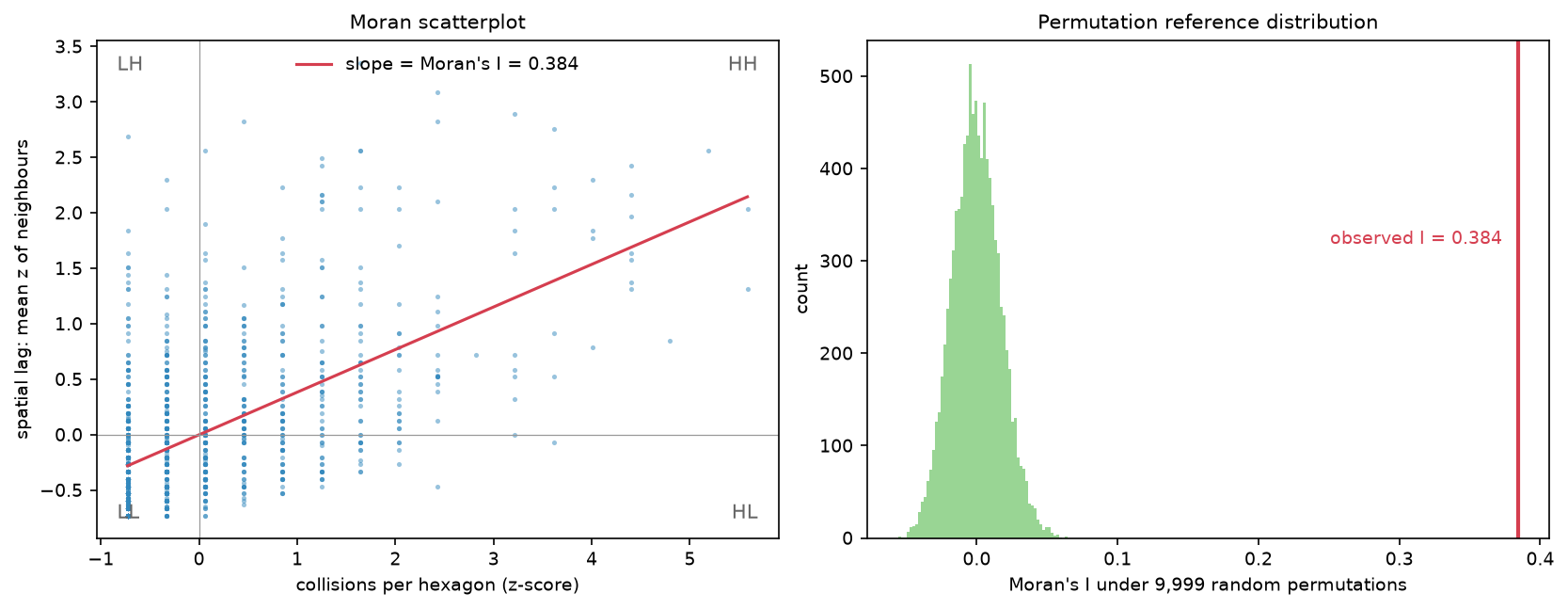
The scatterplot shows what I measures. Each point is a hexagon: its own standardised count on the x axis, the average of its neighbours on the y axis. Points in the upper right are busy hexagons next to busy hexagons (High-High); points in the lower left are quiet next to quiet (Low-Low). The slope of the regression line is Moran’s I.
Step 4: where are the hot spots? Getis-Ord Gi*
Global Moran’s I says the map is clustered. Gi* says where. For each hexagon it adds up the values of the hexagon itself and its neighbours (the star means “include yourself”) and compares the sum with what you would expect if the values were placed at random. A large positive z-score is a hot spot: a busy hexagon surrounded by busy hexagons. A large negative one is a cold spot.
def gi_star(values, w):    """Gi* z-scores and two-sided pseudo p-values: double the one-tailed ("directed") permutation p."""    g = esda.G_Local(values, w, transform="B", permutations=PERMS, star=True, seed=SEED, keep_simulations=False,                     alternative="directed")    return g.Zs, np.minimum(1.0, 2 * g.p_sim)

def fdr_bins(zs, p, alpha=0.05):    thr = esda.fdr(p, alpha)    return np.where(p <= thr, np.sign(zs).astype(int) * 3, 0), thr

w_queen.transform = "b"zs, p = gi_star(y, w_queen)fdr, thr = fdr_bins(zs, p)
Local permutation tests use conditional randomisation: the value in hexagon i is held fixed and the other values are shuffled among its neighbours. The seed argument makes the result repeatable.
two-sided pseudo p-values: min 0.0002 (floor 2/(1+9999) = 0.0002)hot 99%: 59 cold 99%: 150hot 95%: 47 cold 95%: 63hot 90%: 30 cold 90%: 71p <= 0.05 without correction: 319 hexagons (expected false positives under the null: 62)FDR (Benjamini-Hochberg, alpha 0.05) p threshold = 0.0081: 56 hot, 146 cold hexagonsBonferroni threshold would be 0.000040, below the smallest attainable p, so it would find nothing with 9999 permutationsesda alternative='two-sided' instead: smallest p 0.0033, FDR threshold 0.0000, 0 significant hexagonsFDR hot spots hold 369 collisions (16.1%) in 12.1 km2 (4.5% of the city)The multiple-testing problem
We just ran 1,240 tests. If there were no pattern at all, a 5% significance level would still flag about 62 hexagons by chance. The popular 90/95/99% confidence bins, as in ArcGIS’s Hot Spot Analysis tool, do not adjust for this. Neighbouring tests also share most of their data, so the results are not independent either.
Two standard fixes:
- Bonferroni divides α by the number of tests: 0.05 / 1,240 = 0.00004. That controls the chance of any false positive, but it is so strict that it is below the smallest p-value 9,999 permutations can produce. It would find nothing.
- False discovery rate (FDR), using the Benjamini–Hochberg procedure, controls the expected share of false positives among the hexagons you call significant.
esda.fdr(p, 0.05)sorts the p-values and returns the largest one that is at most 0.05 × rank / n. Here that threshold is 0.0081.
FDR is the usual choice for hot spot maps, and it is what ArcGIS Pro’s “Apply False Discovery Rate correction” option does. After correction, 56 hot and 146 cold hexagons remain.
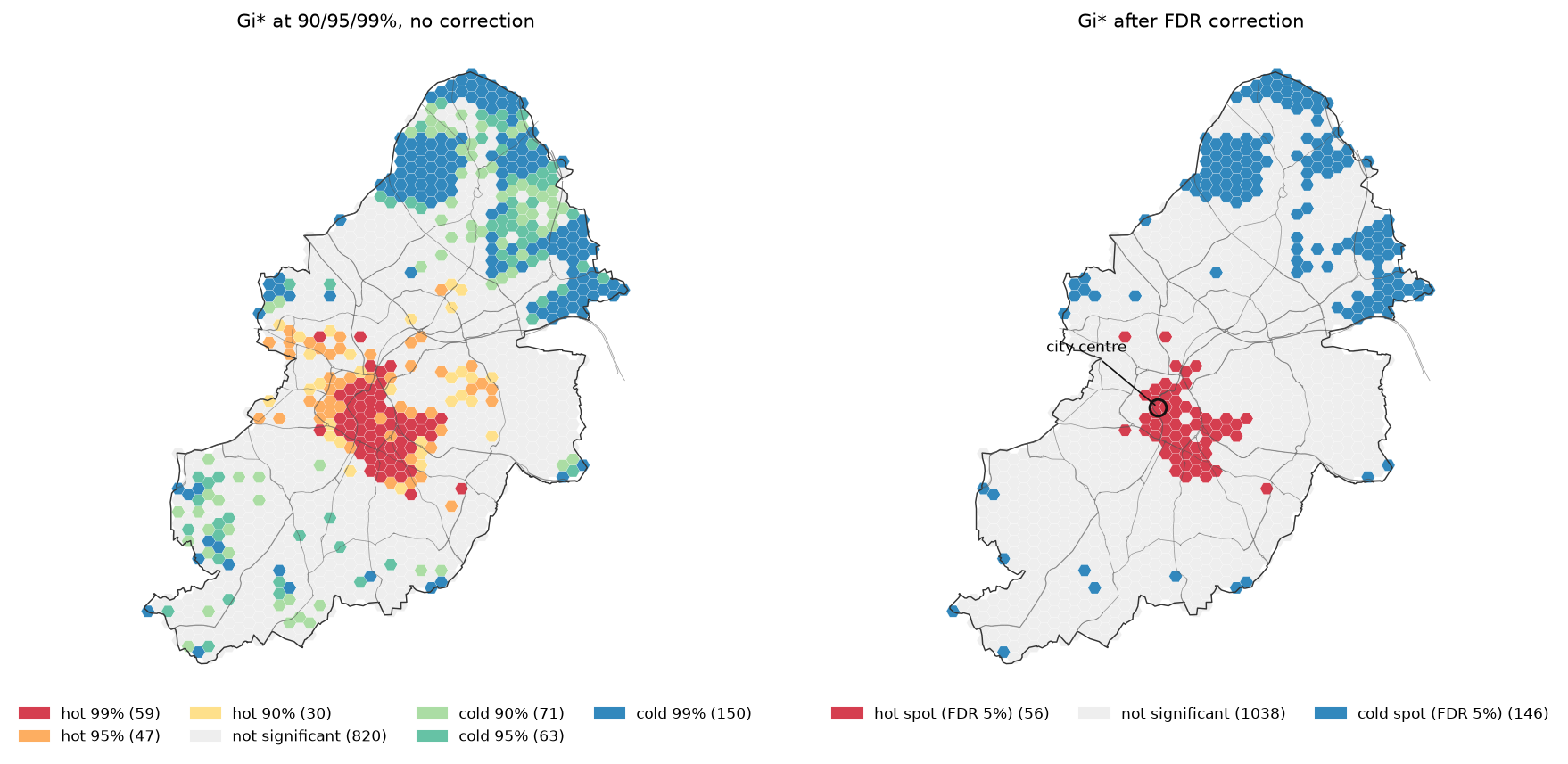
The corrected hot spots form one compact cluster: the city centre inside the ring road and a lobe running south-east through the inner-city neighbourhoods. The cold spots are in the low-density north around Sutton Coldfield and Sutton Park, and along the eastern edge. The hot spots cover 4.5% of the city’s area but hold 16.1% of its collisions.
Step 5: clusters and outliers with LISA
Local Moran’s I (LISA) is the local version of the statistic in Step 3. Where Gi* only says “high” or “low”, LISA uses the quadrants of the Moran scatterplot to separate clusters from spatial outliers:
- High-High: a busy hexagon among busy neighbours (a cluster, comparable with a Gi* hot spot);
- Low-Low: a quiet hexagon among quiet neighbours;
- High-Low: a busy hexagon among quiet ones, such as a dangerous junction in a quiet suburb;
- Low-High: a quiet hexagon in a busy area.
w_queen.transform = "r"lisa = esda.Moran_Local(y, w_queen, permutations=PERMS, seed=SEED, keep_simulations=False, alternative="directed")lp = np.minimum(1.0, 2 * lisa.p_sim)quad = np.where(lp <= esda.fdr(lp, 0.05), lisa.q, 0) # 1 HH, 2 LH, 3 LL, 4 HL, 0 not significantFDR threshold 0.0017; High-High 34, Low-High 3, Low-Low 2, High-Low 2uncorrected p <= 0.05: High-High 88, Low-High 22, Low-Low 124, High-Low 8High-High LISA and Gi* hot spots agree on 34 hexagons; Gi*-only 22, LISA-only 0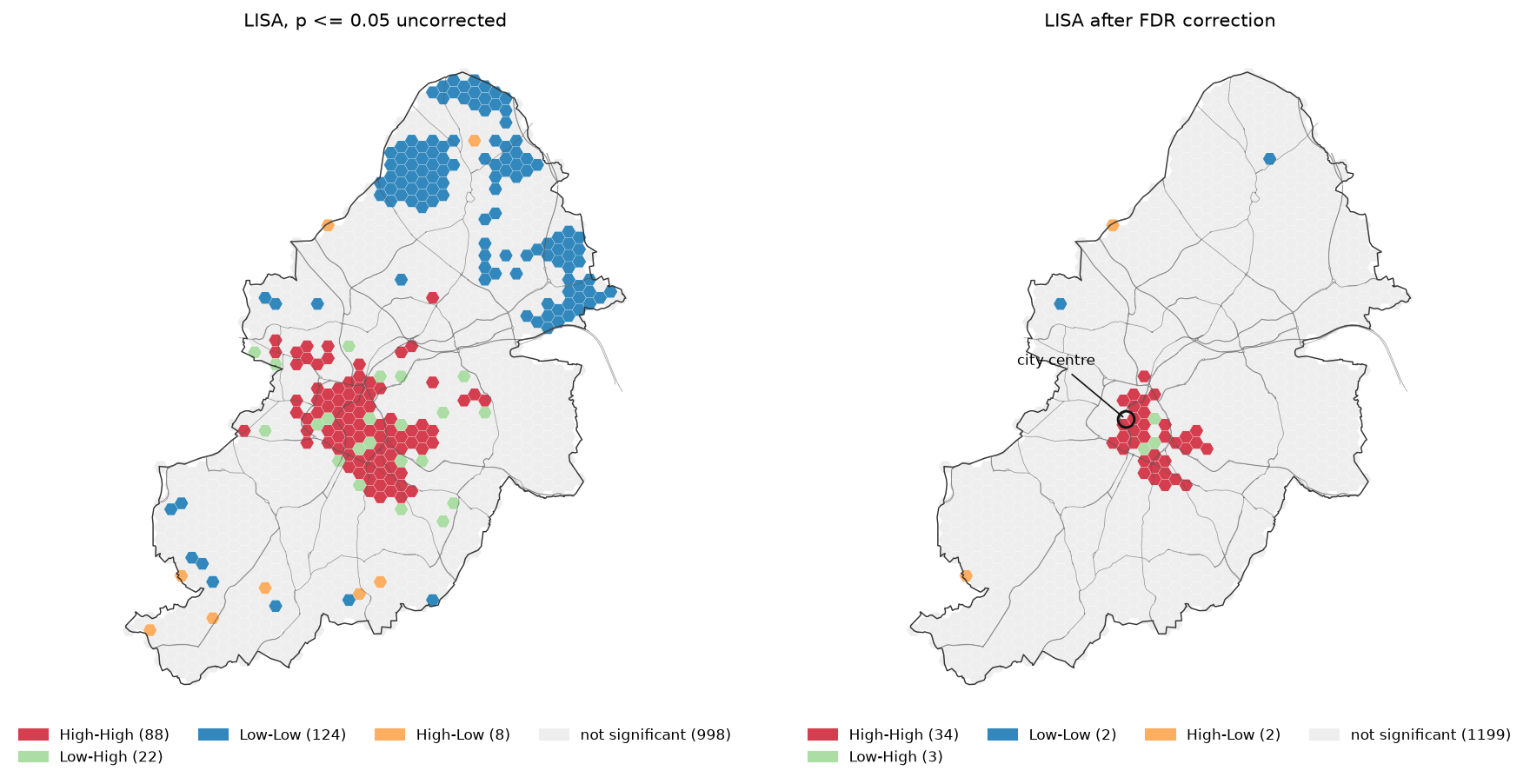
Every one of the 34 FDR High-High hexagons is also a Gi* hot spot. LISA is more conservative here because it compares each hexagon with the average of its neighbours, while Gi* includes the hexagon itself in the sum. The two Low-Low clusters, against 146 Gi* cold spots, show a well-known weakness of local Moran’s I with zero-heavy counts: a hexagon with no collisions surrounded by others with none is common, so it is rarely surprising enough to be significant. Gi* adds up the whole neighbourhood and detects large quiet areas more easily.
Step 6: what changes when the weights change
The “hot spot” is defined by the neighbourhood you choose. Rerunning Gi* with each set of weights from Step 2:
for name, w in [("queen (6 neighbours)", w_queen), ("distance band 1 km (18)", w_d1), ("distance band 2 km (~60)", w_d2)]: w.transform = "b" zz, pp = gi_star(y, w) cls, t = fdr_bins(zz, pp)queen (6 neighbours) hot 56 cold 146 hot area 12.1 km2 FDR p threshold 0.0081distance band 1 km (18) hot 149 cold 255 hot area 32.3 km2 FDR p threshold 0.0163distance band 2 km (~60) hot 295 cold 405 hot area 63.9 km2 FDR p threshold 0.0282hot-spot overlap (Jaccard) queen vs distance band 1 km: 0.36hot-spot overlap (Jaccard) queen vs distance band 2 km: 0.19hot-spot overlap (Jaccard) distance band 1 km vs distance band 2 km: 0.48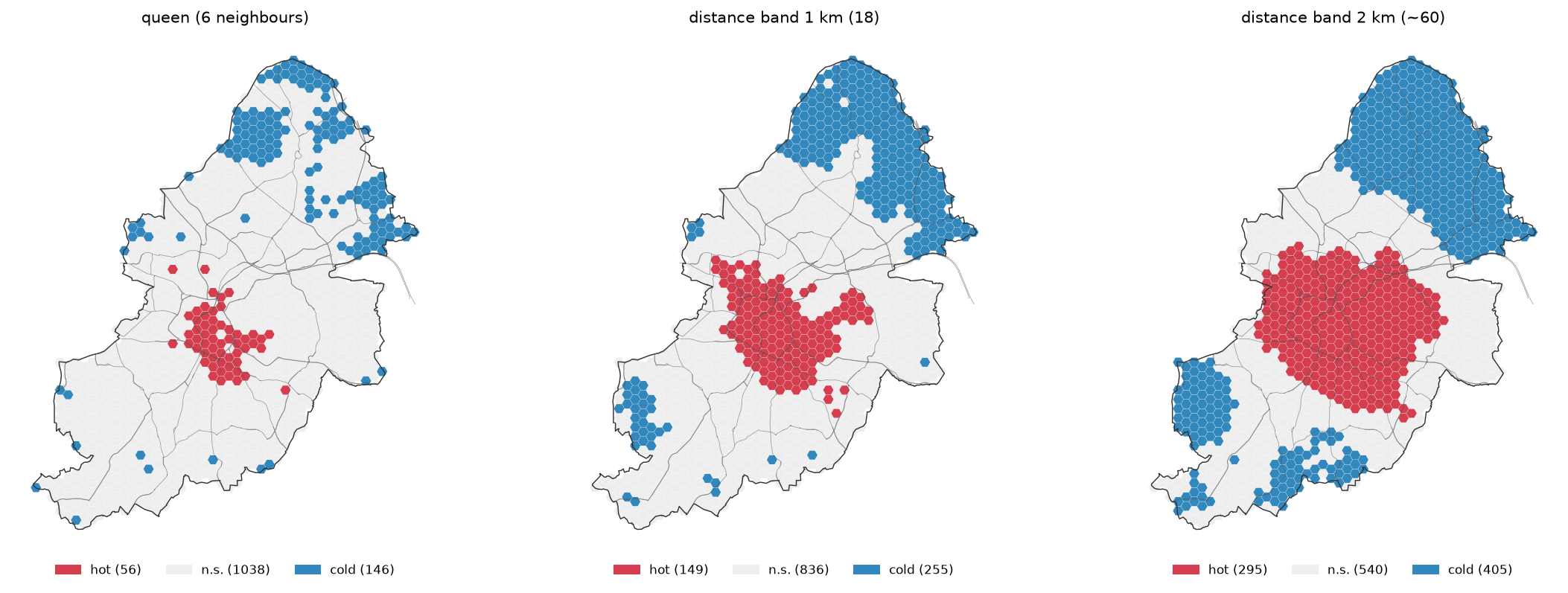
A larger neighbourhood smooths the map: each hexagon’s Gi* now reflects a 2 km radius, so the whole inner city becomes one hot spot and the whole north one cold spot. The Jaccard overlap (shared hot hexagons divided by all hot hexagons) between the queen and 2 km results is only 0.19.
None of these maps is wrong; they answer different questions. Queen weights find the specific streets and junctions where collisions concentrate. A 2 km band finds the broad parts of the city with more collisions. Choose the weights to match the scale of the process and the decision you want to support, say why, and show a sensitivity check like this one. Don’t try several and report the one that looks best.
Step 7: the modifiable areal unit problem
The hexagon size is also a choice. The modifiable areal unit problem (MAUP) is the fact that statistics of aggregated data change with the size (the scale effect) and the shape or position (the zoning effect) of the units. We repeat the analysis with 250 m and 1 km hexagons and with Birmingham’s 659 Lower layer Super Output Areas (LSOAs), the census areas that most UK statistics are published for. Each uses its own queen weights:
hexagons 250 m units 4942 mean count 0.46 Moran's I 0.187 (z 22.4) FDR hot 165 units = 8.9 km2 holding 11.4% of collisionshexagons 500 m units 1240 mean count 1.85 Moran's I 0.384 (z 22.8) FDR hot 56 units = 12.1 km2 holding 16.1% of collisionshexagons 1 km units 310 mean count 7.25 Moran's I 0.552 (z 15.8) FDR hot 20 units = 17.3 km2 holding 20.7% of collisionsLSOAs (659) units 659 mean count 3.49 Moran's I 0.331 (z 14.4) FDR hot 14 units = 7.9 km2 holding 9.6% of collisionsThe z-score for the 500 m grid is 22.8 here and 22.5 in Step 3 because the permutations are random draws; the I value is the same.
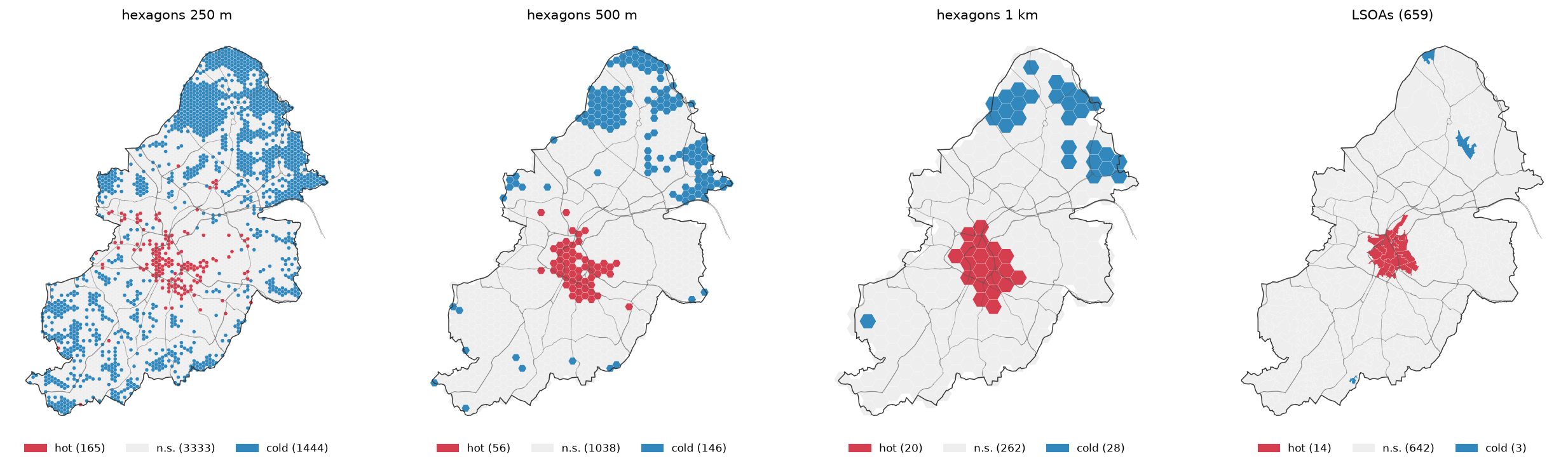
As the hexagons grow, Moran’s I rises from 0.187 to 0.552 and the hot spot area doubles. This is the scale effect: larger units average away the noise of single collisions, so the remaining pattern looks stronger and smoother. The 250 m grid finds 1,444 cold hexagons because most of them have no collisions at all; at that size a “cold spot” mostly means “no road”. The LSOAs, designed to hold similar numbers of people, are small in the dense inner city and large in the suburbs. Only 14 central LSOAs are hot and only 3 are cold.
There is no correct unit. The practical advice:
- choose a unit that matches the scale of the question, such as a junction, a street, a neighbourhood or a ward;
- with point data, prefer a regular grid to administrative areas, unless the results must feed into a decision made per administrative area;
- report the unit, and show at least one other size as a sensitivity check;
- consider methods that skip aggregation altogether, such as kernel density on the road network or network-constrained K-functions.
Step 8: counts are not risk — normalising by exposure
Everything so far maps where collisions happen. More roads and more traffic mean more collisions, so a count hot spot may just be a place with a lot of road. If the question is where roads are unusually dangerous, divide by a measure of exposure.
The ideal measure is vehicle-kilometres travelled, which needs traffic counts on every road. We use a simpler proxy that is available everywhere: road length per hexagon from OpenStreetMap. The script reads the Geofabrik West Midlands extract with pyogrio, keeps the drivable highway types and intersects them with the grid:
roads = gpd.read_file(pbf, layer="lines", columns=["highway"], bbox=tuple(wgs), engine="pyogrio", where="highway IN ({})".format(",".join(f"'{t}'" for t in ROAD_TYPES))).to_crs(CRS)pieces = gpd.overlay(roads[["geometry"]], hexes[["geometry"]].reset_index(names="hex"), how="intersection", keep_geom_type=True)hexes["road_km"] = pieces.assign(km=pieces.length / 1000).groupby("hex").km.sum().reindex(hexes.index, fill_value=0)Rates on small denominators are unstable: a hexagon with 200 m of road and one collision has a huge rate. Two defences are used. First, hexagons with less than 1 km of road are dropped. Second, the rates are smoothed with empirical Bayes, which pulls each hexagon’s rate towards the city-wide rate in proportion to how little road it has. esda does this inside Moran_Rate and Moran_Local_Rate:
sub = hexes[hexes.road_km >= 1].reset_index(drop=True) # then drop any islands and rebuild the weightsws = Queen.from_dataframe(sub, use_index=False, silence_warnings=True)e, bkm = sub.n.to_numpy().astype(float), sub.road_km.to_numpy()mr = esda.Moran_Rate(e, bkm, ws, adjusted=True, transformation="r", permutations=PERMS)rate = esda.Moran_Local_Rate(e, bkm, ws, adjusted=True, transformation="r", permutations=PERMS, seed=SEED, keep_simulations=False, alternative="directed")Note that these two functions take transformation=, not transform= as Moran and G_Local do.
22,464 OSM road ways; 2,842 km of road inside the grid (dual carriageways are mapped as two ways and count twice)road length per hexagon: median 2.4 km, 185 hexagons under 1 kmcorrelation between collisions and road length per hexagon: r = 0.491053 hexagons with >= 1 km of road; city-wide rate 0.817 collisions per road-kmMoran's I of the empirical-Bayes rate: 0.282 (z 14.4, pseudo p 0.0001)EB-rate LISA (FDR 5%): High-High 16, Low-High 3, Low-Low 3, High-Low 0count Gi* hot spots on this subset: 41; EB-rate High-High: 16; in both: 1410 busiest hexagons: median 4.2 road-km vs 2.6 median of all 1053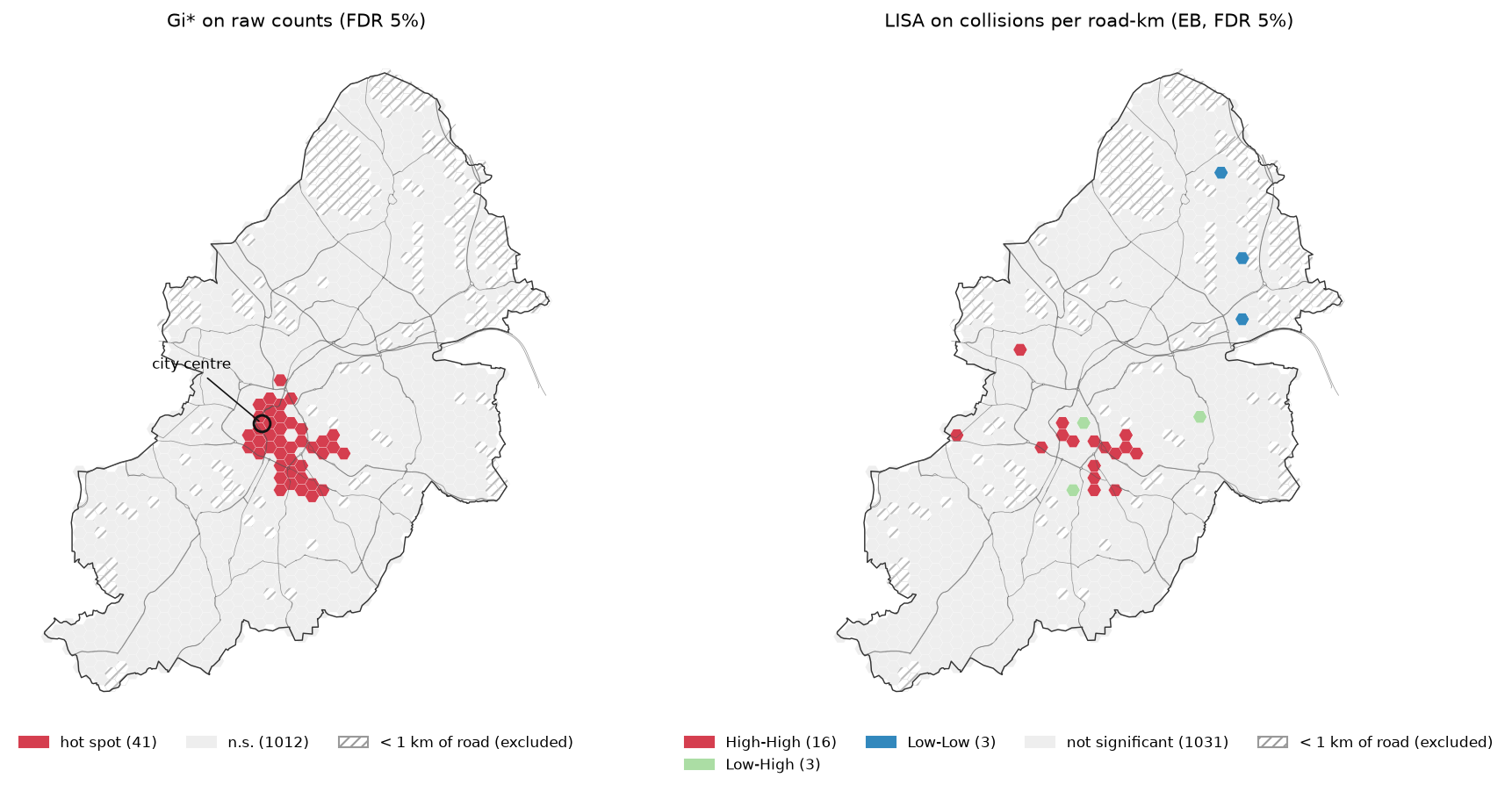
Collisions and road length are clearly related (r = 0.49), and the 10 busiest hexagons have well above the typical amount of road. After normalising, the rate is still clustered (I = 0.282), but the map changes. Only 14 of the 41 count hot spots in this subset are also High-High rate clusters. The city centre largely drops out: it has many collisions, but it also has a dense street grid. What remains, mostly south-east of the centre, is where there are more collisions per km of road than the road network alone would predict.
Road length is a crude exposure measure. A short length of dual carriageway can carry more traffic than a kilometre of residential streets, and dual carriageways are mapped as two OSM ways so their length counts twice. For a real road safety study, use traffic flows from the DfT’s annual average daily flow counts or a traffic model, and consider pedestrian and cyclist exposure too.
Limitations and honest caveats
- STATS19 covers only reported injury collisions. Damage-only collisions are not included, and the DfT acknowledges that a substantial number of injury collisions are never reported to the police. Severity is recorded by the police and is not a medical assessment. The 2025 data is the latest published year and some records may be revised later.
- One year is a small sample. With 1.85 collisions per hexagon on average, a single year is noisy. Road safety engineers usually use three to five years to identify cluster sites. Running the same script on 2021–2025 would give more stable hot spots.
- Permutation p-values have a floor and some randomness. With 9,999 permutations no p-value can be below 0.0001 (or 0.0002 after doubling), and different seeds give slightly different p-values near the threshold. Fix the seed for reproducibility and use more permutations if many hexagons sit near the FDR threshold.
- FDR is not a cure-all. Local tests overlap, so they are positively dependent. Benjamini–Hochberg remains valid under positive dependence of this kind, but the 5% level is still a convention, not a law of nature.
- The hot spot depends on the weights and the units (Steps 6 and 7). Report both and show a sensitivity check.
- Counts and rates answer different questions (Step 8). A count hot spot is where enforcement or treatment would reach the most collisions; a rate hot spot is where the road is riskier than usual. Neither alone proves that a road is dangerous: traffic volume, speed and the mix of road users all matter.
- Edge effects. Hexagons at the city boundary have fewer neighbours, and collisions just outside the city in Sandwell, Solihull or Walsall are ignored. A buffer of neighbouring councils’ data would reduce this.
Frequently asked questions
How do I do a hot spot analysis in Python?
Count your events per unit (for example with a gpd.sjoin onto a hexagon grid), build spatial weights with libpysal.weights.Queen.from_dataframe, and call esda.G_Local(y, w, transform="B", star=True, permutations=9999). Use g.Zs for the z-scores and g.p_sim for the permutation p-values, apply esda.fdr(p, 0.05) to get a corrected threshold, and map hexagons with p at or below that threshold, coloured by the sign of the z-score.
What is the difference between Getis-Ord Gi* and local Moran’s I?
Gi* looks at the sum of values in a unit and its neighbours, so it only says whether an area is high (hot) or low (cold). Local Moran’s I compares each unit with its neighbours, so it also finds spatial outliers: a high value among low ones (High-Low) or the reverse. Gi* is usually better at finding hot and cold areas; LISA is better if outliers matter, such as one dangerous junction in a quiet suburb.
What does a significant Moran’s I mean?
A positive, significant Moran’s I means that similar values are closer together than you would expect if the values were placed at random. It does not say where the clusters are, how many there are or why they exist. Its size depends on the weights and the units, so compare I values only between analyses that use the same weights and units.
Should I use FDR or Bonferroni for hot spot analysis?
Use FDR. Bonferroni controls the chance of even one false positive, which is far too strict for a map of hundreds of overlapping tests; with 9,999 permutations it often cannot find anything at all. FDR controls the expected share of false positives among the hot spots you report, which is what a reader of the map cares about.
How many permutations should I use?
999 is a common default and is fine for exploration. Use 9,999 for results you publish: the smallest possible p-value falls from 0.001 to 0.0001, which matters when an FDR or other correction needs very small p-values, and the p-values near the threshold are more stable.
Is a hexagon grid better than census areas for hot spot analysis?
For point data, usually yes. Hexagons have equal area and a regular set of neighbours, so the result is less distorted by the shape and size of the units. Census areas such as LSOAs are designed around population, so they are small where people live and large where roads and parks are. Use them when the results must match administrative data, and test the effect of the choice as in Step 7.
Next steps
- New to GeoPandas? Start with GeoPandas getting started.
- Replace road length with a proper network: build Birmingham’s drivable street network with OSMnx street network analysis and count collisions per street segment.
- Speed up the spatial joins and overlays on national data with fast vector geoprocessing.
- Publish the hot spots as an interactive map with Folium. The script writes
output/birmingham_hexagons_gi.gpkgwith the counts, z-scores, p-values and classes. - Apply the same hexagon-grid Gi* approach to raster-derived data, such as the forest loss in our deforestation detection tutorial.
Data and licences
- Road safety data (STATS19): Department for Transport, Road Safety Data – collisions 2025, from
data.dft.gov.uk. Contains public sector information licensed under the Open Government Licence v3.0. Downloaded on 19 October 2026. - Boundaries: Office for National Statistics, Local Authority Districts (May 2026) Boundaries UK BGC and Lower layer Super Output Areas (December 2021) Boundaries EW BGC (V5), from the Open Geography Portal. Source: Office for National Statistics licensed under the Open Government Licence v3.0. Contains OS data © Crown copyright and database right 2026.
- Roads: © OpenStreetMap contributors, available under the Open Database Licence. West Midlands extract from Geofabrik, downloaded on 19 October 2026.
- Further reading: Getis, A. and Ord, J. K. (1992), “The analysis of spatial association by use of distance statistics”, Geographical Analysis 24: 189–206; Anselin, L. (1995), “Local Indicators of Spatial Association — LISA”, Geographical Analysis 27: 93–115; Benjamini, Y. and Hochberg, Y. (1995), “Controlling the false discovery rate”, Journal of the Royal Statistical Society B 57: 289–300.
- Code:
hot_spot_analysis.py, tested with Python 3.12.0, esda 2.10.0, libpysal 4.15.0, geopandas 1.2.0, pyogrio 0.13.0, shapely 2.2.0, pyproj 3.8.0, numpy 2.5.4, pandas 3.0.6, scipy 1.18.1, matplotlib 3.11.2 and requests 2.34.2.
Key terms
- Spatial autocorrelation
- The tendency for values at nearby places to be more alike (positive) or less alike (negative) than values at random places.
- Global Moran's I
- A single statistic for the whole map that measures spatial autocorrelation. It is the slope of the Moran scatterplot of each unit's standardised value against the average of its neighbours.
- Getis-Ord Gi*
- A local statistic that compares the sum of values in a unit and its neighbours with the sum expected if values were placed at random. A high positive z-score marks a hot spot; a low negative one marks a cold spot.
- LISA
- Local Indicators of Spatial Association. Local Moran's I splits significant units into High-High and Low-Low clusters and High-Low and Low-High spatial outliers.
- Spatial weights
- A matrix that defines which units are neighbours and how much each neighbour counts, for example shared edges or corners (queen contiguity) or all units within a distance band.
- Permutation inference
- Testing a statistic by shuffling the values across the map many times and seeing how often a random arrangement gives a result as extreme as the observed one. The pseudo p-value is (extreme + 1) / (permutations + 1).
- False discovery rate (FDR)
- The expected share of false positives among the results you call significant. The Benjamini–Hochberg procedure controls it when you run many tests at once.
- MAUP
- The modifiable areal unit problem: results of an analysis of aggregated data change when the size, shape or position of the units changes.
Data for this tutorial
- data.gov.uk · Catalogue entry for the DfT road safety (STATS19) data: collisions, vehicles and casualties since 1979
- Open Geography Portal · ONS local authority (May 2026) and LSOA (December 2021) boundaries
- Geofabrik OpenStreetMap extract (England) · The West Midlands .osm.pbf used for road length
- DfT road traffic statistics · Traffic counts by count point: a better exposure measure than road length on major roads
Licences and formats for each source are listed in the GIS data sources catalogue.