PMTiles vector tiles in Python and a MapLibre GL JS web map
Turn Overture Maps GeoParquet into PMTiles vector tiles with the GDAL that ships in pyogrio, no Tippecanoe needed, measure the zoom-level and size trade-offs, and serve an interactive MapLibre GL JS map of Bristol from static hosting.
- Level
- Intermediate
- Tested with
- Python 3.12
- Source code
- Download scripts
Key takeaways
- GDAL 3.8+ has a PMTiles driver, and the pyogrio wheel includes it (GDAL 3.12.4 in pyogrio 0.13.0). One write_dataframe(driver="PMTiles") call turns a GeoDataFrame into vector tiles on Windows, with no Tippecanoe, WSL or Docker.
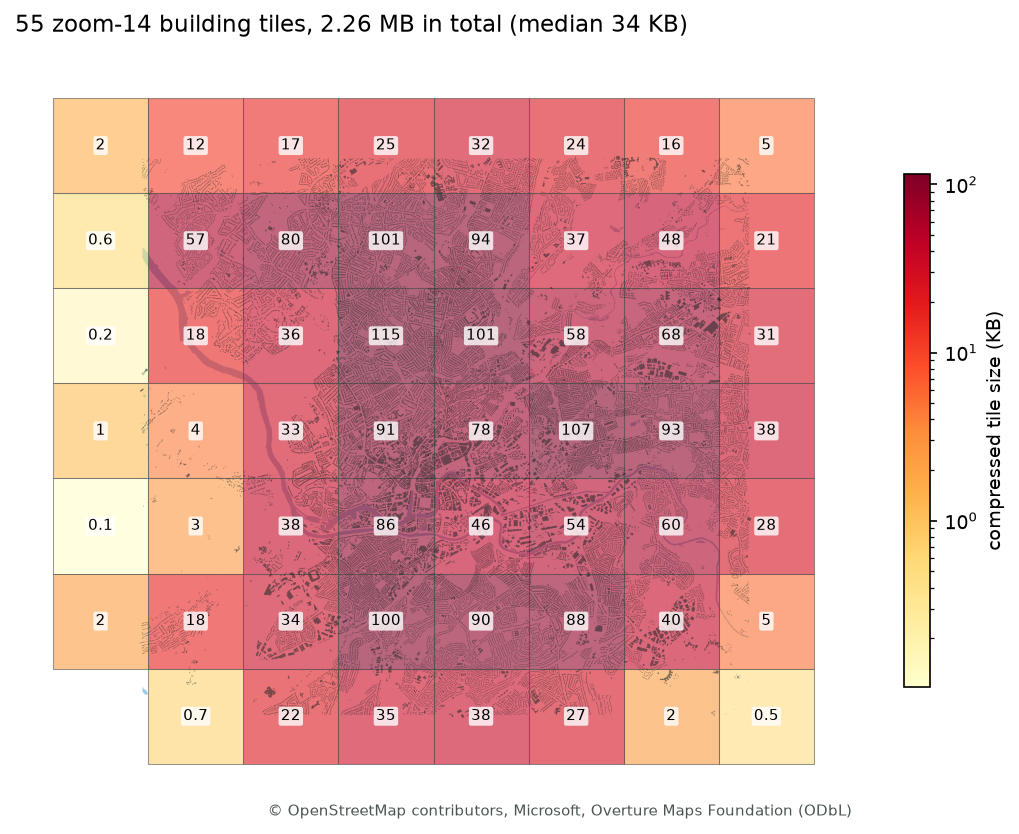
- Each extra zoom level roughly triples the tile count and adds 2–3 MB for 144,965 Bristol buildings: 1.37 MB for zoom 12 alone, 11.25 MB for zooms 12–16. Stop at zoom 14 and let MapLibre overzoom; that kept the buildings at 2.26 MB.
- Attributes cost more than geometry: keeping all ten part 1 columns made the zoom-14 tiles 7.39 MB instead of 2.26 MB. A coarser EXTENT=1024 grid saved 21% and SIMPLIFICATION=4 saved 16%.
- The whole map is four PMTiles files (3.01 MB, 202 tiles) on static hosting. The browser reads only the byte ranges it needs: 104 KB for the opening view and 353 KB for a street-level view.
- Static hosting must answer HTTP Range requests. Python's http.server does not, so the tutorial includes a 50-line serve.py that does; most web servers and object stores already do.
Before you start
- Part 1 of this series, or its four GeoParquet files (the script re-runs part 1 if they are missing)
- Python 3.10+ with geopandas, pyogrio 0.10+ (GDAL 3.8+), pmtiles, pandas, matplotlib and requests
- A little HTML and JavaScript; Node.js only if you want the optional Playwright screenshots
Short answer: to create vector tiles in Python on any platform, write a GeoDataFrame with pyogrio.write_dataframe(gdf, "buildings.pmtiles", driver="PMTiles", layer="buildings", MINZOOM="12", MAXZOOM="14"). The pyogrio wheel bundles GDAL 3.12, whose PMTiles driver cuts and encodes the tiles. Put the .pmtiles file on any static host that supports HTTP Range requests. In the page, register the pmtiles protocol with MapLibre GL JS (maplibregl.addProtocol("pmtiles", new pmtiles.Protocol().tile)) and use pmtiles://…/buildings.pmtiles as a vector source. You don’t need a tile server, a database or Tippecanoe.
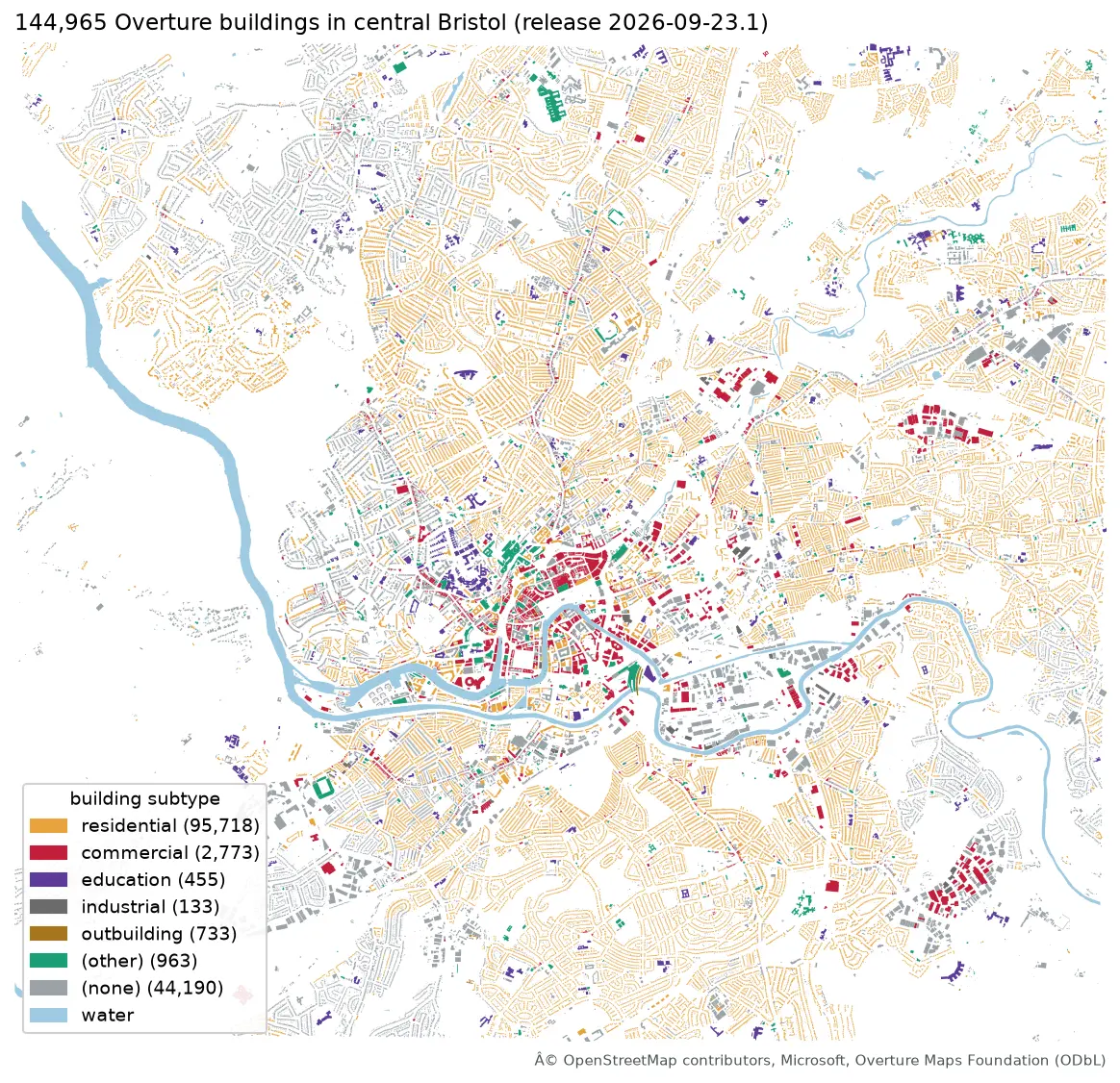
This is part 2 of the two-part series Cloud-native vector GIS with Python. Part 1 pulled central Bristol out of the Overture Maps GeoParquet release with DuckDB. Now we turn that data into PMTiles vector tiles and an interactive MapLibre GL JS map that runs from plain files. The map below is the real result, served from this site as static files.
You will learn how to:
- check that your GDAL has the PMTiles driver, and write vector tiles from GeoPandas;
- choose zoom levels, and measure what each one costs in tiles and megabytes;
- shrink tiles by dropping attributes and changing the extent and simplification;
- build a MapLibre GL JS page with a style for several PMTiles sources;
- serve it locally with HTTP Range support, and see what the browser actually downloads;
- host it on static hosting, with the right licence notices.
All outputs below are real results from pmtiles_vector_tiles.py, run on 19 October 2026 on Windows 11 with Python 3.12.0, GeoPandas 1.2.0, pyogrio 0.13.0 (GDAL 3.12.4), pmtiles 3.8.1, MapLibre GL JS 5.24.0 and pmtiles.js 4.5.0. The screenshots and download counts come from Playwright 1.64.1 driving Chromium.
Set up
pip install geopandas==1.2.0 pyogrio==0.13.0 pyarrow==26.0.0 pmtiles==3.8.1 matplotlib requestsGDAL added a read-write PMTiles driver in version 3.8 (November 2023). You don’t need a separate GDAL install: the binary wheels of pyogrio and Fiona bundle their own GDAL. Check what yours has:
import pyogrio
print(pyogrio.__gdal_version_string__)drivers = pyogrio.list_drivers()print(drivers.get("PMTiles"), drivers.get("MVT"))3.12.4rw rwrw means GDAL can read and write. The MVT driver writes a folder of .pbf tiles instead of one archive. If you see None, upgrade pyogrio, or install GDAL from conda-forge. The rasterio wheels also bundle GDAL, but rasterio only handles rasters, so use pyogrio or Fiona for vectors.
Step 1: load part 1’s GeoParquet and keep only what the map needs
from pathlib import Path
import geopandas as gpd
PART1 = Path("../geoparquet-duckdb-overture-maps/output")b = gpd.read_parquet(PART1 / "bristol_buildings.parquet")buildings = gpd.GeoDataFrame({"subtype": b["subtype"], "height": b["height"].round(1)}, geometry=b.geometry)
buildings 144,965 features 18.86 MB GeoParquet crs OGC:CRS84places 20,727 features 1.75 MB GeoParquet crs OGC:CRS84water 161 features 0.14 MB GeoParquet crs OGC:CRS84hex 758 features 0.08 MB GeoParquet crs OGC:CRS84Every attribute goes into every tile, so keep only what you’ll style or show in a popup: subtype and height for buildings, and name, category, confidence, source and licence for places. Step 3 measures why this matters. Tiles are always in web mercator (EPSG:3857), and GDAL reprojects from longitude/latitude for you.
Step 2: write PMTiles and choose the zoom levels
One call writes a layer to a new archive. GDAL’s creation options are passed as keyword arguments, as strings:
import pyogrio
pyogrio.write_dataframe(buildings, "buildings_z12-14.pmtiles", driver="PMTiles", layer="buildings",                        encoding="UTF-8", MINZOOM="12", MAXZOOM="14")
encoding="UTF-8" matters on Windows. Without it, pyogrio may encode text with the Windows code page and fail on names with characters outside it.
The size of a tileset depends mostly on its zoom range. Each zoom level has four times as many tiles as the one before, each covering a quarter of the area at twice the precision. We wrote the buildings five times, always from zoom 12 and up to a higher maximum:
zooms tiles size_MB write_s largest_tile_KB12-12 6 1.37 11.6 49512-13 22 3.38 25.6 49512-14 77 5.64 39.9 49512-15 243 8.18 54.8 49512-16 840 11.25 69.8 495And inside the zoom 12–16 archive, level by level:
tiles total_KB mean_KB max_KB tile_width_m grid_step_mz12 6 1368 228.0 495 6096 1.4913 16 2008 125.5 307 3048 0.7414 55 2260 41.1 115 1524 0.3715 166 2543 15.3 46 762 0.1916 597 3067 5.1 16 381 0.09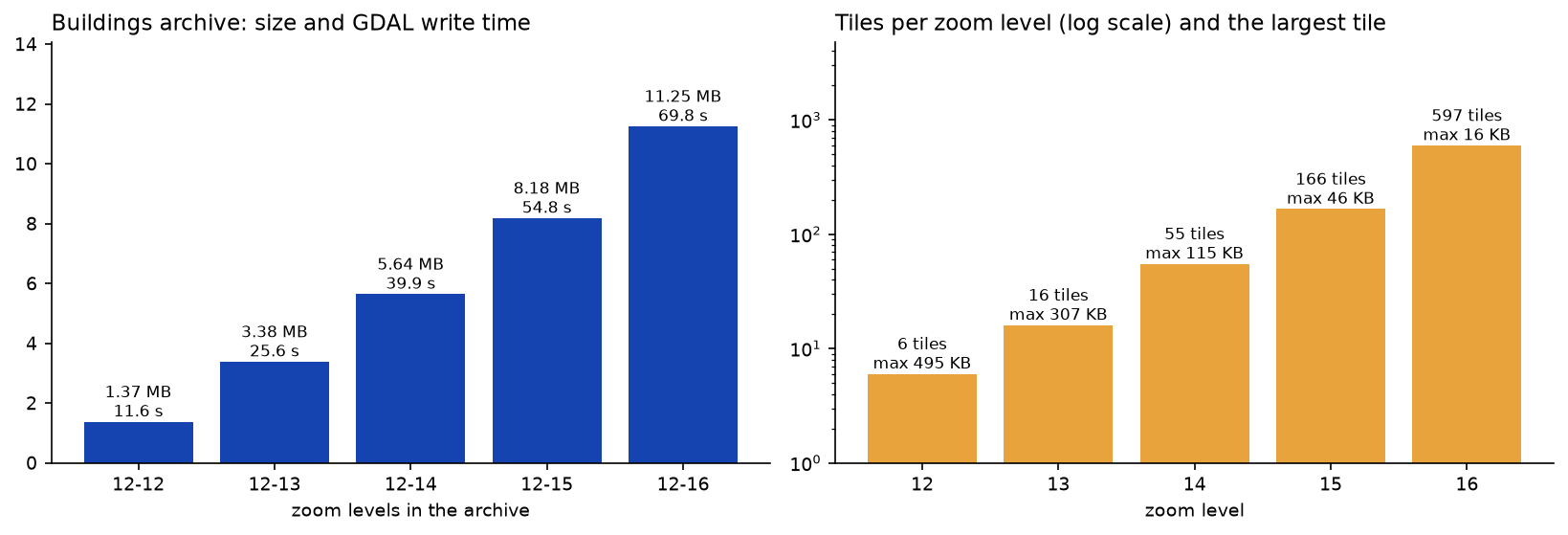
What the numbers show:
- Each zoom level adds 2–3 MB. The whole city is in every level, at a finer grid each time. The
grid_step_mcolumn is the tile width divided by the 4,096-unit extent: 1.49 m at zoom 12, and 0.37 m at zoom 14, which is already finer than the footprints themselves. - Low zooms hit the tile size limit. GDAL keeps every tile under
MAX_SIZE(500 KB by default). The zoom-12 tiles were trimmed to 495 KB, and reading them back withpyogrio.read_dataframe(path, ZOOM_LEVEL="12")gave 135,534 feature pieces against 147,295 at zoom 14: small buildings were dropped to fit. At this zoom, 145,000 footprints are clutter anyway, which is why the map shows hexagons instead. - High zooms are cheap per tile but add up. Zoom 16 tiles average 5.1 KB, but there are 597 of them for one city.
MapLibre overzooms: when there are no tiles past a source’s maxzoom, it scales up the last level. Vector geometry stays sharp, so zoom-14 buildings still look right at zoom 18, and 0.37 m precision is plenty for footprints. So the map uses zoom 14 only for buildings, and 2.26 MB instead of 11.25 MB.
Step 3: what attributes and options cost
Next we wrote the buildings at zoom 14 only, with five different settings:
variant size_MB write_s geometry only 2.12 13.8 subtype + height (used) 2.26 14.9 all 10 Part 1 columns 7.39 16.9 subtype + height, EXTENT=1024 1.79 15.5subtype + height, SIMPLIFICATION=4 1.90 15.1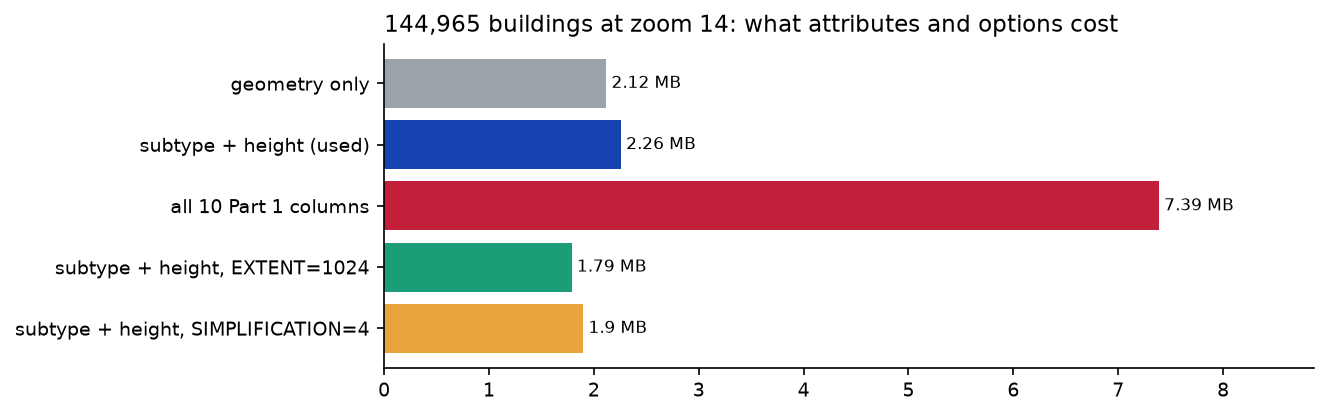
- Attributes are the biggest lever. The ten part 1 columns include Overture’s unique
idand the source record IDs. Vector tiles store each distinct value once per tile, so short repeated values such asresidentialare almost free, but a unique ID per feature is expensive. Keep IDs out of tiles, and look details up from the GeoParquet file when someone clicks. EXTENT=1024(the default is 4096) snaps coordinates to a coarser grid: 1.5 m at zoom 14 here. It saved 21%, but square corners start to wobble when you zoom in past 17.SIMPLIFICATION=4simplifies geometry by 4 grid units before encoding. It saved 16% and is fine for display.
Write times hardly change: almost all the time goes into cutting and encoding geometry, not attributes.
Step 4: the final tilesets
The map has four layers, each in its own archive:
final = { # layer: (data, minzoom, maxzoom) "hex": (hexes, 10, 13), "water": (water, 10, 14), "buildings": (buildings, 14, 14), "places": (places, 14, 14),}for name, (gdf, z0, z1) in final.items(): pyogrio.write_dataframe(gdf, f"output/web/{name}.pmtiles", driver="PMTiles", layer=name, encoding="UTF-8", MINZOOM=str(z0), MAXZOOM=str(z1), NAME=f"Bristol {name}") file features zooms tiles size_MB write_s hex.pmtiles 758 10-13 25 0.10 0.3 water.pmtiles 161 10-14 67 0.07 0.1buildings.pmtiles 144965 14-14 55 2.26 13.8 places.pmtiles 20727 14-14 55 0.58 2.0total: 3.01 MB in 202 tiles (the four GeoParquet inputs are 20.8 MB)Step 5: the MapLibre GL JS page
The page needs MapLibre GL JS, the pmtiles JavaScript library and a style. The script downloads both libraries from unpkg once and serves them with the map, so no third-party CDN is used at run time. The heart of the page is a few lines:
<link rel="stylesheet" href="lib/maplibre-gl.css"><script src="lib/maplibre-gl.js"></script><script src="lib/pmtiles.js"></script><script>const protocol = new pmtiles.Protocol();maplibregl.addProtocol("pmtiles", protocol.tile);const map = new maplibregl.Map({ container: "map", style: STYLE, center: [-2.5925, 51.4585], zoom: 12.4 });</script>The style is plain JSON, so the script builds it as a Python dictionary. Each PMTiles file is a vector source with a pmtiles:// URL, and each layer picks a source-layer (the layer= name we wrote):
style = { "version": 8, "sources": {n: {"type": "vector", "url": f"pmtiles://{n}.pmtiles", "attribution": ATTRIBUTION} for n in ["hex", "water", "buildings", "places"]}, "layers": [ {"id": "background", "type": "background", "paint": {"background-color": "#f3f1ec"}}, {"id": "water", "type": "fill", "source": "water", "source-layer": "water", "paint": {"fill-color": "#9ecae1"}}, {"id": "hex", "type": "fill", "source": "hex", "source-layer": "hex", "maxzoom": 14.5, "paint": {"fill-color": ["interpolate", ["linear"], ["get", "places"], 0, "#fff7ec", 25, "#fdd49e", 75, "#fc8d59", 200, "#d7301f", 500, "#7f0000"]}}, {"id": "buildings", "type": "fill", "source": "buildings", "source-layer": "buildings", "minzoom": 14, "paint": {"fill-color": ["match", ["get", "subtype"], "residential", "#e8c48f", "commercial", "#e49aa6", "#c9cdca"]}}, {"id": "places", "type": "circle", "source": "places", "source-layer": "places", "minzoom": 15, "paint": {"circle-color": ["match", ["get", "group"], "food_and_drink", "#c21f3a", "#6b6b6b"]}}, ],}The full script also fades the hexagons out between zoom 13.5 and 14.5, adds a legend, and opens a popup when you click a place. There is no basemap: the water, buildings and hexagons are the map. To add streets, put a Protomaps or OpenFreeMap basemap source underneath, which is another PMTiles file or style URL.
The script writes two copies of the page: output/web/index.html, with relative paths, and output/map.html, pointing at the copy hosted on this site. The whole output/web/ folder is 4.19 MB: the four tilesets, MapLibre (1.06 MB of JavaScript) and the page.
Step 6: serve it with Range requests
PMTiles needs a server that answers Range headers with 206 Partial Content. Python 3.12’s python -m http.server ignores them and sends the whole file every time, and pmtiles.js then fails to read the archive. The tutorial includes serve.py, a ThreadingHTTPServer subclass of about 50 lines that adds byte ranges:
python serve.py # serving output/web on http://localhost:8000/curl -s -o NUL -w "%{http_code} %{size_download}\n" -H "Range: bytes=0-16383" http://localhost:8000/buildings.pmtiles206 16384Here is the map, served as static files from this site:
What the browser downloads
The script screenshot_map.mjs opens three views with Playwright, each in a fresh browser context with an empty cache, and adds up the bytes of every .pmtiles response:
04-map-overview-hexagons.png: zoom 12.4, 16 range requests to .pmtiles, 104 KB fetched; rendered features {"hex":743,"buildings":0,"places":0}05-map-buildings-places.png: zoom 15.6, 10 range requests to .pmtiles, 353 KB fetched; rendered features {"hex":0,"buildings":1180,"places":1624}06-map-popup-detail.png: zoom 17.6, 7 range requests to .pmtiles, 199 KB fetched; rendered features {"hex":0,"buildings":68,"places":207}, clicked "Bershka"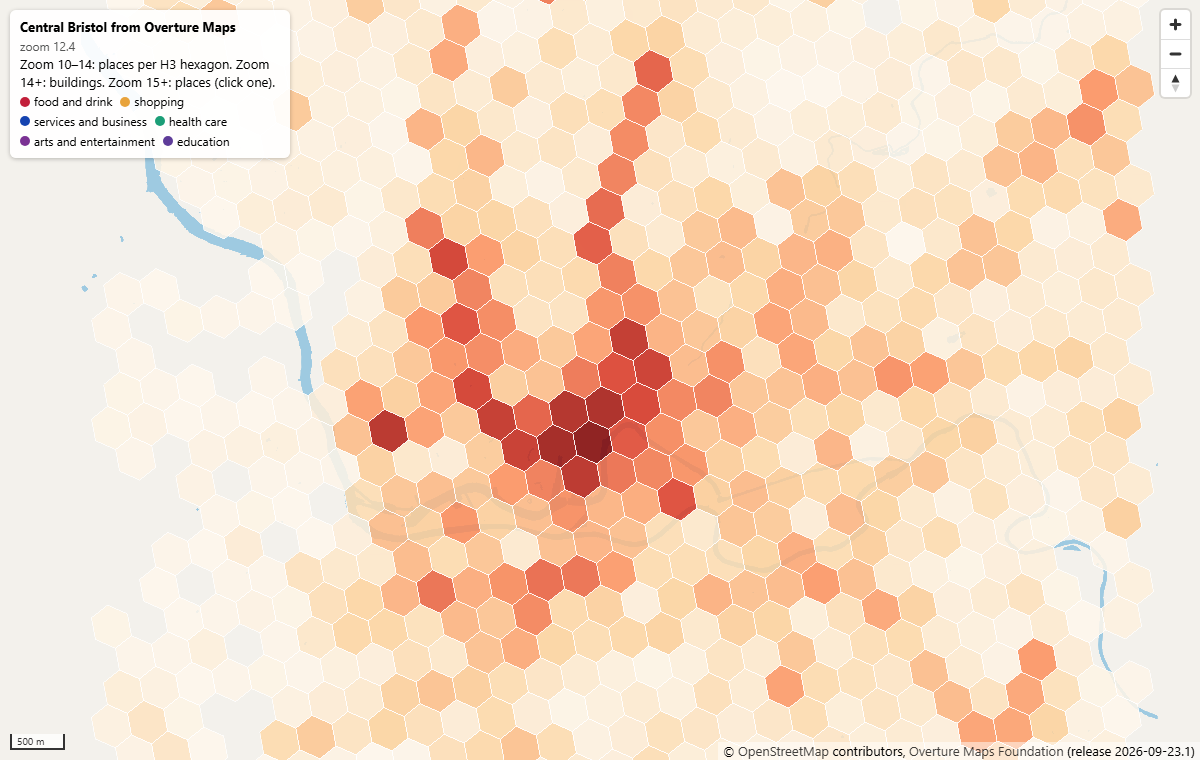
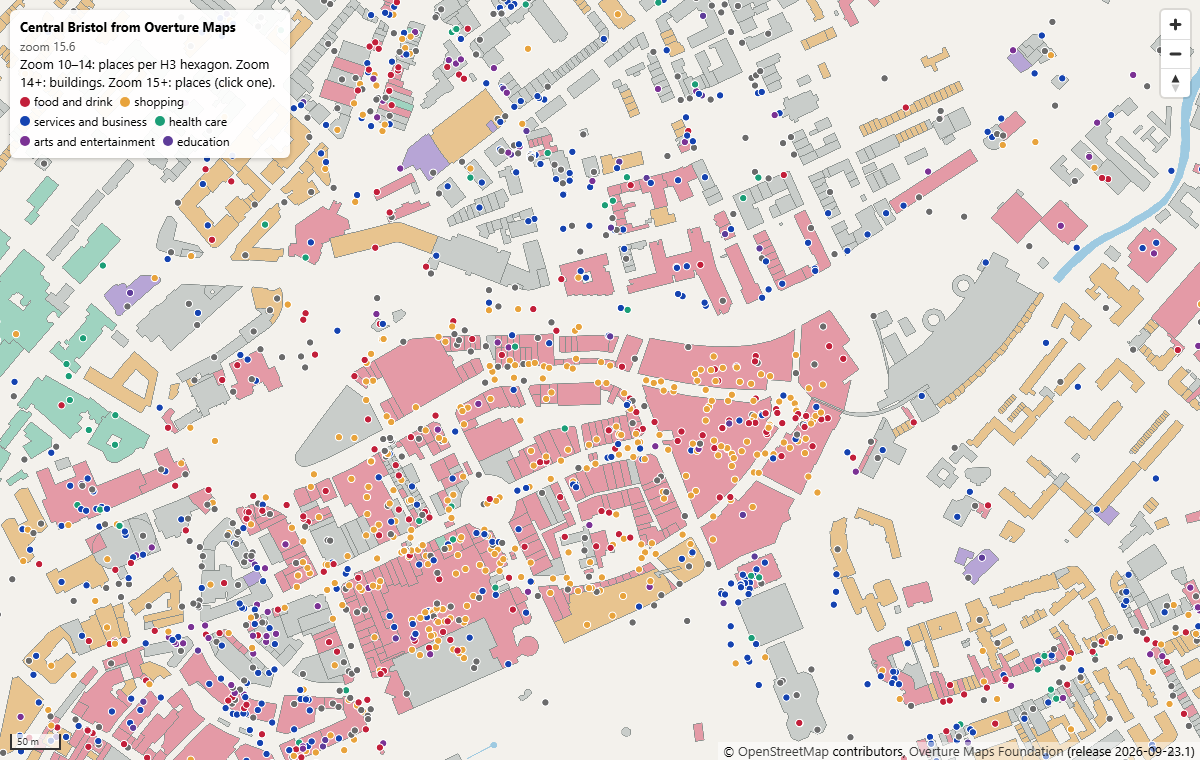
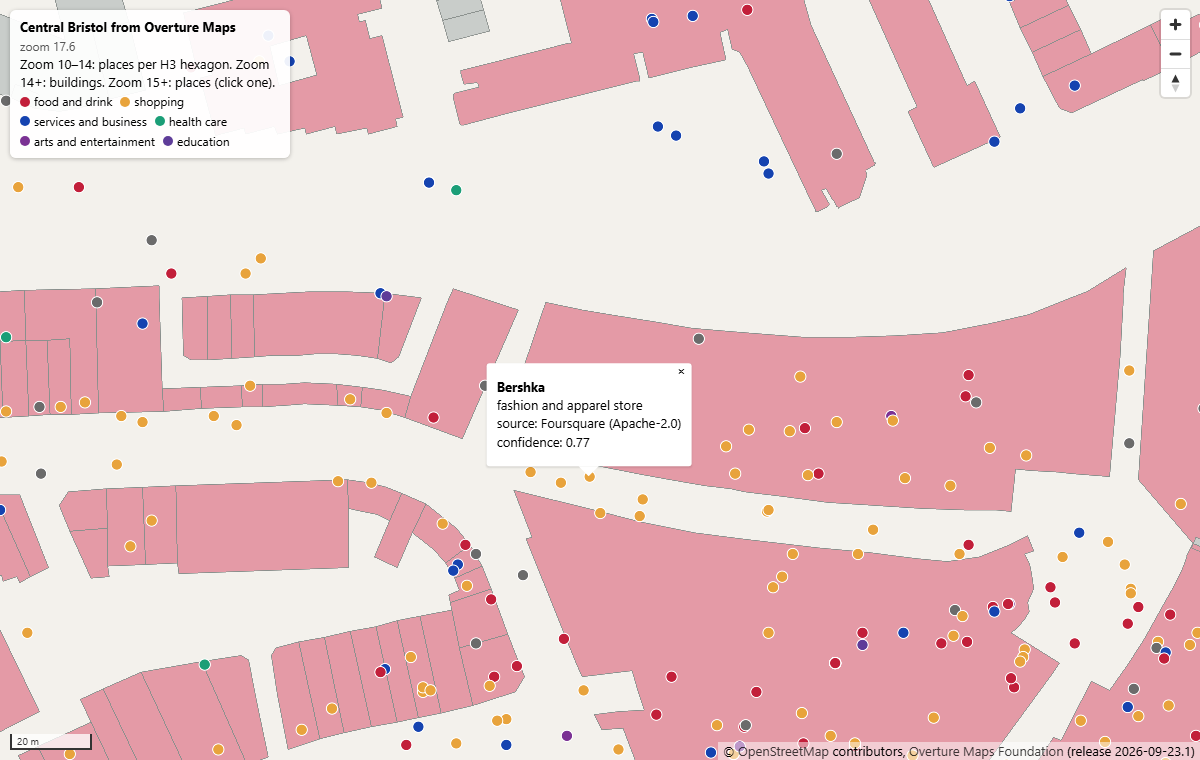
Each view loads a few hundred kilobytes, not the 3 MB tileset. pmtiles.js first reads the first 16 KiB of each archive (the header and root directory). After that, every tile is one Range request for exactly its bytes. At zoom 17.6 the browser still fetches zoom-14 tiles, scaled up, which is why that view costs less than the zoom 15.6 one.
Step 7: host it on static hosting
Copy output/web/ to any host that supports Range requests: GitHub Pages, Netlify, Cloudflare Pages, Apache or Nginx, or an object store such as Amazon S3, Azure Blob Storage or Cloudflare R2. This site uses ordinary shared hosting with Apache. Things to check:
- Range requests. Request the first bytes with
curl -H "Range: bytes=0-99" -I <url>and look for206andContent-Range. - CORS. If the tiles are on a different domain from the page (say a bucket), allow your site’s origin for
GETandHEAD, and expose theContent-RangeandETagheaders. - No extra compression. GDAL already gzips each tile inside the archive. Don’t let the server compress
.pmtilesresponses, or Range offsets may break; serve them asapplication/octet-stream. - Caching. Archives are replaced, not edited, so give them a long cache lifetime and change the file name when you rebuild.
For bigger areas, a whole country or the planet, put the archive in object storage or behind a CDN. Protomaps documents a Cloudflare Worker that turns a PMTiles file in R2 into ordinary /{z}/{x}/{y}.mvt URLs, for clients that don’t speak PMTiles.
Licences and attribution
The tiles are a derived database of Overture data, so part 1’s licences carry over:
- Buildings and water are ODbL 1.0. The tilesets are a produced work when shown as a map, but anyone can download the
.pmtilesfiles, so treat them as a derived database: share them under the ODbL, with credit to OpenStreetMap contributors and Overture. - Places keep their source licence (CDLA-Permissive-2.0, Apache-2.0 or CC0). The
licenceattribute is in every tile, and the popup shows it. - The attribution for each source is in the style, so MapLibre shows “© OpenStreetMap contributors, Overture Maps Foundation (release 2026-09-23.1)” on the map.
- MapLibre GL JS (BSD-3-Clause) is self-hosted with its licence file next to it. pmtiles.js (BSD-3-Clause) is inlined, with a comment naming it.
Limitations and caveats
- GDAL doesn’t generalise as much as Tippecanoe. It drops features to meet
MAX_SIZEand simplifies to the tile grid, but it doesn’t merge small polygons or thin points cleverly. For low-zoom views of dense data, aggregate first, as the hexagons do here. - One layer per archive. Multi-layer files need one GDAL call over a multi-layer source, or a merge with
tile-join. - Tile sizes depend on the area. Bristol’s dense terraces made 80–115 KB zoom-14 tiles. A city of tower blocks or rural sprawl will give different numbers, so measure your own data the same way.
- Timings are from one laptop. Write times depend on CPU and disk. Download sizes depend only on the data and the view, and were the same across repeated runs.
- The data is a snapshot. Overture releases monthly, and places open and close. Rebuild the tiles from a new release rather than editing them.
Frequently asked questions
How do I create vector tiles in Python?
Install pyogrio 0.10 or later, whose wheels include GDAL 3.8+ with the PMTiles and MVT drivers. Then call pyogrio.write_dataframe(gdf, "out.pmtiles", driver="PMTiles", layer="name", MINZOOM="12", MAXZOOM="14"). For a folder of {z}/{x}/{y}.pbf files instead of one archive, use driver="MVT". On the command line, ogr2ogr -f PMTiles out.pmtiles input.gpkg -dsco MAXZOOM=14 does the same.
What is PMTiles and why use it?
PMTiles is a single-file archive of map tiles with an index. A browser can read any tile from it with an HTTP Range request, so you host one file on static hosting or object storage instead of running a tile server or storing thousands of small files. The JavaScript library plugs into MapLibre GL JS and Leaflet. Here, four archives totalling 3.01 MB serve a whole interactive city map.
Which zoom levels should I generate?
Stop at the lowest zoom where your features look right, and let the map overzoom beyond it. Zoom 14 (0.37 m grid in Bristol) is enough for building footprints; zoom 12 or 13 suits roads and land use. Each extra level roughly tripled the tile count here and added 2–3 MB. For low zooms, show an aggregate such as hexagons instead of every feature.
Does Tippecanoe work on Windows?
Not natively. It builds on Linux and macOS, so on Windows run it in WSL or Docker. If you want to stay in Python on Windows, the GDAL PMTiles driver inside pyogrio works without any extra installs, as this tutorial shows.
Why does my PMTiles map not load from python -m http.server?
Python’s built-in server ignores the Range header and returns the whole file with status 200, so the pmtiles library can’t read the archive directory. Use a server that supports ranges: the serve.py in this tutorial, npx serve, npx http-server, Nginx, or any static host.
Can I show PMTiles on a Leaflet or OpenLayers map?
Yes. For Leaflet, the protomaps-leaflet library draws PMTiles vector tiles with its own styling. OpenLayers can read them through the ol-pmtiles package. MapLibre GL JS gives you the full style specification and smooth WebGL rendering, so it is the most common choice. For a quick Leaflet map straight from Python, see interactive web maps with Folium.
Next steps
- Start from part 1: query Overture Maps with DuckDB spatial and GeoParquet to change the city or add another theme, such as transportation.
- Compare this with Leaflet maps generated from Python in Interactive web maps with Folium.
- Add the missing building heights from lidar in Building footprints and heights from lidar in Python, then extrude them in MapLibre with a
fill-extrusionlayer. - Tile a street network from OSMnx as an extra source.
Data and licences
- Overture Maps Foundation, release 2026-09-23.1, via part 1. Buildings and water: ODbL 1.0, © OpenStreetMap contributors, Microsoft ML Buildings. Places: CDLA-Permissive-2.0, Apache-2.0 (Foursquare) and CC0-1.0 (AllThePlaces). See the Overture attribution guide.
- MapLibre GL JS 5.24.0, BSD-3-Clause, © MapLibre contributors. pmtiles 4.5.0 (JavaScript) and 3.8.1 (Python), BSD-3-Clause, © Protomaps LLC.
- Code:
pmtiles_vector_tiles.py,serve.pyandscreenshot_map.mjs, tested with Python 3.12.0, GeoPandas 1.2.0, pyogrio 0.13.0 (GDAL 3.12.4), pmtiles 3.8.1 and Playwright 1.64.1.
Key terms
- Vector tiles
- Map data cut into square tiles on the web-mercator grid and encoded as Mapbox Vector Tile (MVT) protobufs. The browser styles and draws them, so one set of tiles can be shown in many styles.
- PMTiles
- A single-file archive format for map tiles from Protomaps. A header and directory point to each tile's byte range, so a client can read any tile with one HTTP Range request from a plain file on static hosting.
- MapLibre GL JS
- An open-source (BSD-3-Clause) JavaScript library that renders vector tiles with WebGL, forked from Mapbox GL JS 1.x in 2020.
- Overzooming
- Drawing tiles from the highest stored zoom level at higher map zooms by scaling them up. Vector geometry stays sharp, so a zoom-14 tileset can still be used at zoom 18.
- Extent
- The integer grid inside each vector tile, 4,096 units across by default. Coordinates snap to this grid, which sets the precision at each zoom level.
- HTTP Range request
- A request for part of a file (Range: bytes=0-16383). Servers that support it answer 206 Partial Content, which is what lets PMTiles work without a tile server.
Data for this tutorial
- Overture Maps · Buildings, places and water downloaded in part 1 (release 2026-09-23.1)
- PMTiles specification · Format specification and the JavaScript and Python libraries
- GDAL PMTiles driver · Creation options such as MINZOOM, MAXZOOM, EXTENT and MAX_SIZE
Licences and formats for each source are listed in the GIS data sources catalogue.