Make a map in Python with matplotlib and cartopy: projections, classified choropleths, scale bars, north arrows and inset maps
A cartopy tutorial for publication-quality maps in Python: choose a projection, draw a classified choropleth of Census 2021 population density with a proper legend, add a scale bar, a true-north arrow, an inset locator map and gridlines, style it for light and dark backgrounds, export at 300 dpi to PNG, PDF and SVG, and shade the Copernicus DEM for Greater Manchester.
- Level
- Beginner
- Tested with
- Python 3.12
- Source code
- Download scripts
Key takeaways
- Choose the projection for the job. A 1° × 1° cell at 53.5° N, Manchester's latitude, is drawn 2.88 times too large in Mercator and 1.69 times too large in Plate Carrée, but at its true size in Equal Earth, so use an equal-area projection for world choropleths and a national grid such as British National Grid for local maps.
- The classification is the map. For 331 districts of England and Wales, equal intervals put 260 in the lowest class; quantiles put 55 in each; Fisher-Jenks scored the best goodness of variance fit (0.80). Rounded, roughly doubling manual breaks (100, 250, 500 … 5,000 per km²) are easiest to read.
- Draw polygons on cartopy axes with ax.add_geometries(..., crs=...), one call per class, and set zorder explicitly; otherwise context layers can hide the choropleth.
- A scale bar is only honest where the scale is constant. In British National Grid, 100 km of grid was 99.94 to 100.05 km on the ground across England and Wales, so one bar is fine; on a Mercator or Plate Carrée world map it is not.
- Size the figure in millimetres and export at print resolution. A 120 × 140 mm figure at 300 dpi is 1,417 × 1,653 px (554 KB as PNG); vector PDF and SVG versions were 3.0 and 8.8 MB because every district outline is kept.
Before you start
- Basic Python and some GeoPandas; the GeoPandas getting-started tutorial covers what you need
- Python 3.10+ with cartopy, matplotlib, matplotlib-scalebar, mapclassify, geopandas, rasterio, pystac-client, planetary-computer, pandas, pillow and requests
- An internet connection: Natural Earth, ONS boundaries, Nomis census data and the Copernicus DEM are downloaded on the first run, with no account or key
Short answer: to make a map in Python, create a matplotlib axes with a cartopy projection, ax = plt.axes(projection=ccrs.OSGB()) for Britain or ccrs.EqualEarth() for the world, set the area with ax.set_extent(...), and draw your data with ax.add_geometries(gdf.geometry, crs=...) for polygons or ax.imshow(array, extent=..., transform=...) for rasters. Classify the values with mapclassify and build the legend from the class breaks. Add ax.gridlines(draw_labels=True), a scale bar from matplotlib-scalebar, a north arrow with ax.annotate, and an inset locator map with fig.add_axes(..., projection=...). Size the figure in millimetres and save it with fig.savefig("map.png", dpi=300) or as PDF or SVG for print.
Interactive web maps are great for exploring, but reports, papers and slides still need a static map that is correct, legible and reproducible. matplotlib with cartopy is the standard way to make one in Python: it handles projections properly, works with GeoPandas and rasterio, and exports to any format a publisher wants. This tutorial builds up to a finished, print-ready map of England and Wales and a shaded-relief map of Greater Manchester, with every map drawn from real data:
| Map | Data | Projection |
|---|---|---|
| Four projections with Tissot’s indicatrices | Natural Earth 1:110m land | Plate Carrée, Mercator, Equal Earth, Orthographic |
| World population density | Natural Earth 1:50m countries | Equal Earth |
| Population density, England and Wales | ONS districts and Census 2021 (Nomis) | British National Grid |
| Greater Manchester terrain | Copernicus DEM GLO-30 | British National Grid |
You will learn how to:
- pick a projection and see what it does to areas;
- draw a choropleth with a classified legend, and choose between classification schemes;
- add the parts of a proper map: gridlines and labels, a scale bar, a north arrow, an inset locator map, a title and a source note;
- export at print resolution to PNG, PDF and SVG;
- restyle the same map for light and dark backgrounds;
- draw a raster with hillshading and a colour bar.
All outputs below are real results from python_maps_cartopy.py, run on 23 October 2026 with Python 3.12.0, cartopy 0.26.0, matplotlib 3.11.2, geopandas 1.2.0, mapclassify 2.11.0 and matplotlib-scalebar 0.9.0.
Install the packages
pip install cartopy matplotlib matplotlib-scalebar mapclassify geopandas rasterio pystac-client planetary-computer pandas pillow requestsCurrent cartopy releases ship binary wheels for Windows, macOS and Linux, so pip does not need GEOS or PROJ installed separately. The pinned versions are in requirements.txt.
Step 1: choose a projection
Every flat map distorts the globe. Cartopy’s crs module has dozens of projections, and the right choice depends on what the map must preserve. To see the difference, the script draws Natural Earth’s 1:110m land in four projections, with identical 500 km circles (Tissot’s indicatrices) on the ground.
import cartopyimport cartopy.crs as ccrsimport cartopy.feature as cfeaturefrom cartopy.io import shapereader
cartopy.config["data_dir"] = str(Path("cache") / "cartopy")    # Natural Earth downloads land here

def ne(scale, category, name):    return gpd.read_file(shapereader.natural_earth(resolution=scale, category=category, name=name))

land110 = ne("110m", "physical", "land")projs = [("PlateCarree (equirectangular)", ccrs.PlateCarree()),         ("Mercator", ccrs.Mercator(min_latitude=-80, max_latitude=84)),         ("Equal Earth (equal area)", ccrs.EqualEarth()),         ("Orthographic over the UK", ccrs.Orthographic(central_longitude=-2, central_latitude=54))]fig = plt.figure(figsize=(170 * MM, 112 * MM), layout="constrained")for i, (name, proj) in enumerate(projs):    ax = fig.add_subplot(2, 2, i + 1, projection=proj)    ax.set_global()    ax.add_feature(cfeature.OCEAN.with_scale("110m"), facecolor="#e8eef2")    ax.add_geometries(land110.geometry, crs=ccrs.PlateCarree(), facecolor="#d9d9d4", edgecolor="#8a8a8a", lw=0.3)    # Tissot indicatrices: identical 500 km circles on the ground, drawn in each projection    ax.tissot(rad_km=500, lons=np.arange(-150, 180, 60), lats=np.arange(-60, 80, 30), n_samples=40,              facecolor="#d53e4f", alpha=0.6, edgecolor="none")    ax.gridlines(color="#8a8a8a", lw=0.3, alpha=0.6)    ax.set_title(name, fontsize=8.5)fig.savefig(OUT / "01-map-projections-tissot.png", dpi=200, facecolor="white")
The key idea in cartopy is that the axes have a projection (how the map is drawn) and each dataset has a CRS (what its coordinates mean). You pass the data’s CRS with crs= or transform=, and cartopy reprojects it. Natural Earth is in longitude and latitude, so its CRS is ccrs.PlateCarree(). If coordinate reference systems are new to you, coordinate reference systems in Python explains EPSG codes, to_crs and why degrees are not metres.
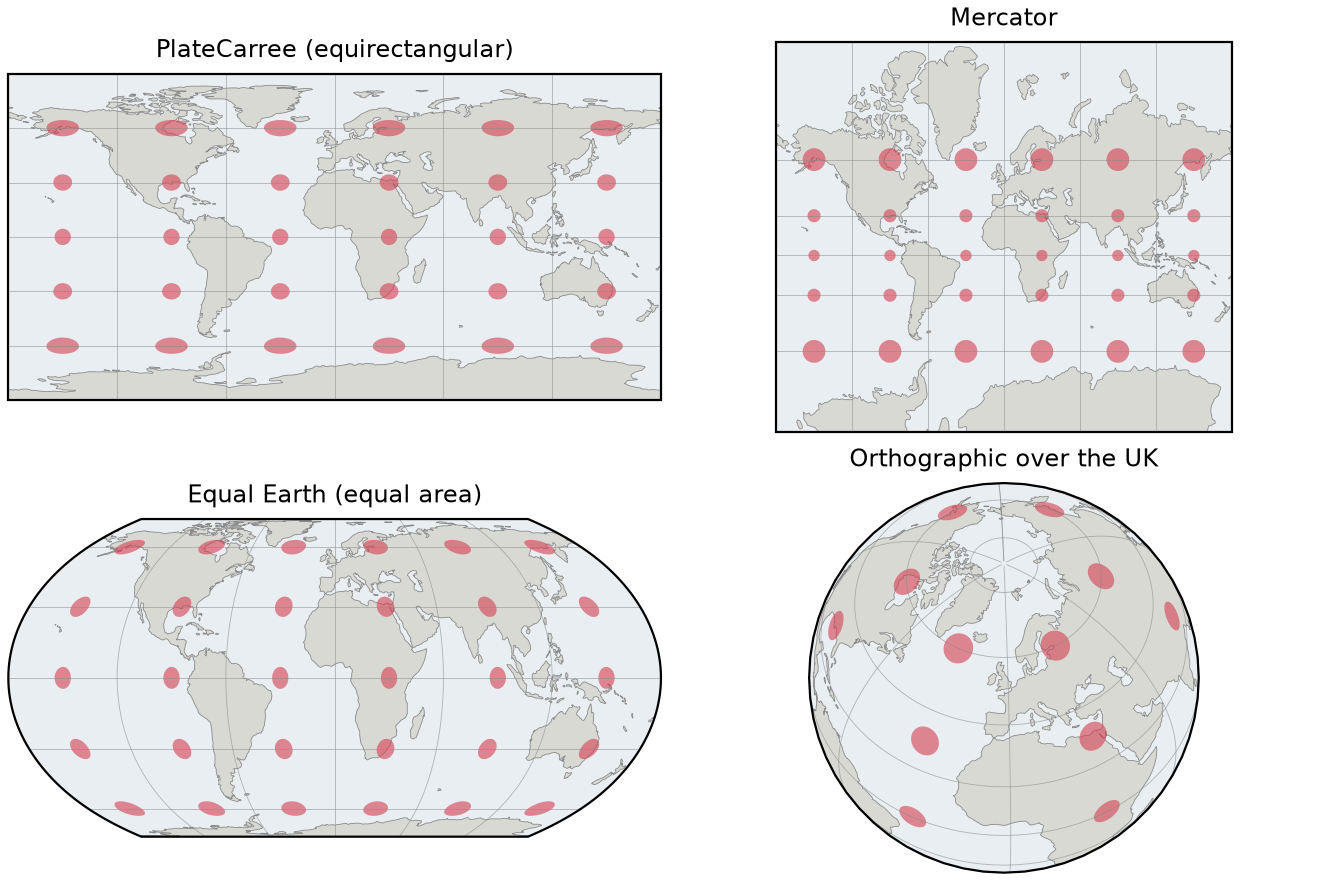
The script also measures the distortion: the area of a 1° × 1° cell, as drawn, divided by its true area.
area of a 1 x 1 degree cell in the projection / true area: lat true_km2 PlateCarree Mercator Equal Earth 0.0 12308.310 1.005 1.000 1.030.0 10642.104 1.162 1.345 1.053.5 7298.450 1.694 2.882 1.070.0 4157.854 2.974 8.924 1.0At Manchester’s latitude, Mercator draws areas 2.9 times too large; at 70° N, 8.9 times. That is fine for web map tiles and navigation, where shapes and bearings matter, but wrong for any map that compares areas, such as a choropleth. A rough guide:
| Map | Good choices in cartopy |
|---|---|
| World thematic map | EqualEarth, Robinson, Mollweide |
| Continent | LambertAzimuthalEqualArea, AlbersEqualArea, LambertConformal |
| Great Britain | OSGB (British National Grid, EPSG:27700) |
| Any national grid | ccrs.epsg(code) or ccrs.Projection(pyproj.CRS(code)) |
| A globe view | Orthographic, NearsidePerspective |
Step 2: a world choropleth with a classified legend
A choropleth shades areas by a value. Two rules make one honest: map a rate or density, not a raw count, and classify the values into a few classes with a legend that states the breaks. Natural Earth’s countries include a population estimate (POP_EST); we divide it by the area measured in an equal-area projection and split the result into six quantile classes with mapclassify.
world = ne("50m", "cultural", "admin_0_countries")world = world[world.POP_EST > 0].copy()world["area_km2"] = world.to_crs("+proj=eqearth").area / 1e6world["density"] = world.POP_EST / world.area_km2q = mapclassify.Quantiles(world.density, k=6)
fig = plt.figure(figsize=(170 * MM, 95 * MM), layout="constrained")ax = fig.add_subplot(projection=ccrs.EqualEarth())ax.set_global()ax.set_facecolor("#e8eef2")cols = SEQ(np.linspace(0, 1, q.k))world["cls"] = q.ybfor k in range(q.k): ax.add_geometries(world.geometry[world.cls == k], crs=ccrs.PlateCarree(), facecolor=cols[k], edgecolor="white", lw=0.2)lows = np.r_[world.density.min(), q.bins[:-1]]labels = [f"{lo:,.0f} – {hi:,.0f} ({n})" for lo, hi, n in zip(lows, q.bins, q.counts)]ax.legend(handles=[Patch(fc=c, ec="none", label=l) for c, l in zip(cols, labels)], loc="lower left", title="People per km² (countries)", fontsize=6.5, title_fontsize=7, frameon=True, framealpha=0.85, facecolor="white", edgecolor="none", bbox_to_anchor=(-0.01, 0.0))240 countries with a population estimate; POP_YEAR values: [np.int32(2018), np.int32(2019), np.int32(2020)]quantile breaks (people per km2): [18.9, 51.0, 88.4, 151.9, 349.7, 28236.2] NAME density Macao 28236.0Singapore 11814.0 Maldives 8030.0United Kingdom: 277.7 per km2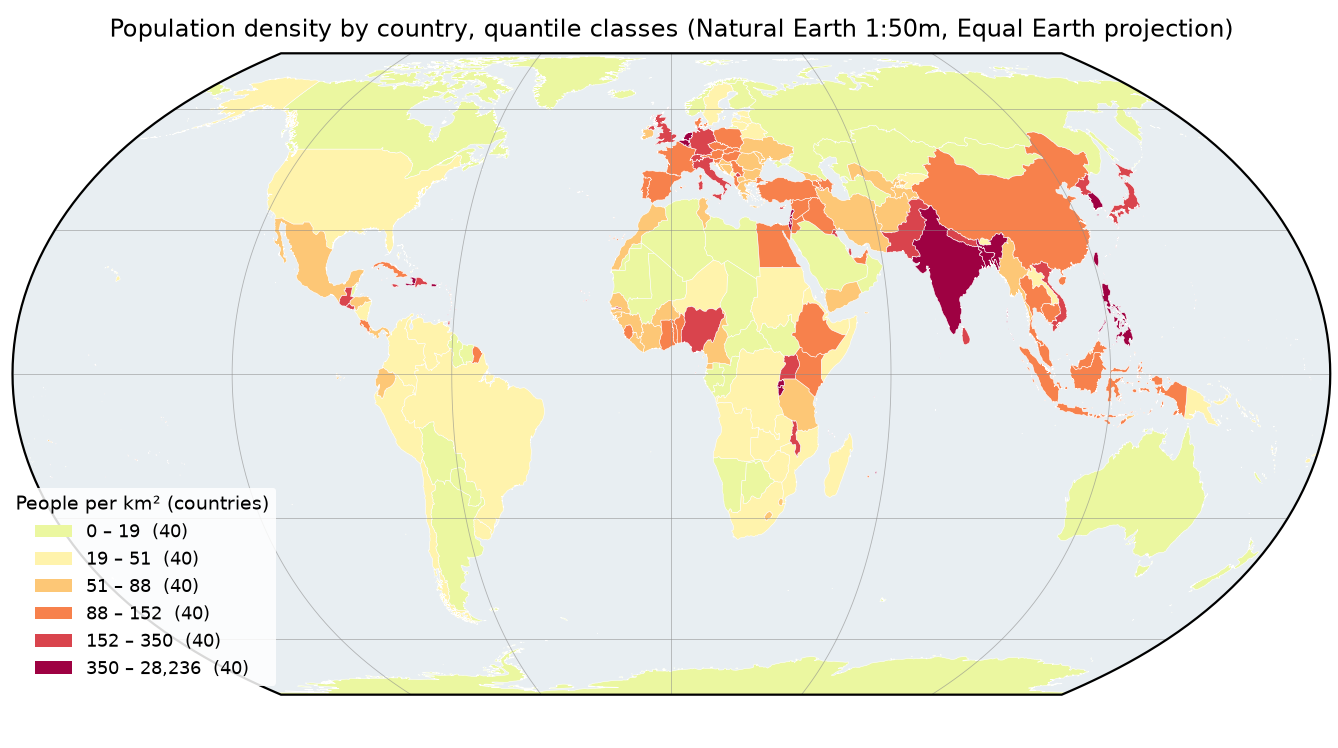
The legend is built by hand from Patch objects rather than from a colour bar, because the classes are discrete: each patch shows exactly one colour, its range and how many countries fall in it. The colours are the warm half of the Spectral palette, a sequential scheme from light to dark, which suits a value that runs from low to high. Use a diverging scheme only when the data have a meaningful midpoint, such as change above and below zero.
Step 3: download districts and census data, and compare classifications
For the main map we use the 331 local authority districts of England and Wales from the ONS (December 2022, generalised to 20 m), joined to Census 2021 population density (table TS006) from the Nomis API.
ONS = ("https://services1.arcgis.com/ESMARspQHYMw9BZ9/arcgis/rest/services/"       "Local_Authority_Districts_December_2022_UK_BGC_V2/FeatureServer/0/query")NOMIS = "https://www.nomisweb.co.uk/api/v01/dataset/NM_2026_1.data.csv"   # Census 2021 TS006 population density
lad_path = DATA / "lad_dec2022_ew_bgc.gpkg"if not lad_path.exists():    r = requests.get(ONS, params={"where": "LAD22CD LIKE 'E%' OR LAD22CD LIKE 'W%'", "outFields": "LAD22CD,LAD22NM",                                  "outSR": 27700, "f": "geojson", "resultRecordCount": 1000}, timeout=300)    r.raise_for_status()    gpd.GeoDataFrame.from_features(r.json()["features"], crs=27700).to_file(lad_path)lad = gpd.read_file(lad_path)r = requests.get(NOMIS, params={"date": "latest", "geography": "TYPE154", "measures": 20100,                                "select": "geography_code,obs_value"}, timeout=300)r.raise_for_status()dens = pd.read_csv(io.StringIO(r.text)).rename(columns={"GEOGRAPHY_CODE": "LAD22CD", "OBS_VALUE": "density"})lad = lad.merge(dens, on="LAD22CD", how="left")
schemes = {"Equal interval": mapclassify.EqualInterval(lad.density, k=6), "Quantiles": mapclassify.Quantiles(lad.density, k=6), "Fisher-Jenks (natural breaks)": mapclassify.FisherJenks(lad.density, k=6), "Manual (rounded, roughly doubling)": mapclassify.UserDefined(lad.density, bins=[100, 250, 500, 1000, 2500, 5000])}331 local authority districts; 0 without a census valuedensity: median 615, min 25.5 (Eden), max 15,703 (Tower Hamlets) usual residents per km2class breaks and counts: Equal interval breaks [2638, 5251, 7864, 10477, 13090, 15703] counts [260, 51, 7, 6, 4, 3] GADF 0.633 Quantiles breaks [158, 338, 615, 1513, 3315, 15703] counts [56, 55, 55, 55, 55, 55] GADF 0.663 Fisher-Jenks (natural breaks) breaks [789, 2005, 3798, 7173, 11839, 15703] counts [178, 62, 48, 29, 11, 3] GADF 0.796 Manual (rounded, roughly doubling) breaks [100, 250, 500, 1000, 2500, 5000, 15703] counts [25, 67, 48, 52, 62, 52, 25] GADF 0.720Density ranges from 25.5 residents per km² in Eden (Cumbria) to 15,703 in Tower Hamlets, a factor of 600, and the distribution is strongly skewed. That makes the classification decisive:
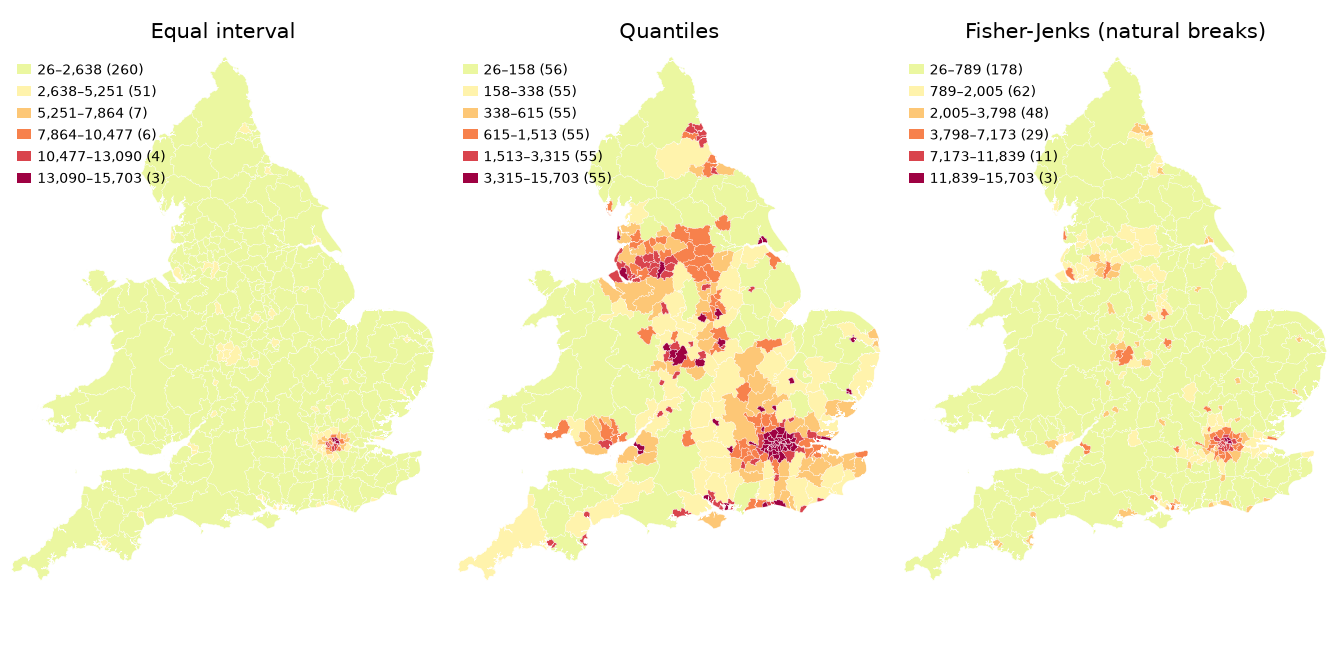
- Equal interval splits the range into equal steps. With skewed data, 260 of 331 districts land in the lowest class and the map shows only London.
- Quantiles put the same number of districts (55) in each class. The map is varied, but the breaks are irregular and hard to remember.
- Fisher-Jenks (natural breaks) minimises variation within classes and had the best fit score, a GADF of 0.80.
- Manual breaks at rounded, roughly doubling values (100, 250, 500, 1,000, 2,500, 5,000) suit skewed data, are easy to read and compare between maps, and still scored a respectable 0.72. We use them for the final map.
Step 4: build a publication-quality map
A finished map needs more than coloured polygons. The function below draws the England and Wales map with everything a reader expects, so we can call it once for each theme. It is shown in full because the order of the layers matters.
OSGB = ccrs.OSGB(approx=False)        # British National Grid, EPSG:27700MM = 1 / 25.4                         # millimetres to inches

def north_arrow(ax, x, y, theme, size=0.06):    """Arrow to true north at axes position (x, y): rotate by the grid convergence at that point."""    px, py = ax.transAxes.transform((x, y))    mx, my = ax.transData.inverted().transform((px, py))    lon, lat = ccrs.PlateCarree().transform_point(mx, my, ax.projection)    nx, ny = ax.projection.transform_point(lon, lat + 0.1, ccrs.PlateCarree())    angle = np.degrees(np.arctan2(nx - mx, ny - my))           # clockwise from grid north    dx, dy = size * np.sin(np.radians(angle)), size * np.cos(np.radians(angle))    ax.annotate("", xy=(x + dx, y + dy), xytext=(x, y), xycoords="axes fraction",                arrowprops=dict(arrowstyle="-|>,head_width=0.35,head_length=0.7", color=theme["text"], lw=1.2))    ax.text(x + dx * 1.35, y + dy * 1.35, "N", transform=ax.transAxes, ha="center", va="center",            fontsize=8, weight="bold", color=theme["text"])    return angle

def ew_map(theme_name, path_stem, dpi):    t = THEMES[theme_name]    c = schemes["Manual (rounded, roughly doubling)"]    cc = SEQ(np.linspace(0, 1, c.k + 1))[1:] if theme_name == "dark" else SEQ(np.linspace(0, 1, c.k + 1))[:-1]    fig = plt.figure(figsize=(120 * MM, 140 * MM), facecolor=t["bg"])    ax = fig.add_axes([0.075, 0.075, 0.905, 0.845], projection=OSGB)    ax.set_extent([60_000, 690_000, -10_000, 680_000], crs=OSGB)    ax.set_facecolor(t["sea"])    # zorder matters: context land first (1), then one collection per class on top (2)    ax.add_geometries(context.geometry, crs=ccrs.PlateCarree(), facecolor=t["land"], edgecolor=t["edge"], lw=0.3,                      zorder=1)    for k in range(c.k):        ax.add_geometries(lad.geometry[c.yb == k], crs=OSGB, facecolor=cc[k], edgecolor=t["edge"], lw=0.15,                          zorder=2)    gl = ax.gridlines(crs=ccrs.PlateCarree(), draw_labels=True, xlocs=range(-8, 4, 2), ylocs=range(50, 57),                      color=t["grid"], lw=0.3, alpha=0.7, dms=True, x_inline=False, y_inline=False)    gl.top_labels = gl.right_labels = False    gl.xlabel_style = gl.ylabel_style = {"size": 6.5, "color": t["muted"]}    lows = np.r_[0, c.bins[:-1]]    labels = [f"{lo:,.0f} – {hi:,.0f}" if i < c.k - 1 else f"{lo:,.0f} – {lad.density.max():,.0f}"              for i, (lo, hi) in enumerate(zip(lows, c.bins))]    labels = [f"{l}   ({n})" for l, n in zip(labels, c.counts)]    leg = ax.legend(handles=[Patch(fc=col, ec=t["edge"], lw=0.3, label=l) for col, l in zip(cc[::-1], labels[::-1])],                    loc="upper right", bbox_to_anchor=(0.995, 0.995), fontsize=6.5, title_fontsize=7,                    title="Usual residents per km²\n(number of districts)", frameon=True, framealpha=0.92,                    facecolor=t["bg"], edgecolor=t["frame"], labelcolor=t["text"])    leg.get_title().set_color(t["text"]); leg.get_frame().set_linewidth(0.4)    # 1 map unit = 1 m in British National Grid; fixed_value gives a round 100 km bar    ax.add_artist(ScaleBar(1, "m", location="lower left", fixed_value=100, fixed_units="km", box_alpha=0,                           color=t["text"], font_properties={"size": 7}, scale_loc="top"))    angle = north_arrow(ax, 0.07, 0.17, t)    # Inset locator: where England and Wales sit in Europe    ins = fig.add_axes([0.09, 0.665, 0.24, 0.24],                       projection=ccrs.LambertAzimuthalEqualArea(central_longitude=10, central_latitude=52))    ins.set_extent([-12, 32, 34, 68], crs=ccrs.PlateCarree())    ins.set_facecolor(t["sea"])    ins.add_geometries(europe.geometry, crs=ccrs.PlateCarree(), facecolor=t["land"], edgecolor=t["edge"], lw=0.2)    ins.add_geometries(ew_outline, crs=OSGB, facecolor="#d53e4f", edgecolor="none")    ins.add_geometries([box(60_000, -10_000, 690_000, 680_000)], crs=OSGB, facecolor="none",                       edgecolor=t["text"], lw=0.8)    ins.spines["geo"].set_edgecolor(t["frame"]); ins.spines["geo"].set_linewidth(0.6)    ax.spines["geo"].set_edgecolor(t["frame"]); ax.spines["geo"].set_linewidth(0.6)    fig.text(0.02, 0.975, "Population density, England and Wales, Census 2021", fontsize=10, weight="bold",             color=t["text"], va="top")    fig.text(0.02, 0.945, "Local authority districts (331), British National Grid", fontsize=7.5,             color=t["muted"], va="top")    fig.text(0.98, 0.006, "Source: ONS Census 2021 (TS006), ONS LAD Dec 2022 BGC, OGL v3.0. Contains OS data "             "© Crown copyright and database right 2022.\nNatural Earth (public domain). Made with cartopy.",             ha="right", va="bottom", fontsize=4.8, color=t["muted"])    paths = {}    for ext in ("png", "pdf", "svg") if theme_name == "light" else ("png",):        p = OUT / f"{path_stem}.{ext}"        fig.savefig(p, dpi=dpi, facecolor=t["bg"])        paths[ext] = p    plt.close(fig)    return angle, paths

countries10 = ne("10m", "cultural", "admin_0_countries")context = countries10[countries10.ADMIN.isin(["United Kingdom", "Ireland", "France", "Isle of Man", "Belgium",                                              "Netherlands", "Guernsey", "Jersey"])]europe = ne("50m", "cultural", "admin_0_countries").cx[-30:45, 30:72]ew_outline = [lad.union_all().simplify(2000)]angle, paths = ew_map("light", "04-england-wales-density-map", dpi=300)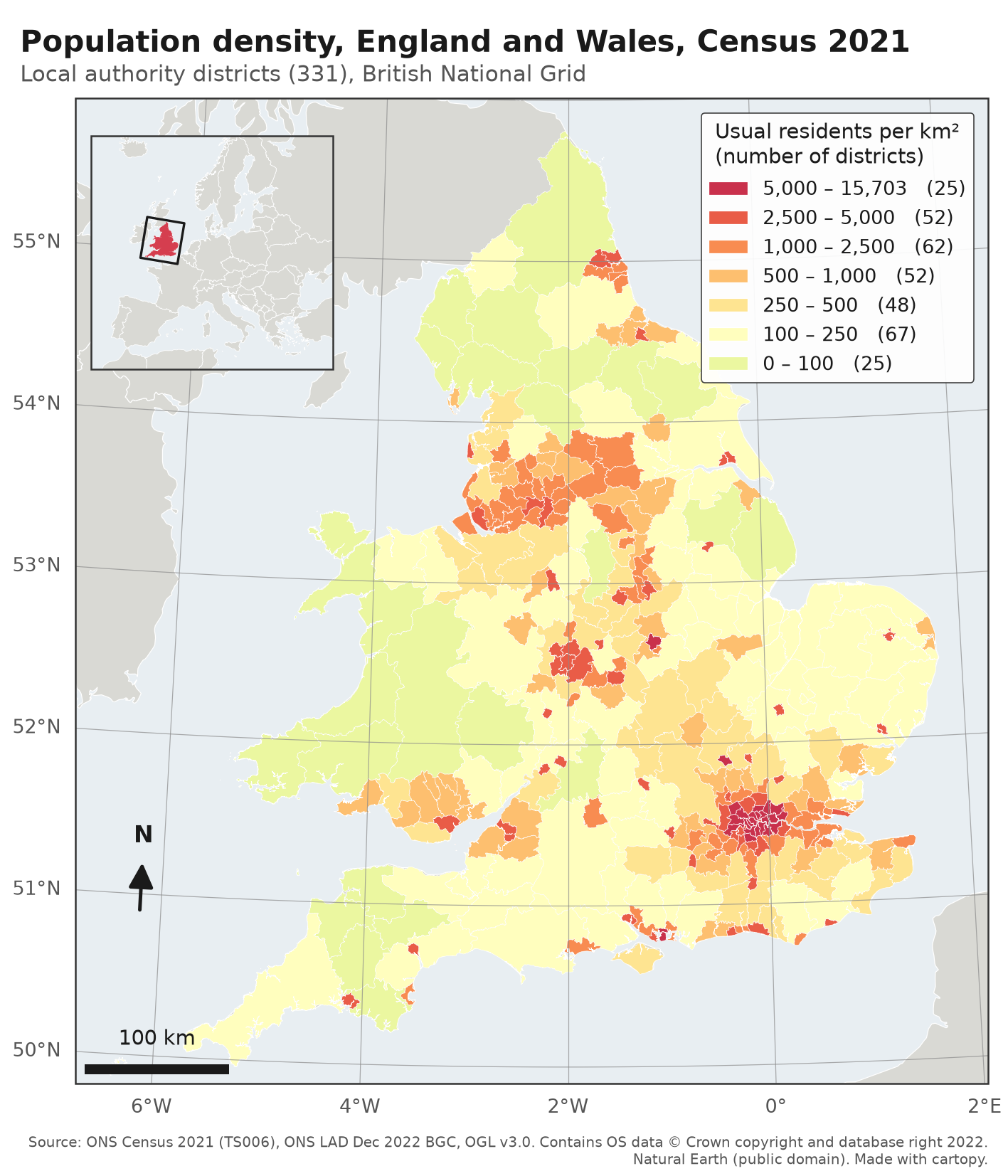
Each element answers a reader’s question:
- Extent and context.
set_extentin British National Grid metres frames England and Wales; Natural Earth 1:10m countries in grey show Scotland, Ireland and France so the reader is not left with a floating shape. Setzorderexplicitly: without it, the context layer can be drawn on top of the choropleth. - Gridlines.
ax.gridlines(crs=ccrs.PlateCarree(), draw_labels=True)draws lines of longitude and latitude, curved in this projection, and labels them on the left and bottom edges.x_inline=False, y_inline=Falsekeeps labels outside the frame. - Legend. Ordered from high to low, with rounded breaks, the unit in the title and the number of districts in each class. The top class is labelled with the real maximum (15,703) rather than “5,000+”, so the reader knows the range.
- Scale bar.
matplotlib_scalebar.ScaleBar(1, "m")tells the bar that one data unit is one metre, which is true in British National Grid.fixed_value=100, fixed_units="km"gives a round 100 km. - North arrow. In British National Grid, grid north and true north coincide only along 2° W. The function finds true north at the arrow’s position by stepping 0.1° north and measuring the angle, then tilts the arrow by it.
- Inset locator. A second cartopy axes in a different projection (Lambert azimuthal equal-area for Europe), with the main map’s extent drawn as a box in British National Grid.
- Title, subtitle and source. Placed with
fig.textin figure coordinates, so they do not move when the map’s extent changes. Crediting the data is a licence requirement, not decoration.
grid convergence at the north arrow: true north is +3.27 degrees from grid north 04-england-wales-density-map.png: 554 KB, 1417 x 1653 px 04-england-wales-density-map.pdf: 2,997 KB 04-england-wales-density-map.svg: 8,791 KB 100 km of grid at easting 100,000 m = 99.97 km on the ground 100 km of grid at easting 400,000 m = 100.05 km on the ground 100 km of grid at easting 650,000 m = 99.94 km on the groundAt the arrow’s position in west Cornwall’s longitude, true north is 3.3° clockwise from the top of the map. The scale check shows why a single scale bar is acceptable here: across the whole map, 100 km of grid is between 99.94 and 100.05 km on the ground. That is not true of a world map in Plate Carrée or Mercator, where the scale changes with latitude by a factor of two or more; leave the scale bar off those, or use a graticule instead.
Colour, contrast and dark backgrounds
The same function draws a dark version by swapping the theme dictionary: background, sea, land, text and grid colours all come from THEMES. For a dark background the colour ramp is shifted one step, so the lowest class is a pale yellow that stands out from the dark land rather than a mid-tone that merges with it.
THEMES = {    "light": dict(bg="white", sea="#e8eef2", land="#d9d9d4", edge="white", text="#1a1a1a", muted="#555555",                  grid="#8a8a8a", frame="#333333", halo="white"),    "dark": dict(bg="#0d1012", sea="#161b1e", land="#2a3033", edge="#0d1012", text="#e7ebe9", muted="#a0aaa7",                 grid="#6d7774", frame="#a0aaa7", halo="#0d1012"),}SEQ = ListedColormap(plt.get_cmap("Spectral_r")(np.linspace(0.42, 1.0, 256)))   # yellow -> red: sequential
_, dark_paths = ew_map("dark", "06-england-wales-density-map-dark", dpi=200)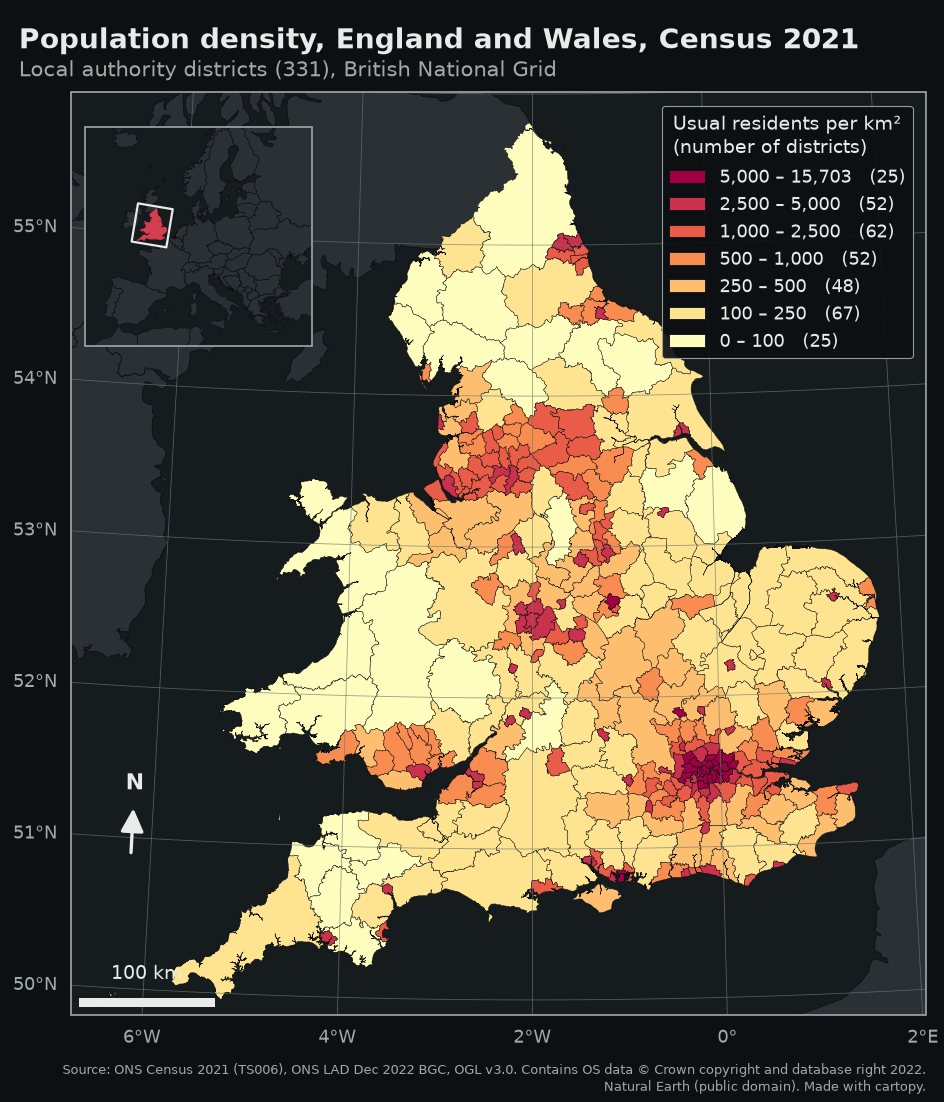
A few rules keep colours legible for everyone: use a sequential ramp for ordered data and check it still reads in greyscale; avoid red–green pairs for the classes that matter most; and keep boundaries thin and in the background colour so small districts do not turn into lines.
Step 5: a raster map with hillshading, a colour bar and an inset
Maps of rasters need the same parts plus a colour bar. The script downloads the two Copernicus DEM GLO-30 tiles that cover Greater Manchester from the Planetary Computer, merges them, reprojects to British National Grid at 30 m and shades the relief with matplotlib’s LightSource.
cat = pystac_client.Client.open(STAC_URL, modifier=pc.sign_inplace)items = list(cat.search(collections=["cop-dem-glo-30"], bbox=list(ll)).items())srcs = [rasterio.open(i.assets["data"].href) for i in items]mosaic, mt = rasterio.merge.merge(srcs, bounds=tuple(ll))src_crs = srcs[0].crswidth = int((xmax - xmin) / 30); height = int((ymax - ymin) / 30)dst_t = rasterio.transform.from_origin(xmin, ymax, 30, 30)out = np.full((height, width), np.nan, dtype="float32")reproject(mosaic[0].astype("float32"), out, src_transform=mt, src_crs=src_crs, dst_transform=dst_t,          dst_crs="EPSG:27700", resampling=Resampling.bilinear)# ... the script writes this to data/gm_dem_bng_30m.tif and reads it back:with rasterio.open(dem_path) as src:    dem = src.read(1)    dext = [src.bounds.left, src.bounds.right, src.bounds.bottom, src.bounds.top]
fig = plt.figure(figsize=(170 * MM, 130 * MM), facecolor="white")ax = fig.add_axes([0.065, 0.05, 0.775, 0.86], projection=OSGB)ax.set_extent(dext, crs=OSGB)norm = Normalize(0, 600)ls = LightSource(azdeg=315, altdeg=45)rgb = ls.shade(np.nan_to_num(dem, nan=0), cmap=plt.get_cmap("Spectral_r"), norm=norm, vert_exag=2, blend_mode="soft", dx=30, dy=30)ax.imshow(rgb, extent=dext, transform=OSGB, origin="upper", interpolation="bilinear")ax.add_geometries(gm.geometry, crs=OSGB, facecolor="none", edgecolor="#1a1a1a", lw=0.7)for _, rw in gm.iterrows(): p = rw.geometry.representative_point() ax.text(p.x, p.y, rw.LAD22NM, transform=OSGB, ha="center", va="center", fontsize=7, color="#111111", path_effects=[pe.withStroke(linewidth=2.2, foreground="white")])cax = fig.add_axes([0.86, 0.25, 0.02, 0.45])cb = fig.colorbar(plt.cm.ScalarMappable(norm=norm, cmap="Spectral_r"), cax=cax, extend="max")cb.set_label("Elevation (m)", fontsize=7.5)Greater Manchester districts: 10DEM tiles: ['Copernicus_DSM_COG_10_N53_00_W002_00_DEM', 'Copernicus_DSM_COG_10_N53_00_W003_00_DEM']DEM 2214 x 1729 px at 30 m; elevation -2 to 634 minside Greater Manchester: 7 to 539 m, mean 123 m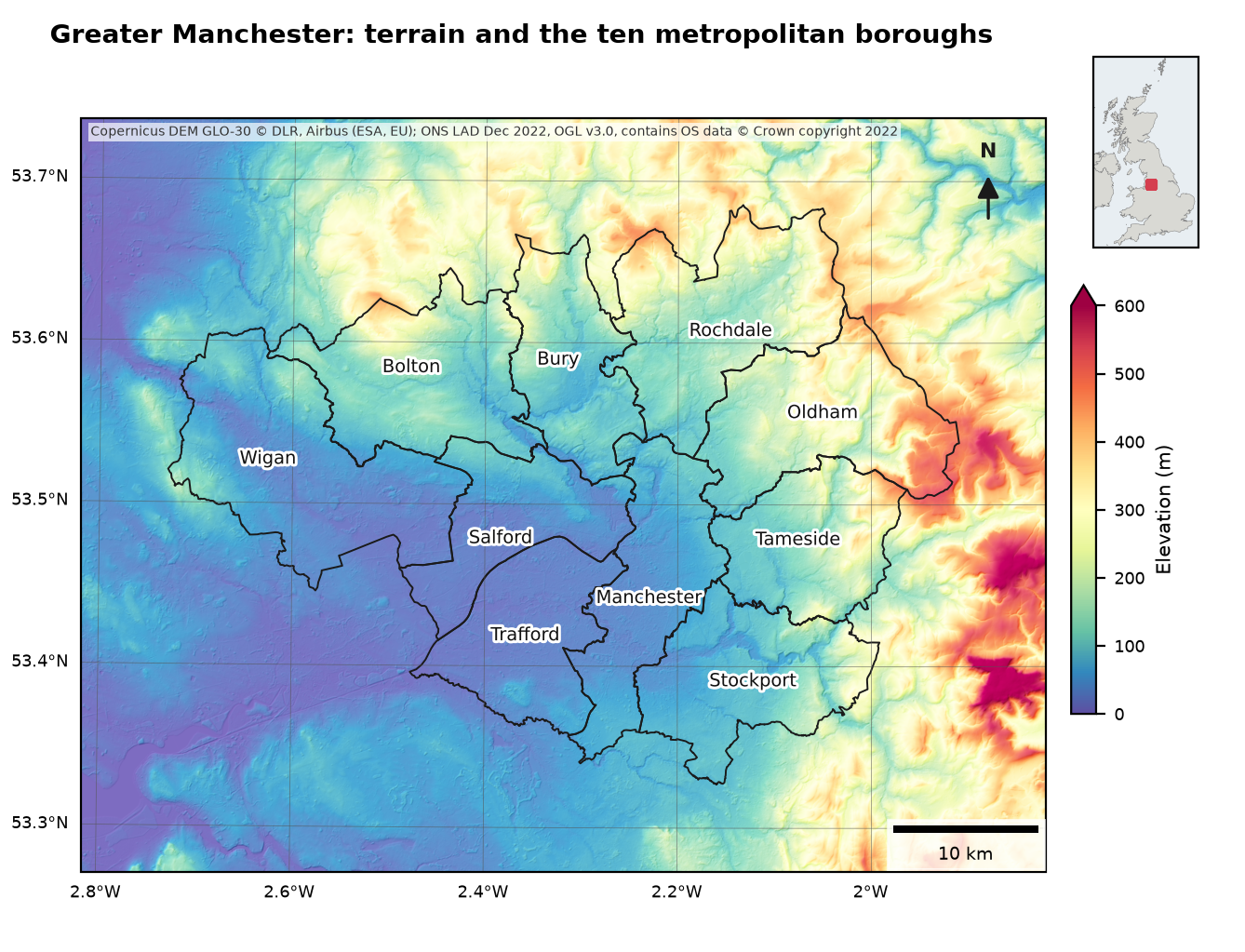
LightSource.shade blends the colour-mapped elevation with a hillshade computed from the same array; dx and dy are the pixel size in metres, so the slopes are correct. The colour bar is drawn from a separate ScalarMappable with the same norm and colormap, because the image itself is already RGB. Labels get a white halo with path_effects so they stay readable on any colour. The Spectral palette suits elevation because it runs through many distinguishable hues; for a single variable such as density, the sequential half used above is the better choice.
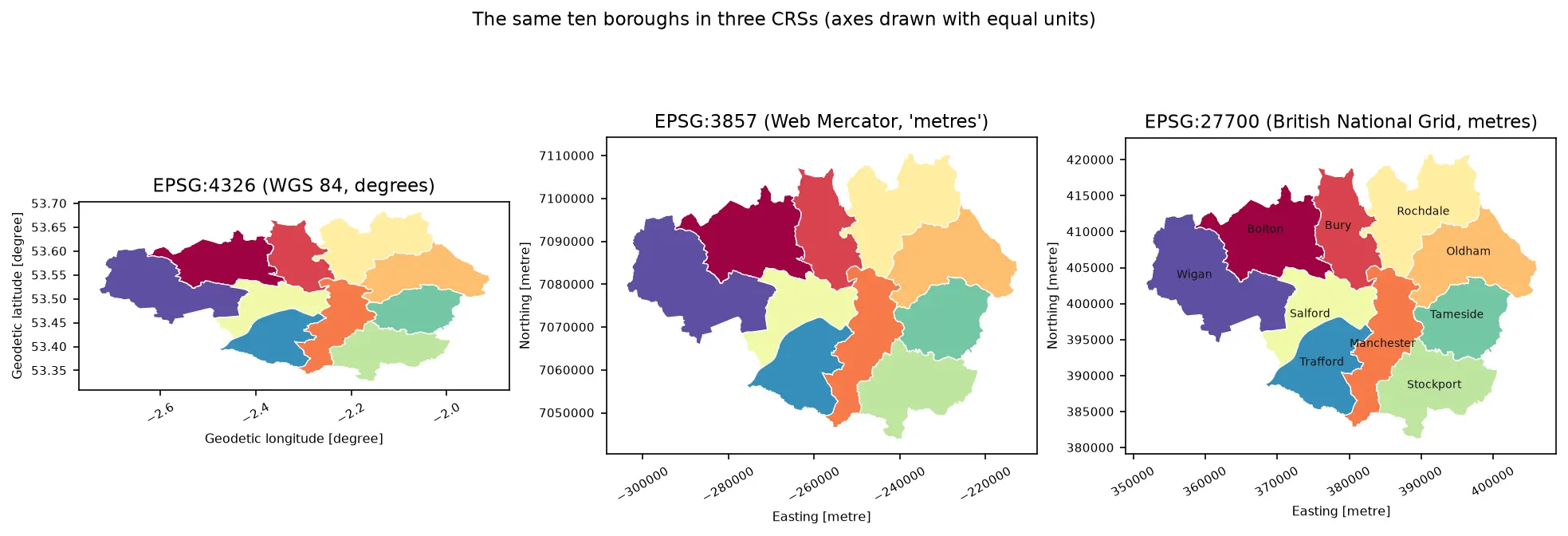
This map uses the same ten boroughs as the Geospatial Python essentials series, where Part 3 polygonizes ESA WorldCover for Greater Manchester and shows how to publish rasters as Cloud Optimized GeoTIFFs.
Pitfalls and limitations
- Pass the data’s CRS, every time. Forgetting
crs=inadd_geometriesortransform=inimshowandplotis the commonest cartopy bug: the data are assumed to be in the axes’ projection and end up in the wrong place, or vanish. - GeoDataFrame.plot on cartopy axes. It works only if the data are already in the axes’ projection; it does not reproject. Reproject first with
gdf.to_crs(ax.projection)or useadd_geometries. - Scale bars on world maps. They are only valid where scale is nearly constant, as in a national grid. On Mercator or Plate Carrée maps, omit them.
- Generalised boundaries and coastlines. We used ONS’s generalised (BGC) boundaries and Natural Earth’s 1:10m coastline; they do not match exactly at the coast and are not suitable for measuring areas. Use full-resolution boundaries for analysis and generalised ones for small-scale maps.
- Vintages differ. Census 2021 densities are on 2021 local authority codes, joined to December 2022 boundaries; all 331 matched here, but boundary changes in later years can break joins. Natural Earth’s population estimates are from 2018 to 2020, and its country polygons follow its own policy on disputed borders.
- The DEM is a surface model. The Copernicus DEM includes buildings and trees, so city centres look slightly raised; it is fine for a backdrop, but use a bare-earth model for hydrology.
- Downloads on the first run. Cartopy fetches Natural Earth files on demand; the script stores them in
cache/cartopyso later runs work offline.
Frequently asked questions
How do I make a map in Python?
Install cartopy and matplotlib, create an axes with a projection (plt.axes(projection=ccrs.EqualEarth())), add data with ax.add_geometries(gdf.geometry, crs=ccrs.PlateCarree()) or ax.imshow(..., transform=...), and save with plt.savefig("map.png", dpi=300). Add ax.coastlines() or Natural Earth features for context and ax.gridlines(draw_labels=True) for labelled coordinates. For quick checks, gdf.plot() from GeoPandas is enough; for interactive web maps, use folium.
What is cartopy used for?
Cartopy adds map projections and geographic data handling to matplotlib. It knows hundreds of coordinate reference systems, reprojects vectors and rasters on the fly, draws gridlines and labels, and downloads Natural Earth layers. It replaced Basemap, which is no longer maintained, as the standard Python library for static maps.
How do I add a scale bar and north arrow to a cartopy map?
For the scale bar, install matplotlib-scalebar and add ScaleBar(1, "m") to an axes whose projection is in metres, such as British National Grid or UTM. For a north arrow, use ax.annotate("", xy=..., xytext=..., arrowprops=...) with an “N” label; on a projected map, rotate it by the grid convergence, as in Step 4, so it points to true north.
How do I make a choropleth map with a proper legend in Python?
Classify the values with mapclassify (Quantiles, FisherJenks or UserDefined with your own breaks), draw each class with its own colour, and build the legend from matplotlib.patches.Patch objects labelled with the class ranges. GeoPandas can do this in one line with gdf.plot(column="density", scheme="FisherJenks", k=6, legend=True), but a hand-built legend gives you control over labels, order and rounding.
How do I save a matplotlib map for publication?
Set figsize to the printed size in inches (millimetres divided by 25.4), design the fonts in points for that size, and save with fig.savefig("map.png", dpi=300) for raster output or fig.savefig("map.pdf") for vector output. Use facecolor= to set the background, and check the result at 100% zoom before submitting.
Which projection should I use for a map of the UK?
British National Grid (ccrs.OSGB(approx=False), EPSG:27700) for Great Britain, and Irish Transverse Mercator (EPSG:2157) for Ireland and Northern Ireland together. Both are transverse Mercator projections with nearly constant scale across the country, so scale bars, distances and areas are reliable.
Next steps
- Make the interactive version of a map like this with interactive web maps in Python with folium, or serve large layers as vector tiles with PMTiles and MapLibre.
- New to vector data in Python? Start with GeoPandas: getting started, then coordinate reference systems in Python for projections and EPSG codes.
- Map summaries of rasters by area with zonal statistics in Python, or polygons derived from a land-cover raster with raster to vector in Python.
- Derive slope and aspect to map alongside the hillshade with raster terrain analysis in Python with rasterio.
- Map clusters rather than raw values with hot spot analysis with Getis-Ord Gi* in Python.
Data and licences
- Natural Earth 1:110m land and 1:50m and 1:10m admin-0 countries: public domain, naturalearthdata.com, downloaded through cartopy.
- Local Authority Districts (December 2022) Boundaries UK BGC V2: Source: Office for National Statistics, licensed under the Open Government Licence v3.0. Contains OS data © Crown copyright and database right 2022. From the ONS Open Geography Portal, accessed on 23 October 2026.
- Census 2021 TS006 (population density): Office for National Statistics via Nomis, Open Government Licence v3.0.
- Copernicus DEM GLO-30: © DLR e.V. 2010–2014 and © Airbus Defence and Space GmbH 2014–2018, provided under COPERNICUS by the European Union and ESA; all rights reserved. Free to use under the Copernicus DEM licence. Accessed from the Microsoft Planetary Computer.
- Code:
python_maps_cartopy.py, tested with Python 3.12.0, cartopy 0.26.0, matplotlib 3.11.2, matplotlib-scalebar 0.9.0, mapclassify 2.11.0, geopandas 1.2.0 and rasterio 1.5.2.
Key terms
- Cartopy
- A Python package that adds map projections to matplotlib. Its GeoAxes know their coordinate reference system and reproject data on the fly when you pass transform= or crs=.
- Choropleth
- A thematic map that shades areas (countries, districts) by a value. Use rates or densities rather than raw counts, so large areas do not dominate.
- Classification (class breaks)
- Grouping a continuous value into a few classes for colouring. Common schemes are equal interval, quantiles, natural breaks (Fisher-Jenks) and manual breaks.
- Goodness of variance fit (GVF / GADF)
- A score from 0 to 1 of how well a classification groups similar values together. mapclassify reports the absolute-deviation version, GADF.
- Grid convergence
- The angle between grid north (up the map's y axis) and true north at a point. In British National Grid it is zero on the 2° W central meridian and grows towards the east and west.
- Tissot's indicatrix
- Identical small circles drawn on the ground and plotted in a projection; their changing size and shape show how the projection distorts area and angles.
Data for this tutorial
- Natural Earth · 1:110m, 1:50m and 1:10m land and countries, with population estimates
- ONS Open Geography Portal · Local authority districts, December 2022, generalised (BGC)
- Nomis · Census 2021 TS006 population density by local authority
- Copernicus DEM GLO-30 · 30 m elevation, via the Microsoft Planetary Computer
Licences and formats for each source are listed in the GIS data sources catalogue.