Raster to vector in Python: polygonize with rasterio, rasterize boundaries and convert a GeoTIFF to a Cloud Optimized GeoTIFF
Convert raster to vector in Python with rasterio.features.shapes on 10 m ESA WorldCover for Greater Manchester: polygonize water and built-up land, fix invalid polygons, simplify without gaps, rasterize ONS district boundaries for land-cover shares, then write and validate a Cloud Optimized GeoTIFF with rio-cogeo and measure HTTP range reads.
- Level
- Intermediate
- Tested with
- Python 3.12
- Source code
- Download scripts
Key takeaways
- rasterio.features.shapes turns every connected group of equal pixels into a polygon. Greater Manchester's 0.9% of WorldCover water became 1,302 polygons whose total area (11.047 km²) matched the pixel count (11.055 km²), and burning them back with rasterize reproduced the mask exactly: 0 of 42.4 million pixels differed.
- Use connectivity=4 when you want valid polygons. With connectivity=8, 1,121 of 8,802 built-up polygons were invalid (ring self-intersections where pixels touch only at a corner); with 4 there were none.
- Simplify in a projected CRS, and use shapely.coverage_simplify for land-cover maps. A 10 m tolerance cut built-up vertices by 72% and the GeoPackage from 19.6 to 6.4 MB for a 0.16% area change; plain simplify on a 4 km tile left 92,228 m² of overlaps and 127,716 m² of gaps, coverage_simplify none.
- A Cloud Optimized GeoTIFF is a tiled GeoTIFF with internal overviews. The COG of the 40.4 MB land-cover grid was 2.6 MB, and over HTTP it served a 4 km window in 0.13 MB (against 4.1 MB) and a 1/16 thumbnail in 0.05 MB (against 15.1 MB in 204 requests).
Before you start
- Basic Python, NumPy and GeoPandas. Part 1 of this series (coordinate reference systems) and Part 2 (spatial joins) help but are not required
- Python 3.10+ with rasterio, rio-cogeo, geopandas, shapely, pyproj, pystac-client, planetary-computer, pandas, requests and matplotlib
- An internet connection: the boundaries come from the ONS Open Geography Portal and the land cover from the Microsoft Planetary Computer, with no account or key
Short answer: to convert a raster to vector in Python, read the band with rasterio and pass it to rasterio.features.shapes(array, mask=array > 0, transform=src.transform, connectivity=4). It yields one (geometry, value) pair per connected region of equal pixels; wrap the geometries with shapely.geometry.shape and put them in a GeoDataFrame with the raster’s CRS. Reproject to a metric CRS before measuring or simplifying. To go the other way, rasterio.features.rasterize(zip(geoms, values), out_shape=..., transform=...) burns polygons into a grid. To convert a GeoTIFF to a Cloud Optimized GeoTIFF, run cog_translate(src, dst, cog_profiles.get("deflate")) from rio-cogeo (or rasterio.shutil.copy(src, dst, driver="COG")) and check the result with cog_validate.
Rasters and vectors are two views of the same world, and most projects need to cross between them: land cover to polygons for a planning report, council boundaries to a grid for per-district statistics, and a finished raster to a format the web can read. This tutorial does all three for Greater Manchester with real data: the 10 m ESA WorldCover 2021 map and the ten metropolitan boroughs from the ONS.
You will learn how to:
- read just the Greater Manchester window of a 103 MB remote WorldCover tile;
- rasterize ONS district boundaries onto the land-cover grid and tabulate land cover per district;
- polygonize water with
rasterio.features.shapes, check the areas, round-trip it and clean speckle with a sieve; - polygonize built-up land, see why connectivity decides whether polygons are valid, and simplify without opening gaps;
- convert the GeoTIFF to a Cloud Optimized GeoTIFF, validate it and compare file sizes and compression;
- measure what a COG saves when it is read over HTTP range requests.
All outputs below are real results from raster_to_vector.py, run on 23 October 2026 with Python 3.12.0, rasterio 1.5.2 (GDAL 3.12.2), rio-cogeo 7.0.4, geopandas 1.2.0 and shapely 2.2.0.
Install the packages
pip install rasterio rio-cogeo geopandas shapely pyproj pystac-client planetary-computer pandas requests matplotlibrasterio’s wheels include GDAL, so no separate GDAL install is needed. If you have PostGIS or another GIS installed, stray PROJ_LIB, PROJ_DATA or GDAL_DATA environment variables can point the wheels at the wrong data files; the script removes them at start-up. The pinned versions are in requirements.txt.
Step 1: download the Greater Manchester boundaries
The ten boroughs (Bolton, Bury, Manchester, Oldham, Rochdale, Salford, Stockport, Tameside, Trafford and Wigan) have consecutive ONS codes, E08000001 to E08000010. We ask the Open Geography Portal’s ArcGIS REST service for them in British National Grid and cache the result as a GeoPackage.
ONS = ("https://services1.arcgis.com/ESMARspQHYMw9BZ9/arcgis/rest/services/"       "Local_Authority_Districts_December_2024_Boundaries_UK_BFC/FeatureServer/0/query")GM_CODES = [f"E080000{i:02d}" for i in range(1, 11)]    # the ten Greater Manchester metropolitan boroughsBNG = "EPSG:27700"
gm_path = DATA / "gm_districts.gpkg"if not gm_path.exists(): where = "LAD24CD IN (" + ",".join(f"'{c}'" for c in GM_CODES) + ")" r = requests.get(ONS, params={"where": where, "outFields": "LAD24CD,LAD24NM", "outSR": 27700, "f": "geojson"}, timeout=120) r.raise_for_status() gpd.GeoDataFrame.from_features(r.json()["features"], crs=BNG).to_file(gm_path)districts = gpd.read_file(gm_path).sort_values("LAD24CD").reset_index(drop=True)districts["zone"] = np.arange(1, len(districts) + 1, dtype="uint8") # 1..10, 0 = outsidegm_wgs84 = districts.to_crs(4326)bounds = gm_wgs84.total_bounds10 districts, CRS EPSG:27700, total area 1,276.0 km2bounds (lon/lat): [-2.7304 53.3272 -1.9096 53.6857]The zone column (1 to 10) is the value we will burn into the raster in Step 3; 0 is reserved for “outside Greater Manchester”.
Step 2: read only the window you need from a remote COG
ESA WorldCover is stored on the Planetary Computer as 3 × 3 degree Cloud Optimized GeoTIFFs. We search the STAC catalogue, sign the asset URL and read a window covering the county’s bounding box. To show what “cloud optimised” buys, the script also logs GDAL’s HTTP range requests (without printing the signed URLs, which contain access tokens).
catalog = pystac_client.Client.open(STAC_URL, modifier=pc.sign_inplace)items = [it for it in catalog.search(collections=["esa-worldcover"], bbox=list(bounds)).items() if "2021" in it.id]href = items[0].assets["map"].href
with rasterio.Env(CPL_DEBUG=True, GDAL_DISABLE_READDIR_ON_OPEN="EMPTY_DIR"):    with rasterio.open(href) as src:        win = from_bounds(*bounds, transform=src.transform).round_offsets().round_lengths()        lc = src.read(1, window=win)        transform = src.window_transform(win)        crs = src.crs
# Save a plain (non-cloud-optimised) GeoTIFF: GDAL's defaults = uncompressed strips, no overviews.profile = {"driver": "GTiff", "dtype": "uint8", "count": 1, "width": lc.shape[1], "height": lc.shape[0], "crs": crs, "transform": transform, "nodata": 0}with rasterio.open(plain_tif, "w", **profile) as dst: dst.write(lc, 1)STAC item: ESA_WorldCover_10m_2021_v200_N51W003remote COG: 36000 x 36000 px, 1024 x 1024 tiles, deflate, 103.0 MB on the serverwindow read: 9850 x 4302 px using 6 HTTP range requests, 2.96 MB downloaded (2.9% of the file)saved worldcover_gm_plain.tif: 40.4 MB, CRS EPSG:4326, pixel 8.333e-05 x 8.333e-05 degreespixel size on the ground: 51.1 to 51.5 m2 (north to south edge of the subset), not 100 m2Two things are worth noticing. First, GDAL fetched 2.96 MB of a 103 MB file, because the file is tiled and compressed; we return to this in Step 7. Second, WorldCover’s “10 m” pixels are 0.3 arcseconds square in EPSG:4326. At 53.5° N that is about 10 m north–south but only about 5.5 m east–west, so each pixel covers roughly 51 m², not 100 m². Any area computed by counting pixels must use the true pixel area, which the script calculates per row with pyproj.Geod. (Part 1 of the series explains why degrees are not metres.)
Step 3: rasterize the district boundaries
To summarise land cover by borough, burn the boroughs into a raster on exactly the same grid as the land cover: same shape, same transform, same CRS. Then every pixel has a land-cover class and a district code, and a cross-tabulation is a single NumPy call.
zones = features.rasterize(zip(gm_wgs84.geometry, districts["zone"]), out_shape=lc.shape, transform=transform,                           fill=0, dtype="uint8")zones_touch = features.rasterize(((g, 1) for g in gm_wgs84.geometry), out_shape=lc.shape, transform=transform,                                 fill=0, dtype="uint8", all_touched=True)inside = zones > 0
# Cross-tabulate land cover by district: one bincount over (zone, class) pairs, weighted by pixel area.weights = np.broadcast_to(row_area[:, None], lc.shape)key = zones.astype(np.int32) * 256 + lctab = np.bincount(key[inside], weights=weights[inside], minlength=11 * 256).reshape(11, 256)[1:]
Note that the geometries are reprojected to the raster’s CRS (EPSG:4326), not the other way round: rasterizing never resamples the land cover.
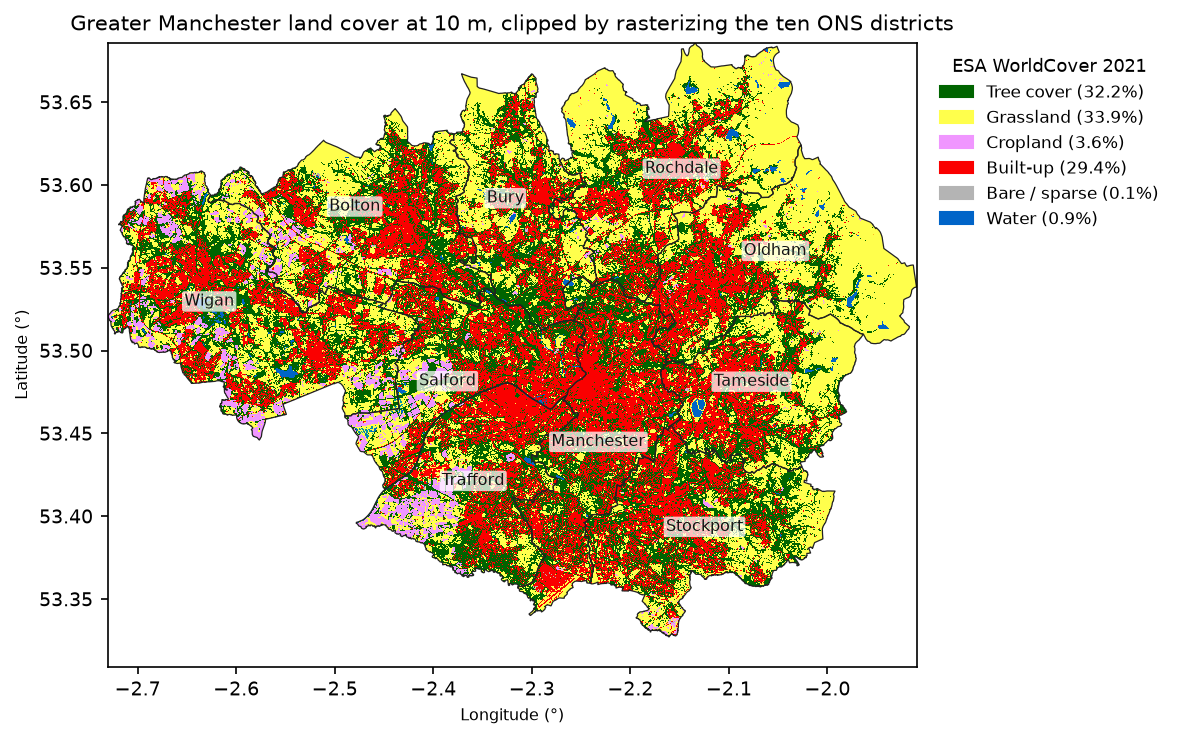
pixels inside Greater Manchester: 24,905,429 (centre rule) vs 24,927,992 (all_touched)rasterized area 1,276.9 km2 vs vector area 1,276.0 km2 (+0.07%)Greater Manchester land cover (% of area):Tree cover            32.2Grassland             33.9Cropland               3.6Built-up              29.4Bare / sparse          0.1Water                  0.9
by district (% of district area):            Built-up  Tree cover  Grassland  Cropland  WaterManchester      50.5        37.8       11.1       0.1    0.4Salford         34.7        35.8       19.6       8.1    1.3Trafford        32.6        35.8       20.4      10.1    1.0Stockport       30.8        39.3       28.8       0.9    0.1Tameside        29.9        31.7       36.9       0.2    1.1Bolton          28.3        33.2       34.6       3.2    0.5Wigan           26.8        34.1       28.0      10.0    1.1Bury            24.9        35.5       37.8       0.8    0.7Oldham          22.3        20.8       55.5       0.5    0.8Rochdale        20.1        23.0       54.8       0.5    1.5
By default rasterize assigns a pixel to a polygon if the pixel’s centre is inside it. With 10 m pixels and 1,276 km² of boroughs, the rasterized area is within 0.07% of the vector area. all_touched=True added 22,563 boundary pixels; it is useful for thin features such as roads and rivers that would otherwise vanish, but it double-counts pixels on shared borders, so do not use it for zone statistics.
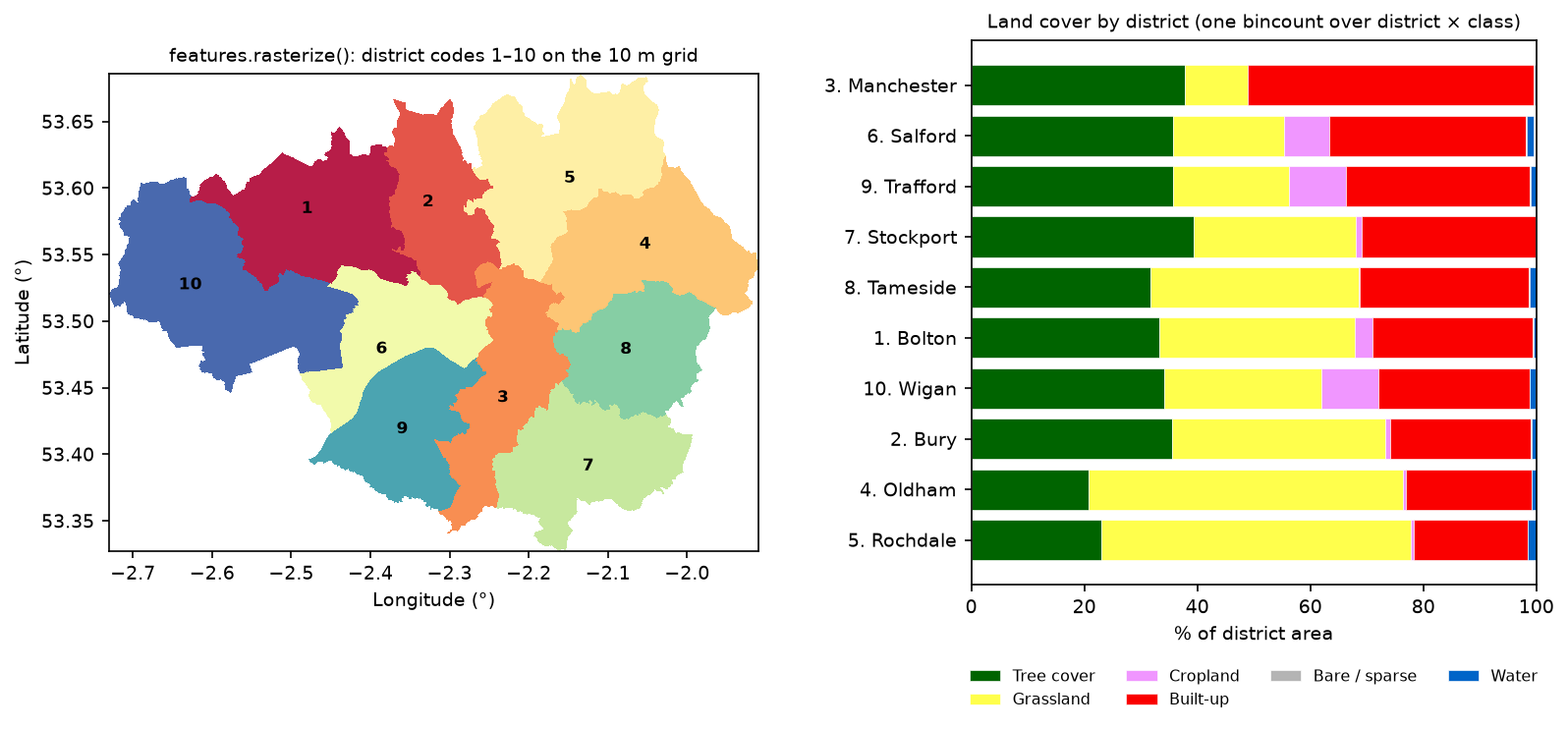
Manchester is half built-up; Oldham and Rochdale, which reach up onto the moors of the South Pennines, are more than half grassland. Trafford, Salford and Wigan have the only significant cropland, on the mossland to the west. If you need weighted statistics for partial pixels or many raster bands, see zonal statistics in Python with exactextract; rasterizing is the simplest approach when the zones are large compared with the pixels.
Step 4: polygonize water with rasterio.features.shapes
rasterio.features.shapes is the Python equivalent of gdal_polygonize. It takes an integer array, an optional mask and the affine transform, and yields GeoJSON-like geometries with the pixel value. Pass a mask, or you will also get polygons for every region of zeros (the background).
water = ((lc == 80) & inside).astype("uint8")results = {}for conn in (4, 8):    t0 = time.perf_counter()    polys = [shape(g) for g, v in features.shapes(water, mask=water.astype(bool), transform=transform,                                                  connectivity=conn)]    results[conn] = (polys, time.perf_counter() - t0)    print(f"connectivity={conn}: {len(polys):,} polygons in {results[conn][1]:.2f} s")water_gdf = gpd.GeoDataFrame({"class": ["Water"] * len(results[4][0])}, geometry=results[4][0], crs=crs).to_crs(BNG)water_gdf["area_m2"] = water_gdf.area
# Round trip: burn the polygons back and compare with the source mask.back = features.rasterize(((g, 1) for g in water_gdf.to_crs(crs).geometry), out_shape=lc.shape,                          transform=transform, fill=0, dtype="uint8")
# Clean up with a sieve before vectorising: remove water patches smaller than 10 pixels.sieved = features.sieve(water, size=10, connectivity=4)connectivity=4: 1,302 polygons in 0.68 sconnectivity=8: 1,186 polygons in 0.65 stotal water area: polygons 11.047 km2, pixel count x pixel area 11.055 km2single-pixel polygons: 366 of 1,302 (28%), holding 0.2% of the water areapolygon area: median 409 m2, 90th percentile 11562 m2, 99th 172,443 m2, max 64.5 haround trip (shapes -> to_crs -> back -> rasterize): 0 pixels differ out of 42,374,700after sieve(size=10): 611 polygons, water area 10.966 km2 (-0.8%)48 water bodies >= 5 ha; the largest: 64.5 ha Wigan centroid 53.4866 N, -2.5483 E 51.0 ha Tameside centroid 53.4642 N, -2.1331 E 40.9 ha Rochdale centroid 53.6303 N, -2.0969 E 35.6 ha Rochdale centroid 53.6575 N, -2.1388 E 34.3 ha Oldham centroid 53.5307 N, -1.9758 E 27.4 ha Wigan centroid 53.5284 N, -2.6360 E 26.7 ha Rochdale centroid 53.6606 N, -2.0443 E 26.5 ha Tameside centroid 53.4676 N, -2.1279 EThe polygonized area agrees with the pixel count to within 0.07%, and rasterizing the polygons back reproduces the water mask exactly, even after a round trip through British National Grid. Vectorising is lossless; the polygons are simply the pixel edges.
The largest water bodies are recognisable: Pennington Flash in Wigan (64.5 ha), the Audenshaw Reservoirs in Tameside (51.0 and 26.5 ha, two separate basins), Hollingworth Lake and Watergrove Reservoir in Rochdale, and Dove Stone Reservoir in Oldham. We found each lake’s borough with districts.intersects(geometry); for thousands of features, the spatial join in Part 2 of this series is the faster, tidier way.
The size distribution is typical of polygonized classifications: 28% of the polygons are single pixels holding 0.2% of the water, mostly isolated misclassified pixels. Sieve before you polygonize: features.sieve(size=10) merged patches under 10 pixels into their surroundings, halving the polygon count for a 0.8% loss of water area.
Step 5: polygonize built-up land, fix validity and simplify
Built-up land is a harder case: it is a third of the county, intricately connected, and full of holes (parks, gardens, water).
built_raw = ((lc == 50) & inside).astype("uint8")for conn in (8, 4):    built = features.sieve(built_raw, size=10, connectivity=conn)    polys = [shape(g) for g, v in features.shapes(built, mask=built.astype(bool), transform=transform,                                                  connectivity=conn)]    bad = [p for p in polys if not p.is_valid]    if bad:        fixed = shapely.make_valid(np.array(bad))built_gdf = gpd.GeoDataFrame({"class": ["Built-up"] * len(polys)}, geometry=polys, crs=crs).to_crs(BNG)  # 4-connected
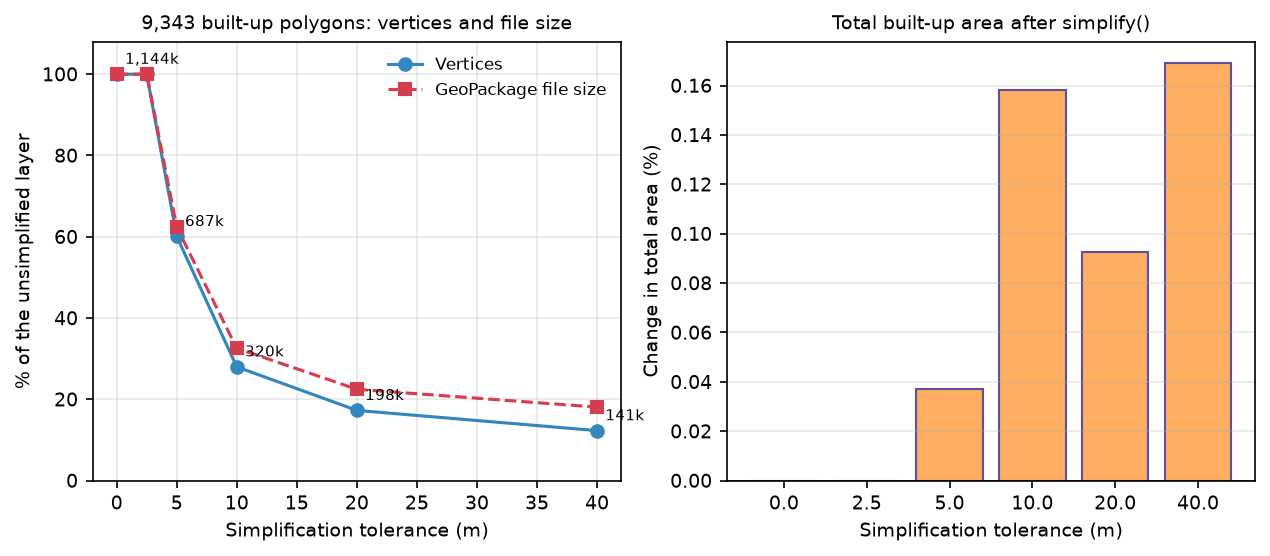
for tol in [0, 2.5, 5, 10, 20, 40]: g = built_gdf.geometry if tol == 0 else built_gdf.geometry.simplify(tol, preserve_topology=True) path = DATA / f"built_simplify_{tol}.gpkg" path.unlink(missing_ok=True) # overwriting a layer does not shrink an existing GeoPackage gpd.GeoDataFrame(geometry=g, crs=BNG).to_file(path)connectivity=8: 8,802 polygons in 2.6 s, 1,121 invalid (e.g. Ring Self-intersection) shapely.make_valid() repairs them; geometry types now: [6] (6 = MultiPolygon)connectivity=4: 9,343 polygons in 3.2 s, 0 invalid9,343 built-up polygons kept (sieve size=10, connectivity=4); largest 193.7 km2 (51% of all built-up area); 13,882 holes in total tolerance_m vertices area_km2 invalid gpkg_MB area_change_% vertices_% 0.0 1144229 376.400 0 19.578 0.000 100.000 2.5 1144229 376.400 0 19.578 0.000 100.000 5.0 687426 376.539 0 12.211 0.037 60.078 10.0 320242 376.996 0 6.375 0.158 27.988 20.0 197609 376.749 0 4.398 0.093 17.270 40.0 140651 377.037 0 3.539 0.169 12.292One polygon, the continuous urban fabric from Bolton to Stockport, holds 51% of all built-up area and 13,882 holes. That is correct, but it is why polygonized land cover is slow to draw and heavy to store.
Simplification helps, if you do it in a projected CRS so the tolerance is in metres. Tolerances below about half a pixel (2.5 m here) change nothing, because every vertex is already on a pixel corner. At 10 m, one pixel width, the layer kept 28% of its vertices and the GeoPackage shrank from 19.6 MB to 6.4 MB, while the total area changed by only 0.16%. preserve_topology=True (the default in GeoPandas) kept every polygon valid.
Simplify a land-cover map without gaps
Simplifying each polygon independently is fine for isolated features, but not for a coverage, where polygons share edges, such as a full land-cover map. Each neighbour’s copy of a shared edge is simplified differently, opening slivers and overlaps. Shapely 2.1 added coverage_simplify, which simplifies shared edges once.
cov = gpd.GeoDataFrame([{"code": int(v), "geometry": shape(g)} for g, v in features.shapes(sub, transform=sub_t)], crs=crs).to_crs(BNG)for name, g in [("simplify(10)", cov.geometry.simplify(10).values), ("coverage_simplify(10)", shapely.coverage_simplify(cov.geometry.values, 10))]: union = shapely.union_all(g).area overlap = shapely.area(g).sum() - union1,883 polygons covering 16.123 km2, 48,822 verticessimplify(10) vertices 19,303 overlaps 92,228 m2 gaps 127,716 m2coverage_simplify(10) vertices 27,988 overlaps 0 m2 gaps 0 m2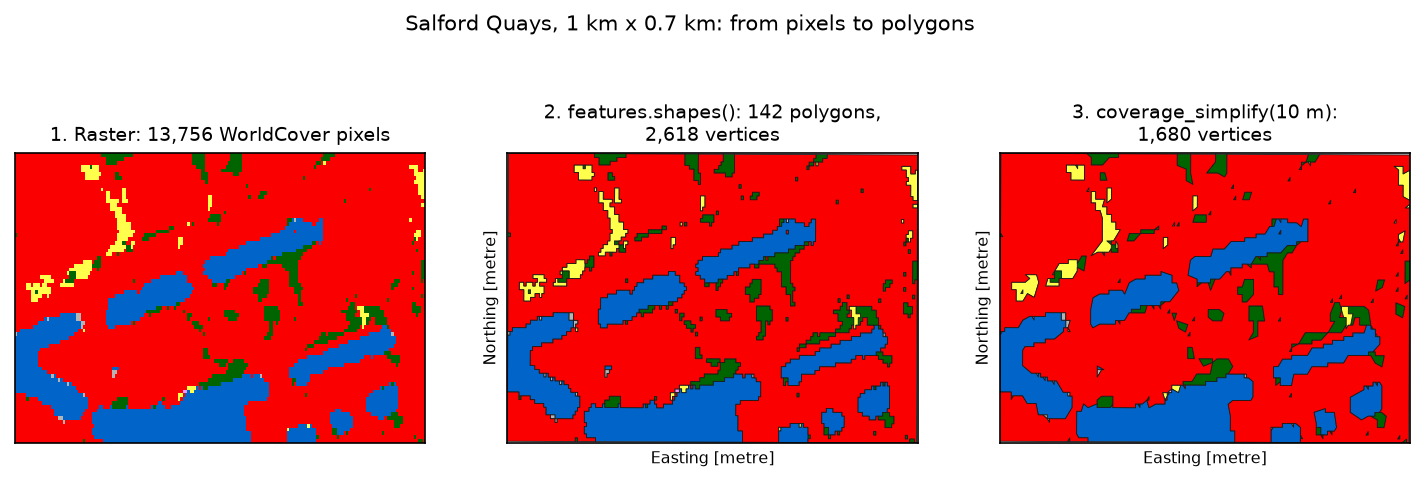
Step 6: convert the GeoTIFF to a Cloud Optimized GeoTIFF
A Cloud Optimized GeoTIFF is still a normal GeoTIFF that any GIS can open. What makes it “cloud optimised” is its layout:
- internal tiling (here 512 × 512 pixels), so a small area can be read without decoding whole rows;
- overviews, lower-resolution copies inside the same file, so a zoomed-out view reads a few small tiles;
- header and tile index at the start of the file, so one request finds where everything else is.
GDAL’s default GeoTIFF has none of these: it writes uncompressed one-row strips and no overviews. cog_validate from rio-cogeo checks a file against the specification.
from rio_cogeo.cogeo import cog_translate, cog_validatefrom rio_cogeo.profiles import cog_profiles
ok, errors, warns = cog_validate(str(masked_tif), quiet=True)
cog_tif = OUT / "worldcover_gm_cog.tif"cog_translate(masked_tif, cog_tif, cog_profiles.get("deflate"), overview_resampling="mode", quiet=True)ok, errors, warns = cog_validate(str(cog_tif), quiet=True)
# The same with GDAL's own COG driver (GDAL 3.1+), no extra package neededrasterio.shutil.copy(masked_tif, gdal_cog, driver="COG", COMPRESS="DEFLATE", OVERVIEW_RESAMPLING="MODE", BLOCKSIZE=512)plain GeoTIFF valid COG? False errors: ['The file is greater than 512xH or 512xW, but is not tiled'] warnings: ['The file is greater than 512xH or 512xW, it is recommended to include internal overviews']rio-cogeo COG written in 7.1 s; valid COG? True; errors: []; warnings: []GDAL COG driver (rasterio.shutil.copy) in 5.1 s: valid COG? True; errors: []file sizes (MB):Plain GeoTIFF (uncompressed) 40.44GeoTIFF, DEFLATE, strips 1.99COG, LZW 2.51COG, DEFLATE (rio-cogeo) 2.60COG, DEFLATE (GDAL driver) 2.60COG, ZSTD 2.58COG pixels identical to the source: True; overview factors [2, 4, 8, 16]; blocks (512, 512); source blocks (1, 9850)Both routes produce a valid COG with identical pixels. rio-cogeo adds validation, web-optimised (web mercator) output and convenient profiles; the GDAL driver needs nothing beyond rasterio. On the command line the equivalents are rio cogeo create in.tif out.tif --overview-resampling mode and gdal_translate in.tif out.tif -of COG -co COMPRESS=DEFLATE -co OVERVIEW_RESAMPLING=MODE.
On file size: compression does the heavy lifting. The land-cover grid shrank from 40.4 MB to 2.6 MB with DEFLATE (LZW and ZSTD were within 4%). The COG is larger than a compressed but untiled GeoTIFF (2.6 vs 2.0 MB), because it also stores overviews and compresses each 512-pixel tile separately. That is the price of fast partial reads. For continuous data, add a predictor (PREDICTOR=2 for integers, 3 for floating point), which usually improves compression noticeably; it makes little difference to class codes like these, and we did not measure it here.
Step 7: read a window and a thumbnail over HTTP
To measure the difference, the script serves both files from a small local web server that honours HTTP Range headers and counts the bytes it sends, then reads a 4 km × 4 km window of central Manchester and a 1/16-resolution thumbnail of the whole county through GDAL’s /vsicurl/.
url = f"/vsicurl/{base}/{path.as_posix()}?run={len(http_rows)}" # unique URL so GDAL's cache is coldwith rasterio.Env(GDAL_DISABLE_READDIR_ON_OPEN="EMPTY_DIR", CPL_VSIL_CURL_ALLOWED_EXTENSIONS=".tif"): with rasterio.open(url) as r: arr = r.read(1, window=from_bounds(*window_ll, transform=r.transform)) # 4 km window arr = r.read(1, out_shape=(r.height // 16, r.width // 16)) # thumbnail file job requests MB pct_of_file pixels secondsPlain GeoTIFF 4 km x 4 km window, full resolution 3 4.125 10.201 726 x 433 0.143Plain GeoTIFF whole-area thumbnail, 1/16 resolution 204 15.094 37.327 615 x 268 0.864COG (DEFLATE) 4 km x 4 km window, full resolution 3 0.127 4.895 726 x 433 0.009COG (DEFLATE) whole-area thumbnail, 1/16 resolution 2 0.047 1.805 615 x 268 0.007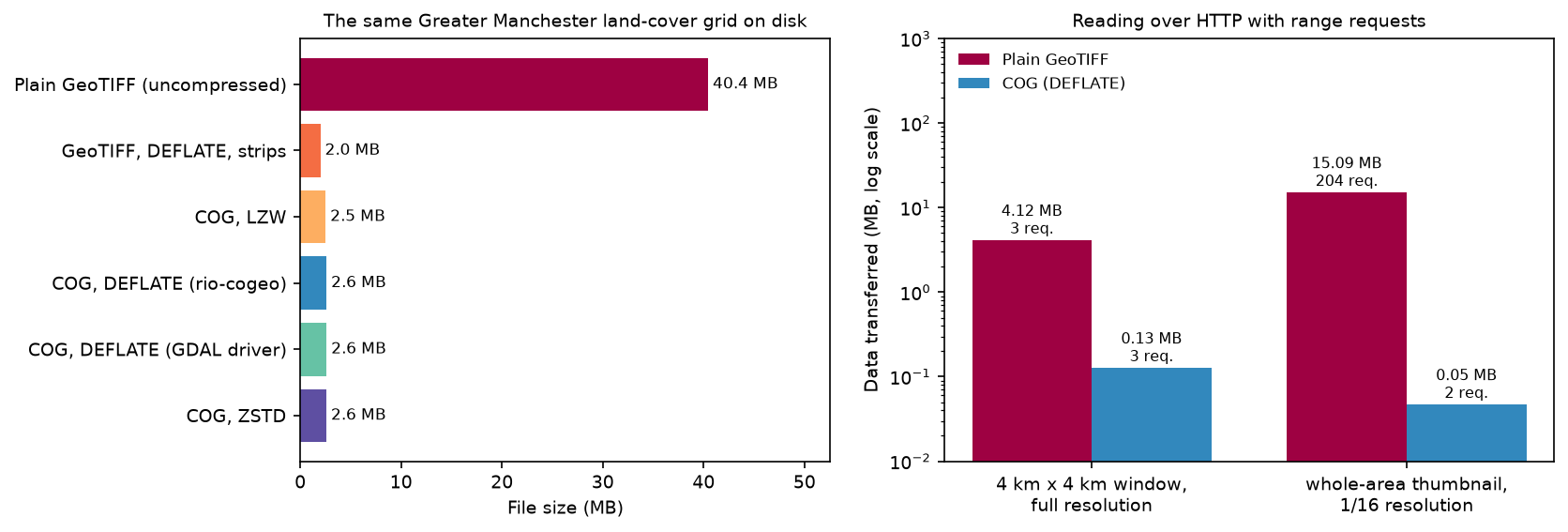
For the window, the plain file had to send every full-width row that crosses it (4.1 MB); the COG sent only the tiles that overlap it (0.13 MB). For the thumbnail, the plain file had no overviews, so GDAL fetched a sample of rows in 204 requests (15.1 MB); the COG read its 1/16 overview in 2 requests (0.05 MB). On a real network each request adds latency, so the gap grows: Step 2’s read of the 103 MB WorldCover COG from Azure Blob Storage needed only 6 requests and 2.96 MB.
Pitfalls and limitations
- Polygonize integer classes, not continuous values.
shapesmakes one polygon per run of identical values; on a float DEM that is one polygon per pixel. Classify or threshold first, and pass amask. - Reproject before measuring or simplifying. In EPSG:4326,
.areais in square degrees and a tolerance of 10 means 10 degrees. Use British National Grid (EPSG:27700) or another projected CRS, as in Part 1. - Pixel areas vary in geographic CRSs. A WorldCover pixel was 51 m² here, not 100 m², and the size changes with latitude. Weight pixel counts by true area, or reproject the raster to an equal-area grid with nearest-neighbour or mode resampling.
- Large connected regions become huge polygons. One built-up polygon held half the county’s urban area and 13,882 holes. Split by a grid or by districts (with
overlayorclip) if a tool struggles. - Polygon edges are pixel edges. Simplification makes them look smoother; it does not make them more accurate than the 10 m source.
- WorldCover is a classification, with errors. Its documented overall accuracy is about 77% globally. Urban gardens and street trees are mapped as tree cover, so “built-up” (29.4% here) underestimates the developed area, and some reservoir edges and shadows are misclassified.
- The HTTP test is local. The byte and request counts are exact, but the timings are from a localhost server; on the internet the COG’s advantage in time is usually larger.
Frequently asked questions
How do I convert a raster to polygons in Python?
Open the raster with rasterio, read a band as an integer array and call rasterio.features.shapes(array, mask=array != nodata, transform=src.transform). Each result is a (geometry, value) pair; build a GeoDataFrame with [shape(g) for g, v in results] and crs=src.crs. This is what gdal_polygonize and QGIS’s Polygonize tool do.
What is the difference between polygonize and rasterize?
Polygonize (vectorise) converts a raster into polygons by tracing the edges of connected regions of equal pixels. Rasterize does the opposite, burning vector features into a grid. In rasterio they are features.shapes and features.rasterize. A polygonize–rasterize round trip on the same grid is lossless: in our test, 0 of 42.4 million pixels changed.
How do I rasterize a shapefile in Python?
Read it with geopandas.read_file, reproject it to the target raster’s CRS, and call rasterio.features.rasterize(zip(gdf.geometry, gdf["value"]), out_shape=(height, width), transform=transform, fill=0, dtype="uint8"). Take out_shape and transform from an existing raster to align the grids. Use all_touched=True only for thin features such as roads or rivers.
How do I convert a GeoTIFF to a Cloud Optimized GeoTIFF?
With rio-cogeo: cog_translate("in.tif", "out.tif", cog_profiles.get("deflate")), or rio cogeo create in.tif out.tif on the command line. With GDAL 3.1 or newer: gdal_translate in.tif out.tif -of COG -co COMPRESS=DEFLATE, or rasterio.shutil.copy(src, dst, driver="COG") in Python. Then check it with cog_validate or rio cogeo validate.
Why are my polygons from rasterio invalid?
Usually because you polygonized with connectivity=8: pixels that touch only at a corner produce self-intersecting rings. Use connectivity=4 (the default), or repair the polygons with shapely.make_valid. Simplifying with preserve_topology=False can also create invalid polygons.
Is a Cloud Optimized GeoTIFF smaller than a normal GeoTIFF?
Not necessarily. Most of the saving comes from compression, which any GeoTIFF can use. A COG adds overviews and compresses tile by tile, so here it was 2.6 MB against 2.0 MB for a compressed, untiled GeoTIFF (and 40.4 MB uncompressed). Its advantage is in reading: a fraction of the file is enough for a window or a zoomed-out view.
Next steps
- Start at the beginning of the series with coordinate reference systems in Python, then spatial joins with GeoPandas to count or attribute the polygons from this tutorial by area.
- Map the results: making maps in Python with matplotlib and cartopy shows how to turn rasters and polygons like these into publication-quality figures, also using Greater Manchester.
- Produce your own class raster to polygonize with land cover classification in Python with a random forest.
- For weighted zonal statistics with partial pixels, see zonal statistics in Python with exactextract.
- Derive terrain layers to classify and polygonize with raster terrain analysis in Python with rasterio.
- Publish the polygons to the web as vector tiles with PMTiles and MapLibre, or store and query them as GeoParquet with DuckDB.
- Speed up the vector side with fast vector geoprocessing in Python.
Data and licences
- ESA WorldCover 2021 (v200): © ESA WorldCover project 2021 / Contains modified Copernicus Sentinel data (2021) processed by the ESA WorldCover consortium, CC BY 4.0. Zanaga, D. et al. (2022), ESA WorldCover 10 m 2021 v200. Accessed from the Microsoft Planetary Computer.
- Local Authority Districts (December 2024) Boundaries UK BFC: Source: Office for National Statistics, licensed under the Open Government Licence v3.0. Contains OS data © Crown copyright and database right 2024. From the ONS Open Geography Portal, accessed on 23 October 2026.
- Code:
raster_to_vector.py, tested with Python 3.12.0, rasterio 1.5.2 (GDAL 3.12.2), rio-cogeo 7.0.4, geopandas 1.2.0, shapely 2.2.0 and pandas 3.1.0.
Key terms
- Polygonize (vectorise)
- Converting a raster into polygons by tracing the outline of each connected region of pixels that share a value. In Python this is rasterio.features.shapes; in GDAL it is gdal_polygonize.
- Rasterize
- The reverse: burning vector geometries into a grid, so that each pixel takes the value of the polygon that covers its centre (or every polygon it touches, with all_touched=True).
- Connectivity (4 or 8)
- Whether pixels count as connected only through shared edges (4, the rook's neighbours) or also through shared corners (8, the queen's neighbours). It decides how many polygons you get and whether they are valid.
- Sieve
- A raster filter that replaces connected regions smaller than a given number of pixels with the value of their largest neighbour, removing speckle before polygonizing.
- Cloud Optimized GeoTIFF (COG)
- An ordinary GeoTIFF laid out for the web: internally tiled, with reduced-resolution overviews and the header at the start of the file, so a client can fetch just the tiles it needs with HTTP range requests.
- HTTP range request
- A request for a byte range of a file (Range: bytes=a-b) rather than the whole file. GDAL's /vsicurl/ uses them to read remote rasters.
Data for this tutorial
- ESA WorldCover · 10 m land cover for 2021 (v200), via the Microsoft Planetary Computer
- ONS Open Geography Portal · Local authority districts, December 2024, full resolution clipped (BFC)
- Microsoft Planetary Computer · STAC search and signed COG access, no key needed
Licences and formats for each source are listed in the GIS data sources catalogue.