Zonal statistics in Python: exactextract vs rasterstats, with partial pixels, land-cover fractions and a benchmark
Calculate zonal statistics in Python with exactextract and rasterstats on real data: ONS 2021 LSOA boundaries for Cumbria with GHSL population, the Copernicus DEM and ESA WorldCover. Covers partial-pixel weighting vs pixel centroids, CRS alignment, categorical land-cover fractions, a speed benchmark, GeoPackage export and choropleth maps.
- Level
- Intermediate
- Tested with
- Python 3.12
- Source code
- Download scripts
Key takeaways
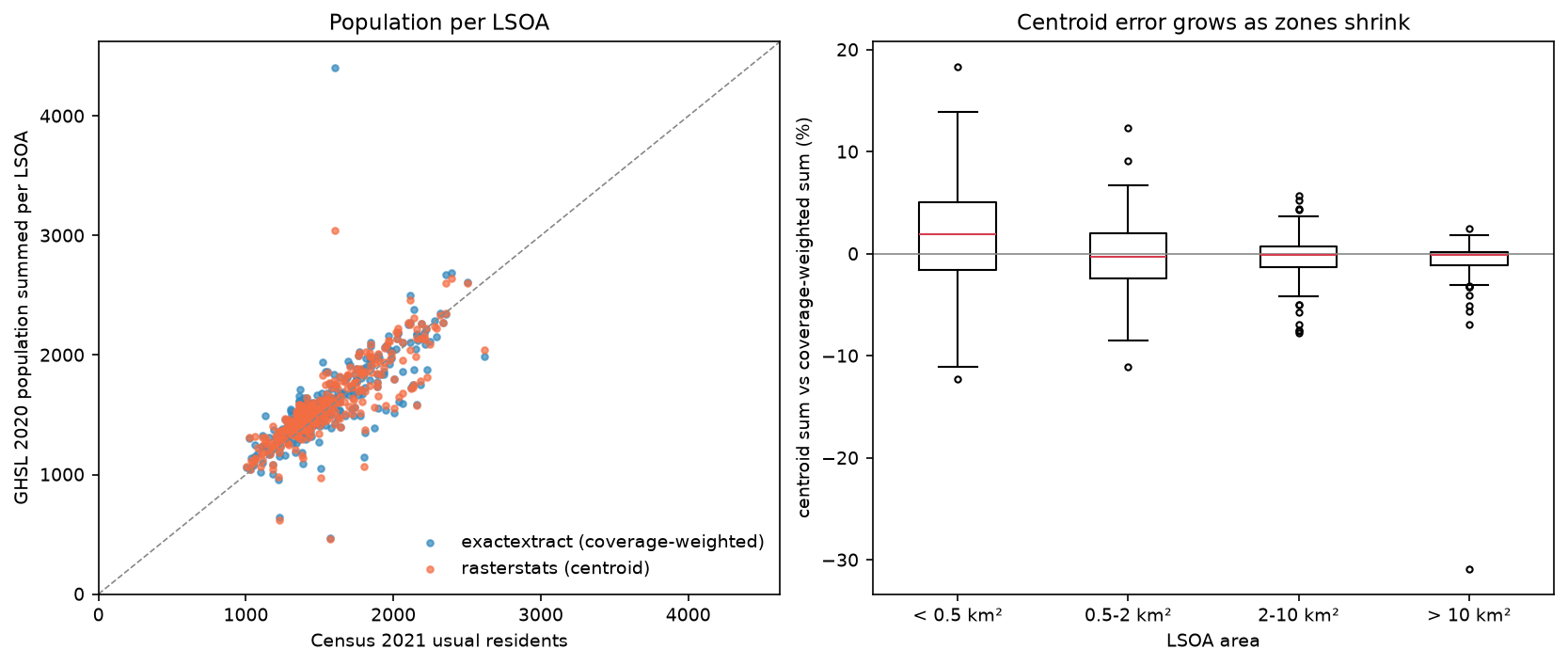
- exactextract weights every pixel by the fraction of it inside the polygon; rasterstats by default counts only pixels whose centre falls inside. For 319 Cumbrian LSOAs summed over 100 m population cells, the two differ by a median of 4.0% for zones under 0.5 km² but only 0.4% for zones over 10 km².
- Never use all_touched=True for counts: it added 36.7% to Cumbria's population, because every boundary pixel is counted in full by both neighbouring zones.
- Reproject the polygons to the raster's CRS, not the raster to the polygons. With mismatched CRSs, rasterstats tried to allocate 120 TiB and exactextract silently returned zeros; warping the population raster changed its total unless the sum resampler was used.
- exactextract was 1.2× faster for population sums and 1.9× faster for elevation means, but rasterstats was faster for categorical land-cover fractions on a 258-million-cell 10 m raster (6.5 s against 10.5 s). Land-cover fractions from the two libraries agreed to within 0.21 percentage points per LSOA.
Before you start
- Comfortable with GeoPandas and rasterio; the GeoPandas getting-started and raster terrain analysis tutorials cover the basics
- Python 3.10+ with exactextract, rasterstats, geopandas, rasterio, pystac-client, planetary-computer, pandas, requests and matplotlib
- An internet connection: boundaries come from the ONS Open Geography Portal, census counts from Nomis, population from the JRC and the DEM and land cover from the Microsoft Planetary Computer, all with no account or key
Short answer: to calculate zonal statistics in Python, put your polygons in a GeoDataFrame, reproject them to the raster’s CRS, and call exact_extract(raster_path, gdf, ["mean", "sum"], output="pandas") from the exactextract package, or zonal_stats(gdf, raster_path, stats=["mean", "sum"]) from rasterstats. exactextract weights each pixel by the fraction of it inside the polygon, which matters for small zones and for sums; rasterstats counts whole pixels whose centre is inside. For land cover, use exactextract’s ["unique", "frac"] or rasterstats’ categorical=True to get class fractions per polygon. Then join the results back to the GeoDataFrame, save to GeoPackage and map them.
Zonal statistics are one of the most common jobs in GIS: average elevation per catchment, population per council ward, forest share per parish. The calculation sounds trivial, but three details change the answer: how partly covered pixels are treated, whether the polygons and raster share a coordinate reference system, and whether the raster holds quantities, measurements or classes. This tutorial works through all three on real UK data, the 319 2021 LSOAs of Cumbria, with three rasters in three different CRSs:
| Raster | What it holds | CRS | Pixel |
|---|---|---|---|
| GHSL GHS-POP 2020 | People per cell (a count) | World Mollweide (ESRI:54009) | 100 m |
| Copernicus DEM GLO-30 | Elevation (a measurement) | WGS 84 (EPSG:4326) | 1 × 1.5 arcseconds, about 30 m |
| ESA WorldCover 2021 | Land-cover class (categories) | WGS 84 (EPSG:4326) | 0.3 arcseconds, about 10 m |
You will learn how to:
- download ONS LSOA boundaries from the Open Geography Portal and Census 2021 counts from Nomis;
- align CRSs correctly, and see what goes wrong when you do not;
- compare coverage-weighted (exactextract) and centroid (rasterstats) sums against the census;
- compute mean and maximum elevation per zone;
- compute categorical land-cover fractions per zone;
- benchmark exactextract against rasterstats;
- export everything to a GeoPackage and draw choropleth maps.
All outputs below are real results from zonal_statistics.py, run on 21 October 2026 with Python 3.12, exactextract 0.3.0, rasterstats 0.21.0, rasterio 1.5.2 (GDAL 3.12.2) and geopandas 1.2.0.
exactextract or rasterstats?
Both libraries take a raster and a set of polygons and return one row of statistics per polygon. The differences are in the details:
| exactextract | rasterstats | |
|---|---|---|
| Pixels on the boundary | Weighted by the exact fraction inside | Whole pixel if its centre is inside (or all touched pixels) |
| Core | C++ (GEOS), with Python bindings | Pure Python on rasterio and NumPy |
| CRS check | Warns if the CRSs differ | None: it assumes they match |
| Categorical output | unique and frac (or frac weighted by area) |
categorical=True returns a count per class |
| Extras | Weighted statistics, coverage per cell, raster-sequential mode for huge rasters |
add_stats for custom Python functions, zone_func, point queries |
exactextract started as a command-line tool by Dan Baston at ISciences; its Python bindings are now the recommended way to use it from Python, and the same engine powers R’s exactextractr. rasterstats has been the standard Python choice for a decade.
Step 1: download LSOA boundaries and census counts
The ONS Open Geography Portal publishes boundaries as ArcGIS feature services. Cumbria was split into two new unitary authorities in 2023, but the 2021 LSOA names still begin with the six former districts, so a SQL LIKE filter selects the county. The service returns results in pages, so the script asks for 100 features at a time in British National Grid coordinates (outSR=27700) until a short page comes back:
ONS = ("https://services1.arcgis.com/ESMARspQHYMw9BZ9/arcgis/rest/services/"       "Lower_layer_Super_Output_Areas_December_2021_Boundaries_EW_BFC_V10/FeatureServer/0/query")DISTRICTS = ["Allerdale", "Barrow-in-Furness", "Carlisle", "Copeland", "Eden", "South Lakeland"]
where = " OR ".join(f"LSOA21NM LIKE '{d} %'" for d in DISTRICTS)parts, offset = [], 0while True:    r = requests.get(ONS, params={"where": where, "outFields": "LSOA21CD,LSOA21NM", "outSR": 27700,                                  "f": "geojson", "resultOffset": offset, "resultRecordCount": 100}, timeout=120)    r.raise_for_status()    page = gpd.GeoDataFrame.from_features(r.json()["features"], crs=27700)    parts.append(page)    offset += len(page)    if len(page) < 100:        breaklsoa = pd.concat(parts, ignore_index=True)
We use the full-resolution clipped (BFC) boundaries, not the generalised ones, because generalisation moves edges by tens of metres, which is enough to change which pixels a small zone gets. To check the population raster later, we also download the Census 2021 usual-resident count for every LSOA from the Nomis API:
NOMIS = "https://www.nomisweb.co.uk/api/v01/dataset/NM_2021_1.data.csv" # Census 2021 TS001, usual residentsr = requests.get(NOMIS, params={"date": "latest", "geography": "TYPE151", "measures": 20100, "c2021_restype_3": 0, "select": "geography_code,obs_value"}, timeout=300)319 LSOAs, CRS EPSG:27700, total area 6,824 km2LSOA area: median 1.40 km2, smallest 0.104 km2, largest 241 km2districtAllerdale 59Barrow-in-Furness 48Carlisle 71Copeland 47Eden 36South Lakeland 58Census 2021 usual residents in these LSOAs: 499,873LSOAs are designed to have similar populations, not similar areas, so they range from 0.1 km² in Carlisle and Barrow to 241 km² in the fells. That range is exactly what makes partial pixels matter.
Step 2: get three rasters in three CRSs
The GHSL population grid is downloaded as one 1000 km tile from the JRC and clipped to Cumbria. The DEM and land cover are mosaicked from STAC items on the Microsoft Planetary Computer with rasterio.merge. Each is saved as a local tiled GeoTIFF, which keeps the benchmark fair; zonal statistics over HTTP are dominated by download time.
catalog = pystac_client.Client.open(STAC_URL, modifier=pc.sign_inplace)bbox_ll = transform_bounds(lsoa.crs, "EPSG:4326", *lsoa.total_bounds)bbox_ll = (bbox_ll[0] - 0.01, bbox_ll[1] - 0.01, bbox_ll[2] + 0.01, bbox_ll[3] + 0.01)
def mosaic_from_stac(collection, asset, out_path, **search):    """Mosaic every STAC item covering Cumbria into one local, tiled GeoTIFF."""    items = catalog.search(collections=[collection], bbox=bbox_ll, **search).item_collection()    hrefs = [it.assets[asset].href for it in items]    arr, transform = rasterio.merge.merge(hrefs, bounds=bbox_ll)    with rasterio.open(hrefs[0]) as src:        prof = src.profile    prof.update(driver="GTiff", width=arr.shape[2], height=arr.shape[1], transform=transform, compress="deflate",                tiled=True, blockxsize=512, blockysize=512, BIGTIFF="IF_SAFER")    with rasterio.open(out_path, "w", **prof) as dst:        dst.write(arr)
mosaic_from_stac("cop-dem-glo-30", "data", dem_tif)mosaic_from_stac("esa-worldcover", "map", lc_tif, datetime="2021") # the 2021 map (v200)population ghs_pop_e2020_cumbria_54009.tif ESRI:54009 (Mollweide) pixel 100 m 1116 x 1201 float64elevation cop_dem_glo30_cumbria.tif EPSG:4326 pixel 0.000416667 deg 3671 x 4218 float32land cover esa_worldcover_2021_cumbria.tif EPSG:4326 pixel 8.33333e-05 deg 18355 x 14059 uint8The DEM’s pixel width is 1.5 arcseconds because Copernicus GLO-30 widens its longitude spacing north of 50° so that cells stay roughly square on the ground. The WorldCover mosaic has 258 million cells, large enough to show real performance differences.
Step 3: align the CRSs (reproject the polygons, not the raster)
The boundaries are in British National Grid; none of the rasters is. Here is what happens if you forget:
try: rs_wrong = zonal_stats(lsoa.head(5), str(dem_tif), stats=["count", "mean"], nodata=-32767)except MemoryError as e: print("rasterstats, BNG zones on the WGS84 DEM:", type(e).__name__, str(e).split(" for an array")[0])with warnings.catch_warnings(record=True) as caught: warnings.simplefilter("always") ee_wrong = exact_extract(str(dem_tif), lsoa.head(5), ["count", "mean"], output="pandas")rasterstats, BNG zones on the WGS84 DEM: MemoryError Unable to allocate 120. TiBexactextract, BNG zones on the WGS84 DEM: [0.0, 0.0, 0.0, 0.0, 0.0] | warning: Spatial reference system of input features does not exactly match raster.rasterstats never reads a CRS. It took the polygons’ coordinates in metres (eastings of about 294 000–390 000 and northings of about 462 000–589 000) as degrees, and tried to build a window hundreds of thousands of “degrees” wide. exactextract notices the mismatch, warns, and returns zero cells, which is easy to miss in a long script. Always check the warning, or assert that the CRSs match.
The fix is to reproject the polygons into each raster’s CRS. Reprojecting vertices is cheap and exact; reprojecting a raster resamples every cell and changes the values:
zones = {"population": lsoa.to_crs(POP_CRS), "elevation": lsoa.to_crs(LL_CRS), "land cover": lsoa.to_crs(LL_CRS)}for name, z in zones.items():    with rasterio.open(rasters[name]) as src:        assert z.crs == pyproj.CRS.from_user_input(src.crs), name
for rs in [Resampling.nearest, Resampling.bilinear, Resampling.sum]: dst = np.zeros((h, w), "float64") reproject(pop, dst, src_transform=src.transform, src_crs=src.crs, dst_transform=t, dst_crs="EPSG:27700", resampling=rs, src_nodata=0, dst_nodata=0)zones reprojected to each raster's CRS: OKGHSL total in the window: 755,462; after warping to BNG with nearest : 753,420 (-0.27%)GHSL total in the window: 755,462; after warping to BNG with bilinear: 757,731 (+0.30%)GHSL total in the window: 755,462; after warping to BNG with sum : 755,462 (-0.00%)Nearest-neighbour and bilinear resampling both change the population total, and they move people between cells, which matters more for small zones. If you must warp a count raster, use Resampling.sum (GDAL 3.1+), which conserves the total. For measurements such as elevation, bilinear is fine; for classes, use nearest or mode. Measuring areas in a geographic CRS is a separate issue: exactextract’s frac is a fraction of cells, which is slightly biased when cell area varies with latitude; across Cumbria’s 1.2° of latitude, cell area varies by about 3%.
Step 4: compare partial-pixel weighting with the centroid rule
This is the heart of the difference between the two libraries. For each LSOA, we sum the population cells with exactextract (coverage-weighted), with rasterstats (centroid rule, its default) and with rasterstats all_touched=True:
zp = zones["population"]ee_pop = exact_extract(str(pop_tif), zp, ["sum", "count"], include_cols=["LSOA21CD"], output="pandas")rs_pop = zonal_stats(zp, str(pop_tif), stats=["sum", "count"], nodata=-200)rs_pop_at = zonal_stats(zp, str(pop_tif), stats=["sum", "count"], nodata=-200, all_touched=True)lsoa["pop_exact"] = ee_pop["sum"].valueslsoa["pop_centroid"] = [s["sum"] or 0 for s in rs_pop]lsoa["pop_all_touched"] = [s["sum"] or 0 for s in rs_pop_at]exactextract’s count is also weighted: it is the sum of coverage fractions, so it measures area in cells rather than the number of cells. Figure 1 shows what that means for one small urban LSOA.
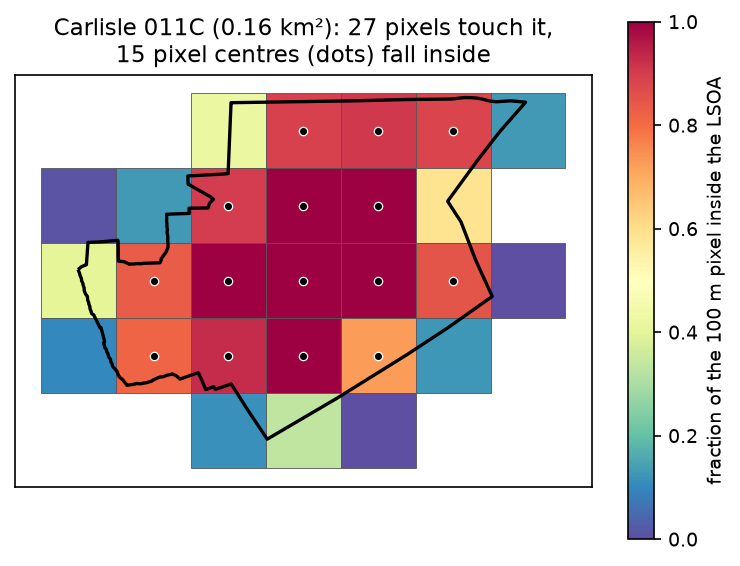
method                     total  vs census  median |err| vs censusexactextract (weighted)   509,188      +1.9%                    6.2%rasterstats (centroid)   508,023      +1.6%                    6.3%rasterstats all_touched   683,566     +36.7%                   33.9%Census 2021              499,873
centroid vs coverage-weighted sum, by LSOA size:            lsoas  median_cells  median_abs_diff_pct  max_abs_diff_pctsize_class< 0.5 km2      79          30.4                  4.0              18.30.5-2 km2      98          88.1                  2.2              12.42-10 km2       54         414.3                  1.2               7.7> 10 km2       88        5237.8                  0.4              30.9LSOAs where the two differ by more than 10%: 10
Three lessons:
- For the county as a whole, the method hardly matters. The weighted and centroid totals differ by 0.2%, and both are within 2% of the census. Errors at the edges cancel out when zones tile the area.
- For individual small zones, it does. In LSOAs under 0.5 km², which cover about 30 pixels, the centroid sum differs from the weighted sum by a median of 4% and up to 18%. The difference shrinks to 0.4% for zones over 10 km². Ten LSOAs differ by more than 10%, including one large rural zone that differs by 31%.
all_touched=Trueis wrong for counts. It counts every boundary pixel in full in both neighbouring zones, adding 36.7% to the county’s population. It is useful only for tiny polygons that would otherwise get no pixels at all, and then only for means.
Step 5: summarise a continuous raster (mean and maximum elevation)
For measurements such as elevation, the statistics you want are mean, minimum, maximum and standard deviation. exactextract calls the last one stdev; rasterstats calls it std:
zd = zones["elevation"]ee_dem = exact_extract(str(dem_tif), zd, ["mean", "max", "stdev"], output="pandas")rs_dem = zonal_stats(zd, str(dem_tif), stats=["mean", "max", "std"], nodata=-32767)lsoa["elev_mean"], lsoa["elev_max"], lsoa["elev_sd"] = ee_dem["mean"].values, ee_dem["max"].values, ee_dem["stdev"].valuesmean elevation, exactextract minus rasterstats: median |diff| 0.02 m, max |diff| 0.29 mhighest point: 974 m in Copeland 007F (E01019304); mean elevation range 6-489 mWith pixels of about 27 × 31 m, even the smallest LSOA covers over a hundred cells, so the two methods agree to within 0.3 m. The highest cell, 974 m, is in Copeland 007F, the LSOA that contains Scafell Pike (978 m): a 30 m DEM cell averages the summit with its slopes, so maxima are always a little low. The highest mean elevation, 489 m, is in Eden 001A in the North Pennines.
Step 6: compute categorical land-cover fractions
For a class raster, the mean of the class codes is meaningless; you want the share of each class in each zone. exactextract’s unique operation lists the classes present and frac gives their coverage-weighted fractions. rasterstats’ categorical=True returns a dictionary of pixel counts per class, which we divide by the total:
zl = zones["land cover"]ee_lc = exact_extract(str(lc_tif), zl, ["unique", "frac"], output="pandas")rs_lc = zonal_stats(zl, str(lc_tif), categorical=True, nodata=0)
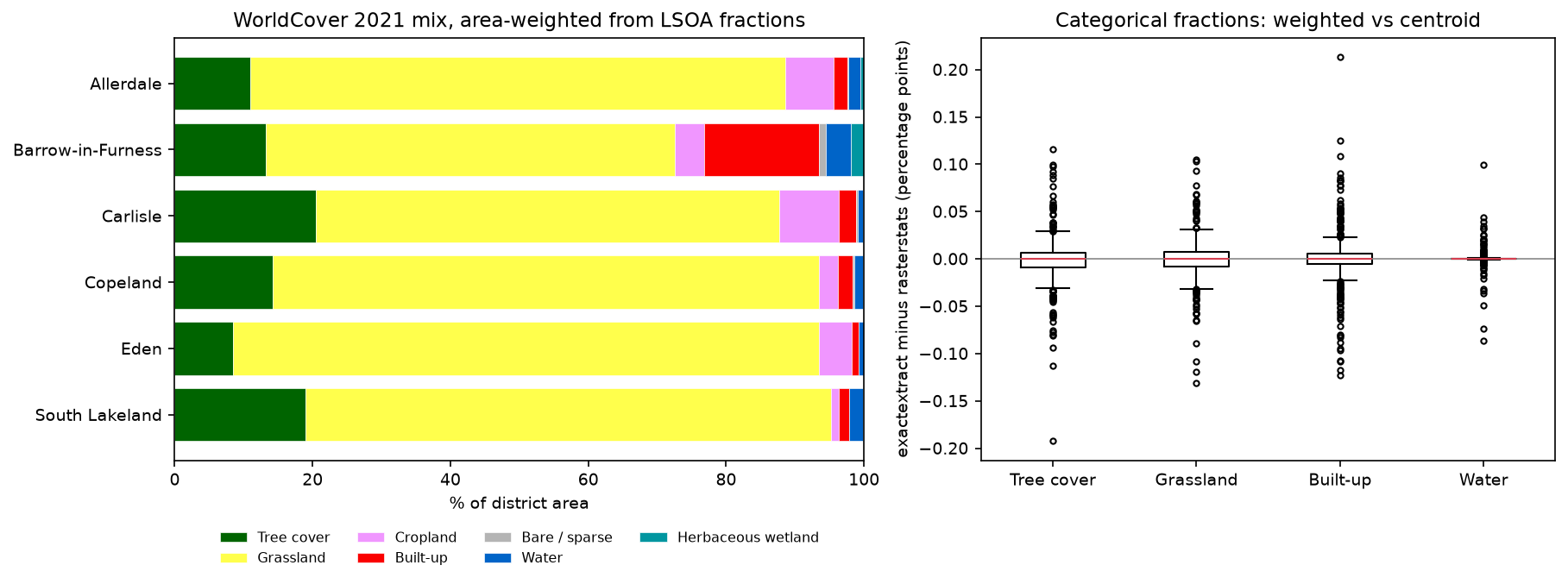
classes = sorted(WORLDCOVER)ee_frac = pd.DataFrame([dict(zip(u.astype(int), f)) for u, f in zip(ee_lc["unique"], ee_lc["frac"])], columns=classes).fillna(0)rs_frac = pd.DataFrame([{k: v / sum(s.values()) for k, v in s.items()} for s in rs_lc], columns=classes).fillna(0)share of Cumbria and exactextract-vs-rasterstats difference per LSOA (percentage points): class area_weighted_% median_abs_diff_pp max_abs_diff_pp Tree cover 13.83 0.01 0.19 Shrubland 0.00 0.00 0.00 Grassland 78.03 0.01 0.13 Cropland 4.67 0.00 0.06 Built-up 1.83 0.01 0.21 Bare / sparse 0.13 0.00 0.03 Water 1.31 0.00 0.10Herbaceous wetland 0.20 0.00 0.02 Moss and lichen 0.00 0.00 0.00fractions sum to 1 for every LSOA: TrueGrassland makes up 78% of Cumbria in WorldCover, which matches the county’s improved pasture and upland rough grazing. At 10 m, every LSOA contains thousands of cells, so the two libraries agree to within 0.21 percentage points everywhere. Without nodata=0, rasterstats warns that it is setting nodata to −999; WorldCover uses 0 for no data.
Step 7: benchmark exactextract against rasterstats
Each job runs three times on all 319 LSOAs from a local GeoTIFF, and we keep the fastest time. exactextract has two strategies: feature-sequential (the default) reads the raster window for each polygon in turn, and raster-sequential reads the raster block by block, which helps when polygons are large and numerous:
def timed(fn, repeats=3):    """Best-of-n wall-clock time, plus the result of the last run."""    best = np.inf    for _ in range(repeats):        t0 = time.perf_counter()        res = fn()        best = min(best, time.perf_counter() - t0)    return best, res
t_ee, _ = timed(lambda: exact_extract(str(path), z, ee_ops, output="pandas"))t_ee_rs, _ = timed(lambda: exact_extract(str(path), z, ee_ops, output="pandas", strategy="raster-sequential"))t_rs, _ = timed(lambda: zonal_stats(z, str(path), **rs_kw)) job raster_Mcells exactextract_s exactextract_raster_seq_s rasterstats_s speed-up population sum (100 m) 1.34 1.38 1.40 1.61 1.16 elevation mean (30 m) 15.48 1.82 2.08 3.49 1.92land-cover fractions (10 m) 258.05 10.48 10.68 6.45 0.62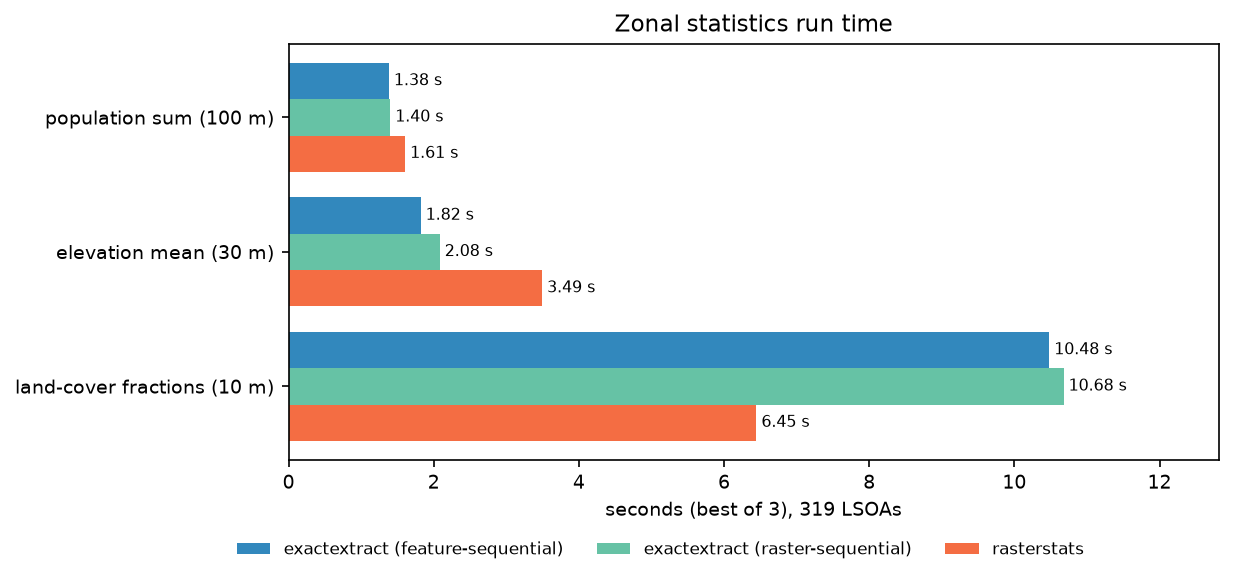
The result is not a clean win for either library:
- For sums and means, exactextract was 1.2–1.9× faster, and the gap grows with the number of cells.
- For categorical fractions on 258 million cells, rasterstats was faster (6.5 s against 10.5 s). rasterstats simply rasterises each polygon and calls
np.unique; exactextract computes a coverage fraction for every boundary cell and keeps a weighted count per class. - raster-sequential made no difference here, because Cumbria’s rasters fit in memory. It matters for continental rasters that do not.
Timings vary by a few per cent between runs, and the ranking may change with polygon complexity, raster block size and hardware. Measure on your own data before choosing for speed; choose for correctness first.
Step 8: export to GeoPackage and draw choropleth maps
Join the statistics to the LSOA polygons and save one GeoPackage layer, which keeps the British National Grid CRS, the geometry and every column together for QGIS or ArcGIS Pro:
gpkg = OUT / "cumbria_lsoa_zonal_stats.gpkg"cols = ["LSOA21CD", "LSOA21NM", "district", "area_km2", "census_2021", "pop_exact", "pop_centroid", "elev_mean", "elev_max", "elev_sd", "tree_pct", "grass_pct", "built_pct", "water_pct", "geometry"]lsoa["pop_density"] = lsoa.census_2021 / lsoa.area_km2out = lsoa[cols[:-1] + ["pop_density", "geometry"]].copy()out.to_file(gpkg, layer="lsoa21_zonal_stats", driver="GPKG")[['lsoa21_zonal_stats' 'MultiPolygon']]319 features, 15 fields, CRS EPSG:27700, 8.4 MBA choropleth is then one call to GeoDataFrame.plot per map. Population density spans three orders of magnitude, so it needs a logarithmic colour scale:
specs = [("elev_mean", "Mean elevation (m)", "Spectral_r", None), ("tree_pct", "Tree cover (% of LSOA)", "Greens", None), ("pop_density", "Residents per km² (Census 2021, log scale)", "Spectral_r", "log")]for ax, (col, title, cm, scale) in zip(axes, specs): kw = {"norm": matplotlib.colors.LogNorm(vmin=max(lsoa[col].min(), 1), vmax=lsoa[col].max())} if scale else {} lsoa.plot(col, ax=ax, cmap=cm, edgecolor="white", linewidth=0.15, legend=True, legend_kwds={"shrink": 0.6}, **kw) districts.boundary.plot(ax=ax, color="#333333", lw=0.6)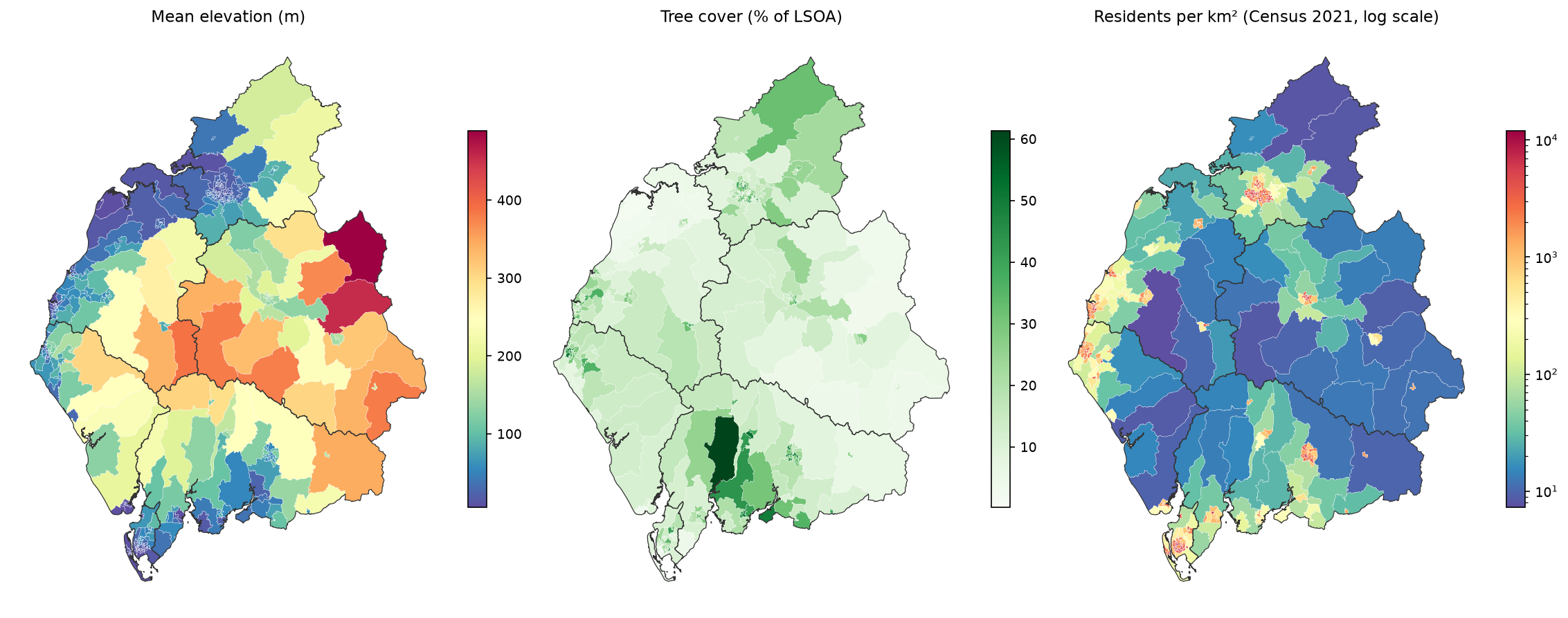
Avoid passing norm=None to GeoDataFrame.plot: in geopandas 1.2 an explicit None produced a 0–1 colour bar in our tests, which is why the script only passes norm when a log scale is needed.
Pitfalls and limitations
- Check the CRS every time. rasterstats does not; exactextract only warns. An
asserton the CRS, as in Step 3, costs one line. - Set nodata explicitly. GHSL uses −200, the Copernicus DEM −32767 and WorldCover 0. A wrong or missing nodata value is the commonest cause of strange means and negative sums.
- Sums need weighting; means are forgiving. Coverage weighting matters most for counts in small zones. For a mean of a smooth surface over large zones, the centroid rule is usually fine.
- Fractions are of cells, not of ground area. In a geographic CRS, cells shrink towards the poles. Over Cumbria the error is small; for a country-wide or global analysis, use an equal-area raster, or pass a raster of cell areas as
weightsand use exactextract’sweighted_frac. - The population raster is a model. GHSL estimates 2020 population from built-up area; the census counts 2021 residents. The 6% median error per LSOA comes from the raster, not the zonal method.
- Boundaries are a choice. We used full-resolution clipped boundaries; generalised or extent-of-the-realm versions change coastal zones and small LSOAs.
- Benchmarks are local. One laptop, one county, three runs. Treat the ratios as indicative.
Frequently asked questions
How do I calculate zonal statistics in Python?
Load the polygons with GeoPandas, reproject them to the raster’s CRS with to_crs, then run exact_extract(raster, gdf, ["mean", "sum", "count"], output="pandas") from exactextract or zonal_stats(gdf, raster, stats=["mean", "sum", "count"]) from rasterstats. Both return one row per polygon in the same order, so you can assign the columns straight back to the GeoDataFrame.
What is the difference between exactextract and rasterstats?
exactextract weights every pixel by the fraction of its area inside the polygon, and is written in C++. rasterstats includes or excludes whole pixels based on their centre point (or counts all touched pixels), and is written in Python. On our Cumbrian LSOAs, exactextract was up to 1.9× faster for sums and means, rasterstats was faster for categorical counts, and the centroid rule differed from weighting by a median of 4% for zones under 0.5 km².
Should I use all_touched=True in rasterstats?
Not for sums or counts. It counts every pixel the polygon touches in full, so boundary pixels are counted in both neighbouring zones; in our test it inflated the county’s population by 36.7%. Use it only for tiny polygons that would otherwise get no pixels, and preferably switch to exactextract’s coverage weighting instead.
How do I get land-cover percentages per polygon?
With exactextract, request ["unique", "frac"]: each row gets an array of class codes and a matching array of fractions that sum to 1. With rasterstats, pass categorical=True and divide each class count by the total. Set the raster’s nodata value (0 for ESA WorldCover) so that no-data cells are not counted as a class.
Do I need to reproject the raster or the polygons?
Reproject the polygons. It is quick and does not change any raster values. Warping a raster resamples it: in our test, nearest-neighbour and bilinear resampling changed the total population by −0.27% and +0.30%. If you must warp a count raster, use the sum resampler, which conserves the total.
Why do my zonal statistics come back empty or as NaN?
The usual causes are a CRS mismatch (the polygons fall outside the raster, as in Step 3), a polygon smaller than one pixel whose centre misses every pixel centre (rasterstats returns None; exactextract still returns a weighted value), or a nodata value that covers the whole zone. Check gdf.crs against the raster’s CRS, set nodata explicitly and look at the count statistic first.
Next steps
- Make your own raster to summarise: build a cloud-free Sentinel-2 composite in Sentinel-2 cloud and cloud-shadow masking in Python, then compute NDVI per LSOA with the code above.
- Summarise a whole growing season per field or parish from NDVI time series in Python with Sentinel-2 and odc-stac.
- Turn your own classification into zone fractions: land cover classification in Python with a random forest produces exactly the kind of class raster used in Step 6.
- Test whether high or low values cluster: hot spot analysis with Getis-Ord Gi* in Python works on zonal tables like this one.
- Derive slope or terrain ruggedness to summarise per zone with raster terrain analysis in Python with rasterio, and speed up the vector side with fast vector geoprocessing.
- Start from the STAC basics in Measuring Lake Mead’s shrinking shoreline with Sentinel-2 and STAC.
- Make a habitat map to summarise by zone in habitat mapping with Sentinel-2 in Python, Part 1 of our five-part AI habitat classification series.
Data and licences
- LSOA (December 2021) boundaries, EW BFC V10: Source: Office for National Statistics, licensed under the Open Government Licence v3.0. Contains OS data © Crown copyright and database right 2026. From the ONS Open Geography Portal, accessed on 21 October 2026.
- Census 2021 TS001 (usual residents): Office for National Statistics via Nomis, Open Government Licence v3.0.
- GHS-POP R2023A, epoch 2020, 100 m, Mollweide: European Commission, Joint Research Centre, CC BY 4.0. Schiavina, M. et al. (2023), GHS-POP R2023A – GHS population grid multitemporal (1975–2030).
- Copernicus DEM GLO-30: © DLR e.V. 2010–2014 and © Airbus Defence and Space GmbH 2014–2018, provided under COPERNICUS by the European Union and ESA; all rights reserved. Free to use under the Copernicus DEM licence. Accessed from the Microsoft Planetary Computer.
- ESA WorldCover 2021 (v200): © ESA WorldCover project 2021 / Contains modified Copernicus Sentinel data (2021) processed by the ESA WorldCover consortium, CC BY 4.0. Zanaga, D. et al. (2022), ESA WorldCover 10 m 2021 v200. Accessed from the Microsoft Planetary Computer.
- Code:
zonal_statistics.py, tested with Python 3.12.0, exactextract 0.3.0, rasterstats 0.21.0, rasterio 1.5.2 (GDAL 3.12.2), geopandas 1.2.0, shapely 2.2.0 and pandas 3.0.6.
Key terms
- Zonal statistics
- Summaries (sum, mean, maximum, class fractions and so on) of the raster cells that fall inside each polygon, or zone, of a vector layer.
- Coverage fraction
- The share of a raster cell's area that lies inside a polygon, from 0 to 1. exactextract computes it exactly from the polygon edges and uses it as a weight.
- Centroid (centre-point) rule
- Counting a raster cell as inside a polygon only if the cell's centre point is inside. It is the default in rasterstats, GDAL rasterisation and most GIS zonal tools.
- all_touched
- A rasterisation option that counts every cell the polygon touches, in full. It avoids empty results for tiny polygons but double-counts boundary cells between neighbouring zones.
- LSOA
- Lower layer Super Output Area: a small census geography in England and Wales with 1,000–3,000 residents (400–1,200 households). There are 35,672 LSOAs in England and Wales for 2021.
- Categorical zonal statistics
- For a class raster such as land cover, the count or area fraction of each class inside each zone, rather than a mean or sum of class codes.
Data for this tutorial
- ONS Open Geography Portal · LSOA (December 2021) boundaries, full resolution clipped (BFC)
- Nomis · Census 2021 TS001 usual residents by LSOA
- Global Human Settlement Layer · GHS-POP R2023A, 2020 population at 100 m
- Copernicus DEM GLO-30 · 30 m elevation, via the Microsoft Planetary Computer
- ESA WorldCover · 10 m land cover for 2021, via the Microsoft Planetary Computer
Licences and formats for each source are listed in the GIS data sources catalogue.