Sentinel-2 cloud and cloud-shadow masking in Python: SCL vs s2cloudless vs OmniCloudMask
Mask clouds and cloud shadows in Sentinel-2 L2A imagery with Python. Compare the Scene Classification Layer (SCL), s2cloudless, OmniCloudMask and a simple threshold over the Lake District, measure how far they agree, score them against 186 reference points and build a cloud-free median composite.
- Level
- Intermediate
- Tested with
- Python 3.12
- Source code
- Download scripts
Key takeaways
- The SCL band is the quickest Sentinel-2 cloud mask: keep classes 3 (cloud shadow), 8 and 9 (cloud) and 10 (cirrus) out. It caught 85% of cloud and 88% of shadow reference points, but also masked 16% of clear points, mostly dark fellside it called shadow.
- OmniCloudMask, a pretrained neural network that needs only red, green and NIR, scored best on our 186 reference points: 95% overall accuracy, 98% of cloud and 96% of shadow found, with 93% of clear points kept.
- s2cloudless found 92% of cloud but has no shadow model; projecting its clouds away from the sun recovered only 76% of shadow points. A blue-band threshold kept clear land well (97%) but missed 23% of cloud and 60% of shadow.
- Masks disagree more than you might expect: SCL and s2cloudless agree on 82% of pixels (kappa 0.63), and all four methods agree on only 63%. A median of 45 summer dates without a mask is mostly cloud; with SCL plus OmniCloudMask it is clean, from a median of 13 clear dates per pixel.
Before you start
- Comfortable with NumPy and rasterio; the Sentinel-2 Lake Mead tutorial introduces STAC searches and Cloud Optimised GeoTIFFs
- Python 3.10+ with pystac-client, planetary-computer, odc-stac, rasterio, scipy, pandas, matplotlib, s2cloudless and omnicloudmask (CPU PyTorch is enough)
- An internet connection: L2A imagery streams from the Microsoft Planetary Computer and L1C from a public Google Cloud bucket, with no account or key
Short answer: to mask clouds in Sentinel-2 with Python, read the SCL band of the L2A product and set every pixel with class 3 (cloud shadow), 8 (cloud, medium probability), 9 (cloud, high probability) or 10 (thin cirrus) to no data: bad = np.isin(scl, [3, 8, 9, 10]). That takes one line and needs no extra download, but it misses some cloud edges and over-flags dark terrain as shadow. For a better mask, run OmniCloudMask on the red, green and NIR bands (predict_from_array), which detects cloud and shadow, or s2cloudless on the L1C bands for cloud probability. On cloudy UK scenes, combining SCL with OmniCloudMask before taking a median gave the cleanest composite.
Cloud is the first problem anyone meets with optical satellite imagery, and in Britain it is the main one. This tutorial uses three summer dates over the Lake District, one of the cloudiest places in England, where tile cloud cover ranged from 10% to 68%. We compare four masks on the same 20 × 20 km area around Derwentwater, Buttermere, Wast Water and Thirlmere, measure how much they agree, score each one against reference points that we labelled by eye, and finally build a cloud-free composite from a whole summer.
You will learn how to:
- find Sentinel-2 L2A scenes with STAC and read bands from the Microsoft Planetary Computer;
- build a cloud and shadow mask from the Scene Classification Layer (SCL);
- run s2cloudless on matching L1C scenes from the public Google Cloud bucket, and project cloud shadows from the sun angle;
- run the OmniCloudMask neural network on CPU;
- write a simple threshold baseline to see what the models add;
- measure agreement (percentage and Cohen’s kappa) between the masks;
- score every mask against reference points with confusion matrices and omission and commission errors;
- build a cloud-free median composite for May–September 2026, and show the before and after.
All outputs below are real results from cloud_masking.py, run on 21 October 2026 with Python 3.12, rasterio 1.5.2, odc-stac 0.5.3, s2cloudless 1.7.3, OmniCloudMask 1.8.0 and PyTorch 2.14.1 (CPU).
Which Sentinel-2 cloud mask should you use?
There are three broad families of cloud mask for Sentinel-2:
| Method | Inputs | Detects | Cost |
|---|---|---|---|
| SCL (Sen2Cor) | Ships with every L2A product | Cloud (two probabilities), cirrus, shadow | Free: it is already in the download |
| s2cloudless | Ten L1C top-of-atmosphere bands | Cloud probability only | Needs L1C, which the Planetary Computer does not host |
| OmniCloudMask | Red, green and NIR (L1C or L2A) | Thick cloud, thin cloud, shadow | A PyTorch model; about 1 s per 1000 × 1000 scene on a laptop CPU |
| Thresholds | Any bands | Whatever you design | Free, but brittle |
Google Earth Engine users also have Cloud Score+, which is not available as open files outside Earth Engine, so it is not compared here. The Sentinel-2 Lake Mead tutorial and NDVI time series with odc-stac both use SCL; this tutorial asks how good that choice is.
Step 1: find cloudy Lake District scenes with STAC
The study area is a 20 × 20 km square in UTM zone 30N, the native grid of Sentinel-2 tile 30UVF. We chose three dates with broken cumulus, cirrus and shadow, the hard but common case, rather than clear or fully overcast days. Where a scene has been reprocessed, we keep the latest version:
CRS = "EPSG:32630"                                # UTM 30N, the native grid of tile 30UVFAOI = (478000, 6030000, 498000, 6050000)          # 20 x 20 km: Keswick, Derwentwater, Borrowdale, ButtermereRES = 20                                          # analysis grid in metres (SCL and s2cloudless are 20 m products)TILE = "30UVF"EVAL_DATES = ["2026-05-26", "2026-08-08", "2026-09-23"]   # three cloudy-but-not-overcast dates
catalog = pystac_client.Client.open(STAC_URL, modifier=pc.sign_inplace)
def l2a_item(date): items = catalog.search(collections=["sentinel-2-l2a"], bbox=BBOX_LL, datetime=date, query={"s2:mgrs_tile": {"eq": TILE}}).item_collection() return sorted(items, key=lambda i: i.properties["s2:generation_time"])[-1] # latest processing2026-05-26 S2B_MSIL2A_20260526T113309_R080_T30UVF_20260526T141142 tile cloud 10.0% sun zenith 34.1 azimuth 165.02026-08-08 S2A_MSIL2A_20260808T112131_R037_T30UVF_20260808T192910 tile cloud 67.6% sun zenith 39.9 azimuth 159.52026-09-23 S2B_MSIL2A_20260923T113319_R080_T30UVF_20260923T151947 tile cloud 21.8% sun zenith 55.1 azimuth 170.5The tile-level eo:cloud_cover is a poor guide for a small area: the 26 May scene is “10% cloudy” for the whole 110 km tile, yet half of our square turns out to be cloud or shadow.
Step 2: read the bands onto one 20 m grid
Each band is read straight from its Cloud Optimised GeoTIFF with a window, and averaged onto the 20 m analysis grid. Since processing baseline 04.00 (January 2022), Sentinel-2 digital numbers carry an offset of 1000, so reflectance is (DN − 1000) / 10 000:
def to_reflectance(dn):    """Processing baseline 04.00+ adds 1000 to every DN, so reflectance = (DN - 1000) / 10000. DN 0 is no data."""    return np.where(dn == 0, np.nan, (dn.astype("float32") - 1000) / 10000)
for d, it in eval_items.items(): b = {k: to_reflectance(read_window(it.assets[k].href)) for k in ["B02", "B03", "B04", "B08", "B11"]} b["SCL"] = read_window(it.assets["SCL"].href, resampling=Resampling.nearest)2026-05-26: 1000 x 1000 px, median B02 0.070, B08 0.390 (4 s)2026-08-08: 1000 x 1000 px, median B02 0.052, B08 0.384 (5 s)2026-09-23: 1000 x 1000 px, median B02 0.047, B08 0.336 (5 s)Note the Resampling.nearest for SCL: it is a categorical band, and averaging class codes would invent classes that do not exist.
Step 3: mask clouds with the Scene Classification Layer (SCL)
The SCL band is a by-product of Sen2Cor’s atmospheric correction. Its 12 classes are listed in the Sentinel-2 L2A documentation. For a cloud mask, the usual choice is to remove classes 3, 8, 9 and 10. We keep shadow as a separate code so that each mask can be scored for cloud and shadow separately:
CLEAR, CLOUD, SHADOW = 0, 1, 2
def scl_mask(scl): m = np.zeros(scl.shape, "uint8") m[np.isin(scl, [8, 9, 10])] = CLOUD # cloud medium probability, cloud high probability, thin cirrus m[scl == 3] = SHADOW # cloud shadow return m2026-05-26 cloud shadow 18.2% | vegetation 44.2% | not vegetated 2.5% | water 2.7% | cloud medium prob. 14.7% | cloud high prob. 17.1%2026-08-08 cloud shadow 2.8% | vegetation 48.8% | not vegetated 2.9% | water 2.0% | unclassified 0.7% | cloud medium prob. 9.5% | cloud high prob. 7.2% | thin cirrus 25.9%2026-09-23 dark area 1.1% | cloud shadow 22.1% | vegetation 44.3% | not vegetated 2.1% | water 2.5% | unclassified 1.4% | cloud medium prob. 14.0% | cloud high prob. 12.4%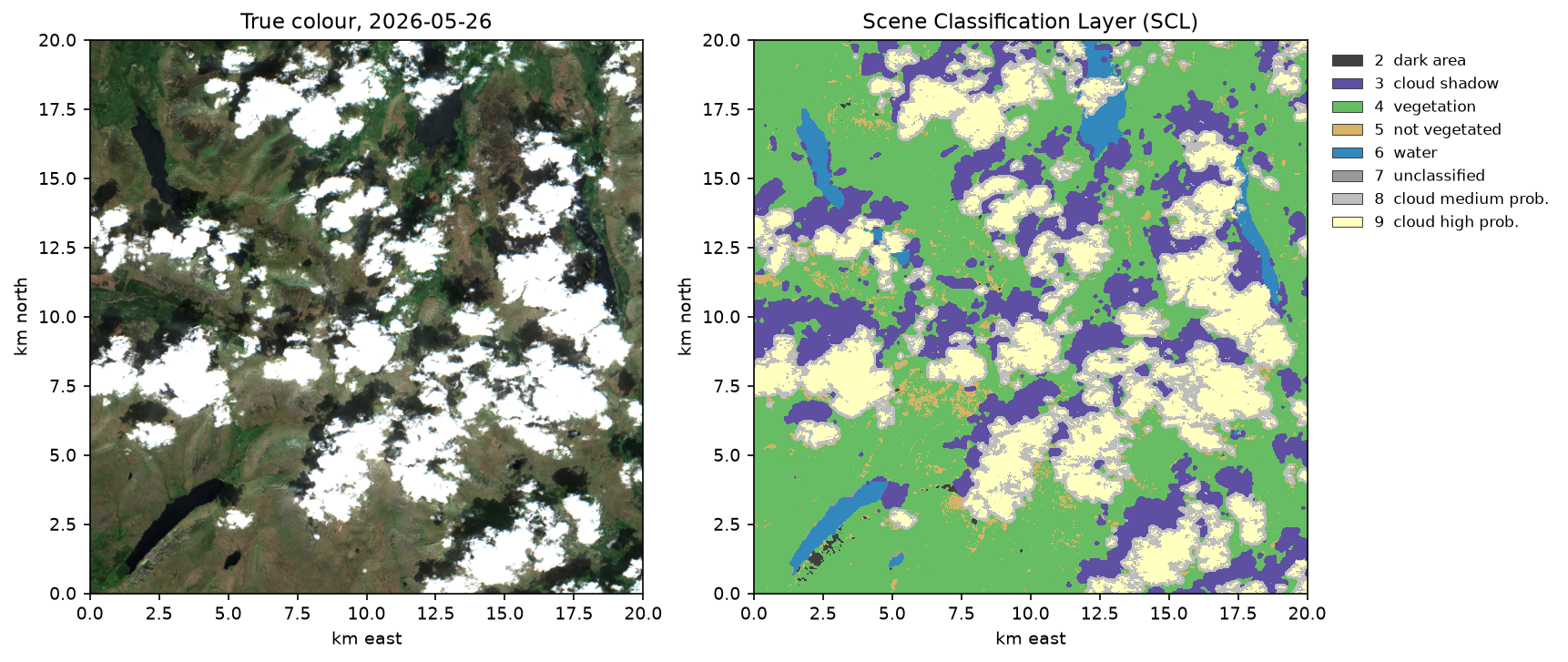
SCL is a good first answer, but it has two habits that matter in hilly, cloudy places. Medium-probability cloud often includes the bright haze at cloud edges, which is usually what you want to remove. And the shadow class is generous on steep, dark slopes facing away from the sun. Over the three dates, SCL masked 45–50% of the square.
Step 4: run s2cloudless and project cloud shadows
s2cloudless was trained on Level-1C top-of-atmosphere reflectance in ten bands, including B10 (cirrus), which L2A products do not keep. The Planetary Computer hosts only L2A, but Google’s public gcp-public-data-sentinel-2 bucket holds the full L1C archive with no login. The script finds the L1C product with the same sensing time and relative orbit, and reads its JPEG 2000 bands over HTTP with GDAL’s /vsicurl/:
S2C_BANDS = ["B01", "B02", "B04", "B05", "B08", "B8A", "B09", "B10", "B11", "B12"]detector = S2PixelCloudDetector(threshold=0.4, average_over=4, dilation_size=2, all_bands=False)
safe, urls = l1c_band_urls(b["item"])          # matching L1C .SAFE in the Google Cloud buckettoa = np.dstack([to_reflectance(read_window(urls[k])) for k in S2C_BANDS])prob = detector.get_cloud_probability_maps(np.nan_to_num(toa)[np.newaxis])[0]cloud = detector.get_mask_from_prob(prob[np.newaxis])[0].astype(bool)
s2cloudless says nothing about shadows. The standard workaround, used for example in Google’s Earth Engine tutorial for s2cloudless, is geometric: a cloud at height h casts its shadow h × tan(solar zenith) away from the sun. We do not know the height, so we shift the cloud mask for every height from 200 m to 3 km and keep only the dark, non-water pixels it lands on:
def project_shadows(cloud, dark, sun_azimuth, sun_zenith, heights_m=range(200, 3001, 200)):    """Cast the cloud mask away from the sun for cloud heights of 0.2-3 km; keep the dark pixels it lands on."""    az = np.radians(sun_azimuth)    projected = np.zeros_like(cloud)    for h in heights_m:        dist = h * np.tan(np.radians(sun_zenith)) / RES          # horizontal offset in pixels        dx, dy = -np.sin(az) * dist, np.cos(az) * dist            # image rows increase southwards        projected |= ndimage.shift(cloud.astype("uint8"), (dy, dx), order=0, cval=0).astype(bool)    return projected & dark & ~cloud
mndwi = (b["B03"] - b["B11"]) / (b["B03"] + b["B11"])dark = (b["B08"] < 0.15) & (mndwi < 0) # dark, but not watershadow = project_shadows(cloud, dark, p["s2:mean_solar_azimuth"], p["s2:mean_solar_zenith"])2026-05-26: S2B_MSIL1C_20260526T113309_N0512_R080_T30UVF_20260526T135808.SAFE cloud 39.2% projected shadow 7.2% (6 s)2026-08-08: S2A_MSIL1C_20260808T112131_N0512_R037_T30UVF_20260808T181539.SAFE cloud 40.3% projected shadow 1.3% (5 s)2026-09-23: S2B_MSIL1C_20260923T113319_N0513_R080_T30UVF_20260923T150444.SAFE cloud 36.9% projected shadow 9.4% (6 s)s2cloudless finds more cloud than SCL on two of the three dates, partly because of the 2-pixel dilation. Its projected shadows are much smaller than SCL’s, because a shadow pixel must be both in the projected path and dark.
Step 5: run OmniCloudMask on CPU
OmniCloudMask is a convolutional neural network trained on large, expert-labelled cloud datasets and designed to work across sensors. It needs only red, green and near-infrared bands at 10–50 m, so it works on L1C, L2A and other sensors. The first call downloads the model weights from Hugging Face; after that, a 1000 × 1000 scene takes about a second on a laptop CPU:
from omnicloudmask import predict_from_array
def omnicloudmask(red, green, nir):    arr = np.nan_to_num(np.stack([red, green, nir]), nan=0.0).astype("float32")    return predict_from_array(arr, inference_device="cpu", mosaic_device="cpu", no_data_value=-9999)[0]
pred = omnicloudmask(b["B04"], b["B03"], b["B08"])# OmniCloudMask classes: 0 clear, 1 thick cloud, 2 thin cloud, 3 cloud shadowm = np.zeros((H, W), "uint8"); m[np.isin(pred, [1, 2])] = CLOUD; m[pred == 3] = SHADOW2026-05-26: thick 33.2% thin 0.0% shadow 16.0% (1 s on CPU)2026-08-08: thick 24.0% thin 11.5% shadow 5.9% (1 s on CPU)2026-09-23: thick 38.6% thin 0.0% shadow 18.1% (1 s on CPU)Step 6: a simple threshold baseline
Before trusting a model, it is worth knowing what two thresholds achieve. Clouds are bright in blue; shadows are dark in the near-infrared. The MNDWI test stops lakes being called shadow:
BLUE_CLOUD = 0.18      # clear land in summer has B02 reflectance of about 0.02-0.08NIR_SHADOW = 0.12      # sunlit vegetation has B08 of 0.2-0.4; in shadow it drops below about 0.12
def threshold_mask(b): mndwi = (b["B03"] - b["B11"]) / (b["B03"] + b["B11"]) cloud = b["B02"] > BLUE_CLOUD shadow = (b["B08"] < NIR_SHADOW) & (mndwi < 0) & ~cloud m = np.zeros((H, W), "uint8"); m[shadow] = SHADOW; m[cloud] = CLOUD return m2026-05-26: cloud 25.3% shadow 6.4%2026-08-08: cloud 14.8% shadow 2.2%2026-09-23: cloud 20.4% shadow 8.4%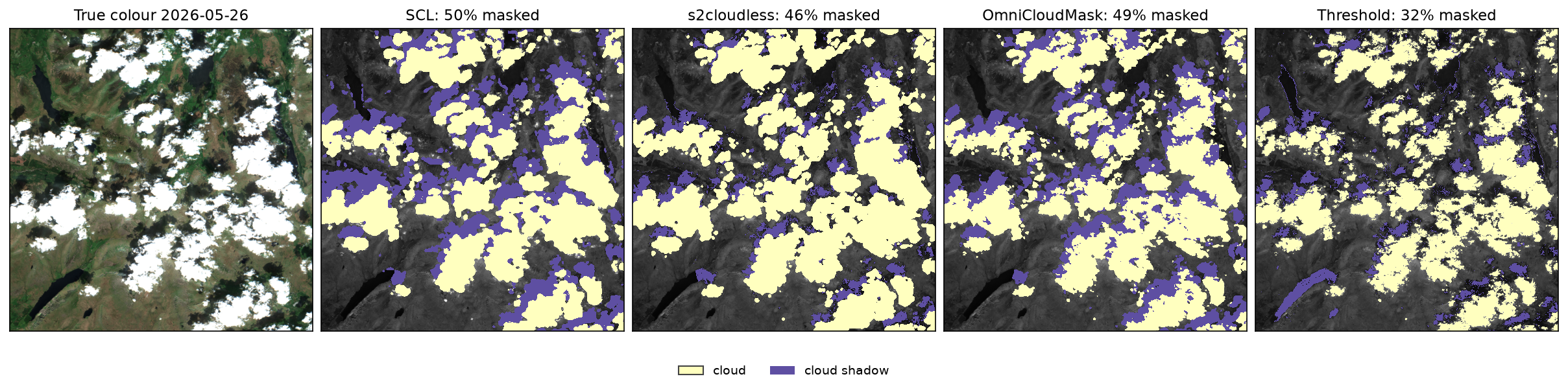
Step 7: measure how much the masks agree
Agreement is the share of pixels where two masks make the same masked or not-masked decision. Cohen’s kappa corrects that for chance: two masks that each flag half the image would agree on 50% of pixels even if they were random.
def kappa(a, b): po = np.mean(a == b) pe = np.mean(a) * np.mean(b) + np.mean(~a) * np.mean(~b) return (po - pe) / (1 - pe)masked (% of the area):date 2026-05-26 2026-08-08 2026-09-23methodSCL 50.1 45.4 48.5s2cloudless 46.4 41.5 46.4OmniCloudMask 49.2 41.3 56.7Threshold 31.7 17.0 28.9
pixel agreement, masked vs not masked, all three dates (%): SCL s2cloudless OmniCloudMask ThresholdSCL 100.0 81.6 81.7 73.6s2cloudless 81.6 100.0 87.6 78.9OmniCloudMask 81.7 87.6 100.0 74.8Threshold 73.6 78.9 74.8 100.0
Cohen's kappa: SCL s2cloudless OmniCloudMask ThresholdSCL 1.00 0.63 0.63 0.46s2cloudless 0.63 1.00 0.75 0.56OmniCloudMask 0.63 0.75 1.00 0.49Threshold 0.46 0.56 0.49 1.00
all four methods agree on 63.4% of pixels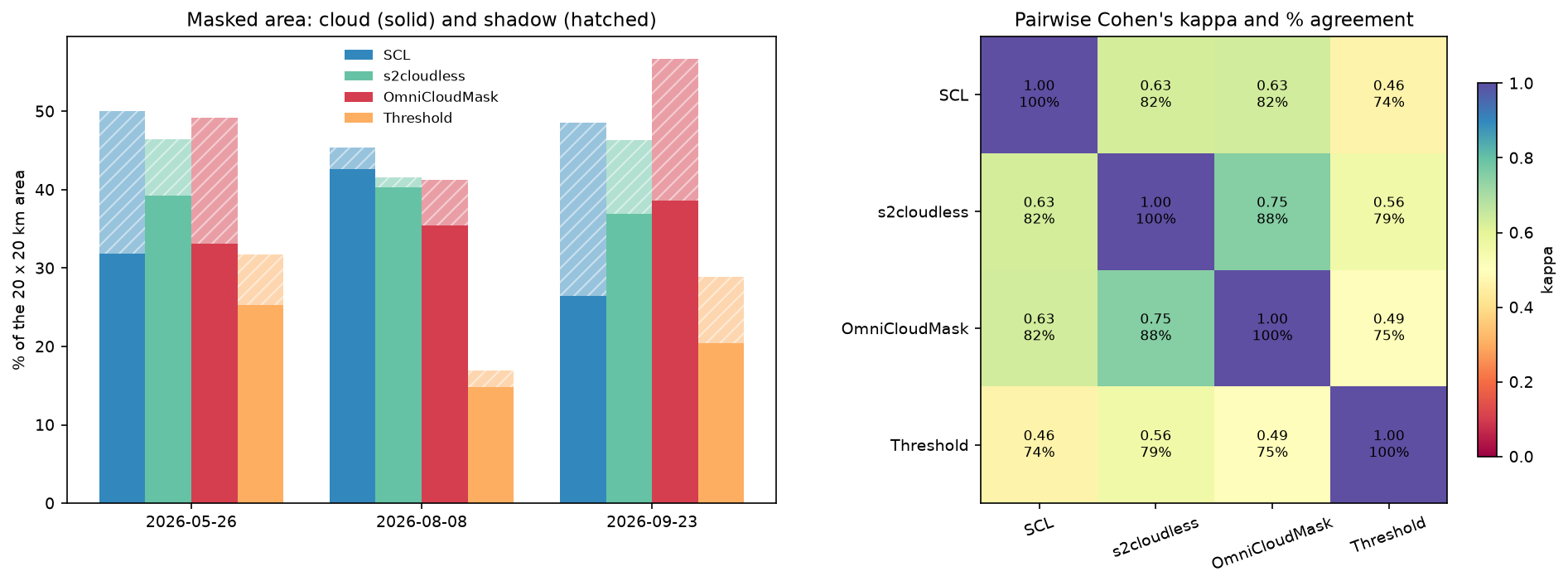
Even the two machine-learning masks disagree on one pixel in eight. The masked area is similar for SCL, s2cloudless and OmniCloudMask (41–57%), but the pixels are not the same. Agreement alone cannot tell us which is right, so the next step needs a reference.
Step 8: score each mask against reference points
There is no independent cloud mask for these dates, so we made one by eye. The script draws 80 random points per date (240 in total) and saves contact sheets of 640 m true-colour chips at 10 m, with the centre 20 m pixel boxed. One of us labelled every point as clear, cloud, shadow or uncertain without looking at any mask, and the labels are committed alongside the code in reference_points.csv. Uncertain points (thin haze, cloud edges, or dark lakes that might be in shadow) are left out of the scores.
ref = pts.merge(pd.read_csv("reference_points.csv")[["point_id", "label"]], on="point_id")ref = ref[ref.label.isin(["clear", "cloud", "shadow"])].copy()ref["truth"] = ref.label.map({"clear": CLEAR, "cloud": CLOUD, "shadow": SHADOW})
scores = []for m in METHODS: pred = np.array([scenes[p.date][f"{m}_mask"][p.row, p.col] for p in ref.itertuples()]) ref[m] = pred t_bad, p_bad = ref.truth.values > 0, pred > 0 tp, fp, fn = np.sum(t_bad & p_bad), np.sum(~t_bad & p_bad), np.sum(t_bad & ~p_bad) scores.append({"method": m, "overall_acc_%": np.mean(t_bad == p_bad) * 100, "kappa": kappa(t_bad, p_bad), "omission_%": fn / (tp + fn) * 100, # cloud or shadow the method left in "commission_%": fp / max(tp + fp, 1) * 100, # masked pixels that were really clear "cloud_found_%": np.mean(pred[ref.truth == CLOUD] > 0) * 100, "shadow_found_%": np.mean(pred[ref.truth == SHADOW] > 0) * 100, "clear_kept_%": np.mean(pred[ref.truth == CLEAR] == 0) * 100})reference labels: {'clear': 100, 'cloud': 61, 'uncertain': 54, 'shadow': 25}
186 usable points (clear 100, cloud 61, shadow 25); masked = cloud or shadow overall_acc_% kappa omission_% commission_% cloud_found_% shadow_found_% clear_kept_%methodSCL 84.95 0.70 13.95 17.78 85.25 88.0 84.0s2cloudless 90.32 0.80 12.79 8.54 91.80 76.0 93.0OmniCloudMask 95.16 0.90 2.33 7.69 98.36 96.0 93.0Threshold 82.80 0.65 33.72 5.00 77.05 40.0 97.0The confusion matrices show how each method goes wrong (rows are the reference label, columns the mask):
-- SCLSCL clear cloud shadowlabelclear 84 8 8cloud 9 49 3shadow 3 3 19-- s2cloudlesss2cloudless clear cloud shadowlabelclear 93 6 1cloud 5 56 0shadow 6 7 12-- OmniCloudMaskOmniCloudMask clear cloud shadowlabelclear 93 5 2cloud 1 59 1shadow 1 3 21-- ThresholdThreshold clear cloud shadowlabelclear 97 0 3cloud 14 47 0shadow 15 1 9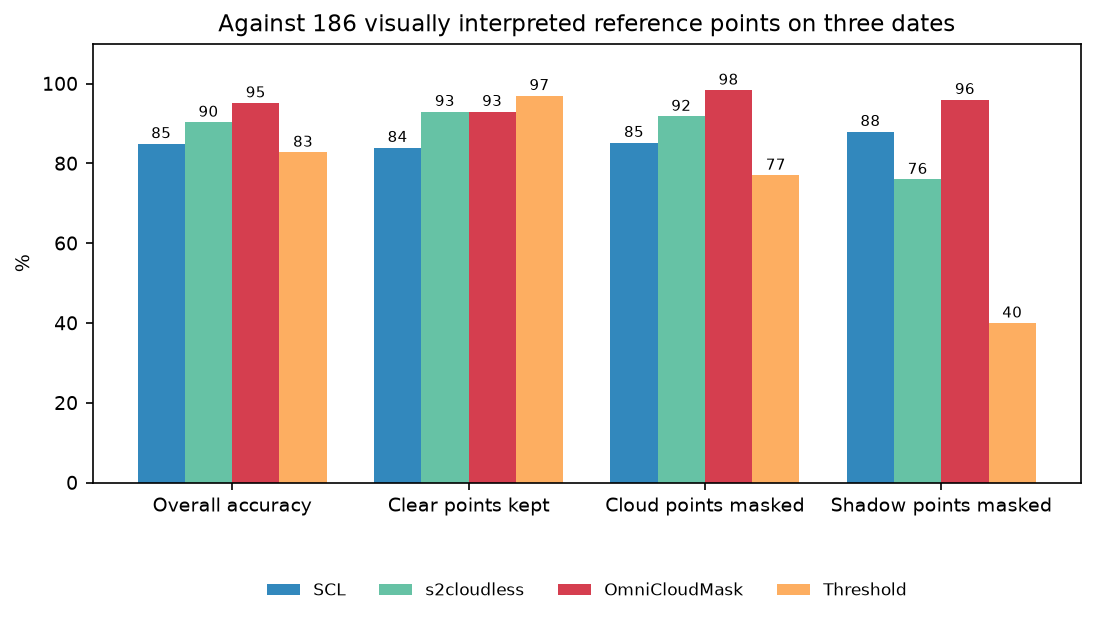
What the numbers say:
- OmniCloudMask made 9 errors in 186 points. It is the only method that is good at both cloud (98% found) and shadow (96%).
- SCL finds most shadow (88%) but pays for it: 16 of 100 clear points were masked, half of them as shadow, typically on dark, steep slopes. It also missed 9 cloud points, mostly thin or patchy cloud.
- s2cloudless is a strong cloud detector (92%), but its projected shadows missed 6 of 25 shadow points and called 7 others cloud, where the dilated cloud edge overlapped the shadow.
- The threshold almost never masks clear land, but misses 14 of 61 cloud points (thin, grey cloud is not bright enough in blue) and 15 of 25 shadow points.
Step 9: build a cloud-free median composite
A single cloudy date is rarely the goal. Usually you want one clean image for a season, and that is where the mask earns its keep. The script loads every scene from May to September 2026 with tile cloud below 90% on the same 20 m grid with odc.stac.load, masks each date, and takes the per-pixel median:
geobox = GeoBox.from_bbox(AOI, crs=CRS, resolution=RES)ds = odc.stac.load(items, bands=["B02", "B03", "B04", "B08", "SCL"], geobox=geobox, groupby="solar_day",                   resampling={"SCL": "nearest", "*": "average"})refl = {k: to_reflectance(ds[k].values) for k in ["B02", "B03", "B04", "B08"]}nodata = ds["SCL"].values == 0scl_bad = np.isin(ds["SCL"].values, [3, 8, 9, 10])
ocm_bad = np.zeros_like(scl_bad)for i in range(ds.sizes["time"]):    if not nodata[i].all():        ocm_bad[i] = omnicloudmask(refl["B04"][i], refl["B03"][i], refl["B08"][i]) > 0
def median_composite(bad):    out = {}    for k, v in refl.items():        a = v.copy()        a[bad | nodata] = np.nan        out[k] = np.nanmedian(a, axis=0)    out["n"] = np.sum(~(bad | nodata), axis=0)    return out
comp = median_composite(scl_bad | ocm_bad) # SCL + OmniCloudMask56 scenes with tile cloud cover < 90%loaded 45 dates x 1000 x 1000 px in 79 sOmniCloudMask on 45 dates: 31 sdates at least 90% clear: SCL 7, OmniCloudMask 8Only 7 or 8 of 45 dates were at least 90% clear over this small square, which is typical of the Lake District. To judge the composites, we compare each with 12 July 2026, the clearest date (SCL masks 0.0% of it, OmniCloudMask 1.5%). A pixel counts as cloud-contaminated if its composite blue is more than 0.03 brighter than on the clear date:
composite median_obs min_obs no_data_% brighter_blue_% darker_nir_% median_ndvi No mask 45.0 45 0.0 99.153 1.952 0.359 SCL 15.0 5 0.0 0.116 3.226 0.764 OmniCloudMask 14.0 5 0.0 0.069 2.854 0.766SCL + OmniCloudMask 13.0 5 0.0 0.058 2.125 0.770Without a mask, 99% of the square is brighter in blue than the clear date: the median of a Lake District summer is cloud. Any of the masks fixes that, and every pixel still has at least 5 clear observations. Combining SCL and OmniCloudMask leaves the fewest bright (cloud) pixels, 0.058%, and the fewest dark (shadow) pixels, at the cost of using 13 rather than 15 observations per pixel. Median NDVI rises from 0.36 to 0.77, a reminder of how badly unmasked clouds bias vegetation indices.
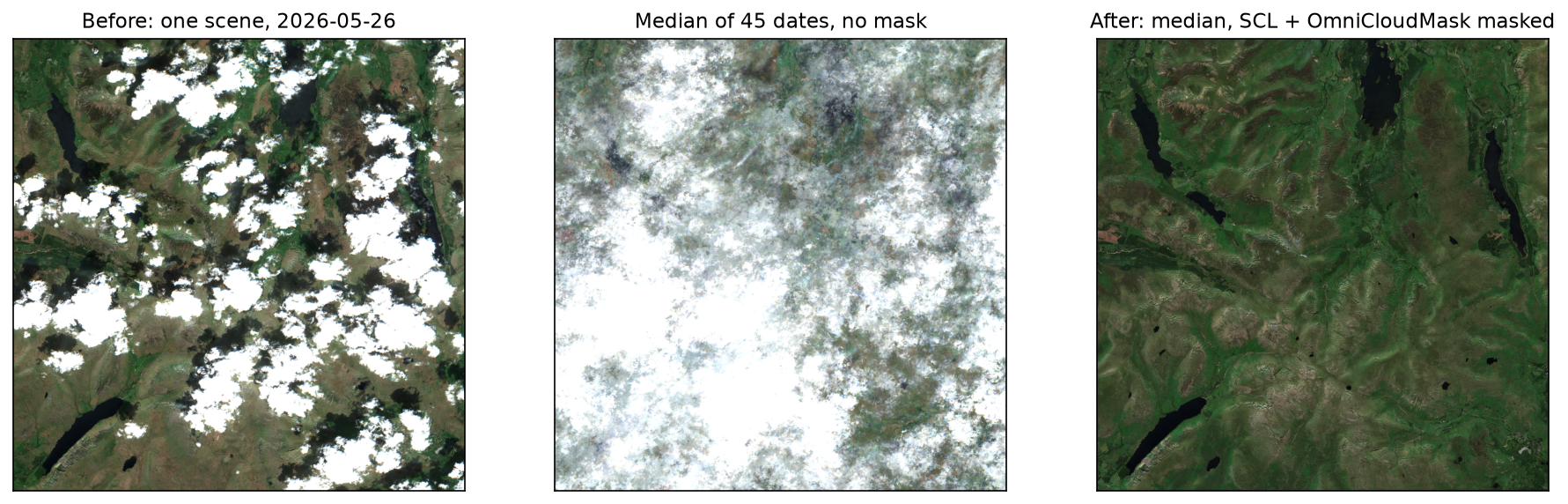
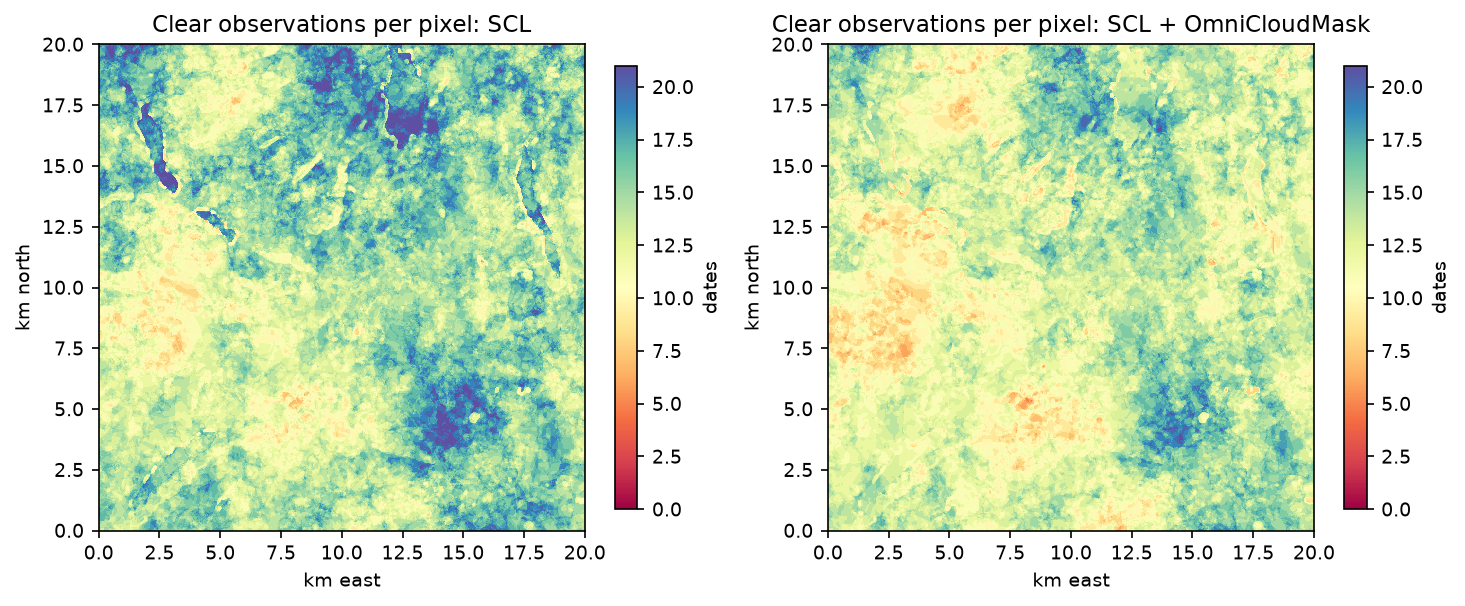
The composite is written as a four-band Cloud Optimised GeoTIFF (lake_district_median_2026.tif, bands B02, B03, B04 and B08), ready for classification or index mapping.
Pitfalls and limitations
- Terrain shadow is not cloud shadow. In the fells, SCL labels steep slopes facing away from the sun as cloud shadow, especially in September when the sun is low (zenith 55°). That removes valid data; it does not add cloud. For terrain-heavy areas, compare the SCL shadow class with a hillshade before trusting it.
- Thin cirrus and haze are hard for everyone. On 8 August SCL put 26% of the square in the cirrus class and OmniCloudMask called 11.5% thin cloud. Many of our “uncertain” points were here, and the scores above do not test them.
- Dark lakes confuse thresholds. The threshold mask called Wast Water shadow because peat-stained lakes are very dark in NIR and their MNDWI can be negative. Our reservoir water quality tutorial explains why.
- s2cloudless needs L1C. On the Planetary Computer you must fetch L1C elsewhere, as here, or use a platform that provides precomputed s2cloudless probabilities. Running it on L2A surface reflectance is outside its training data.
- Our check date is in the composite. 12 July is one of the 45 dates, which slightly favours every composite. The darker-NIR measure also picks up real seasonal change, so we use it only to compare masks with each other.
- One interpreter, one area, three dates. The accuracy figures come from 186 points labelled by one person over one 20 km square. They show the ranking for cloudy UK uplands in summer, not universal accuracy.
- Dilate before compositing if in doubt. A one- or two-pixel buffer around any mask removes the hazy edges that all methods miss, at little cost when you have a dozen observations per pixel.
Frequently asked questions
How do you mask clouds in Sentinel-2 using the SCL band?
Read the 20 m SCL asset from a Sentinel-2 L2A product and treat classes 3 (cloud shadow), 8 (cloud medium probability), 9 (cloud high probability) and 10 (thin cirrus) as invalid: bad = np.isin(scl, [3, 8, 9, 10]). Many workflows also drop 0 (no data) and 1 (saturated or defective), and some drop 11 (snow) in summer. Use nearest-neighbour resampling if you move SCL to a 10 m grid.
Is s2cloudless better than SCL?
For cloud, usually yes: on our reference points it found 92% of cloud against 85% for SCL and masked far fewer clear pixels (7 against 16 out of 100). But s2cloudless has no shadow model, and the geometric shadow projection we added missed a quarter of the shadow points. If you need shadows, OmniCloudMask or SCL’s shadow class is a better starting point.
What is OmniCloudMask?
OmniCloudMask is an open-source (MIT) Python package from the Department of Primary Industries and Regional Development, Western Australia. Its neural network labels each pixel as clear, thick cloud, thin cloud or cloud shadow from red, green and NIR bands, for Sentinel-2, Landsat and other sensors at 10–50 m. It runs on CPU or GPU; here a 20 km square took about one second on a laptop CPU.
Why is my Sentinel-2 median composite still cloudy?
Because the median only removes clouds if fewer than half of the observations at a pixel are cloudy. In the Lake District, most summer dates are cloudy, so the unmasked median of 45 dates was cloud over 99% of the square. Mask each date first, then take the median of what is left, and check that every pixel still has several clear observations.
Does the Sentinel-2 cloud cover percentage refer to my area?
No. eo:cloud_cover is for the whole 110 × 110 km tile (or the granule’s data area). A scene listed as 10% cloudy left half of our 20 km square under cloud or shadow. Filter loosely on tile cloud (we used below 90%) and then measure cloud inside your own area of interest with a mask.
Can I use these masks for Landsat?
OmniCloudMask works directly on Landsat 8 and 9 red, green and NIR bands. SCL and s2cloudless are Sentinel-2 only; Landsat Collection 2 has its own QA_PIXEL band from the CFMask algorithm, which plays the same role as SCL. The land surface temperature tutorial uses QA_PIXEL.
Next steps
- Feed the composite into a classifier: land cover classification with random forest starts from exactly this kind of cloud-free Sentinel-2 median.
- Swap SCL for OmniCloudMask in a time series: NDVI time series in Python with Sentinel-2 and odc-stac uses SCL, and the same
odc.stac.loadstack works with the OmniCloudMask function above. - Revisit the basics of STAC and COGs in Measuring Lake Mead’s shrinking shoreline with Sentinel-2 and STAC.
- Summarise the composite by area: zonal statistics in Python with exactextract and rasterstats turns rasters like this into per-polygon tables and maps.
- When cloud never clears, switch to radar: Sentinel-1 SAR flood mapping in Python sees through cloud.
- Train your own mask: creating satellite imagery training data in Python and training a U-Net for satellite segmentation cover the steps.
- See how clear views per season limit a classifier in habitat mapping with Sentinel-2 in Python, Part 1 of our five-part AI habitat classification series, which builds seasonal composites with an SCL mask buffered by 20 m.
Data and licences
- Sentinel-2 L2A: contains modified Copernicus Sentinel data 2026, processed by ESA. Accessed as Cloud Optimised GeoTIFFs from the Microsoft Planetary Computer on 21 October 2026.
- Sentinel-2 L1C: contains modified Copernicus Sentinel data 2026, from the Google Cloud public dataset
gcp-public-data-sentinel-2, accessed on 21 October 2026. Copernicus Sentinel data are free and open under the Copernicus data licence. - s2cloudless (Sinergise): code and model under CC BY-SA 4.0. Zupanc, A. (2017), “Improving cloud detection with machine learning”, Sentinel Hub blog; Skakun, S. et al. (2022), “Cloud mask intercomparison eXercise (CMIX)”, Remote Sensing of Environment 274.
- OmniCloudMask (DPIRD, Western Australia): MIT licence. Wright, N. et al. (2025), “Training sensor-agnostic deep learning models for remote sensing: achieving state-of-the-art cloud and cloud shadow identification with OmniCloudMask”, Remote Sensing of Environment 322. The weights are downloaded from Hugging Face on first use.
- Reference points: 240 points labelled by TechnicalGIS, published with the code in
reference_points.csv. - Code:
cloud_masking.py, tested with Python 3.12.0, pystac-client 0.9.1, planetary-computer 1.0.0, odc-stac 0.5.3, rasterio 1.5.2, s2cloudless 1.7.3, OmniCloudMask 1.8.0, PyTorch 2.14.1 (CPU) and pandas 3.0.6.
Key terms
- SCL
- Scene Classification Layer: a 20 m band in every Sentinel-2 L2A product, made by ESA's Sen2Cor processor, that labels each pixel as vegetation, water, cloud (medium or high probability), thin cirrus, cloud shadow, snow and so on.
- s2cloudless
- A gradient-boosted classifier from Sinergise that turns ten Sentinel-2 L1C top-of-atmosphere bands into a per-pixel cloud probability. It detects cloud only, not shadow.
- OmniCloudMask
- A pretrained convolutional neural network (Wright et al., 2025) that labels pixels as clear, thick cloud, thin cloud or cloud shadow from red, green and near-infrared bands, at 10–50 m resolution and for several sensors.
- Cloud-shadow projection
- Finding shadows geometrically: shift the cloud mask away from the sun by height × tan(solar zenith) for a range of plausible cloud heights, and keep the dark pixels it lands on.
- Cohen's kappa
- Agreement between two classifications after removing the agreement expected by chance. 1 is perfect, 0 is no better than chance; 0.6–0.8 is usually called substantial.
- Omission and commission
- Omission error is the share of real cloud or shadow that a mask misses; commission error is the share of masked pixels that were really clear.
- Median composite
- An image built by taking, for each pixel and band, the median of all clear observations in a period. Masking first matters because a median of mostly cloudy values is still cloud.
Data for this tutorial
- Microsoft Planetary Computer · Sentinel-2 L2A as Cloud Optimised GeoTIFFs via STAC, including the SCL band
- Copernicus Data Space Ecosystem · The official Sentinel-2 archive (L1C and L2A)
Licences and formats for each source are listed in the GIS data sources catalogue.