Snow cover mapping with NDSI in Python: Sentinel-2 and MODIS over the Cairngorms
Map snow cover in Python with the Normalised Difference Snow Index (NDSI) from Sentinel-2 and the daily MODIS snow product on the Microsoft Planetary Computer: choosing the NDSI threshold, separating snow from cloud, snow-covered area through the winter of 2025–26 in the Cairngorms, and the snowline by elevation and aspect with the Copernicus DEM.
- Level
- Intermediate
- Tested with
- Python 3.12
- Source code
- Download scripts
Key takeaways
- NDSI = (green − SWIR) / (green + SWIR), or (B03 − B11) / (B03 + B11) for Sentinel-2. Snow is bright in green and dark in SWIR, so it scores high; a threshold of 0.4, plus NIR > 0.11 and green > 0.10 to exclude water and dark pixels, is the standard snow test.
- The threshold matters less than you might expect. On a clear Cairngorms scene, snow-covered area changed from 58.8% to 54.8% as the threshold moved from 0.3 to 0.5, because snow forms a distinct peak near NDSI 0.8.
- Cloud is the real problem. NDSI separates snow from most cloud (cloud has bright SWIR: a median B11 reflectance of 0.300 against 0.071 for snow), but ice cloud and thin cirrus still pass the test, so mask cloud with the Scene Classification Layer before you measure snow.
- Of 149 Sentinel-2 scenes from October 2025 to June 2026, only 21 were at least half clear. Combining Terra and Aqua MODIS gave 45 usable days instead of 32 for Terra alone, and on 15 shared days MODIS and Sentinel-2 agreed closely (r = 0.99).
- The snowline (where half of the land is snow-covered) ranged from 389 m in late November to over 1,200 m in spring, and was a median 128 m higher on south-facing slopes than on north-facing ones.
Before you start
- Comfortable with NumPy, pandas and rasterio (the Sentinel-2 Lake Mead tutorial introduces STAC searches and Cloud Optimised GeoTIFFs)
- Python 3.10+ with pystac-client, planetary-computer, rasterio, numpy, pandas, pyproj and matplotlib
- An internet connection: Sentinel-2, MODIS and the Copernicus DEM are streamed from the Microsoft Planetary Computer, which needs no account or API key
Short answer: to map snow cover with NDSI in Python, read the green (B03) and shortwave-infrared (B11) bands of a Sentinel-2 L2A scene, compute NDSI = (B03 − B11) / (B03 + B11), and call a pixel snow where NDSI > 0.4. Add NIR (B08) > 0.11 and green > 0.10 to exclude water and dark surfaces. Then mask cloud first, with the Scene Classification Layer (SCL), because some cloud also has a high NDSI. Divide the snow pixels by the clear pixels to get the snow-covered area, and overlay a DEM to find the snowline. For a daily record through cloudy winters, use the 500 m MODIS MOD10A1 snow product, which is on the Microsoft Planetary Computer and needs no login.
The Cairngorms are the highest and snowiest massif in the British Isles: five of the six highest Scottish mountains, a sub-arctic plateau above 1,000 m, a ski centre on Cairn Gorm, and two of the six areas covered by the Scottish Avalanche Information Service. They are also cloudy, and in midwinter the sun barely clears the hills. That makes them a hard, honest test for satellite snow mapping. In this tutorial we follow the winter of 2025–26 across an 833 km² area from Aviemore to Ben Avon.
You will learn how to:
- build a 20 m analysis grid and put the Copernicus GLO-30 DEM on it, with slope and aspect;
- search a whole winter of Sentinel-2 L2A with STAC and read only the study area;
- compute NDSI, apply the snow tests and check how sensitive the result is to the threshold;
- see where snow and cloud are confused, and how the SCL and the SWIR band separate them;
- track snow-covered area through the winter with Sentinel-2 and the daily MODIS product;
- measure snow cover by elevation band, the snowline, and the difference between north- and south-facing slopes.
All outputs below are real results from snow_cover_ndsi.py, run on 21 October 2026 with Python 3.12, pystac-client 0.9.1, planetary-computer 1.0.0 and rasterio 1.5.2.
Why NDSI works
Snow is one of the brightest natural surfaces in visible light, but it absorbs strongly in the shortwave infrared around 1.6 µm. Most clouds are bright in both. Rock, soil and vegetation are moderately bright in both. A normalised difference of green and SWIR therefore picks out snow:
- Snow: high green, low SWIR, so NDSI is typically 0.6–0.95.
- Water cloud: high green and high SWIR, so NDSI is near 0.
- Vegetation, soil and rock: NDSI below about 0.2, usually negative.
- Water: also has a high NDSI, because it is dark in SWIR. That is why the standard algorithm adds a NIR test.
The test NDSI > 0.4 dates back to Dozier (1989) for Landsat and became the core of the MODIS SNOMAP algorithm (Hall et al., 1995). NIR > 0.11 removes water, and green > 0.10 removes very dark pixels whose NDSI is unstable.
Step 1: a study area grid and the Copernicus DEM
We work on a 20 m grid in UTM zone 30N, the native grid of Sentinel-2 tile 30VVJ and of its 20 m bands, B11 and the SCL. Snapping the grid to the tile’s pixel edges means no resampling of the imagery.
import numpy as npimport planetary_computerimport pystac_clientimport rasteriofrom rasterio.enums import Resamplingfrom rasterio.transform import from_originfrom rasterio.warp import reproject, transform_boundsfrom rasterio.windows import from_bounds
BBOX = (-3.90, 56.98, -3.35, 57.20)                  # lon/latCRS, RES = "EPSG:32630", 20.0                        # UTM 30N, the native grid of tile 30VVJ; 20 m = B11 pixelsSEASON = "2025-10-01/2026-06-30"x0, y0, x1, y1 = transform_bounds("EPSG:4326", CRS, *BBOX)# Snap to the Sentinel-2 20 m grid (tile origins are at ...9960 E / ...0020 N, i.e. multiples of 20 m minus 40).x0, y1 = np.floor((x0 + 40) / RES) * RES - 40, np.ceil((y1 - 20) / RES) * RES + 20W, H = int(np.ceil((x1 - x0) / RES)), int(np.ceil((y1 - y0) / RES))TRANSFORM = from_origin(x0, y1, RES, RES)BOUNDS = (x0, y1 - H * RES, x0 + W * RES, y1)
catalog = pystac_client.Client.open("https://planetarycomputer.microsoft.com/api/stac/v1",                                    modifier=planetary_computer.sign_inplace)
The Copernicus GLO-30 DEM comes in 1° tiles in geographic coordinates. Reproject each tile that touches the area onto the grid with bilinear resampling, then derive slope and aspect:
dem = np.full((H, W), np.nan, dtype="float32")for item in catalog.search(collections=["cop-dem-glo-30"], bbox=BBOX).items(): with rasterio.open(item.assets["data"].href) as src: tmp = np.full((H, W), np.nan, dtype="float32") reproject(rasterio.band(src, 1), tmp, dst_transform=TRANSFORM, dst_crs=CRS, dst_nodata=np.nan, resampling=Resampling.bilinear) dem = np.where(np.isnan(dem), tmp, dem)gy, gx = np.gradient(dem, RES) # rows run north to south, so -gy is the northward slopeslope = np.degrees(np.arctan(np.hypot(gx, gy)))aspect = (np.degrees(np.arctan2(-gx, gy)) + 360) % 360 # direction the slope faces, clockwise from northbbox (-3.9, 56.98, -3.35, 57.2) -> EPSG:32630 1679 x 1241 pixels of 20 m (833 km2)DEM: 202-1307 m, median 632 m; 16% of the area is above 900 mRaster terrain analysis with rasterio explains slope, aspect and hillshade in more detail.
Step 2: search a winter of Sentinel-2 and read only the study area
Filter the STAC search on the MGRS tile so that each date appears once per orbit. Then, for each scene, read the SCL first and skip the band reads when less than 15% of the area is clear. This saves most of the download in a Scottish winter.
items = catalog.search(collections=["sentinel-2-l2a"], bbox=BBOX, datetime=SEASON,                       query={"s2:mgrs_tile": {"eq": "30VVJ"}}).item_collection()BANDS = ["B02", "B03", "B04", "B08", "B11"]CLEAR_SCL = [2, 4, 5, 6, 7, 11]                      # dark area, vegetation, bare, water, unclassified, snowCLOUD_SCL = [3, 8, 9, 10]                            # cloud shadow, cloud medium, cloud high, thin cirrus

def read(href: str, resampling=Resampling.average) -> np.ndarray:    with rasterio.open(href) as src:        return src.read(1, window=from_bounds(*BOUNDS, src.transform), out_shape=(H, W),                        resampling=resampling, boundless=True, fill_value=0)

def load_scene(item) -> dict | None:    f = CACHE / "s2" / f"{item.id}.npz"    if not f.exists():        scl = read(item.assets["SCL"].href, Resampling.nearest)        arrs = {"scl": scl}        if np.isin(scl, CLEAR_SCL + [11]).mean() >= 0.15:          # skip the band reads for overcast scenes            # Processing baseline 04.00 (January 2022) and later add 1000 to every digital number.            offset = 1000 if float(item.properties["s2:processing_baseline"]) >= 4.0 else 0            for b in BANDS:                dn = read(item.assets[b].href).astype("float32")                arrs[b] = np.where(dn > 0, (dn - offset) / 10000, np.nan).astype("float32")        np.savez_compressed(f, **arrs)    z = dict(np.load(f))    z.update(id=item.id, date=pd.Timestamp(item.datetime).tz_localize(None),             sun_elev=90 - float(item.properties["s2:mean_solar_zenith"]))    return z

with ThreadPoolExecutor(8) as pool:    scenes = list(pool.map(load_scene, items))
The 10 m bands (B02, B03, B04, B08) are averaged onto the 20 m grid by out_shape with Resampling.average. B11 and the SCL are read at their native 20 m.
Step 3: NDSI, the snow tests and the threshold
NDSI_T, NIR_T, GREEN_T = 0.4, 0.11, 0.10             # thresholds from the MODIS SNOMAP algorithm (Hall et al.)

def classify(s: dict, t=NDSI_T) -> dict:    g, swir, nir = s["B03"], s["B11"], s["B08"]    with np.errstate(divide="ignore", invalid="ignore"):        ndsi = (g - swir) / (g + swir)    snow = (ndsi > t) & (nir > NIR_T) & (g > GREEN_T)    clear = np.isin(s["scl"], CLEAR_SCL) & np.isfinite(ndsi)    return {"ndsi": ndsi, "snow": snow & clear, "clear": clear, "snow_any": snow}
snow is snow on clear pixels and is what we measure. snow_any ignores the cloud mask, and we use it in Step 4 to see what the NDSI test alone would call snow. The snow-covered area of a scene is snow.sum() / clear.sum(). We keep scenes in which at least half the area is clear.
149 Sentinel-2 L2A scenes of tile 30VVJ, 2025-10-01/2026-06-30scenes with any data: 149; with >= 15% clear land (bands read): 65; with >= 50% clear (used): 21sun elevation at overpass: 8.9 deg (December) to 55.7 deg (June)149 scenes, but only 21 that were at least half clear: one in seven. That is the reality of optical snow mapping in Scotland. The clearest scene with plenty of snow was 25 November 2025:
S2C_MSIL2A_20251125T114431_R123_T30VVJ_20251125T150420: clear 97.3%, snow-covered area 57.1% (463.2 km2), sun elevation 11.8 degNDSI of clear pixels: 5th/50th/95th percentile -0.48 / 0.65 / 0.92snow-covered area vs NDSI threshold: 0.10: 61.4%, 0.15: 60.8%, 0.20: 60.2%, 0.25: 59.6%, 0.30: 58.8%, 0.35: 58.0%, 0.40: 57.1%, 0.45: 56.0%, 0.50: 54.8%, 0.55: 53.2%, 0.60: 51.2%, 0.65: 48.3%, 0.70: 43.8%pixels with NDSI > 0.4 removed by the NIR > 0.11 / green > 0.10 tests: 86,914 (7.0%), of which in water (SCL 6): 10,220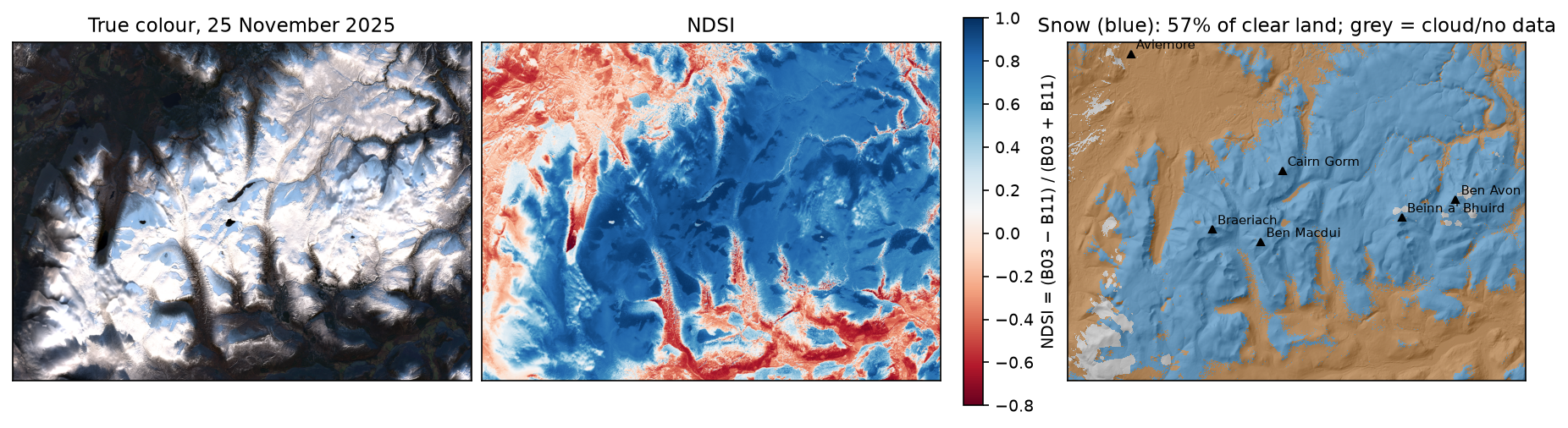
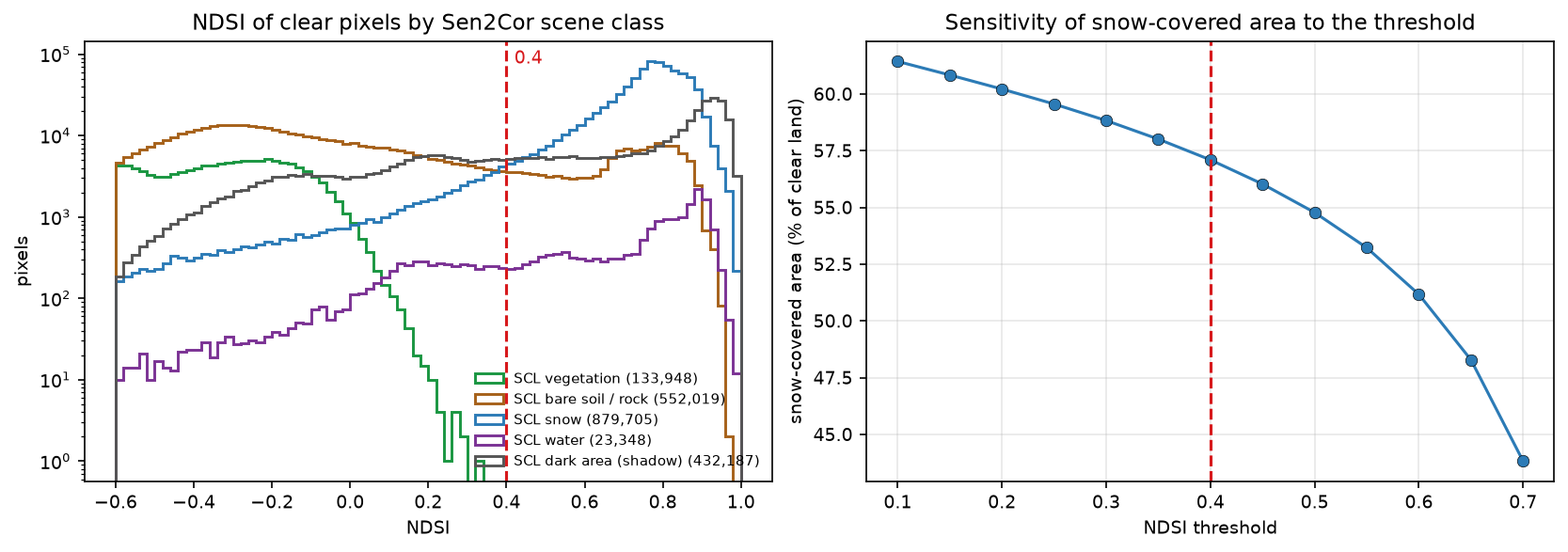
Two things stand out. First, the snow class forms a tight peak near 0.8, so any threshold between about 0.3 and 0.5 gives a similar answer. That is why 0.4 has lasted so long. Second, many dark area pixels (Sen2Cor’s label for deep shadow) have a high NDSI. With the sun only 12° up, whole north-facing slopes are in shadow, and Sen2Cor calls them dark area rather than snow. Because NDSI is a ratio, it still recognises them as snow, which is one reason our snow mask covers more ground than the SCL snow class. The NIR and green tests removed 7% of the pixels with NDSI above 0.4, including 10,220 water pixels on lochs such as Loch Morlich and Loch Einich.
Step 4: snow and cloud confusion
The worst errors in snow mapping come from cloud. To see them, pick a scene that is partly cloudy and snowy, and ask how Sen2Cor labels the pixels that the NDSI test alone (snow_any) calls snow:
mixed = s2[(s2.clear_frac.between(0.3, 0.8)) & (s2.sca > 0.2)].sort_values("ndsi_snow_scl_cloud", ascending=False)M = next(s for s in scenes if s["id"] == mixed.iloc[0].id)MC = classify(M)tab = pd.Series(M["scl"][MC["snow_any"]]).map(scl_names).value_counts(normalize=True).mul(100).round(1)cloud = np.isin(M["scl"], [8, 9])print(f"NDSI of SCL cloud (medium/high) pixels: median {np.nanmedian(MC['ndsi'][cloud]):.2f}; " f"{100 * np.nanmean(MC['ndsi'][cloud] > NDSI_T):.1f}% exceed 0.4")print(f"B11 (SWIR) reflectance: SCL snow median {np.nanmedian(M['B11'][M['scl'] == 11]):.3f}, " f"SCL cloud median {np.nanmedian(M['B11'][cloud]):.3f}")SCL class of the pixels the NDSI test calls snow (%):cloud medium 36.5dark area 18.9snow 18.6thin cirrus 16.0cloud high 3.6water 3.2bare 2.0unclassified 1.1NDSI of SCL cloud (medium/high) pixels: median 0.13; 13.3% exceed 0.4B11 (SWIR) reflectance: SCL snow median 0.071, SCL cloud median 0.300
across all scenes read: share of NDSI-snow pixels that the SCL labels cloud or shadow: median 62.3%, max 99.9%agreement of our snow mask with SCL class 11 on clear pixels (scenes used): median 95.0%, min 71.9%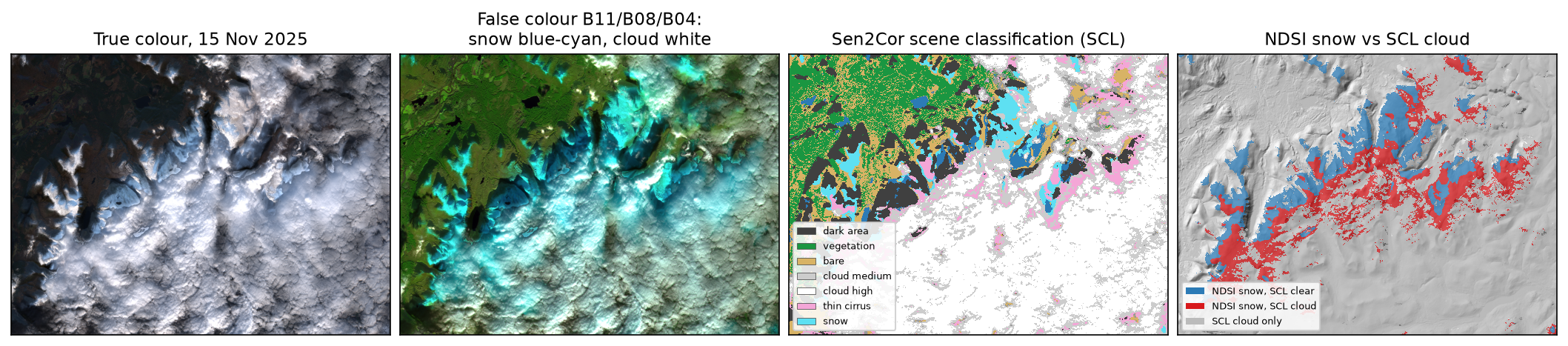
The SWIR band does most of the work: the median cloud pixel reflects 0.300 in B11 against 0.071 for snow, and its NDSI is only 0.13. But 13% of the medium and high cloud pixels still exceed 0.4. These are mostly ice clouds and thin cirrus, whose ice crystals absorb SWIR as snow does, and thin cloud over snow, where the snow shows through. On this scene, more than half of the NDSI snow pixels are labelled cloud or cirrus.
The practical rule is: mask cloud first, then threshold NDSI on what is left, and never report a snow-covered area as a share of the whole image. Across all 65 scenes we read, a median of 62% of the NDSI snow pixels sat under SCL cloud or shadow. Without the cloud mask, the snow-covered area of a cloudy winter would be badly overestimated. On clear pixels of the scenes we used, our NDSI mask and the SCL snow class agreed on a median of 95% of pixels.
Step 5: snow-covered area through the winter, with MODIS
21 clear Sentinel-2 scenes in nine months leave long gaps. The MODIS sensors on Terra (morning) and Aqua (afternoon) image Scotland every day at 500 m. The collection 6.1 MOD10A1 and MYD10A1 products are on the Planetary Computer as Cloud Optimised GeoTIFFs. Their NDSI_Snow_Cover layer holds NDSI × 100 for land pixels, and flag values above 100 (250 is cloud). We read a window from each day, fill Terra’s cloud gaps with Aqua, and apply the same 0.4 threshold:
modis_items = catalog.search(collections=["modis-10A1-061"], bbox=BBOX, datetime=SEASON).item_collection()mb = transform_bounds(CRS, SIN, *BOUNDS)                 # SIN is the MODIS sinusoidal projection

def load_modis(item) -> tuple:    f = CACHE / "modis" / f"{item.id}.npy"    if not f.exists():        with rasterio.open(item.assets["NDSI_Snow_Cover"].href) as src:            win = from_bounds(*mb, src.transform).round_offsets().round_lengths()            np.save(f, src.read(1, window=win))            if not (CACHE / "modis_transform.npy").exists():                np.save(CACHE / "modis_transform.npy", np.array(src.window_transform(win))[:6])    return item.id, pd.Timestamp(item.properties["start_datetime"]).tz_localize(None).normalize(), np.load(f)

with ThreadPoolExecutor(16) as pool: mods = list(pool.map(load_modis, modis_items))terra = {d: a for i, d, a in mods if i.startswith("MOD")}aqua = {d: a for i, d, a in mods if i.startswith("MYD")}for d in sorted(set(terra) | set(aqua)): t = terra.get(d, np.full(shape_m, 250, "uint8")) a = aqua.get(d, np.full(shape_m, 250, "uint8")) comb = np.where(t <= 100, t, np.where(a <= 100, a, t)) # Terra first, Aqua where Terra is cloudy ok = (comb <= 100) & np.isfinite(dem_m) snow = ok & (comb >= 40) # NDSI >= 0.4 (values are NDSI x 100)271 Terra and 273 Aqua days on a 75 x 54 grid of 463 m pixelsdays with >= 70% clear (Terra or Aqua): 45 of 273; Terra alone would give 32monthly mean snow-covered area on clear days (%):day 2025-10 2025-11 2025-12 2026-01 2026-02 2026-03 2026-04 2026-05 2026-06mean 2.0 80.4 38.8 63.2 47.6 27.6 8.4 0.0 0.0count 7.0 3.0 8.0 1.0 2.0 5.0 10.0 5.0 4.0
same-day Sentinel-2 and MODIS (both >= 50%/70% clear): 15 days; SCA difference MODIS - S2: mean +1.0 points, r = 0.99 date sun_elev clear_frac sca snow_km2 scl_snow_agree ndsi_snow_scl_cloud2025-10-13 11:33 24.574 0.751 0.000 0.000 1.000 0.0002025-10-15 11:33 23.841 1.000 0.000 0.000 1.000 NaN2025-11-22 11:34 12.327 0.679 0.871 493.158 0.750 0.2232025-11-25 11:44 11.828 0.973 0.571 463.207 0.807 0.0132025-11-30 11:43 10.931 0.771 0.697 447.895 0.823 0.1592025-12-02 11:34 10.491 0.555 0.219 101.279 0.826 0.5452025-12-24 11:35 8.931 0.811 0.264 178.180 0.741 0.0052025-12-30 11:44 9.336 0.862 0.366 262.854 0.719 0.0132026-02-13 11:43 18.911 0.655 0.649 354.329 0.891 0.3572026-02-28 11:43 24.326 0.776 0.220 142.490 0.851 0.2492026-03-20 11:43 32.224 0.764 0.081 51.438 0.915 0.3482026-04-14 11:43 41.914 0.778 0.113 73.410 0.941 0.4422026-04-23 11:33 44.804 0.999 0.040 33.504 0.950 0.0002026-04-24 11:43 45.396 1.000 0.039 32.496 0.952 0.0002026-04-26 11:33 45.781 0.640 0.034 17.897 0.959 0.1812026-04-26 11:44 46.056 0.725 0.027 16.599 0.966 0.1902026-04-29 11:43 47.001 1.000 0.028 23.227 0.961 0.0002026-05-26 11:33 53.304 0.514 0.003 1.479 0.994 0.4162026-05-26 11:44 53.605 0.627 0.004 2.148 0.993 0.2842026-06-15 11:33 55.300 0.842 0.000 0.306 0.999 0.2952026-06-15 11:44 55.642 0.794 0.000 0.186 0.999 0.399Some dates appear twice: tile 30VVJ lies under two adjacent Sentinel-2 orbits (relative orbits 080 and 123), so on some days both passes, 10 minutes apart, cover the area. They give very similar results, which is a useful check.
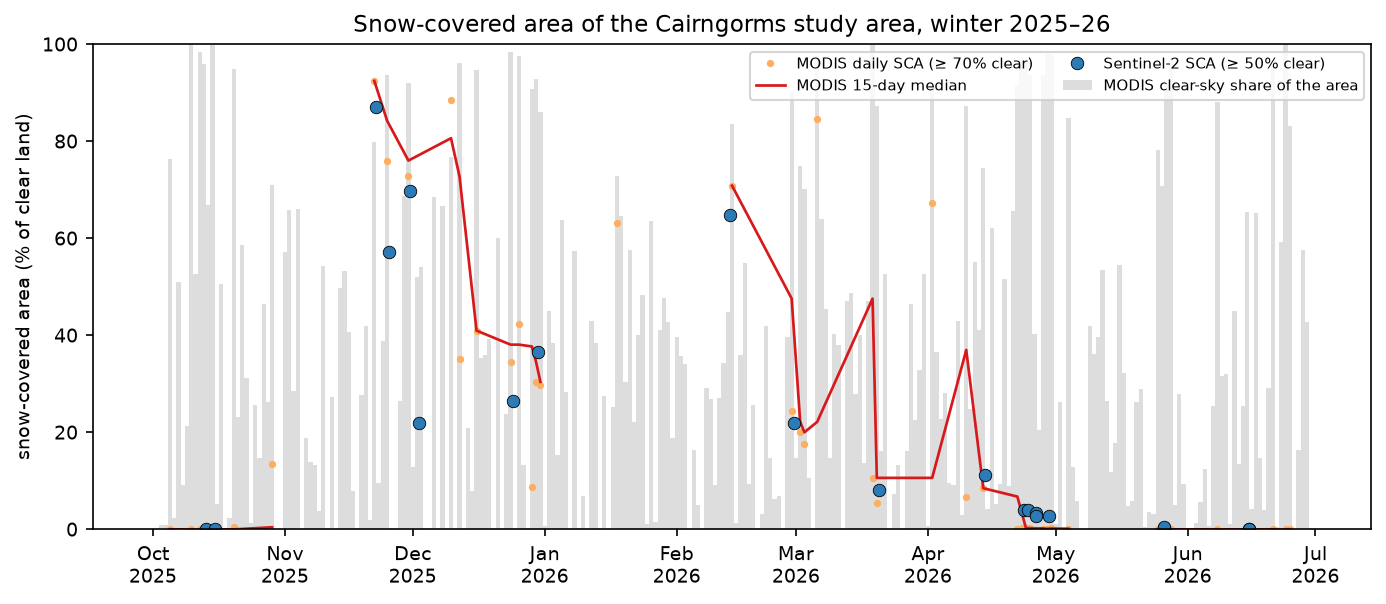
Filling Terra’s gaps with Aqua raised the number of usable days from 32 to 45, because the afternoon pass sometimes finds a gap in the cloud that the morning pass did not. Even so, only 45 of 273 days were at least 70% clear, and January 2026 had one. Gaps of several weeks are normal in Scottish winters, so treat the line between clear days as an interpolation, not a measurement.
Step 6: snow cover by elevation, the snowline and aspect
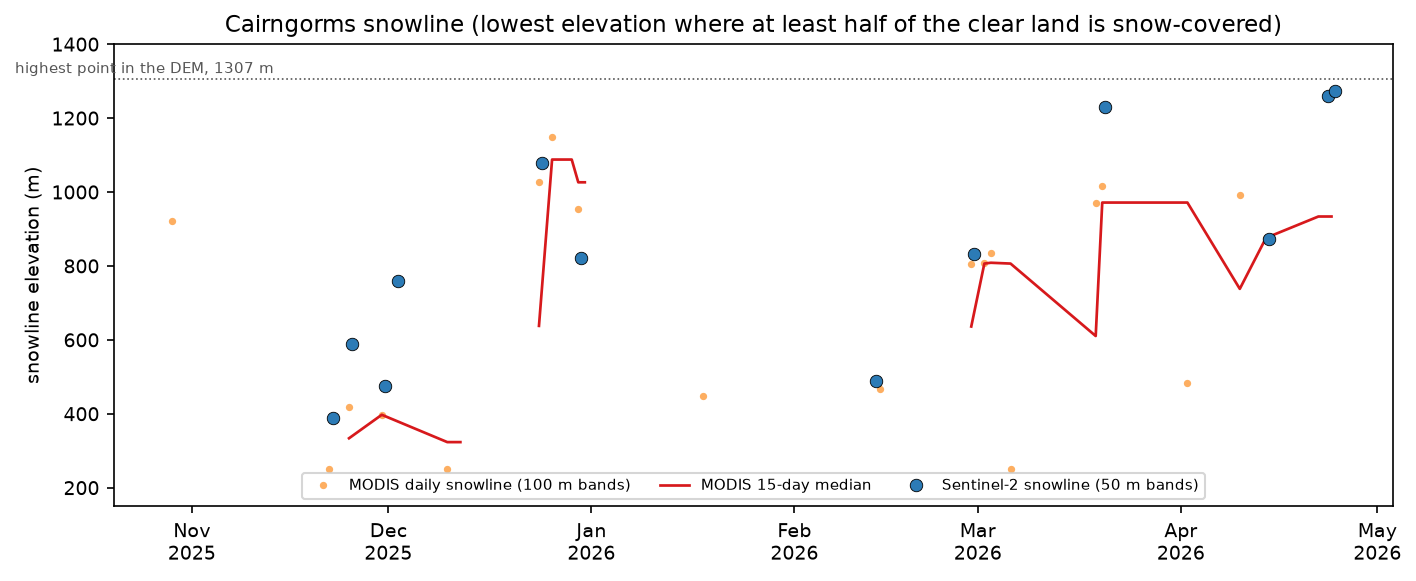
With the DEM on the same grid, count the share of clear pixels that are snow in each 50 m elevation band. The snowline is then the lowest elevation above which every band is at least 50% snow-covered, interpolated between bands. If even the top band is below 50%, there is no snowline that day.
EDGES = np.arange(200, 1351, 50)MID = (EDGES[:-1] + EDGES[1:]) / 2

def snow_by_band(snow, clear, z, edges=EDGES, min_px=200):    zb = np.digitize(z, edges) - 1    out = np.full(len(edges) - 1, np.nan)    for i in range(len(edges) - 1):        m = clear & (zb == i)        if m.sum() >= min_px:            out[i] = snow[m].mean()    return out

def snowline(frac, mids=MID, level=0.5):    """Lowest elevation above which the snow fraction stays at or above `level` (linear interpolation)."""    ok = np.isfinite(frac)    f, z = frac[ok], mids[ok]    if len(f) < 3 or f[-1] < level:        return np.nan                                  # no snowline: the top band is not snow-covered    above = f >= level    i = len(f) - 1    while i > 0 and above[i - 1]:        i -= 1    if i == 0:        return z[0]                                    # snow down to the lowest band with data    return z[i - 1] + (level - f[i - 1]) / (f[i] - f[i - 1]) * (z[i] - z[i - 1])

north = (aspect >= 315) | (aspect < 45)south = (aspect >= 135) & (aspect < 225)for _, r in use.iterrows():    s = next(x for x in scenes if x["id"] == r.id)    c = classify(s)    frac = snow_by_band(c["snow"], c["clear"], dem)    srows.append({"date": r.date, "sca": r.sca, "snowline": snowline(frac),                  "snowline_N": snowline(snow_by_band(c["snow"], c["clear"] & north & (slope > 5), dem, min_px=100)),                  "snowline_S": snowline(snow_by_band(c["snow"], c["clear"] & south & (slope > 5), dem, min_px=100))})
The same function runs on the MODIS days, with the DEM averaged onto the 463 m MODIS grid and 100 m bands.
      date   sca  snowline  snowline_N  snowline_S2025-10-13 0.000       NaN         NaN         NaN2025-10-15 0.000       NaN         NaN         NaN2025-11-22 0.871     389.0       351.0       420.02025-11-25 0.571     588.0       568.0       596.02025-11-30 0.697     475.0       460.0       459.02025-12-02 0.219     759.0       655.0      1029.02025-12-24 0.264    1079.0       785.0      1184.02025-12-30 0.366     821.0       578.0       943.02026-02-13 0.649     490.0       462.0         NaN2026-02-28 0.220     832.0       776.0       853.02026-03-20 0.081    1230.0       903.0      1229.02026-04-14 0.113     874.0       802.0       930.02026-04-23 0.040    1261.0      1066.0         NaN2026-04-24 0.039    1273.0      1067.0         NaN2026-04-26 0.034       NaN      1099.0         NaN2026-04-26 0.027       NaN      1187.0         NaN2026-04-29 0.028       NaN      1165.0         NaN2026-05-26 0.003       NaN         NaN         NaN2026-05-26 0.004       NaN         NaN         NaN2026-06-15 0.000       NaN         NaN         NaN2026-06-15 0.000       NaN         NaN         NaN
south-facing minus north-facing snowline: median 128 m over 9 scenes (range -1 to 400 m)MODIS snowline (100 m bands) on 19 clear days; monthly median (m):day       2025-10  2025-11  2025-12  2026-01  2026-02  2026-03  2026-04  2026-05  2026-06snowline    921.0    398.0    991.0    449.0    637.0    834.0    876.0      NaN      NaN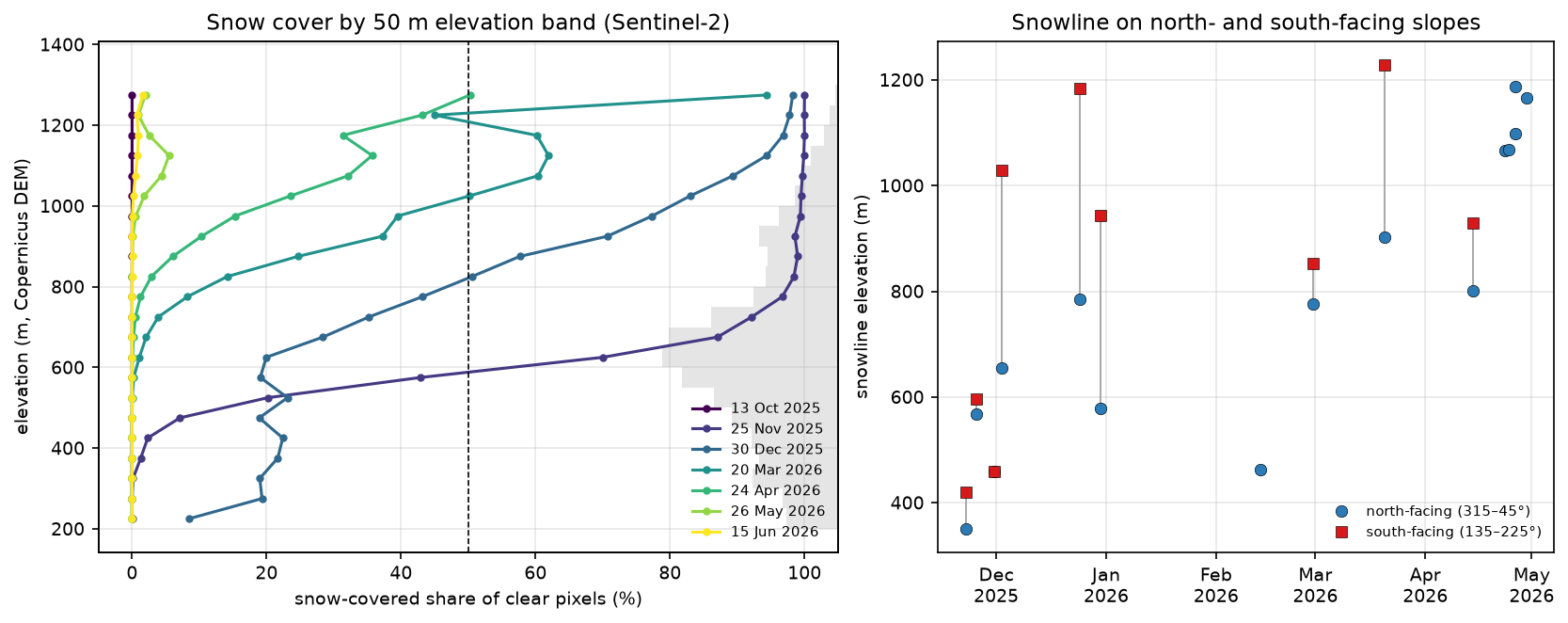
The elevation profiles show how the winter worked. After the late-November snowfall the transition was sharp, from almost no snow below 450 m to almost complete cover above 650 m. By the end of December the snowline had risen to 820–1,080 m, with snow lying longer in the gullies and on north-facing slopes. On 9 Sentinel-2 dates with snowlines on both, the south-facing snowline was a median 128 m higher than the north-facing one, and up to 400 m higher in December and March. In midwinter, Scottish south-facing slopes get far more sun than north-facing ones, while north-facing corries such as those on Braeriach can hold snow into summer.
Step 7: save the results
s2.drop(columns=["day"]).to_csv(OUT / "sentinel2_scenes.csv", index=False, float_format="%.4f")modis.to_csv(OUT / "modis_daily_sca.csv", index=False, float_format="%.4f")sl.to_csv(OUT / "snowline_sentinel2.csv", index=False, float_format="%.1f")with rasterio.open(OUT / f"snow_{best.date:%Y%m%d}.tif", "w", driver="GTiff", height=H, width=W, count=1, dtype="uint8", crs=CRS, transform=TRANSFORM, nodata=255, compress="deflate") as dst: dst.write(np.where(C["clear"], C["snow"].astype("uint8"), 255), 1)The GeoTIFF holds the 25 November snow map (1 = snow, 0 = no snow, 255 = cloud or no data). Open it in QGIS over a basemap, as described in How to add Google Maps and OpenStreetMap layers to QGIS.
Pitfalls and limitations
- Cloud is the dominant error. Ice cloud, cirrus and thin cloud over snow pass the NDSI test, and Sen2Cor sometimes labels snow as cloud. Check false colour, and treat snow-covered area from partly cloudy scenes with care.
- Low sun and shadow. In December the sun was under 9° at overpass. Deep shadow lowers the signal, Sen2Cor labels it dark area, and topographic shading makes NDSI noisier. We count dark-area pixels as clear land and let NDSI decide; a stricter approach would apply a topographic illumination correction.
- Forest hides snow. Under the Caledonian pine forests of Rothiemurchus and Glenmore, the canopy shades and hides the snow on the ground, so NDSI underestimates it. Expect snow-covered area in forested glens to be too low.
- Mixed pixels. At 20 m, and much more at 500 m, a pixel can be partly snow. MODIS
NDSI_Snow_Covercan be converted into a fractional snow cover with a regression, but the binary 0.4 threshold treats each pixel as all or nothing. - Our snowline is a definition. “The lowest elevation above which at least half of the land is snow-covered” is one of several. It depends on the band width, the 50% level and the minimum pixel count, and it is undefined when even the summits are less than half covered.
- Gaps are not measurements. With 21 clear Sentinel-2 scenes and 45 clear MODIS days, short snowfalls and thaws between clear days are missed. Radar (Sentinel-1) sees through cloud but detects wet snow far better than dry snow.
Frequently asked questions
What is NDSI and how is it calculated?
The Normalised Difference Snow Index is (green − SWIR) / (green + SWIR). For Sentinel-2 that is (B03 − B11) / (B03 + B11); for Landsat 8 and 9, (B3 − B6) / (B3 + B6); for MODIS, (band 4 − band 6) / (band 4 + band 6). Snow reflects strongly in green and absorbs in the shortwave infrared, so it has a high NDSI, usually 0.6–0.95.
What NDSI threshold should I use for snow?
0.4 is the standard, from the MODIS SNOMAP algorithm. Add NIR > 0.11 to exclude water and green > 0.10 to exclude dark pixels. On our Cairngorms scene the snow-covered area changed by only 4 percentage points between thresholds of 0.3 and 0.5, so the exact value matters less than masking cloud properly.
How do you tell snow from cloud in Sentinel-2?
Use the SWIR band. Snow is dark in B11 and most cloud is bright: here, median B11 reflectance was 0.071 for snow and 0.300 for cloud. A false-colour composite of B11, B08 and B04 shows snow as cyan and cloud as white. In practice, mask cloud with the Scene Classification Layer, or with s2cloudless or Fmask, before applying the NDSI threshold, because ice cloud and cirrus can still exceed NDSI 0.4.
Is MODIS snow cover available without a login?
Yes. The Microsoft Planetary Computer hosts MOD10A1 and MYD10A1 collection 6.1 (modis-10A1-061) as Cloud Optimised GeoTIFFs, with free anonymous access through its STAC API: sign the URLs with the planetary-computer package. NASA’s own archive at the NSIDC DAAC needs an Earthdata login.
How do I calculate the snowline from satellite data?
Put a DEM on the same grid as the snow map, group the clear pixels into elevation bands, and compute the snow-covered share of each band. The snowline is where that share crosses a chosen level, here 50%, working down from the summits. Do it separately for north- and south-facing slopes to see the effect of aspect: in the Cairngorms the south-facing snowline was a median 128 m higher.
Next steps
- Measure how glaciers flow in the companion tutorial, glacier velocity in Python with NASA ITS_LIVE.
- Build a gridded, cloud-masked time series with xarray instead of a scene loop with NDVI time series in Python with Sentinel-2 and odc-stac.
- See through the cloud with radar: the thresholding in Sentinel-1 SAR flood mapping in Python carries over to wet-snow mapping.
- Compare normalised-difference indices and Otsu thresholds for water in coastal erosion and shoreline change from Sentinel-2 and monitoring reservoir water quality with Sentinel-2.
- Add land surface temperature to see when the snowpack is melting, with land surface temperature from Landsat in Python.
- Share the snow maps on an interactive web map with Folium, or find more open data in the TechnicalGIS data catalogue.
Data and licences
- Sentinel-2 L2A: contains modified Copernicus Sentinel data 2025–2026, processed by ESA. Accessed as Cloud Optimised GeoTIFFs from the Microsoft Planetary Computer on 21 October 2026.
- MODIS snow cover: Hall, D. K. and Riggs, G. A. (2021), MODIS/Terra Snow Cover Daily L3 Global 500m SIN Grid, Version 61 and MODIS/Aqua Snow Cover Daily L3 Global 500m SIN Grid, Version 61, NASA National Snow and Ice Data Center DAAC, doi:10.5067/MODIS/MOD10A1.061 and doi:10.5067/MODIS/MYD10A1.061. NASA data are free to use without restriction. Accessed from the Microsoft Planetary Computer on 21 October 2026.
- Copernicus DEM GLO-30: © DLR e.V. 2010–2014 and © Airbus Defence and Space GmbH 2014–2018, provided under COPERNICUS by the European Union and ESA; all rights reserved. Used under the Copernicus DEM licence, which permits free use with attribution. Accessed from the Microsoft Planetary Computer.
- References: Dozier, J. (1989), “Spectral signature of alpine snow cover from the Landsat Thematic Mapper”, Remote Sensing of Environment 28, 9–22; Hall, D. K., Riggs, G. A. and Salomonson, V. V. (1995), “Development of methods for mapping global snow cover using moderate resolution imaging spectroradiometer data”, Remote Sensing of Environment 54(2), 127–140.
- Code:
snow_cover_ndsi.py, tested with Python 3.12.0, pystac-client 0.9.1, planetary-computer 1.0.0, rasterio 1.5.2, numpy 2.5.4, pandas 3.0.6 and matplotlib 3.11.2.
Key terms
- NDSI
- Normalised Difference Snow Index, (green − SWIR) / (green + SWIR) (Dozier, 1989; Hall et al., 1995). For Sentinel-2, (B03 − B11) / (B03 + B11); for MODIS, bands 4 and 6. Snow is strongly positive.
- Snow-covered area (SCA)
- The area, or share of the clear land, classified as snow in an image. Cloudy pixels are excluded from both the numerator and the denominator.
- SCL
- The Scene Classification Layer produced by ESA's Sen2Cor processor with every Sentinel-2 L2A product, a 20 m map of 12 classes including vegetation, water, snow, cloud shadow, three cloud classes and dark areas.
- MOD10A1
- The daily 500 m MODIS/Terra snow cover product (MYD10A1 for Aqua), in collection 6.1 an NDSI value from 0 to 100 for each land pixel plus flag values for cloud, night, water and missing data.
- Snowline
- Here, the lowest elevation above which at least half of the clear land in every elevation band is snow-covered, interpolated between 50 m (Sentinel-2) or 100 m (MODIS) bands.
- Copernicus DEM
- The Copernicus GLO-30 global digital surface model at 1 arc-second (about 30 m), derived from TanDEM-X radar data and openly licensed.
Data for this tutorial
- Microsoft Planetary Computer · Sentinel-2 L2A, MODIS MOD10A1/MYD10A1 and Copernicus DEM GLO-30 via STAC
- Sentinel-2 L2A on the Planetary Computer · Surface reflectance and the Scene Classification Layer as COGs
- MODIS snow cover daily (10A1) on the Planetary Computer · Terra and Aqua daily NDSI snow cover, collection 6.1
- Copernicus DEM GLO-30 on the Planetary Computer · 30 m elevation for the snowline analysis
Licences and formats for each source are listed in the GIS data sources catalogue.