H3 hexagon grids in Python: indexing, aggregating and smoothing 541,000 London places with Uber's H3
A practical guide to Uber's H3 hexagonal grid in Python with the h3-py v4 API: index points, choose a resolution, fill polygons, count 541,081 Overture places across London, smooth with k-rings, do the same in DuckDB's h3 extension, and compare hexagons with square grids of equal area.
- Level
- Intermediate
- Tested with
- Python 3.12
- Source code
- Download scripts
Key takeaways
- H3 is a global grid of hexagons with 16 resolutions, from 4.4 million km² cells at resolution 0 to 0.9 m² at resolution 15. Each cell has a 64-bit ID such as 89195da49b7ffff, so joining data on a cell ID replaces a spatial join.
- H3 cells are not equal-area. In London, cells are about 10.6% smaller than the global average for their resolution: a resolution-8 cell is 0.659 km², not 0.737 km². Use cell_area() when you calculate densities, but across a city the variation is only about 1%.
- h3-py v4 renamed almost every function: latlng_to_cell, cell_to_boundary, grid_disk and h3shape_to_cells replace geo_to_h3, h3_to_geo_boundary, k_ring and polyfill. Indexing 541,081 points takes about 0.4 s with a plain Python loop, and the same in DuckDB's h3 extension, which returns identical cell IDs.
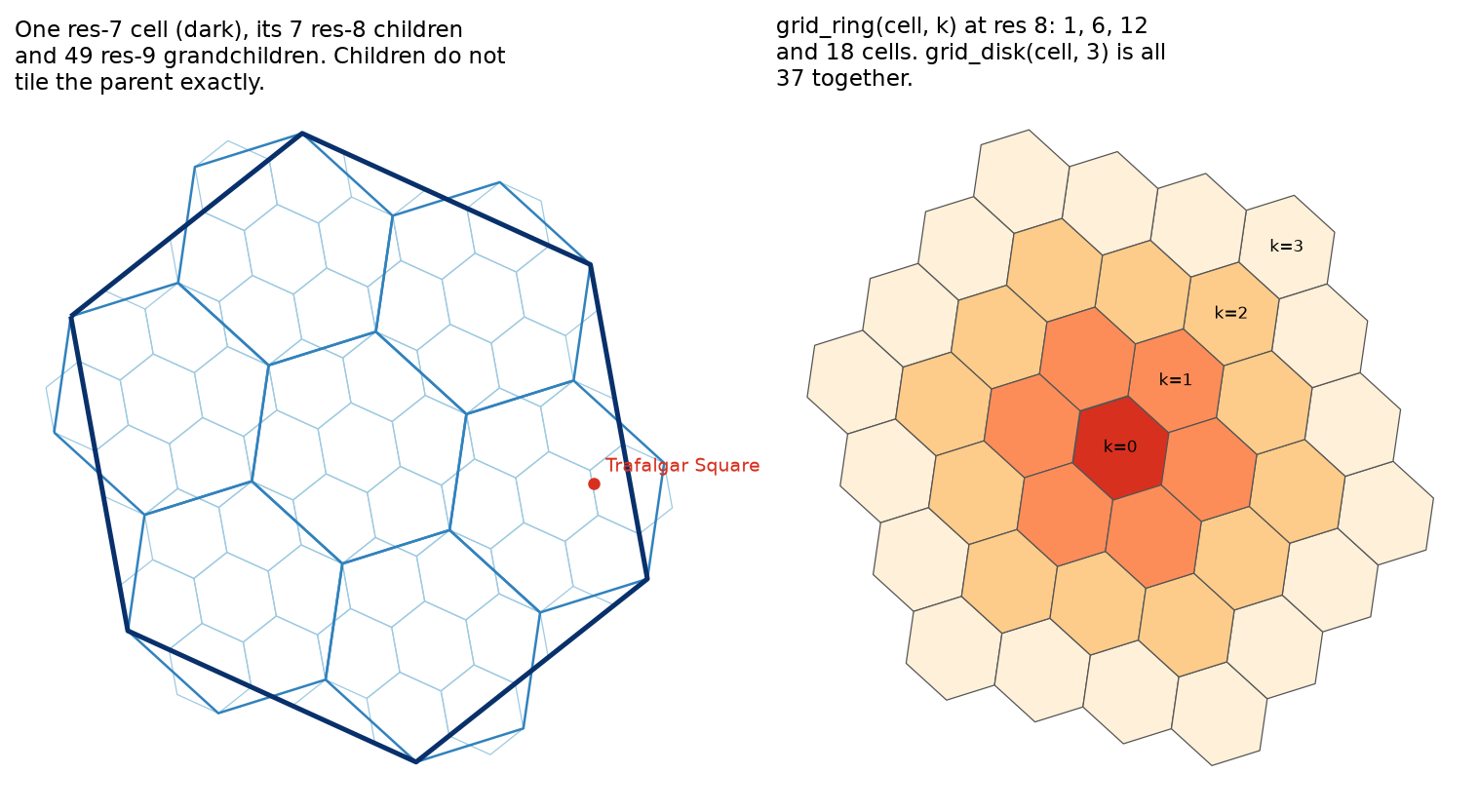
- Children do not nest exactly inside their parent. For 7.0% of London's places, the parent of their resolution-9 cell is not the resolution-8 cell that contains them, so rolling counts up the hierarchy is an approximation.
- Against squares of the same area, hexagons are more compact and have one kind of neighbour instead of two, which makes k-ring smoothing clean. They do not solve the modifiable areal unit problem: moving a square grid by half a cell changes the count a typical place sits in by 36%, and H3 is just one more arbitrary placement.
Before you start
- Basic pandas and GeoPandas: reading files, grouping and plotting a GeoDataFrame
- Python 3.10+ with h3 (version 4), duckdb, geopandas, pyogrio, shapely, pyproj, pyarrow, pandas, numpy, matplotlib and requests
- An internet connection: the first run saves about 53 MB of Overture places and a 90 kB London boundary. No accounts or keys are needed
Short answer: install h3 (version 4) and call h3.latlng_to_cell(lat, lng, res) to turn each point into a hexagon ID, then group by that ID to count or average. h3.cell_to_boundary(cell) gives the hexagon’s outline for mapping, h3.geo_to_cells(polygon, res) fills an area with cells, and h3.grid_disk(cell, k) returns the neighbours for smoothing. Resolution 8 (about 0.7 km² per cell) and resolution 9 (about 0.1 km²) suit city-scale point data. For millions of rows, DuckDB’s h3 extension does the same in SQL and gives identical cell IDs.
A hexbin map is the quickest way to make sense of a large point dataset, and H3 is the hexagon grid most people now reach for. It started at Uber for pricing and dispatch, and it is now built into Snowflake and Databricks, available as extensions for DuckDB and PostgreSQL, and understood by map viewers such as kepler.gl and deck.gl. Because every hexagon has a global ID, two datasets indexed to H3 can be joined with an ordinary JOIN on a column, with no geometry involved.
This tutorial works through H3 with real data at scale: 541,081 points of interest from the Overture Maps places theme, inside the Greater London boundary. You will learn how to:
- index points with the h3-py v4 API and inspect a cell;
- choose a resolution, and see why H3 cells are not equal-area;
- fill a polygon with cells, using three containment modes;
- aggregate half a million points in Python and in DuckDB’s h3 extension, and see where the hierarchy is not exact;
- smooth counts with k-rings;
- compare hexagons with a square grid of the same area, and see what hexagons do and do not fix.
All outputs below are real results from h3_hexagon_grid.py, run on 23 October 2026 with Python 3.12.0, h3 4.5.0, DuckDB 2.0.0, GeoPandas 1.2.0 and shapely 2.2.0. The whole script runs in under a minute.
Set up
python -m venv .venv.venv\Scripts\activate # macOS/Linux: source .venv/bin/activatepip install -r requirements.txtStep 1: Download Overture places and the London boundary
The Overture places theme is about 88 million points of interest worldwide, stored as GeoParquet on AWS. We use the same pattern as the GeoParquet and DuckDB tutorial: read Overture’s STAC index to find which files overlap London, then let DuckDB read only the rows inside a bounding box, using the bbox column. Only one file covers London, and the query takes under 10 seconds.
BBOX = (-0.52, 51.28, 0.34, 51.70)       # lon/lat box around Greater London
con = duckdb.connect()con.sql("INSTALL spatial; LOAD spatial; INSTALL httpfs; LOAD httpfs; INSTALL h3 FROM community; LOAD h3;")con.sql("SET s3_region = 'us-west-2'; SET geometry_always_xy = true")
release = requests.get("https://stac.overturemaps.org/catalog.json", timeout=60).json()["latest"]xmin, ymin, xmax, ymax = BBOXfiles = [r[0] for r in con.execute(f""" SELECT assets.aws.alternate.s3.href FROM read_parquet('https://stac.overturemaps.org/{release}/collections.parquet') WHERE collection = 'place' AND bbox.xmin <= {xmax} AND bbox.xmax >= {xmin} AND bbox.ymin <= {ymax} AND bbox.ymax >= {ymin}""").fetchall()]con.execute(f""" COPY ( SELECT id, names.primary AS name, basic_category AS category, confidence, operating_status, ST_X(geometry) AS lng, ST_Y(geometry) AS lat, '{release}' AS release FROM read_parquet({files}) WHERE bbox.xmin <= {xmax} AND bbox.xmax >= {xmin} AND bbox.ymin <= {ymax} AND bbox.ymax >= {ymin} ) TO '{places_file.as_posix()}' (FORMAT parquet)""")The boundary is the ONS Regions (December 2023) generalised, clipped boundary for London, which comes as GeoJSON from the ONS ArcGIS REST service. “Clipped” means it excludes the tidal Thames, which matters later.
We then keep places inside the boundary, drop those Overture marks as closed, and drop low-confidence records. One more filter turned out to be essential:
x, y = TO_BNG.transform(raw["lng"].to_numpy(), raw["lat"].to_numpy())inside = shapely.contains_xy(london_bng.geometry.iloc[0], x, y)closed = raw["operating_status"].isin(["permanently_closed", "temporarily_closed"])keep = inside & ~closed & (raw["confidence"] >= 0.5)places = raw.loc[keep].reset_index(drop=True)
stack = places.groupby(["lat", "lng"])["id"].transform("size")farm = stack >= STACK_LIMIT # STACK_LIMIT = 50places = places.loc[~farm].reset_index(drop=True)downloaded from 1 Overture file(s) in 8.8 sOverture release 2026-10-21.0: 756,088 places in the bounding box (52.7 MB on disk)ONS boundary E12000007 London: 1,573.3 km2inside London: 670,318 | closed: 30,749 | confidence < 0.5: 57,430 | left: 582,139largest stack: 4,322 places at (51.51357, -0.12430), e.g. Cupella Uk, Salve Herbal, Hubnetix Corporationdropping 41,058 places at 247 coordinates shared by 50+ places (mostly registered-office addresses) | kept: 541,081top categories: professional_service 29,741, restaurant 29,114, home_service 28,953, personal_or_beauty_service 23,742, financial_service 18,191, fashion_and_apparel_store 17,162cafes (cafe + coffee_shop): 9,156Step 2: One point, one cell
latlng_to_cell takes latitude first, then longitude, then the resolution. Note the order: it is the opposite of GeoJSON and shapely.
lat, lng = 51.50809, -0.12804 # Nelson's Column, Trafalgar Squarecell = h3.latlng_to_cell(lat, lng, 9)h3.str_to_int(cell), h3.get_resolution(cell), h3.get_base_cell_number(cell), h3.is_pentagon(cell)h3.cell_to_latlng(cell) # centre as (lat, lng)h3.cell_to_boundary(cell) # six (lat, lng) verticesh3.cell_to_parent(cell, 7), h3.cell_to_children(cell, 10), h3.grid_disk(cell, 1)h3.cell_area(cell, unit="m^2"), h3.average_hexagon_area(9, unit="m^2")latlng_to_cell(51.50809, -0.12804, 9) = 89195da49b7ffffas a 64-bit integer: 617439388698673151 | resolution 9 | base cell 12 | pentagon? Falsecell centre (51.50784, -0.12571), 164 m from the input point; boundary has 6 verticescell_to_parent(cell, 7) = 87195da49ffffff | children at res 10: 7 | grid_disk k=1: 7 cells, k=2: 19area of this cell 94,175 m2 vs global average res-9 hexagon 105,333 m2The string and the integer are the same ID. Strings are easier to read; integers (UBIGINT in DuckDB) are smaller and faster to join. The second character, 9, is the resolution, and the parent at resolution 7 shares the first characters of the ID, which is why truncating an ID moves up the hierarchy.
Choose a resolution
Each resolution is about seven times finer than the last. The global averages are in every H3 table, but the actual cell areas vary with position:
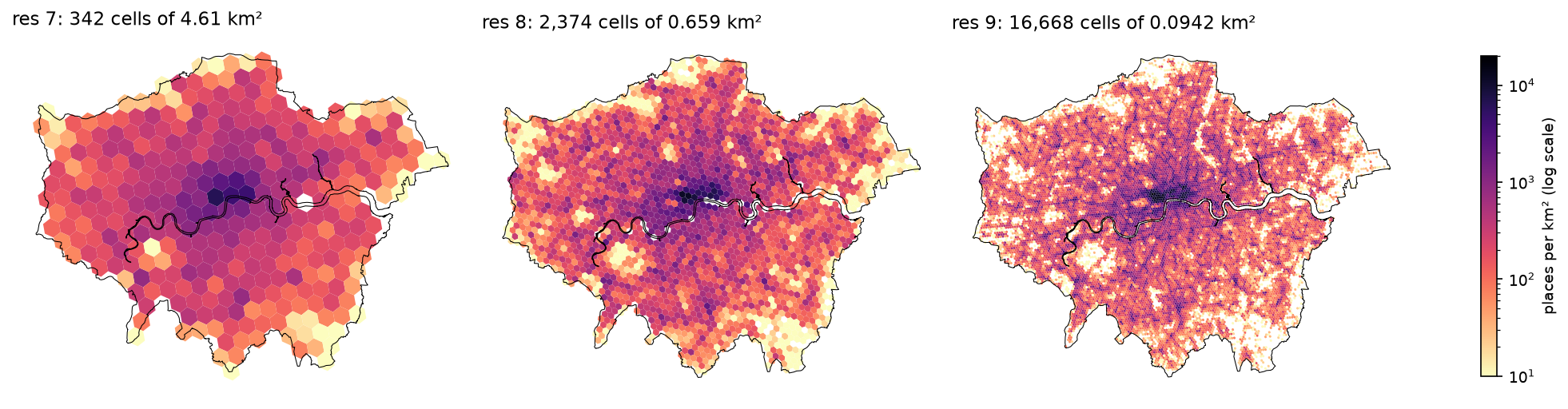
for res in range(16): c = h3.latlng_to_cell(lat, lng, res) h3.average_hexagon_area(res, unit="km^2"), h3.average_hexagon_edge_length(res, unit="km") h3.get_num_cells(res), h3.cell_area(c, unit="km^2") res avg_area_km2 avg_edge_km cells_on_earth london_cell_km2 london/avg 0 4.35745e+06 1,281 122 4.10617e+06 0.942 1 609,788 483.1 842 523,942 0.859 2 86,801.8 182.5 5,882 76,219.8 0.878 3 12,393.4 68.98 41,162 11,131.6 0.898 4 1,770.35 26.07 288,122 1,586.72 0.896 5 252.904 9.854 2,016,842 226.037 0.894 6 36.1291 3.725 14,117,882 32.3094 0.894 7 5.16129 1.406 98,825,162 4.61548 0.894 8 0.737328 0.5314 691,776,122 0.659268 0.894 9 0.105333 0.2008 4,842,432,842 0.0941753 0.894 10 0.0150475 0.07586 33,897,029,882 0.0134539 0.894 11 0.00214964 0.02866 237,279,209,162 0.001922 0.894 12 0.000307092 0.01083 1,660,954,464,122 0.000274571 0.894 13 4.38703e-05 0.004092 11,626,681,248,842 3.92244e-05 0.894 14 6.26718e-06 0.001546 81,386,768,741,882 5.60349e-06 0.894 15 8.95312e-07 0.0005842 569,707,381,193,162 8.00499e-07 0.894pentagons per resolution: 12; the grid is oriented so that they all fall in the seaIn London, every cell from resolution 5 down is 10.6% smaller than the global average for its resolution. H3 is not an equal-area grid: cells near the centre of an icosahedron face are larger than those near its vertices, by roughly a factor of two between the smallest and largest cells on the globe. Within one city the variation is small (Step 3 shows 1.2% across London), but if you compare densities between continents, or quote “cells of 0.74 km²”, use cell_area rather than the average.
A rough guide for point data: resolution 7 (about 5 km²) for regional summaries, 8 (about 0.7 km²) for neighbourhoods, 9 (about 0.1 km², roughly a city block or two) for street-level patterns, and 10 or finer only when you have very dense data.
Step 3: Fill the London polygon
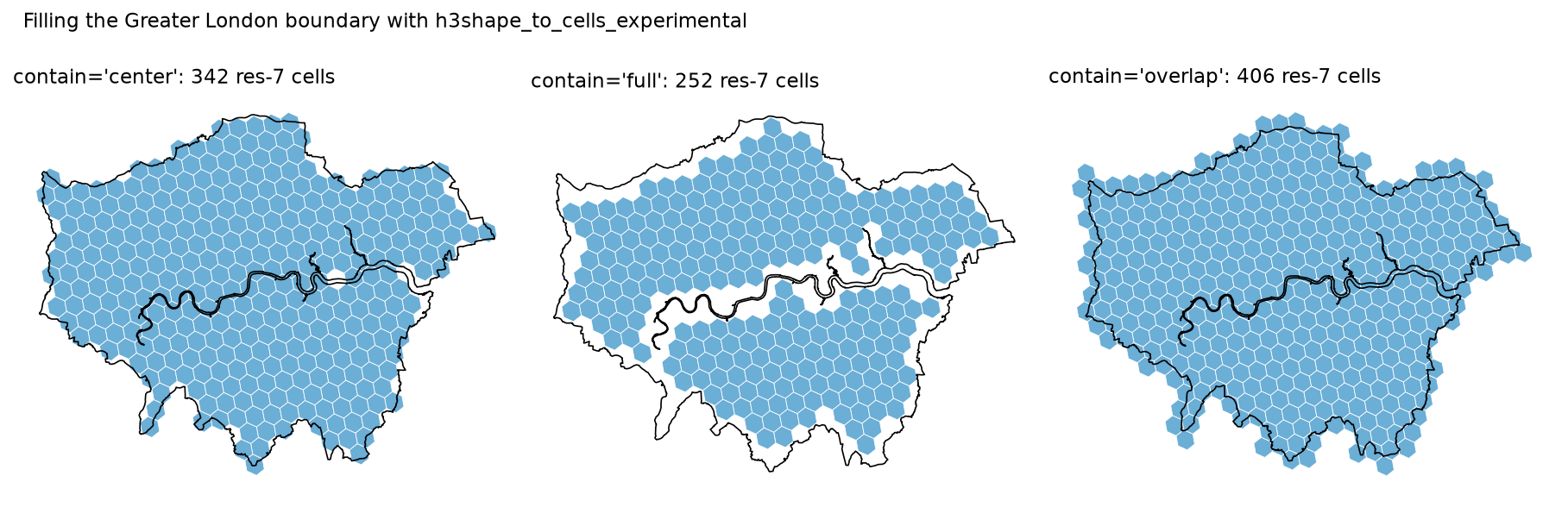
To map zeros as well as counts you need the cells that cover your study area, not just the ones that contain points. geo_to_cells accepts anything with a __geo_interface__, such as a shapely polygon, and returns the cells whose centre lies inside it. The experimental h3shape_to_cells_experimental adds two other modes: full (whole cell inside) and overlap (any part inside).
shape_ll = h3.geo_to_h3shape(london_geom)        # a LatLngMultiPoly with 11 partsfor res in (7, 8, 9):    for mode in ("center", "full", "overlap"):        cells = h3.h3shape_to_cells_experimental(shape_ll, res, contain=mode)        unique = set(cells)  # a cell overlapping two parts of a MultiPolygon is returned twice
compact = h3.compact_cells(fill9) # replace complete sets of children by their parentgeo_to_h3shape -> LatLngMultiPoly with 11 part(s)res 7 contain=center : 342 cells ( 0 duplicates), 1,578.1 km2 (100.3% of the polygon area) in 0.01 sres 7 contain=full : 252 cells ( 0 duplicates), 1,162.7 km2 ( 73.9% of the polygon area) in 0.01 sres 7 contain=overlap: 406 cells (13 duplicates), 1,873.3 km2 (119.1% of the polygon area) in 0.01 sres 8 contain=center : 2,374 cells ( 0 duplicates), 1,564.8 km2 ( 99.5% of the polygon area) in 0.02 sres 8 contain=full : 2,125 cells ( 0 duplicates), 1,400.7 km2 ( 89.0% of the polygon area) in 0.03 sres 8 contain=overlap: 2,579 cells (15 duplicates), 1,699.9 km2 (108.0% of the polygon area) in 0.04 sres 9 contain=center : 16,668 cells ( 0 duplicates), 1,569.5 km2 ( 99.8% of the polygon area) in 0.11 sres 9 contain=full : 15,908 cells ( 0 duplicates), 1,498.0 km2 ( 95.2% of the polygon area) in 0.15 sres 9 contain=overlap: 17,275 cells (20 duplicates), 1,626.7 km2 (103.4% of the polygon area) in 0.22 sgeo_to_cells(geometry, 8) gives the same cells as contain='center'compact_cells: 16,668 res-9 cells -> 1,650 mixed-resolution cells (res 6: 20, res 7: 122, res 8: 387, res 9: 1121)res-8 cell areas inside London: 0.6550 to 0.6627 km2 (range 1.18%), mean 0.6592 km2The center mode gets the total area right to within half a per cent at resolutions 8 and 9, because cells that stick out and gaps that are missed roughly cancel. full under-covers and overlap over-covers, and the error shrinks as the cells get smaller. With a MultiPolygon, overlap mode returned the same cell more than once where two parts of the boundary meet in one cell, so always pass the result through set().
compact_cells stores the same area with 1,650 cells instead of 16,668 by replacing each complete group of seven children with their parent. That is useful for storing coverage areas and for fast “is this cell in the area?” lookups; uncompact_cells reverses it exactly.
Step 4: Aggregate half a million points
In Python
h3-py v4 has no vectorised latlng_to_cell, but the C library is fast enough that a list comprehension is fine at this size:
RES = 8lats, lngs = places["lat"].to_numpy(), places["lng"].to_numpy()places["h3_8"] = [h3.latlng_to_cell(a, b, RES) for a, b in zip(lats, lngs)]
counts = (places.groupby("h3_8").size().rename("places")          .reindex(fill8, fill_value=0).rename_axis("h3").reset_index())   # include empty cellscounts["area_km2"] = [h3.cell_area(c, unit="km^2") for c in counts["h3"]]counts["per_km2"] = counts["places"] / counts["area_km2"]
In DuckDB
The DuckDB community h3 extension wraps the same C library. It returns cell IDs as UBIGINT; h3_h3_to_string converts them to the familiar strings. You can query a pandas DataFrame directly by registering it:
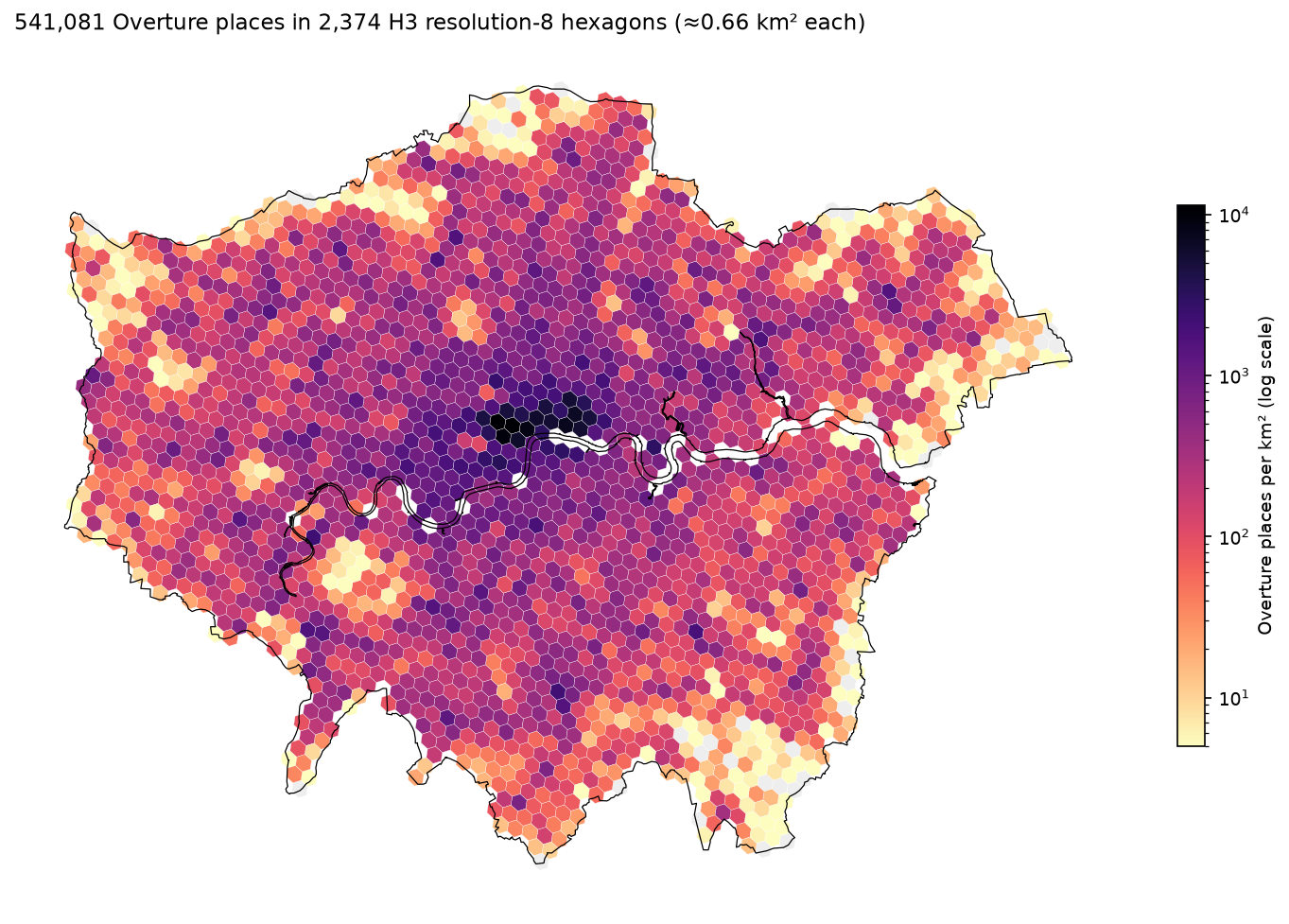
con.register("places_df", places[["id", "lat", "lng", "category"]])sql_counts = con.execute(f""" SELECT h3_h3_to_string(h3_latlng_to_cell(lat, lng, {RES})) AS h3, count(*) AS places FROM places_df GROUP BY 1""").df()h3-py list comprehension: 541,081 cells in 0.42 s (779 ns per point)DuckDB h3_latlng_to_cell: 541,081 cells in 0.41 s (753 ns per point)identical cell IDs from both: Trueres-8 cells: 2,374 | empty: 38 (1.6%) | points whose cell centre is outside the polygon: 10,181places per cell: median 116, 90th pct 482, 99th pct 1789, max 7,533 h3 places per_km2 centre top_category88195da49dfffff 7533 11,425 51.5175, -0.1468 professional_service88195da499fffff 7508 11,389 51.5154, -0.1346 professional_service88195da491fffff 6205 9,411 51.5097, -0.1425 financial_service88194ad325fffff 5579 8,464 51.5133, -0.1224 professional_service88194ad305fffff 4815 7,308 51.5148, -0.0901 financial_servicebusiest cell: 7,533 places at 3,992 distinct coordinates; the 5 largest stacks hold 48, 47, 46, 45, 41 places (3% of the cell)DuckDB GROUP BY gives the same counts: TrueBoth approaches give identical IDs and counts in about 0.4 s. DuckDB pays off when the points are not in memory yet: in the GeoParquet tutorial, the same h3_latlng_to_cell call runs inside the query that reads Overture from S3, so the raw points never reach Python at all.
The densest cells are round Oxford Street, Soho, Mayfair, Covent Garden and the City, at 7,000 to 11,400 places per km². 10,181 places fall in cells whose centre is outside the boundary, mostly along the edge and the Thames; whether to keep those cells is the same choice as the containment mode in Step 3.
The hierarchy is not exact
It is tempting to count points at resolution 9 and then sum to resolution 8 with cell_to_parent. Because the seven children of a cell do not tile it exactly (Figure 1), that is not the same as counting at resolution 8 directly:
parent_of_9 = np.array([h3.cell_to_parent(c, 8) for c in places["h3_9"]])mismatch = parent_of_9 != places["h3_8"].to_numpy()cell_to_parent(res-9 cell, 8) != latlng_to_cell(point, 8) for 38,027 of 541,081 points (7.0%)rolling res-9 counts up to res 8 changes 2,051 of 2,374 cell counts (largest change 291 places)7% of points end up in a different cell. Rolling up is fine for display, compact storage and approximate summaries, but if exact counts matter, index the points again at each resolution you need. It costs less than half a second.
Step 5: Smooth with k-rings
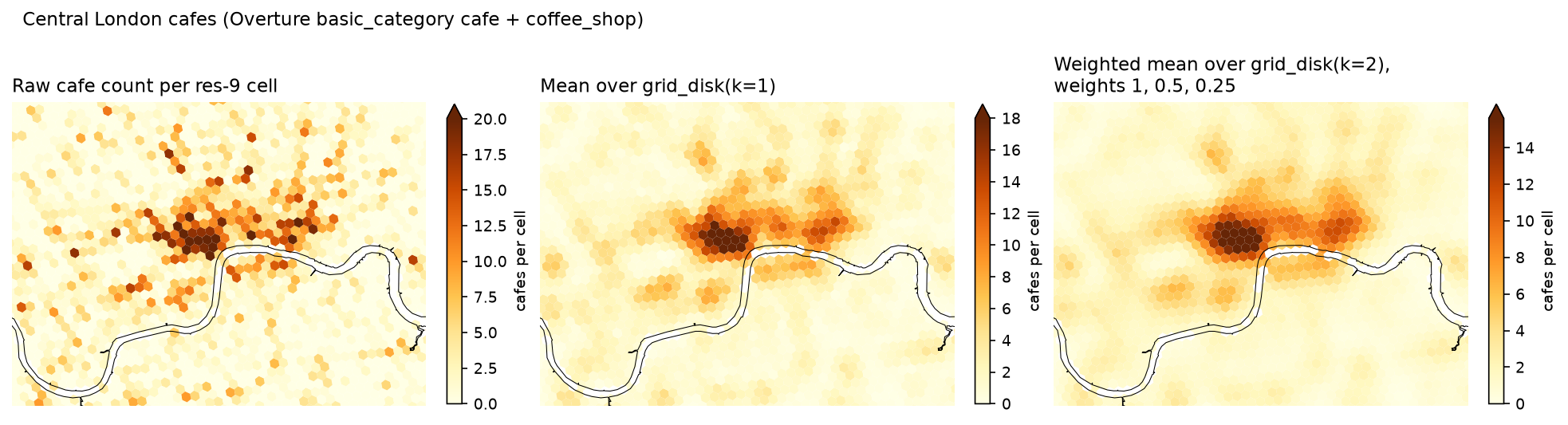
At resolution 9, cafe counts are noisy: most cells have none, and the ones that do have one or two. Averaging each cell with its neighbours shows the pattern more clearly. grid_ring(cell, d) returns the ring at distance d; weighting rings by distance gives a simple kernel smoother:
lookup = cafes.groupby("h3_9").size().to_dict()   # include cafes in edge cells outside London
def disk_mean(cell: str, k: int, decay: float = 1.0) -> float:    """Weighted mean over grid_disk(cell, k); ring d gets weight decay**d, missing cells count as 0."""    total = weight = 0.0    for d in range(k + 1):        w = decay ** d        ring = h3.grid_ring(cell, d)        total += w * sum(lookup.get(c, 0) for c in ring)        weight += w * len(ring)    return total / weight
smooth["k1"] = [disk_mean(c, 1) for c in fill9]smooth["k2_decay"] = [disk_mean(c, 2, decay=0.5) for c in fill9]
The same k = 1 mean in DuckDB “scatters” each count to the seven cells of its disk and sums. It matches the Python result exactly:
WITH c AS (SELECT h3_latlng_to_cell(lat, lng, 9) AS cell, count(*) AS n FROM places_df WHERE category IN ('cafe', 'coffee_shop') GROUP BY 1), spread AS (SELECT unnest(h3_grid_disk(cell, 1)) AS nb, n FROM c)SELECT h3_h3_to_string(nb) AS h3, sum(n) / 7.0 AS k1 FROM spread GROUP BY nbraw : cells > 0 20.6% | max 32.00 at (51.5129, -0.1316) | std 1.722 | lag-1 autocorrelation 0.67k1 : cells > 0 60.5% | max 22.00 at (51.5131, -0.1270) | std 1.230 | lag-1 autocorrelation 0.97k2_decay : cells > 0 82.6% | max 19.46 at (51.5129, -0.1316) | std 1.124 | lag-1 autocorrelation 0.99DuckDB h3_grid_disk scatter-sum: max |difference| from the Python k=1 mean = 0.00e+00Here “lag-1 autocorrelation” is the correlation between each cell and the mean of its six neighbours. Smoothing raises it from 0.67 to 0.97 and reduces the peak, and the k = 1 maximum moves about 300 m east from Soho towards Covent Garden, where several busy cells sit side by side.
Step 6: Hexagons versus squares
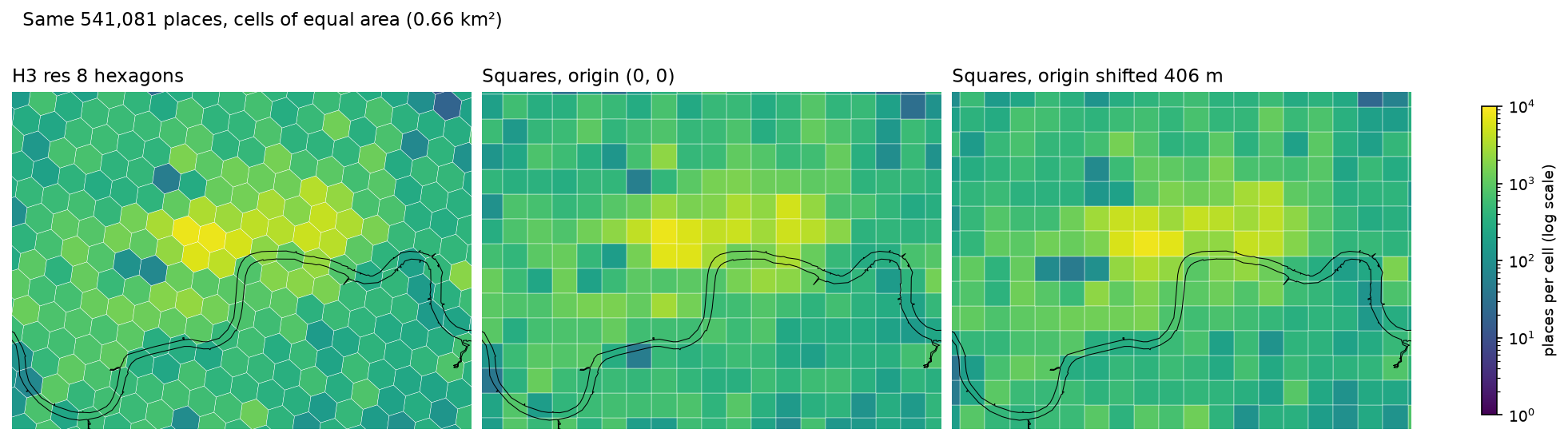
Are hexagons actually better than a square grid? We built a square grid in British National Grid with the same area as the mean London resolution-8 hexagon and compared them on the same points:
side = np.sqrt(areas8.mean() * 1e6)              # 811.9 m
def square_counts(offset: float):    ix = np.floor((places["x"] - offset) / side).astype(int)    iy = np.floor((places["y"] - offset) / side).astype(int)    key = ix.astype(str) + "_" + iy.astype(str)    cx, cy = (ix + 0.5) * side + offset, (iy + 0.5) * side + offset    return key, np.hypot(places["x"] - cx, places["y"] - cy)
sq_key, d_sq = square_counts(0.0)sq_key_shift, _ = square_counts(side / 2) # the same grid moved by half a cellsquare side for equal area with the mean London res-8 hexagon: 811.9 mhexagon: 6 neighbours at 836-911 m from the centresquare : 4 edge neighbours at 812 m and 4 corner neighbours at 1148 mcompactness 4*pi*A/P^2: hexagon 0.904, square 0.785farthest point from the centre: hexagon 527 m, square 574 mmean distance from a place to its cell centre: hexagon 309 m, square 313 msquare : 2,459 occupied cells, max 7,624 places in a cellsquare shifted by half a cell : 2,457 occupied cells, max 8,032 places in a cellH3 res 8 : 2,456 occupied cells, max 7,533 places in a cellmoving the square grid origin by 406 m changes the count of the cell a place falls in by a median 36% (90th pct 117%)What hexagons give you:
- One kind of neighbour. A square has four edge neighbours at 812 m and four corner neighbours at 1,148 m, so “the neighbours” is ambiguous. A hexagon has six, all sharing an edge, at similar distances. That is why k-ring smoothing and spatial weights are cleaner on hexagons. H3 hexagons are not perfectly regular, so the distances vary from 836 to 911 m.
- Compactness. The hexagon is closer to a circle (0.904 against 0.785) and its farthest point is 527 m from the centre rather than 574 m, so a cell’s value describes a tighter area.
- A global ID. Any dataset indexed with H3 at the same resolution lines up exactly, which no locally defined square grid does.
What they do not give you is a better answer to the modifiable areal unit problem. The average distance from a place to its cell centre is only 1% lower for hexagons. Moving the square grid by half a cell changes the count of a typical place’s cell by 36%, and by more than 117% for one place in ten. The H3 grid is just one more arbitrary placement; it would show the same sensitivity if it could be shifted. Pick a resolution that suits the question, check that your conclusions survive a change of resolution, and prefer smoothing or point-based methods over reading single cells.
Step 7: Map it
All the maps in this tutorial use the same helper, which turns cells into polygons in a GeoDataFrame. cell_to_boundary returns (lat, lng) pairs, so swap them for shapely:
def cell_polygon(cell: str) -> Polygon:    """H3 returns (lat, lng) pairs; shapely wants (x=lng, y=lat)."""    return Polygon([(lng, lat) for lat, lng in h3.cell_to_boundary(cell)])
def cells_to_gdf(cells, **columns) -> gpd.GeoDataFrame:    cells = list(cells)    gdf = gpd.GeoDataFrame({"h3": cells, **columns}, geometry=[cell_polygon(c) for c in cells], crs="EPSG:4326")    return gdf.to_crs(BNG)
g8 = cells_to_gdf(counts["h3"], places=counts["places"].to_numpy(), per_km2=counts["per_km2"].to_numpy())g8.plot(column="per_km2", cmap="magma_r", norm=LogNorm(vmin=5), legend=True)
For an interactive map, write g8 to GeoJSON or GeoParquet and open it in Folium, or pass cell IDs straight to a viewer that understands H3, such as kepler.gl or deck.gl’s H3HexagonLayer, which draw hexagons from the IDs without any polygons.
Plotting the same data at three resolutions shows how much the choice of resolution shapes the picture:
Limitations and caveats
- Overture places are not a census of businesses. They combine sources such as Meta and Microsoft, with uneven coverage, duplicates and registered-office addresses, as the stacked points show. Treat counts as an index of activity, not a count of premises.
- H3 cells are not equal-area. Use
cell_areafor densities, especially when comparing places far apart. - The hierarchy is approximate. Children do not exactly fill their parent; re-index rather than roll up when exact counts matter.
- Hexagons do not remove the MAUP. Results depend on resolution and grid placement, as Step 6 shows.
- Edge effects. Cells on the boundary are partly outside the study area and k-ring smoothing pulls in cells beyond it. Decide deliberately which cells to keep.
Frequently asked questions
What is H3?
H3 is a global hierarchical grid of hexagons created by Uber and released as open source in 2018. It divides the Earth into cells at 16 resolutions, each identified by a 64-bit ID. It is used to aggregate, join and analyse point data, and is supported by h3-py, DuckDB, Snowflake, Databricks, PostgreSQL (h3-pg) and many map viewers.
How do I install H3 in Python?
Run pip install h3. This installs version 4, which renamed most functions from version 3: for example, geo_to_h3 is now latlng_to_cell and k_ring is now grid_disk. Check h3.__version__ and update older code before running it.
Which H3 resolution should I use?
Match the cell size to the question and the density of your data. Resolution 7 (about 5 km²) suits regional summaries, 8 (about 0.7 km²) neighbourhoods, and 9 (about 0.1 km²) street-level patterns. If most cells hold zero or one point, the resolution is too fine; if one cell covers several distinct areas, it is too coarse.
Are H3 hexagons equal-area?
No. At the same resolution, the largest cells on the globe are roughly twice the area of the smallest. In London, cells are about 10.6% smaller than the global average, but they vary by only about 1% across the city. Use h3.cell_area(cell) when you calculate densities.
Why use hexagons instead of a square grid?
Hexagons have six equidistant neighbours that all share an edge, while squares have two kinds of neighbour at different distances. That makes smoothing, neighbourhood statistics and movement between cells more consistent. Hexagons are also slightly more compact. They do not remove the dependence of results on cell size and position.
Can I use H3 in DuckDB or SQL?
Yes. DuckDB’s community extension (INSTALL h3 FROM community; LOAD h3;) provides h3_latlng_to_cell, h3_grid_disk, h3_cell_to_boundary_wkt and most other H3 functions. In this tutorial it gave exactly the same cell IDs as h3-py for 541,081 points. Snowflake and Databricks have built-in H3 functions, PostgreSQL has the h3-pg extension, and BigQuery has community-maintained H3 functions.
Next steps
- Query Overture buildings and places straight from S3, with H3 summaries in SQL, in GeoParquet and DuckDB with Overture Maps.
- Test whether your hexagon clusters are statistically significant with hot spot analysis in Python.
- Turn your hexagons into an interactive web map with Folium.
- Brush up on GeoDataFrames in getting started with GeoPandas.
Data and licences
- Places: Overture Maps Foundation, places theme, release 2026-10-21.0, from
s3://overturemaps-us-west-2, licensed CDLA Permissive 2.0. Accessed on 23 October 2026. - Boundary: Office for National Statistics, Regions (December 2023) Boundaries EN BGC, from the ONS Open Geography Portal. Source: Office for National Statistics licensed under the Open Government Licence v3.0. Contains OS data © Crown copyright and database right 2023.
- H3: Uber Technologies, H3, Apache License 2.0.
- Code:
h3_hexagon_grid.py, tested with Python 3.12.0, h3 4.5.0, duckdb 2.0.0, geopandas 1.2.0, pyogrio 0.13.0, shapely 2.2.0, pyproj 3.8.0, pyarrow 26.0.0, pandas 3.1.0, numpy 2.5.4, matplotlib 3.11.2 and requests 2.34.2.
Key terms
- H3
- A hierarchical hexagonal discrete global grid system, open-sourced by Uber in 2018 under the Apache 2.0 licence. It projects the Earth onto an icosahedron and tiles each face with hexagons at 16 resolutions.
- Resolution
- The level of the H3 hierarchy, from 0 (coarsest) to 15 (finest). Each step makes cells about seven times smaller in area.
- Cell ID (H3 index)
- A 64-bit integer that identifies one cell at one resolution, usually written as a 15-character hexadecimal string. It encodes the resolution, the base cell and the path down the hierarchy.
- k-ring (grid disk)
- All cells within k steps of a cell on the grid. grid_disk(cell, 1) is the cell and its 6 neighbours, 7 in total; grid_disk(cell, 2) has 19 cells.
- Polygon fill
- Turning a polygon into the set of cells that cover it. By default H3 keeps cells whose centre lies inside the polygon.
- Pentagon
- Twelve cells at each resolution have five sides, at the vertices of the icosahedron. H3 orients the icosahedron so that they all fall in the sea.
- MAUP
- The modifiable areal unit problem: aggregate statistics change when you change the size or placement of the zones you aggregate to.
Data for this tutorial
- Overture Maps · Places theme: 756,088 points of interest in a box round London, read from GeoParquet on S3
- ONS Open Geography Portal · Regions (December 2023) boundary for London
Licences and formats for each source are listed in the GIS data sources catalogue.