Climate time-series tools: charts and time-lapses for any place
An introduction to the TechnicalGIS climate time-series tools: five open datasets, how to draw an area on the map, worked examples from London, north Evia, Nairobi and Las Vegas, the processing limits and the terms for reusing every output.
Key takeaways
- The tools produce charts, warming stripes and satellite time-lapses for a chosen point or rectangle from five open datasets: ERA5, CHIRPS, Sentinel-2, Landsat and MODIS.
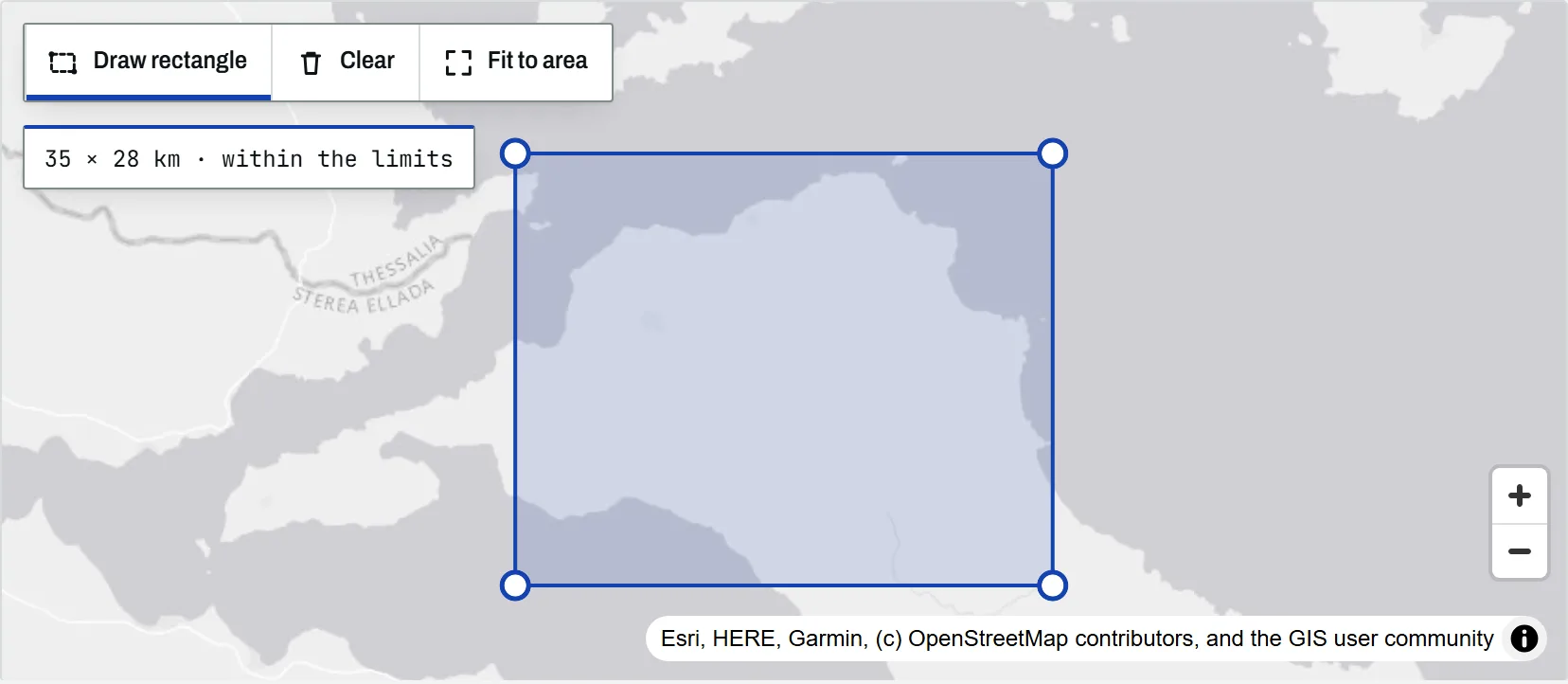
- Areas are drawn directly on the map with the Draw rectangle tool; the rectangle turns amber close to the processing limit and red, with a dashed outline, when it is over it.
- Each request is bounded by pixels per frame, number of frames, total work and a 90-second processing time, so the service stays responsive on shared infrastructure.
- Outputs may be reused for any purpose, including commercially, provided the line "Generated at TechnicalGIS.com" and the dataset credit are kept.
The climate time-series tools turn open climate and satellite archives into charts, warming stripes and time-lapse animations for a place you choose on the map. There is nothing to install and no account to create: select a dataset, mark a point or draw a rectangle, choose the period, and the service returns a PNG chart or an MP4 and GIF animation together with a CSV of the values behind it.
This article explains what the tools do, which datasets they use and under which licences, how to draw an area, and why requests are limited. The worked examples are real outputs from the example gallery, each of which can be opened in the tool and run again for another place.
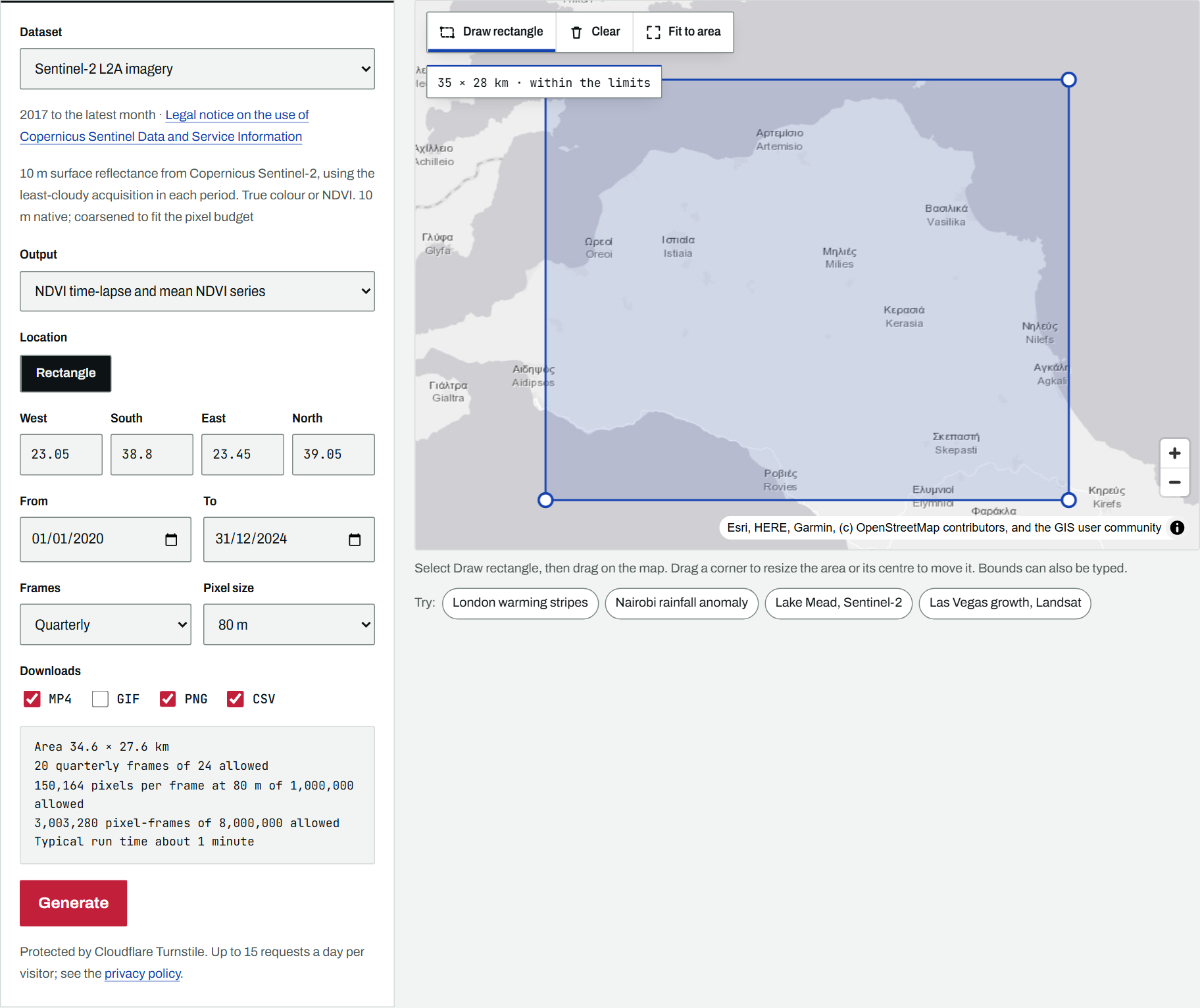
What the tools produce
Each dataset offers one or more outputs:
- ERA5 reanalysis: monthly mean temperature, monthly precipitation and annual warming stripes for a point, from 1940 to the latest complete month.
- CHIRPS rainfall: monthly rainfall against the 1991–2020 normal for a point or an area, and an animated map of rainfall as a percentage of normal, from 1981.
- Sentinel-2 L2A: true-colour or NDVI time-lapses of a rectangle at up to 10 m, from April 2017.
- Landsat Collection 2 Level-2: true-colour or NDVI time-lapses at up to 30 m, from 1984, which makes it the dataset for long-term change.
- MODIS MOD13Q1: a 16-day NDVI series at 250 m for a point or the mean of an area, from 2000.
For imagery, the service picks the clearest acquisition in each monthly, quarterly or annual period, masks cloud and shadow in grey, and applies a fixed stretch so that frames can be compared. Periods with no usable scene are listed in the output notes rather than causing the request to fail. The methodology describes each step.
Datasets and licences
All five interactive datasets are openly licensed, which is why outputs derived from them can be offered for reuse:
| Dataset | Provider and access | Licence |
|---|---|---|
| ERA5 | Copernicus Climate Change Service, via Earthmover Icechunk | CC BY 4.0 |
| CHIRPS v3 | UCSB Climate Hazards Center, via dynamical.org | CC BY 4.0 |
| Sentinel-2 L2A | Copernicus, via Element 84 Earth Search | Copernicus legal notice (free, full and open) |
| Landsat C2 L2 | USGS, via Microsoft Planetary Computer | Public domain |
| MODIS MOD13Q1 | NASA LP DAAC, via Microsoft Planetary Computer | No restrictions |
The gallery also contains a pre-computed projection from NASA’s NEX-GDDP-CMIP6 downscaled climate scenarios (CC0). It is not offered interactively because each year of each scenario is stored as a separate global file, so a single long series for one point means reading well over a hundred files, which the shared service cannot do within its time limit. The data catalogue lists these and many other sources, with notes on access and cost.
Drawing an area on the map
The map carries a toolbar in its top-left corner. Only the tools that suit the selected dataset and output are shown: ERA5 accepts a point only, Sentinel-2 and Landsat a rectangle only, and CHIRPS and MODIS either.
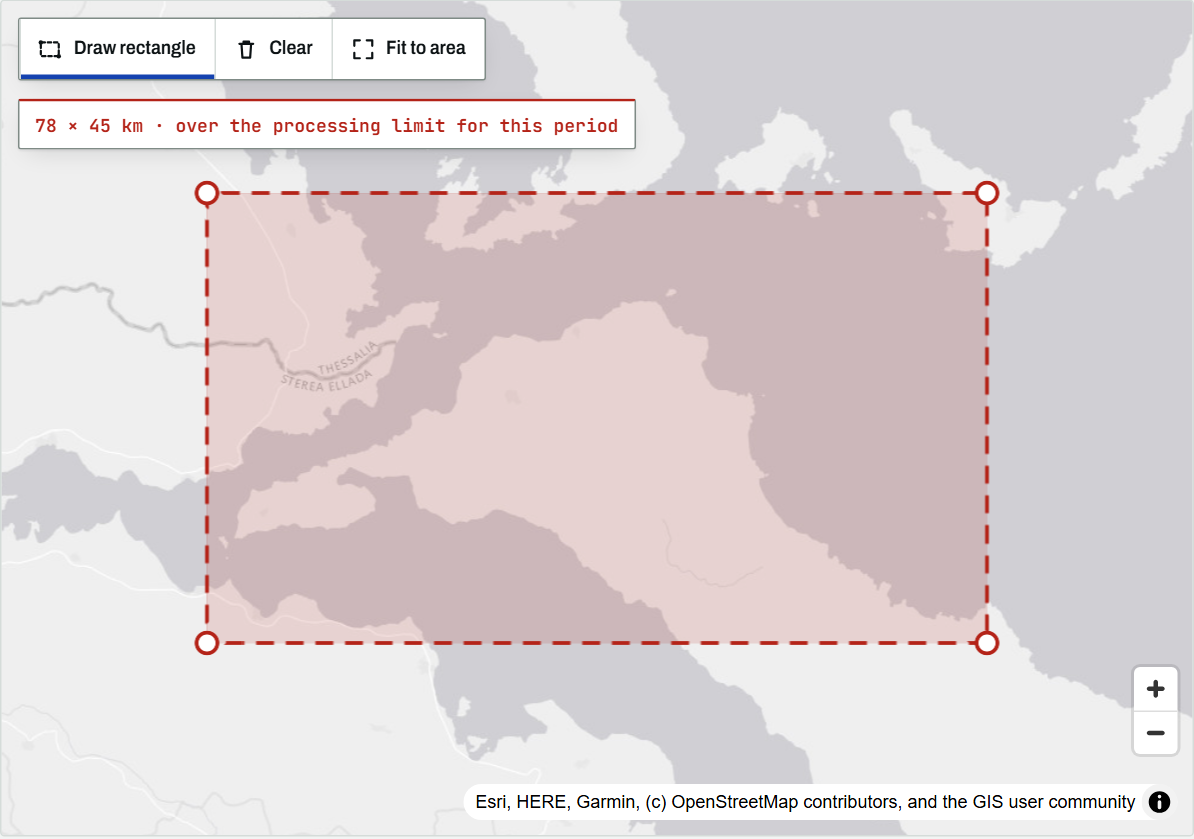
Draw rectangle. Select the tool, then press and drag across the map. The map stops panning while the tool is active, so the drag draws rather than moves. A readout below the toolbar shows the size in kilometres while you draw, and the outline changes colour as the area approaches the processing limit:
- blue when the request is comfortably within the limits;
- amber when it uses 85% or more of a limit;
- red, with a dashed outline, when it is over a limit.
If dragging is awkward, for example with a trackpad, click one corner and then the opposite corner. Touch screens are supported: on a phone or tablet, select Draw rectangle and drag with one finger.
Editing. Once drawn, the rectangle has a handle at each corner. Drag a corner to resize the area, or drag inside the rectangle to move it. The bounds fields, the readout and the limit summary update as you go.
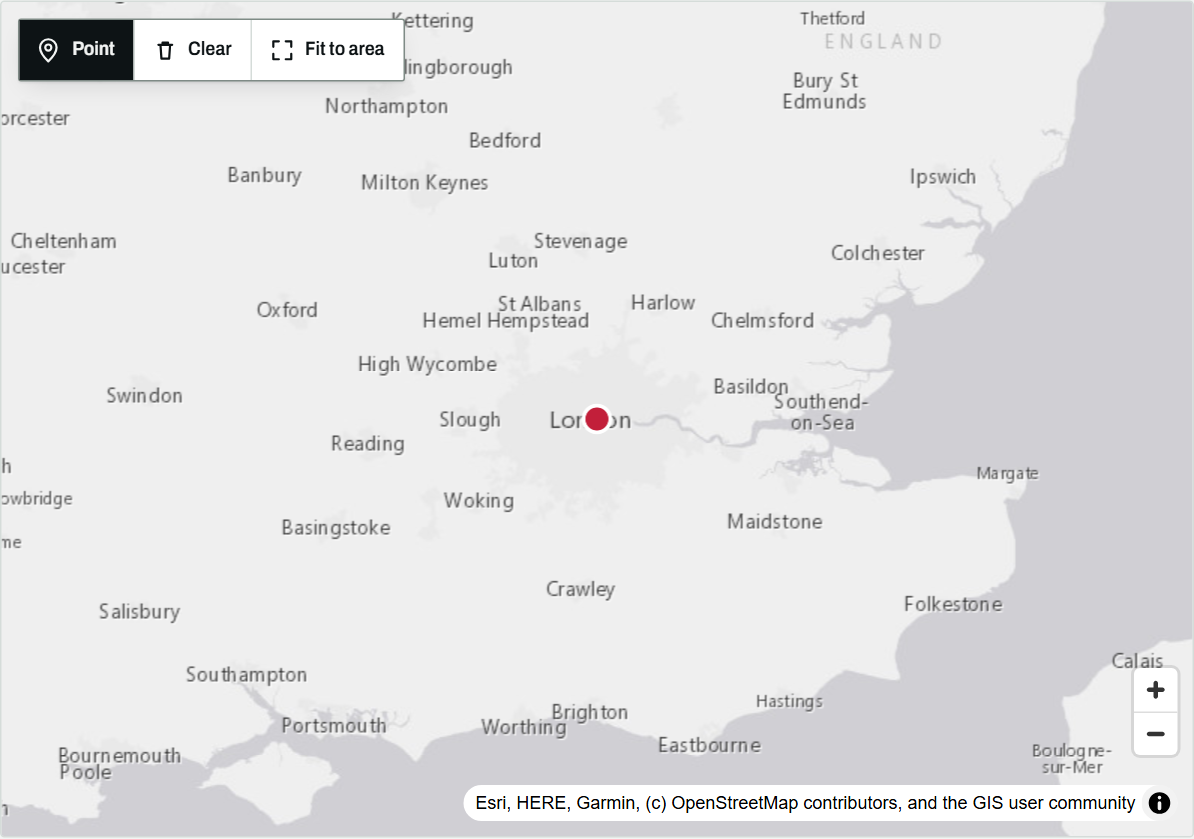
Point. Select Point and click the map to place a marker; drag the marker to move it.
Clear and Fit to area. Clear removes the current shape. Fit to area zooms the map to it, which is useful after typing coordinates.
Press Escape to cancel a rectangle part-way through. The West, South, East and North fields (or Latitude and Longitude for a point) remain available for anyone who prefers to type coordinates or uses a keyboard or screen reader; the shape on the map follows what is typed.
Worked examples
Warming stripes for London
Warming stripes colour each year by its mean temperature relative to the 1991–2020 average, following the design popularised by Ed Hawkins. For the ERA5 cell containing west London, the 1991–2020 mean is 10.7 °C and the linear trend since 1940 is 0.21 °C per decade. The coldest years were 1963 (2.5 °C below the normal) and 1962; the warmest was 2022, 1.1 °C above it, and eleven of the twelve years from 2014 to 2025 were warmer than the normal.
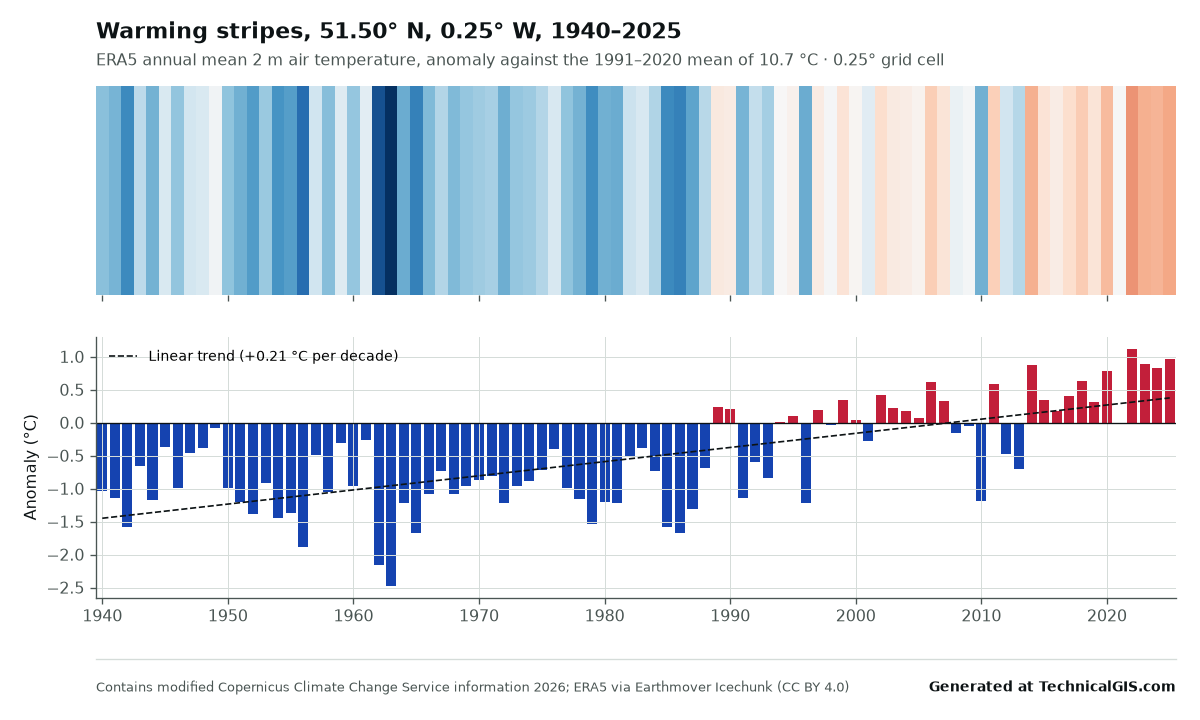
The London warming stripes item can be run again for any other point on land or sea. For the same analysis in code, the tutorial ERA5 in Python with xarray reads the reanalysis directly from cloud Zarr stores.
Vegetation loss after the 2021 north Evia wildfire
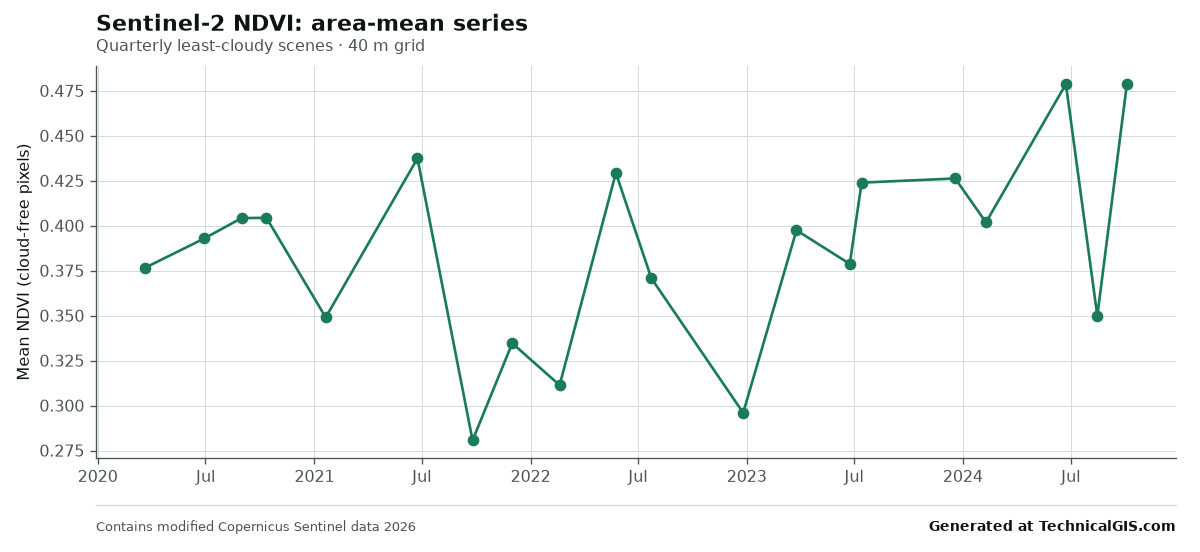
In August 2021 a wildfire burned a large part of northern Evia, Greece. The north Evia NDVI example is a quarterly Sentinel-2 NDVI time-lapse from 2020 to 2024. Mean NDVI over the rectangle was between 0.38 and 0.44 through 2020 and in June 2021, fell to 0.28 in the scene of 25 September 2021, and returned to around 0.42 by the second half of 2023 as shrubs and grasses re-established.
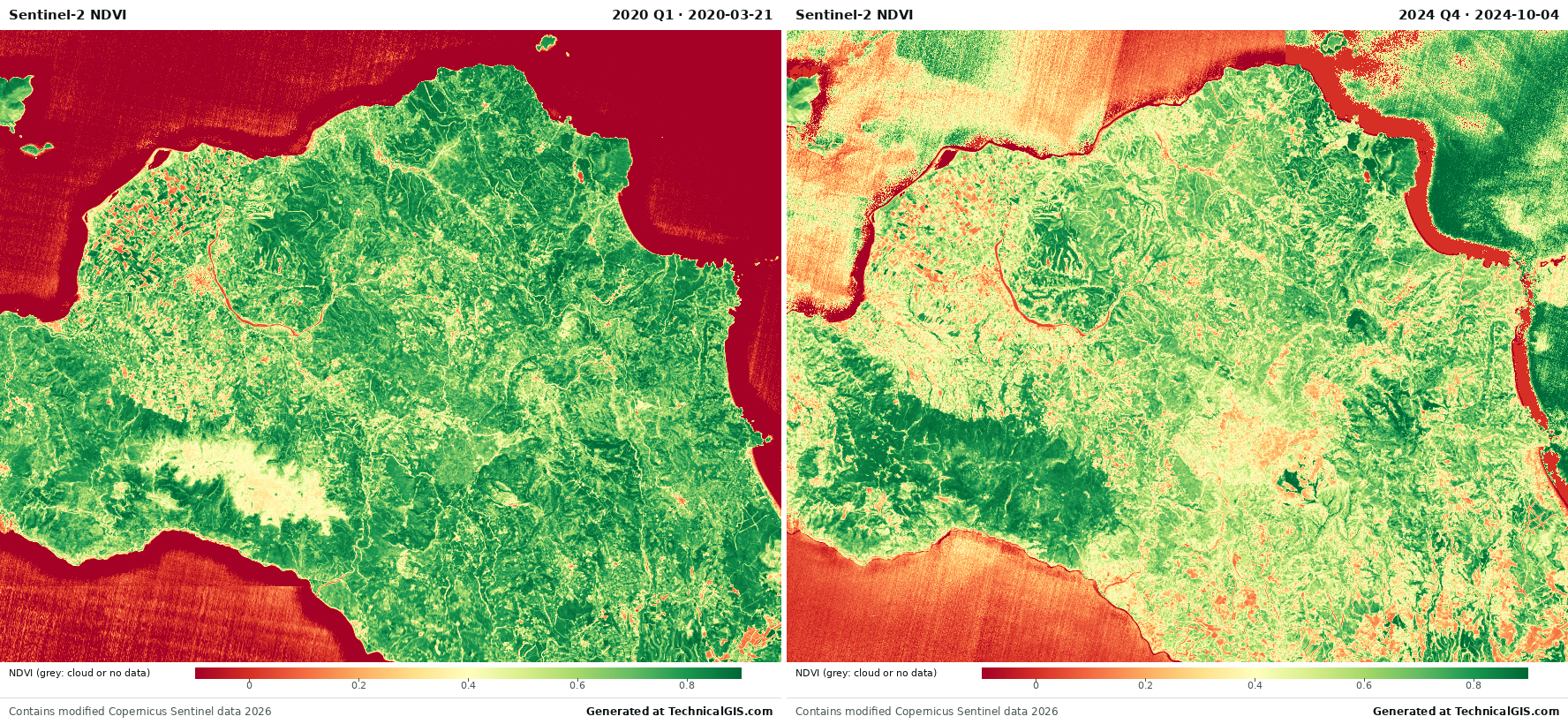
The gallery item was produced at 40 m, finer than an interactive request allows for 20 frames, so the tool opens it at 80 m. For a dedicated burn-severity analysis, see burn severity mapping with Sentinel-2 and dNBR; for NDVI series in code, see NDVI time series with odc-stac.
Rainfall against the normal in Nairobi
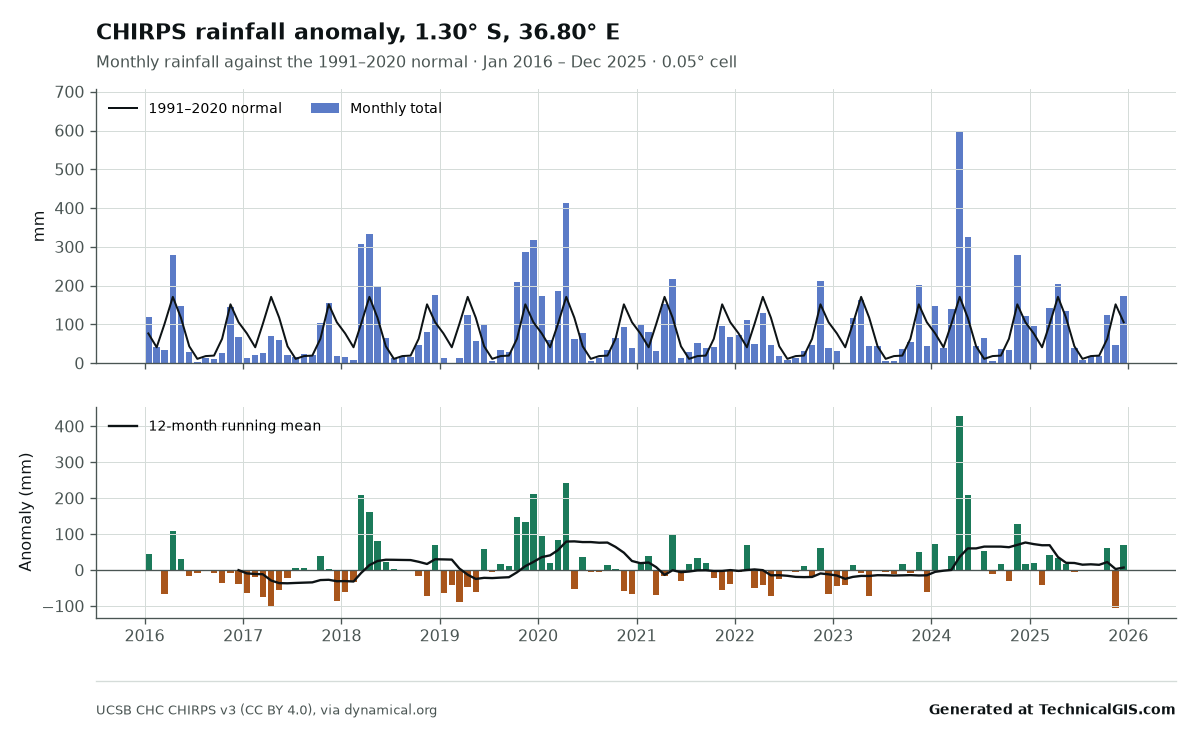
The Nairobi rainfall anomaly compares CHIRPS monthly totals for 2016 to 2025 with the 1991–2020 normal. The October to December short rains of 2021 delivered about 35% less than normal, part of the run of failed seasons behind the 2020–2023 drought in the Horn of Africa. The largest anomaly is April 2024, with 599 mm against a normal of 171 mm, 350% of the usual total, during the long rains that caused widespread flooding in Kenya.
The rainfall anomaly map for southern Kenya and northern Tanzania shows the same months as an animation over an area.
Growth of Las Vegas from Landsat
The Las Vegas Landsat example is an annual true-colour time-lapse from 2000 to 2024 at 120 m. Successive frames show new suburbs and road grids extending south-west, north-west and south-east into the desert. No usable scene was found for 2012, after Landsat 5 was retired and before Landsat 8 was launched, so that year appears as a grey gap. For the reservoir east of the city, the Lake Mead Sentinel-2 example and the tutorial on measuring Lake Mead’s shoreline look at the falling water level in more detail.
Projected temperature for London (gallery only)
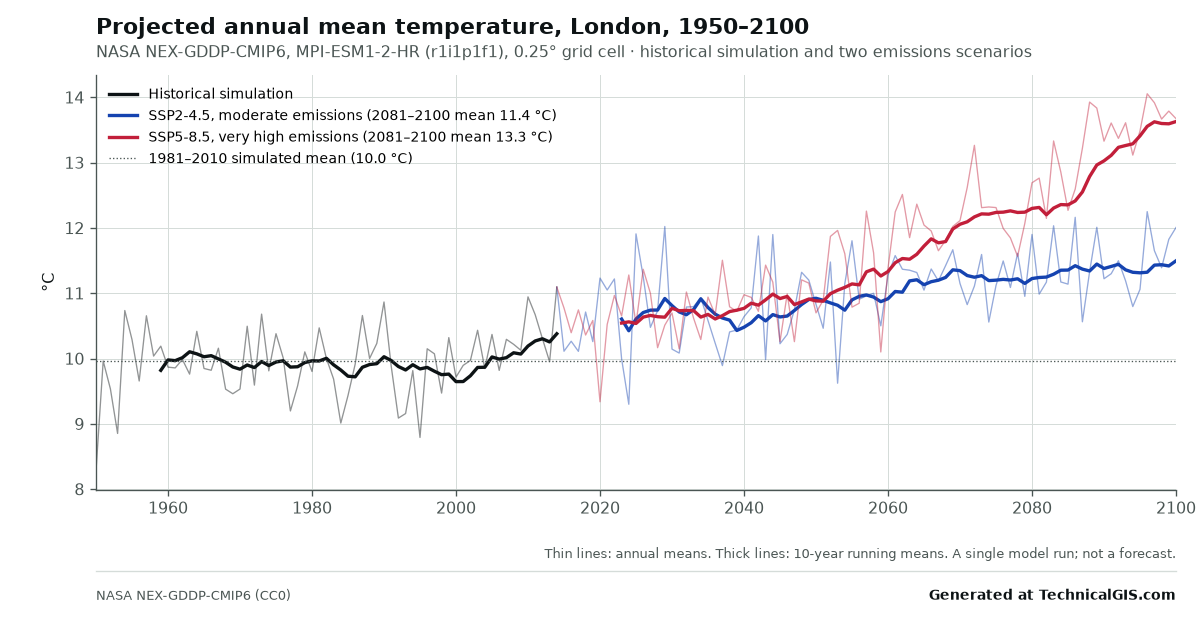
The CMIP6 projection for London uses one model, MPI-ESM1-2-HR, from NASA’s NEX-GDDP-CMIP6. Its simulated annual mean for 1981–2010 is 10.0 °C; for 2081–2100 it averages 11.4 °C under the intermediate SSP2-4.5 scenario and 13.3 °C under the high-emission SSP5-8.5 scenario. A single model run illustrates the scale of change under each scenario; it is not a forecast for any particular year, and other models give different values.
Limits, and why they exist
The service runs on shared infrastructure, and each request reads data from public cloud archives in real time. To keep it responsive for everyone, each request is bounded:
- 1 million pixels per frame, and 36 frames at most;
- a total work budget for imagery time-lapses of 8 million pixel-frames;
- a maximum area of 60 km across for Sentinel-2 and Landsat and 25 km for MODIS;
- 90 seconds of processing per job;
- one job at a time per visitor, and 15 requests a day.
The limit summary under the form shows each figure as you draw, and Generate stays disabled until the request fits. When an area is over the limit, the summary suggests the smallest change that brings it within bounds, usually a coarser pixel size. Results are kept for seven days, and an identical recent request is served from the stored result immediately.
Attribution and reuse
Outputs, including the gallery items, may be used, shared and adapted for any purpose, including commercially, provided that:
- the line “Generated at TechnicalGIS.com” is kept with the output, or given alongside it if the output is cropped or re-plotted;
- the dataset credit shown on the output is kept, as each dataset’s licence requires;
- the output is not presented as endorsed by TechnicalGIS or by any data provider.
Every PNG, MP4 and GIF carries both lines, and the CSV header repeats the full citation. The outputs are derived from reanalysis, satellite and gridded estimates with known uncertainties, so they are not suitable on their own for safety-critical, engineering or legal decisions. The full terms are in the methodology.
Larger areas and bespoke processing
The interactive limits suit a town, a catchment or a single site. Larger areas, finer resolution, longer series, other variables or scheduled updates are better handled as a dedicated job. To discuss a requirement, request bespoke processing.
To begin, open the tool, select Draw rectangle and drag across the place you are interested in.
Key terms
- Area of interest (AOI)
- The point or rectangle on the map for which a chart or time-lapse is produced.
- Reanalysis
- A consistent, gap-free reconstruction of past weather made by combining a fixed forecast model with historical observations; ERA5 is the most widely used example.
- NDVI
- Normalised Difference Vegetation Index: (near-infrared − red) / (near-infrared + red). Dense green vegetation scores high; bare ground, burnt areas and water score low.
- Anomaly
- The difference between a value and its long-term normal, here the 1991–2020 average for the same place and month or year.
- Pixel-frames
- Pixels per frame multiplied by the number of frames: the measure of total work used to limit imagery time-lapses.
Data for this article
- ERA5 reanalysis · Hourly global reanalysis from 1940, 0.25°
- CHIRPS rainfall · Daily rainfall estimates from 1981, 0.05°
- Earth Search STAC API · Sentinel-2 L2A Cloud Optimised GeoTIFFs
- Microsoft Planetary Computer · Landsat Collection 2 and MODIS MOD13Q1
- Landsat missions · USGS Landsat archive from 1972
Licences and formats for each source are listed in the GIS data sources catalogue.