Kernel density estimation in Python for GIS: bandwidths, GeoTIFF heatmaps and relative risk
Make a kernel density heatmap from points in Python: compare Scott/Silverman, likelihood cross-validation and a fixed planning distance, Gaussian and Epanechnikov kernels and sample weights, export an edge-corrected GeoTIFF with rasterio, show it on a basemap, and map case-control relative risk on Camden's London plane trees.
- Level
- Intermediate
- Tested with
- Python 3.12
- Source code
- Download scripts
Key takeaways
- A KDE heatmap is a smoothed count: put a kernel on every point, add them up on a projected grid, and multiply by n to get points per unit area. scikit-learn's KernelDensity and scipy's gaussian_kde both do it; rasterio writes the grid as a GeoTIFF.
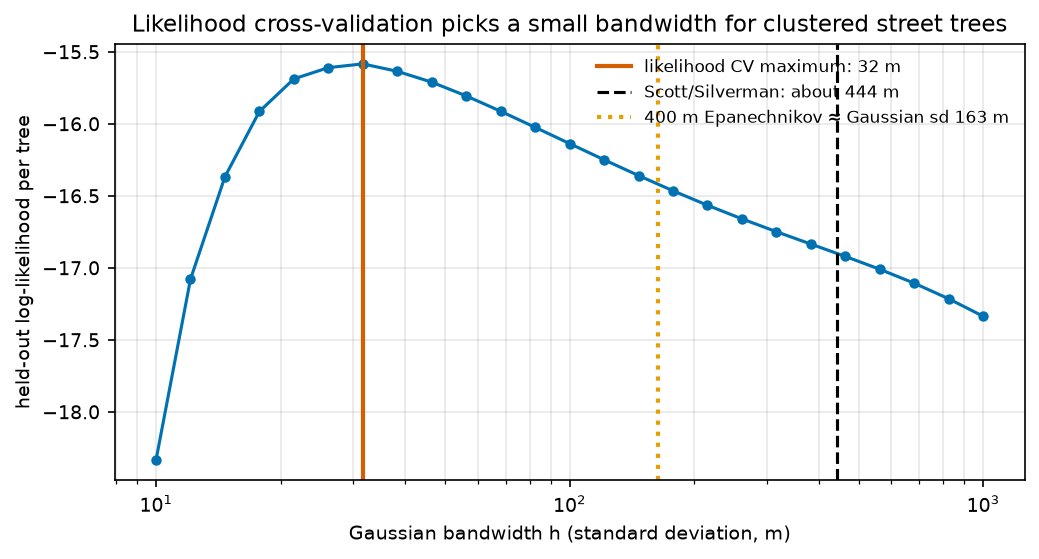
- The bandwidth matters far more than the kernel. On 3,292 London planes, Scott's rule gives a 470 × 417 m Gaussian (peak 3.3 trees/ha) and likelihood cross-validation picks 32 m (peak 37.4 trees/ha). Four kernels with the same 100 m spread correlate at r = 0.97–0.99.
- Scott's and Silverman's rules are identical in two dimensions, and both oversmooth clustered data. scikit-learn's bandwidth='scott' returns a bare factor (0.259), not metres, so on raw coordinates it gives a 26 cm kernel.
- Correct the edges: 1.8% to 18% of the kernel mass falls outside the borough, depending on the bandwidth. Dividing by the in-window share keeps the GeoTIFF honest; its mean is 1.51 trees/ha, exactly n/area.
- A raw KDE often maps the background. Dividing the plane density by the density of all other council trees gives a relative-risk surface, from 0.08× to 4.9× the borough-wide share. It is outlined where random labelling says the excess is unusual (pointwise p ≤ 0.05).
Before you start
- Comfortable with GeoPandas and projected coordinates; Part 1 of this series explains the data and the study window
- Python 3.10+ with scikit-learn, scipy, rasterio, contextily, geopandas, shapely, numpy, pandas, matplotlib and requests
- An internet connection: the script downloads about 11 MB of open data and a few basemap tiles
Short answer: to make a kernel density heatmap from points in Python for GIS, follow five steps.
- Put the points in a projected CRS (metres).
- Build a grid of cell centres over your study area.
- Fit
sklearn.neighbors.KernelDensity(bandwidth=h)to the coordinates and evaluatenp.exp(kde.score_samples(cells)). - Multiply by the number of points to get points per square metre, and by 10,000 for points per hectare.
- Write the grid to a GeoTIFF with rasterio, using
from_origin(xmin, ymax, cell, cell)as the transform.
Choose the bandwidth h deliberately, because it changes the map far more than the kernel does. Likelihood cross-validation (GridSearchCV over h) picks 32 m for Camden’s London plane trees. Scott’s and Silverman’s rules give about 440 m, and a fixed 400 m planning radius sits in between. If the points sit on an uneven background, map relative risk (cases over controls) instead of raw density.
This is Part 2 of the series Point pattern analysis in Python. Part 1 tested whether the same trees are clustered and at what distances, using quadrats, nearest neighbours and Ripley’s K. This part estimates how dense they are everywhere.
You will learn how to:
- compare Scott/Silverman, likelihood cross-validation and a fixed planning distance for the bandwidth;
- see how little the kernel shape matters at a matched spread;
- use sample weights (here, crown area);
- apply an edge correction, export a georeferenced GeoTIFF with rasterio and show it on a basemap;
- build a relative-risk (dual KDE) surface with random-labelling tolerance contours, and see why a raw KDE often maps the background;
- understand why KDE is not a hot spot test and when to use network KDE instead.
All outputs below are real results from kde_trees.py, run on 27 October 2026 with Python 3.12.0, scikit-learn 1.9.1, scipy 1.18.1, rasterio 1.5.2, contextily 1.7.1 and geopandas 1.2.0. The script takes about 30 seconds.
The data and the grid
The data is Trees In Camden, the London Borough of Camden’s open inventory of council-managed trees (Open Government Licence). We use the snapshot uploaded on 26 October 2026, with London plane trees as the points of interest. Part 1 describes the data in detail. Here we load it, clip it to the borough and build a 25 m grid of cell centres. The rows run from the top down, which is the order a GeoTIFF expects.
RES = 25              # output grid cell size (m)HA = 1e4              # m2 per hectare
df = pd.read_csv(download(TREES_URL, DATA / "trees_in_camden.csv"), low_memory=False)df = df[df.Easting > 0]boundary = gpd.read_file(download(LAD_URL, DATA / "camden_lad.geojson", where=f"LAD26CD='{LAD}'",                                  outFields="LAD26CD,LAD26NM", outSR=27700, f="geojson")).set_crs(CRS, allow_override=True)W = boundary.geometry.iloc[0]trees = df[shapely.contains_xy(W, df.Easting, df.Northing)].drop_duplicates(["Easting", "Northing", "Common Name"])is_plane = (trees["Common Name"] == SPECIES).to_numpy()planes = trees[is_plane]xy = planes[["Easting", "Northing"]].to_numpy(float)n = len(xy)
# a 25 m grid of cell centres over the borough, top row first (the order a GeoTIFF expects)x0, y0 = np.floor(np.array(W.bounds[:2]) / RES) * RESx1, y1 = np.ceil(np.array(W.bounds[2:]) / RES) * RESxs = np.arange(x0 + RES / 2, x1, RES)ys = np.arange(y1 - RES / 2, y0, -RES)XX, YY = np.meshgrid(xs, ys)inside = shapely.contains_xy(W, XX, YY)cells = np.column_stack([XX[inside], YY[inside]])

def to_grid(values):    out = np.full(XX.shape, np.nan)    out[inside] = values    return out

def kde_sklearn(points, bandwidth, kernel="gaussian", weights=None): """Density per m2 (integrates to 1 over the plane) at every grid cell inside the borough.""" kd = KernelDensity(bandwidth=bandwidth, kernel=kernel, rtol=1e-4).fit(points, sample_weight=weights) return to_grid(np.exp(kd.score_samples(cells)))snapshot uploaded 26 October 2026: 27,552 council trees in the borough, 3,292 London planesgrid: 305 x 267 cells of 25 m, 34,847 inside the boroughscore_samples returns the log density, a probability density per square metre that integrates to 1. Multiply by n to get trees per m², and by 10,000 to get trees per hectare. The rtol=1e-4 setting lets scikit-learn’s tree-based algorithm skip negligible far-away contributions, which makes evaluation on 35,000 cells fast.
Step 1: choose the bandwidth
Three common ways to choose h:
- Rules of thumb. Scott’s rule sets h = n^(−1/(d+4)) × σ, and Silverman’s multiplies that by (4/(d+2))^(1/(d+4)). In two dimensions (d = 2) that factor is exactly 1, so the two rules are identical.
scipy.stats.gaussian_kdeuses them with the full covariance of the data, so the kernel is an ellipse. - Likelihood cross-validation. Pick the h that maximises the log-likelihood of points that were left out of the fit. scikit-learn’s
KernelDensity.scorereturns that log-likelihood, soGridSearchCVworks directly. - A fixed, explainable distance. Planners often want “trees within a 5-minute walk”. A bounded kernel such as Epanechnikov with a 400 m radius gives exactly that: trees more than 400 m away contribute nothing.
scott = gaussian_kde(xy.T, bw_method="scott")silver = gaussian_kde(xy.T, bw_method="silverman")sd_xy = np.sqrt(np.diag(scott.covariance))kd_scott = KernelDensity(bandwidth="scott").fit(xy)
grid_h = np.geomspace(10, 1000, 25)cv = GridSearchCV(KernelDensity(kernel="gaussian"), {"bandwidth": grid_h},                  cv=KFold(5, shuffle=True, random_state=SEED))cv.fit(xy)h_cv = cv.best_params_["bandwidth"]cv_ll = cv.cv_results_["mean_test_score"] / (n / 5)   # mean held-out log-likelihood per tree
# A fixed planning distance: an Epanechnikov kernel that reaches exactly 400 m and is zero beyondh_epan = PLANNING_RADIUS
dens = { f"Scott/Silverman (Gaussian, sd {sd_xy[0]:.0f} × {sd_xy[1]:.0f} m)": to_grid(scott(cells.T)), f"likelihood CV (Gaussian, sd {h_cv:.0f} m)": kde_sklearn(xy, h_cv), f"planning distance (Epanechnikov, radius {h_epan} m)": kde_sklearn(xy, h_epan, "epanechnikov"),}scipy gaussian_kde: Scott factor 0.2593, Silverman factor 0.2593 kernel standard deviation (from the data covariance): 470 m east-west, 417 m north-southscikit-learn KernelDensity(bandwidth='scott').bandwidth_ = 0.259 -> read as metres on raw coordinates: standardise first or pass a numberlikelihood cross-validation (5-fold, 25 bandwidths from 10 to 1,000 m): best h = 32 m h = 10 m: mean held-out log-likelihood -18.333 per tree h = 22 m: mean held-out log-likelihood -15.687 per tree h = 46 m: mean held-out log-likelihood -15.709 per tree h = 100 m: mean held-out log-likelihood -16.136 per tree h = 215 m: mean held-out log-likelihood -16.564 per tree h = 464 m: mean held-out log-likelihood -16.919 per tree h = 1000 m: mean held-out log-likelihood -17.335 per treefixed planning distance: Epanechnikov kernel, radius 400 m (same spread as a Gaussian with sd 163 m)Scott/Silverman (Gaussian, sd 470 × 417 m): peak 3.3 planes/ha, 99th percentile 3.1, share of the kernel mass inside the borough 0.818likelihood CV (Gaussian, sd 32 m): peak 37.4 planes/ha, 99th percentile 15.0, share of the kernel mass inside the borough 0.980planning distance (Epanechnikov, radius 400 m): peak 5.3 planes/ha, 99th percentile 4.4, share of the kernel mass inside the borough 0.913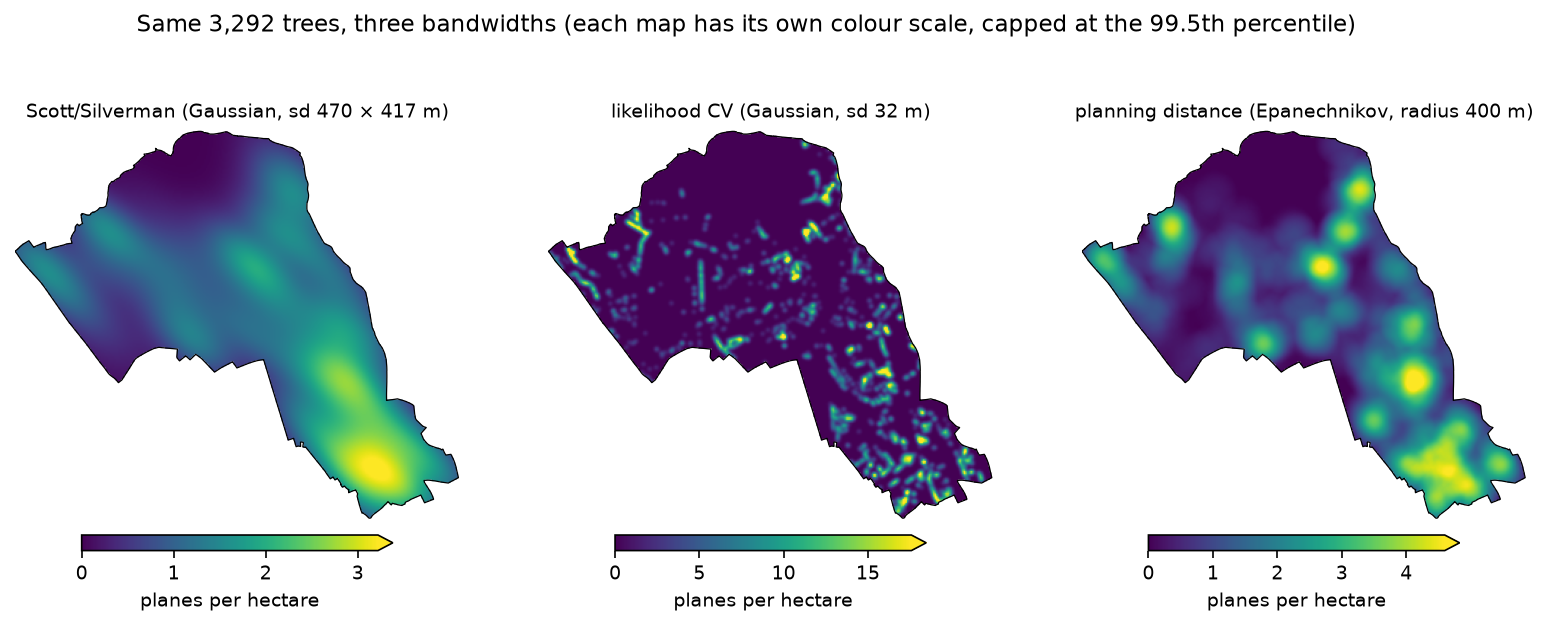
Which is right? None is “right”; each answers a different question.
- Scott’s and Silverman’s rules assume a single, roughly normal blob of points. For a clustered pattern they oversmooth, often badly, and here they leave 18% of the kernel mass outside the borough.
- Cross-validated likelihood is objective and finds the scale that best predicts where the next tree is. For clustered data that is the scale of the clusters themselves (the avenues). It can undersmooth, and with duplicate or near-duplicate points it can collapse towards zero.
- A fixed planning distance is subjective but explainable: “planes within a 5-minute walk”. It is often the best choice for a map that will inform a decision.
Report the bandwidth and the method on every KDE map. A heatmap without a bandwidth is not reproducible.
Step 2: the kernel shape matters much less
To compare kernels fairly, match their spread, not their bandwidth parameter. In scikit-learn, the Gaussian h is a standard deviation, while the Epanechnikov, tophat and exponential h are radii or scales. In two dimensions, these give a 100 m standard deviation along each axis:
SD = 100kernels = { # scikit-learn h giving each 2-D kernel a 100 m standard deviation along each axis "gaussian": SD, "epanechnikov": SD * np.sqrt(6), "tophat": SD * 2, "exponential": SD / np.sqrt(3)}kd_maps = {k: kde_sklearn(xy, h, k) for k, h in kernels.items()} gaussian: h = 100 m, peak 9.7 planes/ha, correlation with Gaussian r = 1.000epanechnikov: h = 245 m, peak 8.7 planes/ha, correlation with Gaussian r = 0.990 tophat: h = 200 m, peak 8.4 planes/ha, correlation with Gaussian r = 0.967 exponential: h = 58 m, peak 13.5 planes/ha, correlation with Gaussian r = 0.977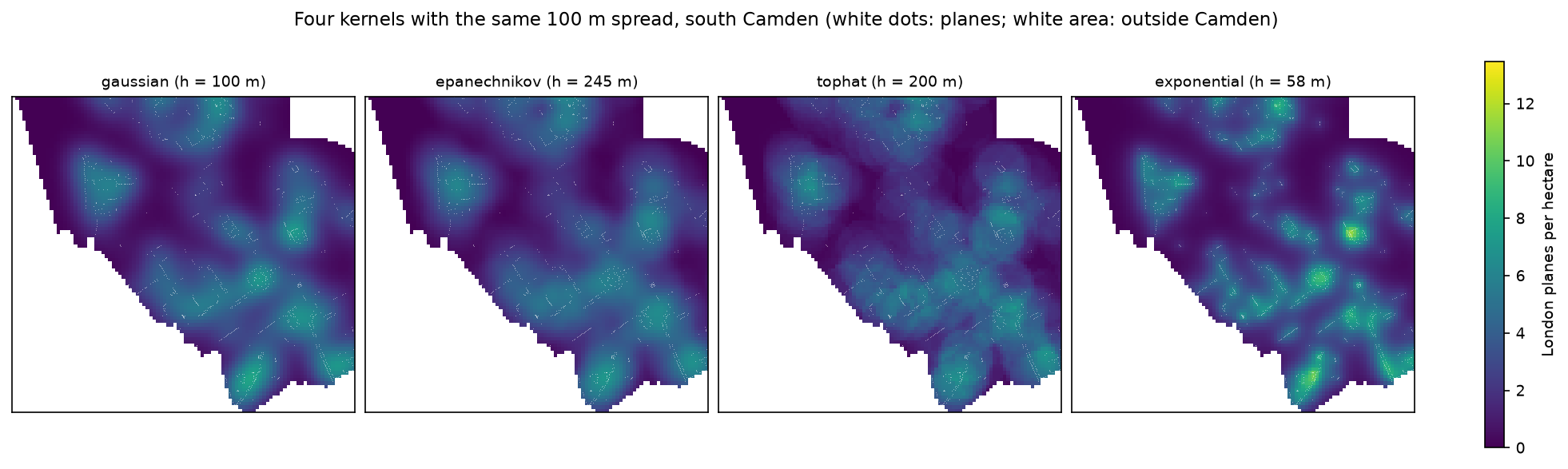
The Epanechnikov kernel is theoretically the most efficient, and it is the “quartic” kernel’s close cousin used by ArcGIS Pro’s Kernel Density tool and QGIS’s heatmap. It is also bounded, so cells more than h away from every point are exactly zero. The Gaussian never reaches zero. The tophat is a moving-window count, easy to explain but blocky. In practice, pick a smooth kernel, then spend your effort on the bandwidth.
Step 3: sample weights
Every point does not have to count equally. KernelDensity.fit(..., sample_weight=w) scales each kernel by its weight. The council records each tree’s crown spread, so weighting by crown area π(spread/2)² turns “planes per hectare” into plane canopy per hectare. Large, old planes then count for more than newly planted whips:
spread = pd.to_numeric(planes["Spread In Metres"], errors="coerce").to_numpy()ok = spread > 0crown = np.pi * (spread[ok] / 2) ** 2H_MAP = 100unweighted = kde_sklearn(xy, H_MAP)weighted = kde_sklearn(xy[ok], H_MAP, weights=crown)u_map = unweighted * n * HA # planes per hectarew_map = weighted * crown.sum() # m2 of plane crown per m2 of ground3,288 of 3,292 planes have a crown spread > 0 (median 11 m); total crown area 38.6 haGaussian h = 100 m: peak 9.7 planes/ha; peak crown density 19.7% of the ground under plane crownscorrelation between count and crown-area surfaces: r = 0.859count peak at E 528438 N 185888; crown-area peak at E 529738 N 183462 (2,751 m apart)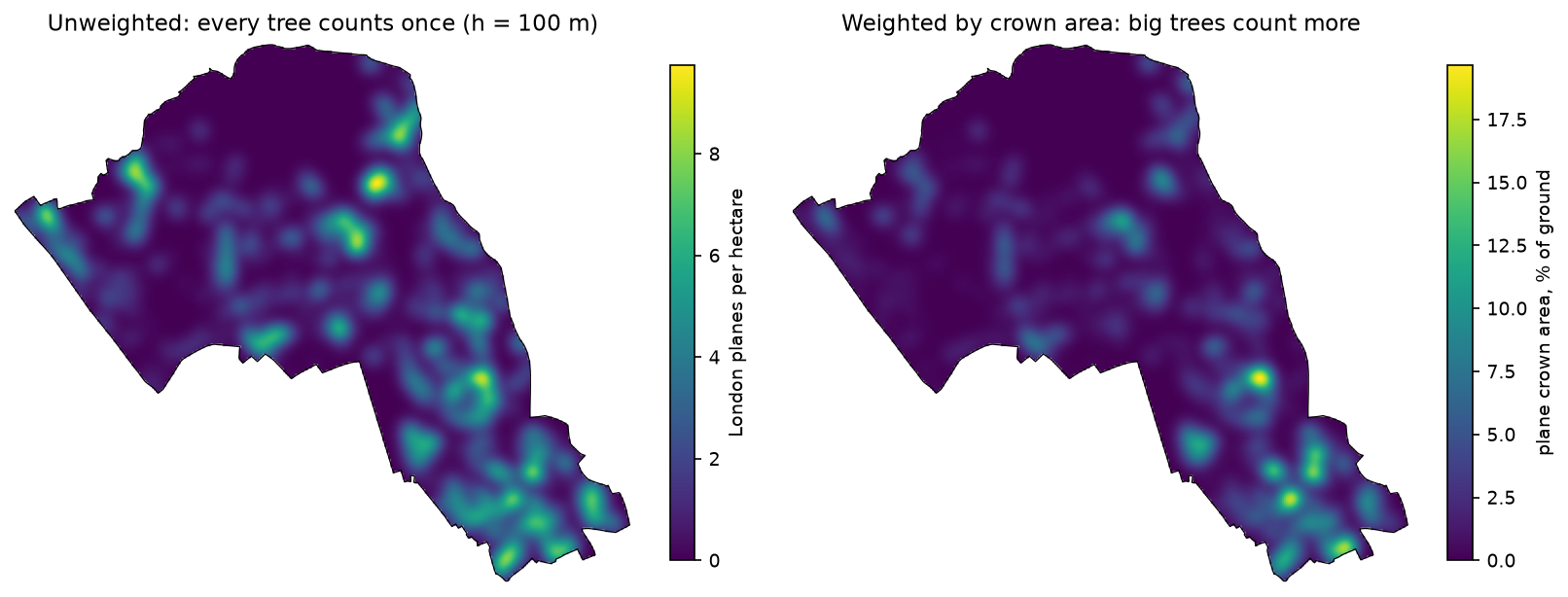
The weights must be on a scale you can explain. Here the weighted surface integrates to the total crown area, so it reads as the share of ground under plane crowns. Overlapping crowns are counted twice, so treat it as an index rather than measured canopy cover. For measured canopy, use a canopy height model, as in our canopy height map tutorial. Divide the weights by their sum if you want a probability density instead.
Step 4: edge correction, GeoTIFF export and a basemap
Near the boundary, part of every kernel spills outside the borough, so densities there are biased low. The Scott surface loses 18% of its mass this way. Diggle’s (1985) correction divides each cell by the share of its kernel that falls inside the window. For a Gaussian kernel, that share is the window mask blurred with the same kernel, which scipy.ndimage.gaussian_filter computes in one call. Then we write the result to a GeoTIFF:
edge = ndimage.gaussian_filter(inside.astype(float), sigma=H_MAP / RES, mode="constant", cval=0.0)corrected = np.where(inside, u_map / edge, np.nan)
tif = OUT / "camden_london_plane_density.tif"profile = dict(driver="GTiff", width=len(xs), height=len(ys), count=1, dtype="float32", crs=CRS,               transform=from_origin(x0, y1, RES, RES), nodata=-9999.0, compress="deflate", tiled=True,               blockxsize=256, blockysize=256)with rasterio.open(tif, "w", **profile) as dst:    dst.write(np.where(inside, corrected, -9999.0).astype("float32"), 1)    dst.update_tags(units="trees per hectare", kernel="gaussian", bandwidth_m=str(H_MAP),                    edge_correction="Diggle: divided by the kernel mass inside the borough",                    source=f"Trees In Camden, London Borough of Camden, snapshot {snapshot:%Y-%m-%d}, OGL v3")    dst.set_band_description(1, "London plane density (trees/ha)")
from_origin(x0, y1, RES, RES) places the top-left corner of the top-left cell, which is why the grid rows run north to south. Cells outside the borough get the nodata value. The units, bandwidth and source are stored as tags, so anyone who opens the file in QGIS can see how it was made.
edge correction factor 1/c(x): median 1.00, max 3.69 (cells on the boundary)wrote output\camden_london_plane_density.tif: 305 x 267 cells, EPSG:27700, 25 m, float32, nodata -9999, 131 KB read back: max 11.0 trees/ha, mean 1.51 trees/ha (the borough average is 1.51)The read-back check is worth copying. After edge correction, the mean density over the borough equals n/area. Not a single tree’s worth of mass is lost at the boundary.
To display the raster on a basemap, read it back with rasterio and pass the CRS to contextily. contextily reprojects the web tiles to British National Grid on the fly:
with rasterio.open(tif) as src:    arr = src.read(1, masked=True)    bounds = src.bounds
fig, ax = plt.subplots(figsize=(8, 7.5))show = np.ma.masked_less(arr, 2)   # leave low densities transparent so the streets show throughim = ax.imshow(show, extent=(bounds.left, bounds.right, bounds.bottom, bounds.top), cmap="magma_r", alpha=0.75,               vmin=2, vmax=float(np.percentile(arr.compressed(), 99.5)), zorder=2)boundary.boundary.plot(ax=ax, color="black", linewidth=0.8, zorder=3)cx.add_basemap(ax, crs=CRS, source=cx.providers.Esri.WorldGrayCanvas, zoom=14, attribution_size=6)fig.colorbar(im, ax=ax, shrink=0.7, label="London planes per hectare (below 2: transparent)", extend="max")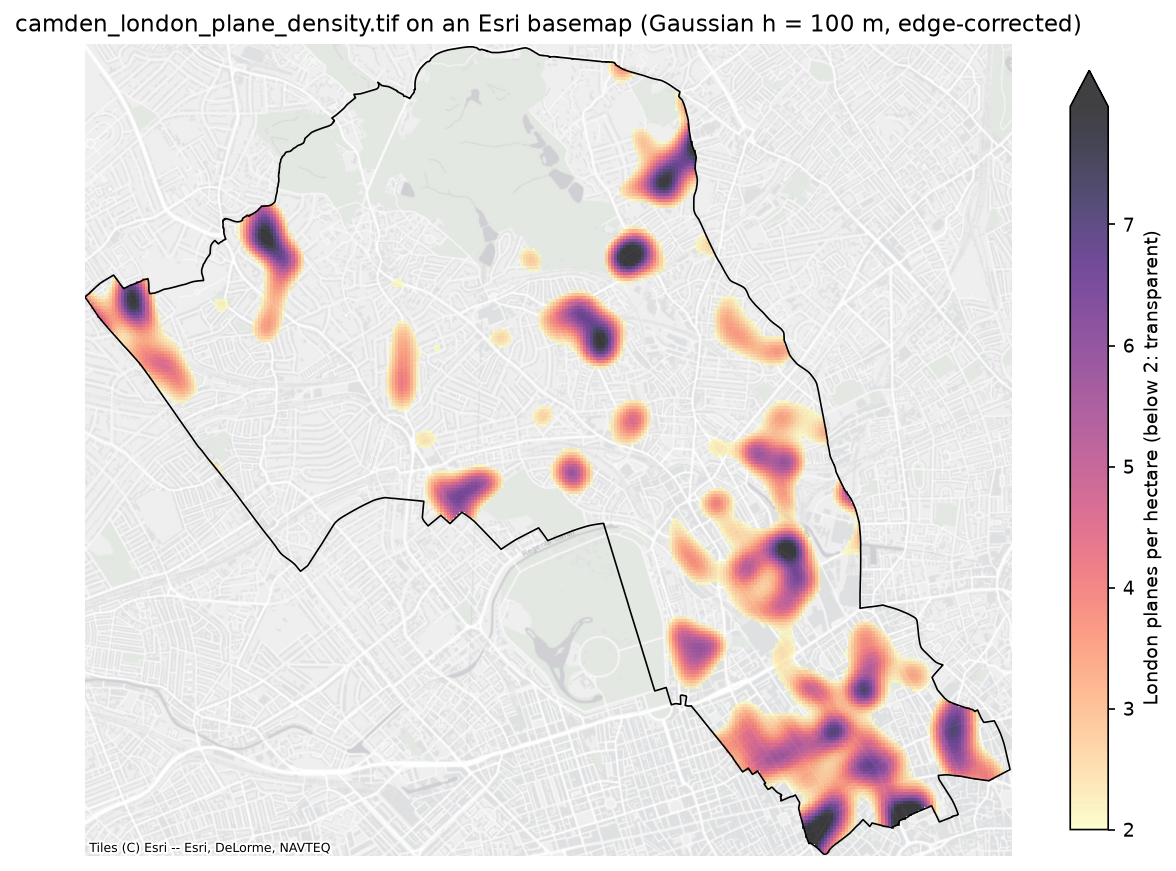
For an interactive version, load the GeoTIFF into a Folium map as an image overlay, as in interactive web maps with Folium. For publication-quality static maps, see Python maps with Matplotlib and Cartopy.
Step 5: relative risk, or why a raw KDE often maps the background
A raw KDE answers “where are there many planes?”. Often, that just means “where are there many trees”, or for crime and disease data, “where do many people live”. The classic fix is a dual KDE, or relative-risk surface (Bithell 1990; Kelsall and Diggle 1995). Estimate one density for the cases (planes) and one for the controls (all other council trees) with the same bandwidth. Scale each to integrate to 1 and take the ratio. A value of 1 means planes make up their borough-wide share of trees there (11.9%); 2 means twice that share.
H_RR = 150all_xy = trees[["Easting", "Northing"]].to_numpy(float)xedges = np.arange(x0, x1 + RES / 2, RES)yedges = np.arange(y0, y1 + RES / 2, RES)

def binned_kde(points):    """Fast binned Gaussian KDE: counts per 25 m cell smoothed with a Gaussian filter (trees per cell)."""    h, _, _ = np.histogram2d(points[:, 1], points[:, 0], bins=[yedges, xedges])    return ndimage.gaussian_filter(np.flipud(h), sigma=H_RR / RES, mode="constant", cval=0.0)

case = binned_kde(all_xy[is_plane])control = binned_kde(all_xy[~is_plane])n_case, n_ctrl = int(is_plane.sum()), int((~is_plane).sum())valid = inside & (control / (RES * RES) * HA >= 5)   # at least 5 other trees per hectare for a stable ratiolog_rr = np.where(valid, np.log2((case / n_case) / (control / n_ctrl)), np.nan)
The binned KDE counts points per 25 m cell and blurs the counts with a Gaussian filter. It approximates the exact KDE closely when the cells are much smaller than the bandwidth, and it is fast enough to repeat 199 times. Any edge correction is the same for cases and controls, so it cancels in the ratio. We mask cells with fewer than 5 other trees per hectare, where the denominator is too small for a stable ratio.
To judge which excesses are unusual, we randomly relabel the trees: choose 3,292 of the 27,552 trees at random as “planes”, recompute the surface, and repeat 199 times. That keeps the control locations and asks whether the plane labels could be random among them, the same null as Part 1’s random-labelling test.
rng = np.random.default_rng(SEED)total = case + controltarget = np.nan_to_num(log_rr, nan=np.inf)exceed = np.zeros_like(case)for _ in range(NSIM): lab = np.zeros(len(all_xy), bool) lab[rng.choice(len(all_xy), n_case, replace=False)] = True c = binned_kde(all_xy[lab]) exceed += np.log2((c / n_case) / ((total - c) / n_ctrl)) >= targetp_upper = (exceed + 1) / (NSIM + 1)sig = valid & (p_upper <= 0.05)cases 3,292 planes, controls 24,260 other trees; common Gaussian h = 150 mcorrelation of the raw plane density with the density of all council trees: r = 0.4572% of the borough has >= 5 other trees per ha (elsewhere the ratio is masked)log2 relative risk, 1st to 99th percentile: -3.65 to 2.30 (planes 0.08x to 4.9x their borough-wide share)pointwise p <= 0.05 (planes over-represented), 199 random labellings: 28.9% of valid cells (4.50 km2); about 5% would be flagged by chance aloneLondon plane share of council trees by contract area: Highways 17%, Parks 13%, Housing 7%, Education 5%, Corporate Landlord 2%, Valuers 0%borough-wide share: 11.9%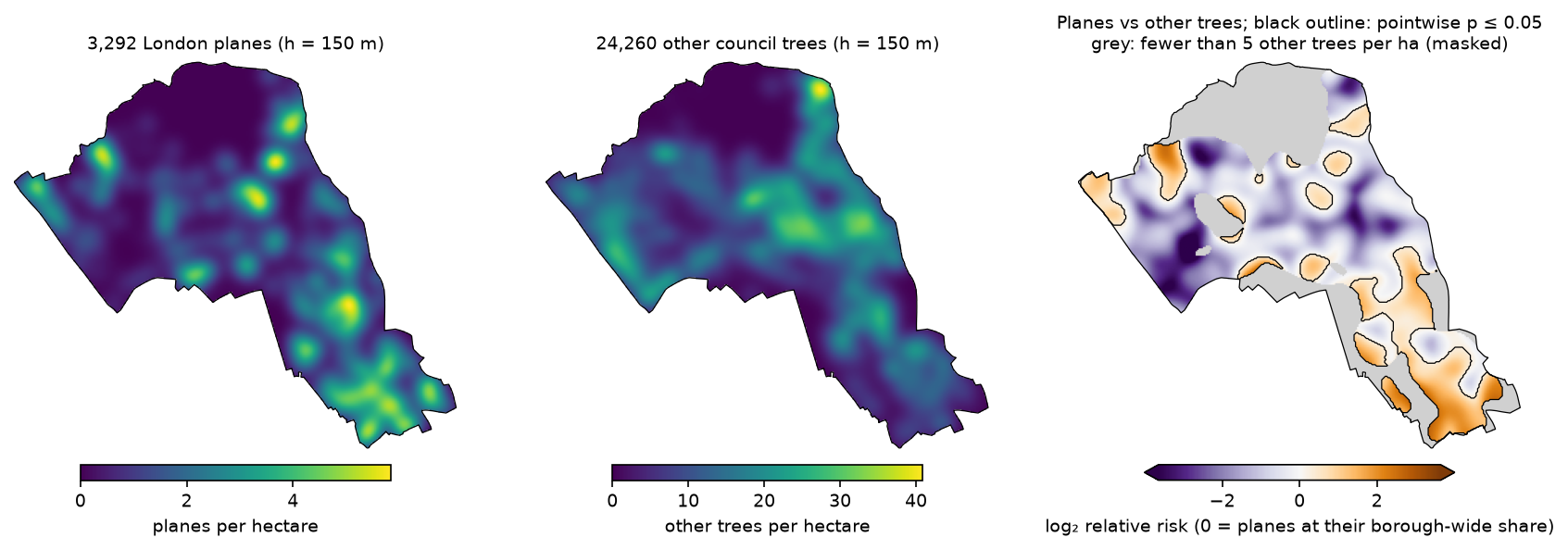
Two things stand out:
- The raw plane map partly mirrors the tree map (r = 0.45 between plane density and all-tree density). Some of its bright spots are simply places with many trees of every kind. In this dataset the overlap is moderate. In crime, disease or footfall data, a raw KDE often correlates with population at 0.8 or more, and then it is essentially a population map.
- The relative-risk map tells a different story. Planes are over-represented in south Camden and along a few major streets, which the share by contract area supports: 17% of Highways trees are planes, against 7% of Housing trees. In the centre-west, where there are many trees, planes are under-represented. A per-capita alternative is to divide by a population surface, such as Census 2021 counts rasterised to the same grid. The ratio logic is the same.
KDE is not a hot spot test
A KDE heatmap is a descriptive smoother. It always produces peaks, even for points scattered completely at random. It has no null hypothesis, no p-values and no correction for multiple testing, and the “hot spots” it shows grow and shrink with the bandwidth (Step 1). Use it to describe and communicate, not to claim that a place is significantly different.
- To test whether points are clustered at all, and at what scales, use the methods in Part 1: quadrats, nearest neighbour, Ripley’s K with a global envelope test.
- To find where counts are significantly high, aggregate the points to a grid and run Getis-Ord Gi* with permutation inference and FDR correction, as in hot spot analysis in Python.
- For cases against a background, the relative-risk surface with tolerance contours (Step 5) is the closest KDE-based tool to a test. The caveats above still apply.
Network KDE for road and street events
Street trees, road collisions, street crime and bus stops do not occur anywhere in the plane. They occur on a network. A planar KDE spreads each event’s mass over buildings, back gardens and the other side of a railway. It also counts two events on parallel streets 30 m apart as neighbours, even if the walk between them is 500 m. The result overstates density at junctions and in dense street grids.
Network KDE (Okabe, Satoh and Sugihara 2009; Xie and Yan 2008) measures distance along the network and expresses density per metre of street. It splits the network into short segments (“lixels”) and spreads each event’s kernel along the network paths around it. For road collisions in particular, a network KDE or a count per road segment is the honest choice. The R package spNetwork implements several network KDE variants. In Python, build the street graph with OSMnx, snap the events to edges, and compute kernel weights from shortest-path distances to lixel centres.
Limitations and honest caveats
- The bandwidth is a modelling choice, not a fact. The peaks in Step 1 range from 3.3 to 37.4 trees/ha for the same data. Always state the bandwidth, the kernel and how you chose them, and show a sensitivity check if the map will inform a decision.
- Units and edges. A KDE in trees per hectare is only meaningful in a projected CRS and only within the window. Without edge correction, densities near the boundary are biased low by up to 3.7× here. Cells outside the borough are nodata, not zero.
- Inventory coverage. Trees In Camden lists council-managed trees only. Royal Parks, Hampstead Heath (City of London) and private trees are missing, so low densities there are a gap in the data, not a lack of trees.
- The relative-risk denominator matters. Using “all other council trees” as controls answers a question about the council’s planting mix. A different background, such as street length or area, would give a different map. Ratios are unstable where the controls are sparse, hence the mask.
- Pointwise tolerance contours are not controlled for multiple testing (see the callout in Step 5).
- Planar distance. Every distance here is straight-line. For events on streets, network KDE is more faithful (see above).
Frequently asked questions
How do I create a heatmap from points in Python?
Project the points to a metric CRS and build a grid of cell centres over the study area. Fit KernelDensity(bandwidth=h) from scikit-learn to the coordinates, then evaluate np.exp(kde.score_samples(cells)) and multiply by the number of points to get points per square metre. Reshape the result to the grid and plot it with imshow, or write it to a GeoTIFF with rasterio for use in QGIS. For a quick look only, seaborn.kdeplot or Matplotlib’s hexbin will do, but they do not give you a georeferenced raster.
How do I choose the bandwidth for kernel density estimation?
Try more than one. Scott’s and Silverman’s rules are quick, but they assume a single normal-shaped cluster and oversmooth clustered spatial data. Likelihood cross-validation (GridSearchCV over bandwidths with KernelDensity) chooses the scale that best predicts held-out points. A fixed distance tied to the question, such as a 400 m walk, is the easiest to explain. Show the map at two or three bandwidths and state the one you use.
What is the difference between Scott’s and Silverman’s rule?
In one dimension, Silverman’s rule is slightly narrower and more robust to outliers than Scott’s. In scipy’s multivariate form, Silverman’s factor is (n(d+2)/4)^(−1/(d+4)) and Scott’s is n^(−1/(d+4)). In two dimensions (d = 2) these are identical, so for maps the two rules give exactly the same bandwidth.
Which kernel should I use for KDE in GIS?
The kernel matters much less than the bandwidth. At the same spread, the Gaussian and Epanechnikov surfaces here correlate at r = 0.99. Use Epanechnikov or quartic if you want the density to be exactly zero beyond a set radius, as in ArcGIS and QGIS. Use a Gaussian if you want smooth tails and a simple edge correction with gaussian_filter. Avoid a tophat for maps: it leaves circular artefacts.
Is kernel density the same as hot spot analysis?
No. KDE describes where points are dense and will show peaks even in random data. Hot spot analysis tests whether local counts are significantly higher than expected, for example with Getis-Ord Gi* and permutation p-values corrected for multiple testing. Use KDE to visualise and hot spot analysis to make claims. The hot spot analysis tutorial shows the testing workflow.
How do I save a kernel density map as a GeoTIFF?
Build the grid with rows from north to south, and set transform = rasterio.transform.from_origin(xmin, ymax, cell, cell) and the CRS of your points. Write the array as float32 with a nodata value outside the study area. rasterio.open(path, "w", driver="GTiff", ...) and dst.write(array, 1) do the rest. Add tags with the units and bandwidth so the file documents itself.
Next steps
- Go back to Part 1: point pattern analysis in Python to test whether the trees are clustered and at what distances, with Ripley’s K and a global envelope test.
- Test where counts are significantly high with hot spot analysis in Python (Getis-Ord Gi*).
- Summarise the GeoTIFF by ward or LSOA with zonal statistics in Python.
- Interpolate a measured value, such as air pollution at sensors, rather than the density of locations, with kriging in Python.
- Process the output raster further, for example resampling or slope-style neighbourhood operations, with raster analysis with rasterio.
- Use hexagons instead of a smooth surface with H3 hexagon grids in Python.
Data and licences
- Trees In Camden: London Borough of Camden, from Camden Open Data. Contains public sector information licensed under the Open Government Licence v3.0. Snapshot uploaded on 26 October 2026, downloaded on 27 October 2026.
- Boundary: Office for National Statistics, Local Authority Districts (May 2026) Boundaries UK BFC, from the Open Geography Portal. Source: Office for National Statistics licensed under the Open Government Licence v3.0. Contains OS data © Crown copyright and database right 2026.
- Basemap (GeoTIFF figure): tiles © Esri — Esri, DeLorme, NAVTEQ (World Light Gray Canvas), via contextily.
- Further reading: Silverman, B. W. (1986), Density Estimation for Statistics and Data Analysis, Chapman and Hall; Diggle, P. (1985), “A kernel method for smoothing point process data”, Applied Statistics 34: 138–147; Kelsall, J. E. and Diggle, P. J. (1995), “Non-parametric estimation of spatial variation in relative risk”, Statistics in Medicine 14: 2335–2342; Okabe, A., Satoh, T. and Sugihara, K. (2009), “A kernel density estimation method for networks, its computational method and a GIS-based tool”, International Journal of Geographical Information Science 23: 7–32.
- Code:
kde_trees.py, tested with Python 3.12.0, scikit-learn 1.9.1, scipy 1.18.1, rasterio 1.5.2, contextily 1.7.1, xyzservices 2026.9.1, geopandas 1.2.0, pyogrio 0.13.0, shapely 2.2.0, pyproj 3.8.0, numpy 2.5.4, pandas 3.1.0, matplotlib 3.11.2 and requests 2.34.2.
Key terms
- Kernel density estimation (KDE)
- A way to estimate a smooth density surface from points by placing a small bump (the kernel) on every point and adding them up.
- Bandwidth
- The width of the kernel, in map units. For a Gaussian kernel it is the standard deviation; for Epanechnikov and other bounded kernels it is usually the radius beyond which the kernel is zero.
- Scott's and Silverman's rules
- Rules of thumb that set the bandwidth from the spread of the data and the sample size, assuming a single, roughly normal blob. In two dimensions both give n^(-1/6) times the standard deviation.
- Likelihood cross-validation
- Choosing the bandwidth that maximises the log-likelihood of points left out of the fit, so the surface predicts unseen points well.
- Edge correction
- Dividing the density at each cell by the share of its kernel that falls inside the study window, so cells near the boundary are not biased low.
- Relative risk surface
- The ratio of two kernel density surfaces, cases over controls, each scaled to integrate to one. It shows where cases are over- or under-represented relative to the background.
- Network KDE
- A kernel density estimate where distances are measured along a network, such as roads, and the density is expressed per metre of network, not per square metre.
Data for this tutorial
- Trees In Camden (Camden Open Data) · Every council-managed tree in the borough, with species, crown spread and British National Grid coordinates; updated daily
- Open Geography Portal · ONS Local Authority Districts (May 2026) boundaries, used as the study window and raster mask
Licences and formats for each source are listed in the GIS data sources catalogue.